Removing MS visual C++ re-distributables - how?

Davidk101

New member
Member
Local time
1:53 AM
Messages
47
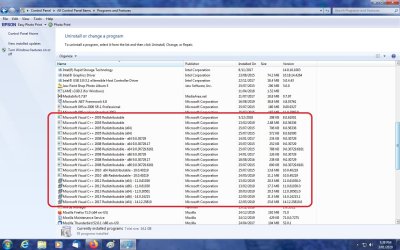
Cleaning up a PC, this is what my Program & Features page at the relevant part looks like: screenshot. There are 17 versions of Visual C++ redistributable dating from 2005 to 2017.


How do I uninstall/remove any MS Visual C++ re-distributable program files from a win7 system?
- Is it just the uninstall option from the programs and features page? or
- are there entries in the registry that must also be removed?
??
 

Attachments

  • C++redistributable packages.jpg
    C++redistributable packages.jpg
    393.1 KB · Views: 1

My Computer

Computer type
PC/Desktop
Computer Manufacturer/Model Number
custom build
OS
windows 7 home premium 64bit
CPU
Intel core i3-4700
Motherboard
Gigabyte GA-H97M-d3H
Memory
8gb
Hard Drives
1x256gb SSD
3x500gb HDD
To asnwer your direct question, yes, it's just enough to remove them using their uninstallers as you found them.

But the real question is, why do you want to remove them? What problem are they causing?
Those runtimes may be needed by other programs, so unless you know they aren't needed, you might break something else.
 

My Computer

Computer type
Laptop
Computer Manufacturer/Model Number
Toshiba Sattelite A665-S6092
OS
Windows 7 Ultimate x64
CPU
Intel Core i7-740QM
Memory
8 GB DDR3
Graphics Card(s)
NVIDIA GeForce 330GT
Screen Resolution
1366x768
Hard Drives
Samsung 840 SSD 500GB
1TB USB3 external HD
Cooling
Coolermaster Notepal U3 notebook cooling pad
Internet Speed
3mbps ASDL
Antivirus
ClamWin 0.98.7
Browser
Opera 12.17 x86 (main), Firefox 38 (sec), IE11 (last resort)
I've established that the only software using redist is Corel's video studio program.


Why uninstall them??
Various information pages say redistributables need to run under the version (of runtime) they were installed for. And I found that out the hard way after I had migrated a win 7 installation to win10 (attempt 1): 5 versions of Corel's video Studio program all broke at the same place. reverted to win 7 using recovery from backup file after 4 weeks of unsuccessful frustrating attempts to establish a cause.


A clean install of win10 (attempt 2) installed the redistributables as part of new installs of VS - different ones shown in P&F - and ran correctly. The security query about downloading them identified a probable cause of the migrated situation, and MS Answers confirmed that the runtime is part of the OS and different for each OS, and thus the opening statement above. But a clean install broke too many other essential items in the software environment, and I reverted to win 7 again.


Attempt 3 was a migrated install and this time after the migration I uninstalled the re-distributables before doing anything else. When I installed video studio again (version x10), it ran correctly. Heartened, I installed version 2018 (the program allows multiple installations, but only one can run at any one time) and it also ran correctly. But a check on the earlier x10 version showed it now broke at the same place as before: as tho the newest VS installation had captured the re-distributable required by the earlier version. Something clearly carried over in the migration, even tho new redist were installed. Reverted to win7 again.


So before my 4th attempt at migration, because of that prior "carry over result", is the standard P&F uninstall all that's needed to uninstall one of those programs? So far the answer seems to yes, but that doesn't explain the previous results.
 

My Computer

Computer type
PC/Desktop
Computer Manufacturer/Model Number
custom build
OS
windows 7 home premium 64bit
CPU
Intel core i3-4700
Motherboard
Gigabyte GA-H97M-d3H
Memory
8gb
Hard Drives
1x256gb SSD
3x500gb HDD
hi

from this comment

but only one can run at any one time


can you check your services, its possible that thier set to load automatically, even tho not in use.
set them to manual.

Roy
 

My Computer

Computer type
PC/Desktop
Computer Manufacturer/Model Number
medionl/Aspire 6930G/acer x55a
OS
W7 home premium 32bit/W7HP 64bit/w10 tp insider ring
CPU
E5300 dual core
Motherboard
medion MS7366
Memory
3gb
Graphics Card(s)
Nvidia Geforce 7100 Nforce 630i
Monitor(s) Displays
avixc
Internet Speed
n (isp resticted to 72)
Antivirus
mse/pands
Browser
palemoon
Other Info
Belkin Fd7050 n USB using Railink RT2870 drivers, more upto date
Torchwood,
Can you be a bit more explicit?


Right now I'm running win7, with 5 versions of VS and 17 re-distributables, all running OK. But which services(s) affecting re-distributables are you referring to?


And I'm planning to attempt upgrade try #4 on 2 July, after my normal end-of-month backup cycle.

So, if you can identify which service is involved with re-distributables, I can check that on the current (running) installation, and also on the new one post upgrade if there is still an issue.


And I guess fair warning is appropriate; if there is still an issue with VS installs after upgrade, I'll be back here (the tenforums??) with questions on how to fix.
 

My Computer

Computer type
PC/Desktop
Computer Manufacturer/Model Number
custom build
OS
windows 7 home premium 64bit
CPU
Intel core i3-4700
Motherboard
Gigabyte GA-H97M-d3H
Memory
8gb
Hard Drives
1x256gb SSD
3x500gb HDD
I really don't understand what you were trying to do and its issue, but it sounds like you're complicating this. By in large, if you want to go with Windows 10 (and it sounds like you already did this) then do a clean install. No migration this and that. You start fresh. Which means that when you install Corel's video studio program you ONLY install the visual studio installs that are needed for that program and are meant for Windows 10. A program like that should tell you what visual studio installs you need either upon installation or on their website. Sometimes if the program was made right (in my opinion) it will already have the visual studio installs and/or .net in its installer to use in case you don't have those requirements already installed.

Edit-

What version/s of Corel are you using?
 

My Computer

Computer type
PC/Desktop
OS
Windows 7 Ultimate x64
I have 5 versions installed on the desktop: X9, X10,2018,2019,2020 all ultimate. With about 2.5Tb of storage over 4 drives (1xSSD and 3xHDD) there's more than enough room. Why that many? I have done class tutoring in using the program for a number of years, and quite often reference to an older version is necessary.


As to why focus on migration vs a clean install? 2 main reasons:
1. in-place migration is the MS recommended way.
2. I have a lot of older software on the desktop that I cannot afford to replace and simply do not want to go thru the pain of re-installing.
Essentially, migration in-place is the easier approach. And the only problem with that has been with the re-distributables that VS uses. So an explanation I sent to a friend might make it clearer:


The clean install approach is one that - having tried it once - really puts me off for several reasons:
- the UAC thing. I don't mind doing a password on start but I draw the line at passwording everything after that, esp as seems apparent the network stuff, for a machine that has only one user. Now, I know that it's 'reducible' by changing the UAC settings, but I have not the faintest idea of how to do that, and would rather not cope with that on top of everything else: see next bullet points. Migrated does this for me . . . .
- re-mapping all the drive letters so the VS project files won't get 're-links' forever. That's what happened when I upgraded to win7 from XP3 in 2012: a nightmare. Again, doable, just one more problem . . .
- re-installing all the software I have - much of it old and yet quite functional. Such as Acrobat reader, word, excel, powerpoint occasionally from the Office Pro 2000 suite I have, Acronis backup and disk tools, mozilla (email and browser) and the printer; some games. I use some every day, but don't use some of it all that often, but when I do: it works on win7. They also work on a migrated win10. Some of them just don't work on a clean win10.

- Profiles (the settings) for thunderbird and firefox are another: migration in place works, a clean install transfer process I got from mozilla just did not work, and I was in the process of manually laboriously copying settings from a laptop when something else broke: gave it up.

Nevertheless for everyone of them a re-install would be needed and that will take days. And I found on the one occasion I tried a clean install that win10 has a low tolerance (none?) for older software installs: they run Ok when installed but getting it that way can be/several times was an 'it doesn't work' issue, despite using the original distribution disks. And I am certain that if I raised that in any help forum the answer would be "buy an updated copy of the program" - but it works under win7 and a migrated win10: so why should I have to buy a new one (program or hardware eg printer) just to get it working on clean win10??

 

My Computer

Computer type
PC/Desktop
Computer Manufacturer/Model Number
custom build
OS
windows 7 home premium 64bit
CPU
Intel core i3-4700
Motherboard
Gigabyte GA-H97M-d3H
Memory
8gb
Hard Drives
1x256gb SSD
3x500gb HDD
hi

im talking about coral, if there loaded at startup thier running in the background.

if thier in admin services local make sure the option is manual, not automatic.
if theres nothing there check in system configuation. if present UNtick


Roy

notes
i would install coral oldest version first and use compatabilty mode
Change Compatibility Mode Settings for Apps in Windows 10 | Tutorials
see option2 no4
all re-distributables are in prog/features, i'd uninstall from there not wu.
if you uninstall them any program that requires them will advise and ask to install
 

My Computer

Computer type
PC/Desktop
Computer Manufacturer/Model Number
medionl/Aspire 6930G/acer x55a
OS
W7 home premium 32bit/W7HP 64bit/w10 tp insider ring
CPU
E5300 dual core
Motherboard
medion MS7366
Memory
3gb
Graphics Card(s)
Nvidia Geforce 7100 Nforce 630i
Monitor(s) Displays
avixc
Internet Speed
n (isp resticted to 72)
Antivirus
mse/pands
Browser
palemoon
Other Info
Belkin Fd7050 n USB using Railink RT2870 drivers, more upto date
Torchwood,
1. Services.
You will have to be a bit more explicit about where to find services you are talking about.
I've run msconfig, and looked in services there: there are Corel license validation services running, but none that by name refer to Video studio, and the only comment on any service here is either running or stopped.
2. Install sequence.
The advice has always been to do the oldest install first, and that's what I have done. In the example of 'captured' re-distributables' I cited, version X10 is older than version 2018 and was installed first.
3. Uninstalling re-distributables
When I uninstalled the re-distributables, I did it from the P&F panel; select one, rt-click, choose uninstall, etc Cleanup later by running Cclean. It was the apparent 'capture effect' evident with the 2nd install of VS2018 after X10 that caused me to ask if there was anything else I should have done.
4. Run in compatibility mode
I've done that for many programs. But Video Studio supports windows 10, and has for years: running a new installation under win10 should not require this. In fact there are some options that are now (from 2019 onwards) only available if win10 is the OS: the software item involved (Dolby sound) is only installed if the OS is win 10, and that choice is made at install time. The software for it is in the download, there's been a lot of adverse commentary about it since many users still have library recordings made with dolby, and no one understands why corel did it that way: but it's a side issue here.
 

My Computer

Computer type
PC/Desktop
Computer Manufacturer/Model Number
custom build
OS
windows 7 home premium 64bit
CPU
Intel core i3-4700
Motherboard
Gigabyte GA-H97M-d3H
Memory
8gb
Hard Drives
1x256gb SSD
3x500gb HDD
One way to get to services is to simply type services.msc into the search box of the start orb.

A program's service doesn't necessarily have to have a name that coincides with the program name. So you could have a program that's an FTP server called FTPWidget, but its startup service could be called widget.exe. What does matter however is the code withen the service that loads the executable to FTPWidget and starts it. So knowing this Corel may have services there that fire up versions of Coreal, but their service names may be opaque and not apparent at first glance.

A better tool to use in replace of msconfig is Autoruns. Autoruns for Windows - Windows Sysinternals | Microsoft Docs

Just be careful on what you chose to enable or disable. If you don't know what it is with 100% certainly then leave it alone.
 

My Computer

Computer type
PC/Desktop
OS
Windows 7 Ultimate x64
I found services in task manager, but none of the items there mention manual or auto, either.
I'm advised that uninstalling licensed software should remove any of the licensing services that go with it.
This is not something I know a lot about, so I think for the moment I'll just leave it alone.
 

My Computer

Computer type
PC/Desktop
Computer Manufacturer/Model Number
custom build
OS
windows 7 home premium 64bit
CPU
Intel core i3-4700
Motherboard
Gigabyte GA-H97M-d3H
Memory
8gb
Hard Drives
1x256gb SSD
3x500gb HDD
Back
Top