Removing Old Windows Install while keeping partitions

Microbell

New member
Member
VIP
Local time
12:41 PM
Messages
60
Gents,

I recently upgraded my PC and installed Windows 7 to an SSD. The old HD that Windows was on has 3 partitions and I want to recover the space that Windows 7 was on (was C:\ now G:\) but leave the other 2 partitions alone as the data can not be moved easily.

If I mark G:\ as Inactive in Disk Management can I simply format G:\ to wipe that partition without effecting the other 2 partitions on that drive?
 

My Computer

Computer type
PC/Desktop
Computer Manufacturer/Model Number
Custom Build
OS
Windows 7 Pro 64bit SP1+Updates
CPU
Intel I3 6100
Motherboard
MSI Z170a Gaming 3 Bios ver a.4
Memory
G.Skill Ripjaws V Series 16GB (2 x 8GB) DDR4 2133mhz
Graphics Card(s)
MSI GTX 960 GAMING 100ME 2GB
Sound Card
X-Fi xtremegamer fatal1ty pro series
Monitor(s) Displays
LG 32MP58HQ-P 32"
Screen Resolution
1920X1080
Hard Drives
Samsung 850EVO SSD 250GB
4 WD HD
PSU
EVGA SuperNova 650 G2 650w
Case
Thermaltake Armor II Tower
Cooling
6 Fan air cooled modded case
Keyboard
Logitech G15
Mouse
Logitech G5
Internet Speed
Cable 120MB/3MB
Antivirus
Avast Ver 12.1.2272
Browser
Chrome
Yes, but DM may not let you mark it inactive, if it doesn`t just use Partition Wizard.

You didn`t have the hard drive plugged in when you installed Windows on the ssd did you ?

If you did, do not proceed without posting a snip of Disk Management

Does the ssd boot on its own ? Without the hard drive plugged in ?
 

My Computer

Computer type
PC/Desktop
Computer Manufacturer/Model Number
Skylake Special #666
OS
Windows 10 Pro x64
CPU
Intel Core i7 6700K
Motherboard
Asus Sabertooth Z170 Mark 1
Memory
GSkill TridentZ RGB 16GB 3600 16-16-16-36
Graphics Card(s)
EVGA GTX 980 Ti SC x2
Sound Card
Realtek High Definition
Monitor(s) Displays
AOC G2460PG
Screen Resolution
1920 x 1080 144Hz
Hard Drives
Samsung 860 Pro 256GB, Seagate Barracuda 4TB x2
PSU
EVGA 1000 P2, EVGA White Custom Braided Cables
Case
Corsair Vengeance C70 Gunmetal Black
Cooling
Corsair H100i v2, Corsair ML120 x2, Thermal Grizzly Kryonaut
Keyboard
Logitech G910 Orion Spectrum
Mouse
Logitech G700s
Internet Speed
Verizon Fios Quantum Gateway 75/75
Antivirus
Windows Defender, Malwarebytes Free 3.8.3
Browser
Chrome
Other Info
Corsair SP120 x4, LG Blu-ray Drive, Durabrand HT-395 100 Watt Dolby Digital Amp, Corsair H2100 Wireless 7.1 Headset
You didn`t have the hard drive plugged in when you installed Windows on the ssd did you ?

No I did not. Windows 7 was installed with just the SSD connected..... nothing else. I just wanted to make sure that if I formatted the Old partition that Windows was on it would not mess with the other 2 partitions as it will be removing the old MBR and I still need access to those other 2 partitions.

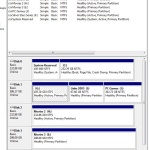
Below is my setup in Disk Management "Click to enlarge"


My Computer

Computer type
PC/Desktop
Computer Manufacturer/Model Number
Custom Build
OS
Windows 7 Pro 64bit SP1+Updates
CPU
Intel I3 6100
Motherboard
MSI Z170a Gaming 3 Bios ver a.4
Memory
G.Skill Ripjaws V Series 16GB (2 x 8GB) DDR4 2133mhz
Graphics Card(s)
MSI GTX 960 GAMING 100ME 2GB
Sound Card
X-Fi xtremegamer fatal1ty pro series
Monitor(s) Displays
LG 32MP58HQ-P 32"
Screen Resolution
1920X1080
Hard Drives
Samsung 850EVO SSD 250GB
4 WD HD
PSU
EVGA SuperNova 650 G2 650w
Case
Thermaltake Armor II Tower
Cooling
6 Fan air cooled modded case
Keyboard
Logitech G15
Mouse
Logitech G5
Internet Speed
Cable 120MB/3MB
Antivirus
Avast Ver 12.1.2272
Browser
Chrome
As long as windows boots on its own on the ssd, then go ahead and format G.

As long as the others are not extended partitions you should be fine.

If you`re still concerned post a snip, if not carry on :)
 

My Computer

Computer type
PC/Desktop
Computer Manufacturer/Model Number
Skylake Special #666
OS
Windows 10 Pro x64
CPU
Intel Core i7 6700K
Motherboard
Asus Sabertooth Z170 Mark 1
Memory
GSkill TridentZ RGB 16GB 3600 16-16-16-36
Graphics Card(s)
EVGA GTX 980 Ti SC x2
Sound Card
Realtek High Definition
Monitor(s) Displays
AOC G2460PG
Screen Resolution
1920 x 1080 144Hz
Hard Drives
Samsung 860 Pro 256GB, Seagate Barracuda 4TB x2
PSU
EVGA 1000 P2, EVGA White Custom Braided Cables
Case
Corsair Vengeance C70 Gunmetal Black
Cooling
Corsair H100i v2, Corsair ML120 x2, Thermal Grizzly Kryonaut
Keyboard
Logitech G910 Orion Spectrum
Mouse
Logitech G700s
Internet Speed
Verizon Fios Quantum Gateway 75/75
Antivirus
Windows Defender, Malwarebytes Free 3.8.3
Browser
Chrome
Other Info
Corsair SP120 x4, LG Blu-ray Drive, Durabrand HT-395 100 Watt Dolby Digital Amp, Corsair H2100 Wireless 7.1 Headset
As long as windows boots on its own on the ssd, then go ahead and format G.

As long as the others are not extended partitions you should be fine.

If you`re still concerned post a snip, if not carry on :)

Ok thanks. I'll give it a go later today :D
 

My Computer

Computer type
PC/Desktop
Computer Manufacturer/Model Number
Custom Build
OS
Windows 7 Pro 64bit SP1+Updates
CPU
Intel I3 6100
Motherboard
MSI Z170a Gaming 3 Bios ver a.4
Memory
G.Skill Ripjaws V Series 16GB (2 x 8GB) DDR4 2133mhz
Graphics Card(s)
MSI GTX 960 GAMING 100ME 2GB
Sound Card
X-Fi xtremegamer fatal1ty pro series
Monitor(s) Displays
LG 32MP58HQ-P 32"
Screen Resolution
1920X1080
Hard Drives
Samsung 850EVO SSD 250GB
4 WD HD
PSU
EVGA SuperNova 650 G2 650w
Case
Thermaltake Armor II Tower
Cooling
6 Fan air cooled modded case
Keyboard
Logitech G15
Mouse
Logitech G5
Internet Speed
Cable 120MB/3MB
Antivirus
Avast Ver 12.1.2272
Browser
Chrome
Why are Disk 2 and Disk 4 marked Active ????

If they are just data drives they should not be marked Active.
 

My Computer

Computer type
PC/Desktop
Computer Manufacturer/Model Number
Skylake Special #666
OS
Windows 10 Pro x64
CPU
Intel Core i7 6700K
Motherboard
Asus Sabertooth Z170 Mark 1
Memory
GSkill TridentZ RGB 16GB 3600 16-16-16-36
Graphics Card(s)
EVGA GTX 980 Ti SC x2
Sound Card
Realtek High Definition
Monitor(s) Displays
AOC G2460PG
Screen Resolution
1920 x 1080 144Hz
Hard Drives
Samsung 860 Pro 256GB, Seagate Barracuda 4TB x2
PSU
EVGA 1000 P2, EVGA White Custom Braided Cables
Case
Corsair Vengeance C70 Gunmetal Black
Cooling
Corsair H100i v2, Corsair ML120 x2, Thermal Grizzly Kryonaut
Keyboard
Logitech G910 Orion Spectrum
Mouse
Logitech G700s
Internet Speed
Verizon Fios Quantum Gateway 75/75
Antivirus
Windows Defender, Malwarebytes Free 3.8.3
Browser
Chrome
Other Info
Corsair SP120 x4, LG Blu-ray Drive, Durabrand HT-395 100 Watt Dolby Digital Amp, Corsair H2100 Wireless 7.1 Headset
Why are Disk 2 and Disk 4 marked Active ????

Disk 2 and 4 are separate hard drives used for storage. If I remember correctly I did not format those drives prior to moving Data to them.
 

My Computer

Computer type
PC/Desktop
Computer Manufacturer/Model Number
Custom Build
OS
Windows 7 Pro 64bit SP1+Updates
CPU
Intel I3 6100
Motherboard
MSI Z170a Gaming 3 Bios ver a.4
Memory
G.Skill Ripjaws V Series 16GB (2 x 8GB) DDR4 2133mhz
Graphics Card(s)
MSI GTX 960 GAMING 100ME 2GB
Sound Card
X-Fi xtremegamer fatal1ty pro series
Monitor(s) Displays
LG 32MP58HQ-P 32"
Screen Resolution
1920X1080
Hard Drives
Samsung 850EVO SSD 250GB
4 WD HD
PSU
EVGA SuperNova 650 G2 650w
Case
Thermaltake Armor II Tower
Cooling
6 Fan air cooled modded case
Keyboard
Logitech G15
Mouse
Logitech G5
Internet Speed
Cable 120MB/3MB
Antivirus
Avast Ver 12.1.2272
Browser
Chrome
So then you should mark them inactive.

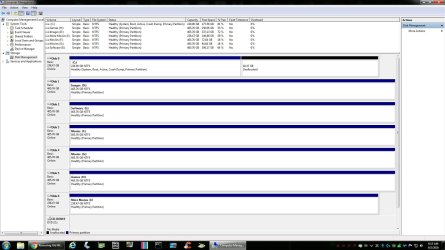
Example of mine.
 

Attachments

  • DM.jpg
    DM.jpg
    172.5 KB · Views: 5

My Computer

Computer type
PC/Desktop
Computer Manufacturer/Model Number
Skylake Special #666
OS
Windows 10 Pro x64
CPU
Intel Core i7 6700K
Motherboard
Asus Sabertooth Z170 Mark 1
Memory
GSkill TridentZ RGB 16GB 3600 16-16-16-36
Graphics Card(s)
EVGA GTX 980 Ti SC x2
Sound Card
Realtek High Definition
Monitor(s) Displays
AOC G2460PG
Screen Resolution
1920 x 1080 144Hz
Hard Drives
Samsung 860 Pro 256GB, Seagate Barracuda 4TB x2
PSU
EVGA 1000 P2, EVGA White Custom Braided Cables
Case
Corsair Vengeance C70 Gunmetal Black
Cooling
Corsair H100i v2, Corsair ML120 x2, Thermal Grizzly Kryonaut
Keyboard
Logitech G910 Orion Spectrum
Mouse
Logitech G700s
Internet Speed
Verizon Fios Quantum Gateway 75/75
Antivirus
Windows Defender, Malwarebytes Free 3.8.3
Browser
Chrome
Other Info
Corsair SP120 x4, LG Blu-ray Drive, Durabrand HT-395 100 Watt Dolby Digital Amp, Corsair H2100 Wireless 7.1 Headset
So then you should mark them inactive.

Can do..... but I be curious how the active flag got set in the first place as I did not do it and those drives never held an OS on them. Haven't had any issues with them with either the new build and old though and the bios only see's my bootable drives.
 

My Computer

Computer type
PC/Desktop
Computer Manufacturer/Model Number
Custom Build
OS
Windows 7 Pro 64bit SP1+Updates
CPU
Intel I3 6100
Motherboard
MSI Z170a Gaming 3 Bios ver a.4
Memory
G.Skill Ripjaws V Series 16GB (2 x 8GB) DDR4 2133mhz
Graphics Card(s)
MSI GTX 960 GAMING 100ME 2GB
Sound Card
X-Fi xtremegamer fatal1ty pro series
Monitor(s) Displays
LG 32MP58HQ-P 32"
Screen Resolution
1920X1080
Hard Drives
Samsung 850EVO SSD 250GB
4 WD HD
PSU
EVGA SuperNova 650 G2 650w
Case
Thermaltake Armor II Tower
Cooling
6 Fan air cooled modded case
Keyboard
Logitech G15
Mouse
Logitech G5
Internet Speed
Cable 120MB/3MB
Antivirus
Avast Ver 12.1.2272
Browser
Chrome
That`s odd, the bios should see all your drives.
 

My Computer

Computer type
PC/Desktop
Computer Manufacturer/Model Number
Skylake Special #666
OS
Windows 10 Pro x64
CPU
Intel Core i7 6700K
Motherboard
Asus Sabertooth Z170 Mark 1
Memory
GSkill TridentZ RGB 16GB 3600 16-16-16-36
Graphics Card(s)
EVGA GTX 980 Ti SC x2
Sound Card
Realtek High Definition
Monitor(s) Displays
AOC G2460PG
Screen Resolution
1920 x 1080 144Hz
Hard Drives
Samsung 860 Pro 256GB, Seagate Barracuda 4TB x2
PSU
EVGA 1000 P2, EVGA White Custom Braided Cables
Case
Corsair Vengeance C70 Gunmetal Black
Cooling
Corsair H100i v2, Corsair ML120 x2, Thermal Grizzly Kryonaut
Keyboard
Logitech G910 Orion Spectrum
Mouse
Logitech G700s
Internet Speed
Verizon Fios Quantum Gateway 75/75
Antivirus
Windows Defender, Malwarebytes Free 3.8.3
Browser
Chrome
Other Info
Corsair SP120 x4, LG Blu-ray Drive, Durabrand HT-395 100 Watt Dolby Digital Amp, Corsair H2100 Wireless 7.1 Headset
Do note that some HDD come with Active Primary Partition.

I have this Samsung 3TB (bought in June) and just check, it confirm it is stated "Active" Primary partition.
I did not do any setting or any other setting.
As i am busy with my newly bought 3 SSD which is no giving a headache to troubleshoot the real cause.

So Microbell really did nothing like set it to Active, but HDD come with "Active" being set.
 

My Computer

Computer type
Laptop
Computer Manufacturer/Model Number
Toshiba L630 and L735
OS
Windows 7 x64
Hard Drives
240 GB SSD
Do note that some HDD come with Active Primary Partition.

I have this Samsung 3TB (bought in June) and just check, it confirm it is stated "Active" Primary partition.
I did not do any setting or any other setting.
As i am busy with my newly bought 3 SSD which is no giving a headache to troubleshoot the real cause.

So Microbell really did nothing like set it to Active, but HDD come with "Active" being set.

Correct on both comments. After checking the Manufactures site they ship their OEM drives set up as Active Primary's.

@AddRAM

I should have made that clear in my last statement. Sorry. The bios does see all hard drives attached but only has 2 that are bootable. Since the SSD is now the main OS I may just leave them Active/Primary as I have not run into any problems accessing them and they contain some encrypted data on them that I don't want to mess with. If it works....don't muck with it...lol :p
 

My Computer

Computer type
PC/Desktop
Computer Manufacturer/Model Number
Custom Build
OS
Windows 7 Pro 64bit SP1+Updates
CPU
Intel I3 6100
Motherboard
MSI Z170a Gaming 3 Bios ver a.4
Memory
G.Skill Ripjaws V Series 16GB (2 x 8GB) DDR4 2133mhz
Graphics Card(s)
MSI GTX 960 GAMING 100ME 2GB
Sound Card
X-Fi xtremegamer fatal1ty pro series
Monitor(s) Displays
LG 32MP58HQ-P 32"
Screen Resolution
1920X1080
Hard Drives
Samsung 850EVO SSD 250GB
4 WD HD
PSU
EVGA SuperNova 650 G2 650w
Case
Thermaltake Armor II Tower
Cooling
6 Fan air cooled modded case
Keyboard
Logitech G15
Mouse
Logitech G5
Internet Speed
Cable 120MB/3MB
Antivirus
Avast Ver 12.1.2272
Browser
Chrome
Do note that some HDD come with Active Primary Partition.

I have this Samsung 3TB (bought in June) and just check, it confirm it is stated "Active" Primary partition.
I did not do any setting or any other setting.
As i am busy with my newly bought 3 SSD which is no giving a headache to troubleshoot the real cause.

So Microbell really did nothing like set it to Active, but HDD come with "Active" being set.

Correct on both comments. After checking the Manufactures site they ship their OEM drives set up as Active Primary's.

@AddRAM

I should have made that clear in my last statement. Sorry. The bios does see all hard drives attached but only has 2 that are bootable. Since the SSD is now the main OS I may just leave them Active/Primary as I have not run into any problems accessing them and they contain some encrypted data on them that I don't want to mess with. If it works....don't muck with it...lol :p


@Microbell

You better not mess around.
I already messy my 3 SSD somewhat like failed to clone.
Now 1 SSD failed to recognize when switch to external, but no problem using it internal as OS.
 

My Computer

Computer type
Laptop
Computer Manufacturer/Model Number
Toshiba L630 and L735
OS
Windows 7 x64
Hard Drives
240 GB SSD
@Eric3742

Agreed.

I only asked here as I was unsure if I removed the old drive's OS folders (format or just delete the Windows folders) that it would screw up the 2 other partitions on that drive and leave them unreadable. That would be a slight problem :shock:

I might try to use the "Take Ownership" tool first to see if I can simply delete the folders then wipe the drive's partition and see what happens. :p
 

My Computer

Computer type
PC/Desktop
Computer Manufacturer/Model Number
Custom Build
OS
Windows 7 Pro 64bit SP1+Updates
CPU
Intel I3 6100
Motherboard
MSI Z170a Gaming 3 Bios ver a.4
Memory
G.Skill Ripjaws V Series 16GB (2 x 8GB) DDR4 2133mhz
Graphics Card(s)
MSI GTX 960 GAMING 100ME 2GB
Sound Card
X-Fi xtremegamer fatal1ty pro series
Monitor(s) Displays
LG 32MP58HQ-P 32"
Screen Resolution
1920X1080
Hard Drives
Samsung 850EVO SSD 250GB
4 WD HD
PSU
EVGA SuperNova 650 G2 650w
Case
Thermaltake Armor II Tower
Cooling
6 Fan air cooled modded case
Keyboard
Logitech G15
Mouse
Logitech G5
Internet Speed
Cable 120MB/3MB
Antivirus
Avast Ver 12.1.2272
Browser
Chrome
Back
Top