Removing one OS after double install activation?

lilmac1000

New member
Local time
4:47 PM
Messages
6
Location
SC
Ok, so i double installed windows 7 to activate it and naturally it boots both at start up. I can disable one of them from booting in "msconfig" which seems like it would free up RAM but my question is will this mess something up? Will my pc start up normally or will this cause a mess?
 

My Computer My Computer

At a glance

Windows 7 Pro 64bitPhenom II x4 555 BE 3.2 GHzG-Skill 2GB @ 1333ATI 4650 1GB ddr2
OS
Windows 7 Pro 64bit
CPU
Phenom II x4 555 BE 3.2 GHz
Motherboard
MSI 870-g45
Memory
G-Skill 2GB @ 1333
Graphics Card(s)
ATI 4650 1GB ddr2
Hard Drives
WD Caviar Blue 500GB
Cooling
2X 80mm (one in side, other in back) 1X 120mm fan in front
Keyboard
cheap for now
Mouse
cheap as well
Hello lilmac1000, welcome to Seven Forums!


Before we make any specific recommendations will you please post a snip/screen-shot of the entire disk management drive map with a full description as to which drive/partition is which, so we can see what you have going on as there may be a fairly simple way to resolve the situation.

In the Windows start menu right click computer and click manage, in the left pane of the "Computer Management" window that opens click disk management and post a snip of that.


How to Upload and Post a Screenshot and File in Seven Forums
 

My Computer My Computer

At a glance

W 7 64-bit UltimateIntel Q9550 Yorkfield8GB Dominator 8500C5DATI : XFX 5870
Computer Manufacturer/Model Number
* BFK Customs *
OS
W 7 64-bit Ultimate
CPU
Intel Q9550 Yorkfield
Motherboard
ASUS P5Q Pro
Memory
8GB Dominator 8500C5D
Graphics Card(s)
ATI : XFX 5870
Sound Card
Realtek HD Audio 7-1
Monitor(s) Displays
1x 47" LCD HDMI & 3x 26" LCD HDMI
Screen Resolution
1920x1080P & 1920x1200
Hard Drives
1x 80GB Intel X25-M G2 SSD : 1x 500GB & 1x 640GB WD Caviar Black(s)
PSU
Corsair 620HX
Case
Cooler Master RC-690
Cooling
Tuniq Tower 120, 2x 140mm and 3x 120mm case fans
Keyboard
Microsoft 500
Mouse
Razer Diamondback 3G
Internet Speed
14 Mb/s
Other Info
1x Koutech 3Gb/s SATA HDD Hot Swap Rack
Why install two Win7's to activate? You need to run a Repair Install (upgrade over itself) to get the Upgrade version Product key accepted, not install twice.

Once we see the Disk Mgmt screenshot we can help you remove one of the installs. Are each seen as C when you are within them? This may not be the case if you installed the second Win7 from the first one.

Let us know which one you want to keep for sure and we'll help you remove the other one correctly.
 
sorry i forgot to mention it was a fresh install on a system i put together. 1st time btw. And I know i sound stupid saying this but idk what you mean when you say disk management map. it would be awesome if you kept your patience with me until i get pointed in the right direction lol. Thanks
 

My Computer My Computer

At a glance

Windows 7 Pro 64bitPhenom II x4 555 BE 3.2 GHzG-Skill 2GB @ 1333ATI 4650 1GB ddr2
OS
Windows 7 Pro 64bit
CPU
Phenom II x4 555 BE 3.2 GHz
Motherboard
MSI 870-g45
Memory
G-Skill 2GB @ 1333
Graphics Card(s)
ATI 4650 1GB ddr2
Hard Drives
WD Caviar Blue 500GB
Cooling
2X 80mm (one in side, other in back) 1X 120mm fan in front
Keyboard
cheap for now
Mouse
cheap as well
No problem.

Type Disk Management in Start Search box, click on result at top, maximize window, open Snipping Tool in Start Menu, choose Rectangular Snip, draw box around Disk Mgmt drive map and listings windows, Save File, attach using Paper Clip in Reply box.
 
Hello lilmac1000, welcome to Seven Forums!


Before we make any specific recommendations will you please post a snip/screen-shot of the entire disk management drive map with a full description as to which drive/partition is which, so we can see what you have going on as there may be a fairly simple way to resolve the situation.

In the Windows start menu right click computer and click manage, in the left pane of the "Computer Management" window that opens click disk management and post a snip of that.


How to Upload and Post a Screenshot and File in Seven Forums

All the instructions were posted in my post above. ;)
 

My Computer My Computer

At a glance

W 7 64-bit UltimateIntel Q9550 Yorkfield8GB Dominator 8500C5DATI : XFX 5870
Computer Manufacturer/Model Number
* BFK Customs *
OS
W 7 64-bit Ultimate
CPU
Intel Q9550 Yorkfield
Motherboard
ASUS P5Q Pro
Memory
8GB Dominator 8500C5D
Graphics Card(s)
ATI : XFX 5870
Sound Card
Realtek HD Audio 7-1
Monitor(s) Displays
1x 47" LCD HDMI & 3x 26" LCD HDMI
Screen Resolution
1920x1080P & 1920x1200
Hard Drives
1x 80GB Intel X25-M G2 SSD : 1x 500GB & 1x 640GB WD Caviar Black(s)
PSU
Corsair 620HX
Case
Cooler Master RC-690
Cooling
Tuniq Tower 120, 2x 140mm and 3x 120mm case fans
Keyboard
Microsoft 500
Mouse
Razer Diamondback 3G
Internet Speed
14 Mb/s
Other Info
1x Koutech 3Gb/s SATA HDD Hot Swap Rack
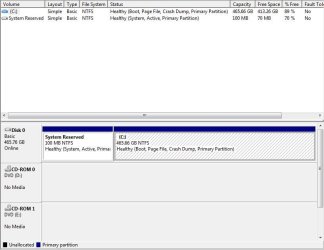
haha oops sorry, at a glance i thought it was an automated reply for making a first thread or something of the sort. Ok so heres what i got.
 

Attachments

  • Disk managment.JPG
    Disk managment.JPG
    51.9 KB · Views: 73

My Computer My Computer

At a glance

Windows 7 Pro 64bitPhenom II x4 555 BE 3.2 GHzG-Skill 2GB @ 1333ATI 4650 1GB ddr2
OS
Windows 7 Pro 64bit
CPU
Phenom II x4 555 BE 3.2 GHz
Motherboard
MSI 870-g45
Memory
G-Skill 2GB @ 1333
Graphics Card(s)
ATI 4650 1GB ddr2
Hard Drives
WD Caviar Blue 500GB
Cooling
2X 80mm (one in side, other in back) 1X 120mm fan in front
Keyboard
cheap for now
Mouse
cheap as well
It looks exactly right.

Are you saying you have a Dual Boot Menu when you start your computer? I'm not sure how that happened if you only installed the one OS as shown.

You are correct that you can remove any stray boot listing in msconfig>Boot tab, or by installing EasyBCD 2.0 to remove it on the Edit Boot Menu tab.
 
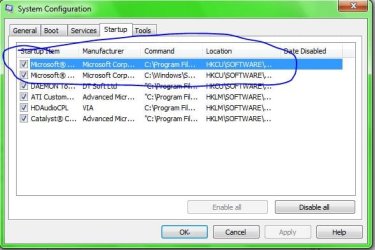
ok check this out and tell me if im seeing what i think i am or if you could explain it. both are OS's
 

Attachments

  • system config..JPG
    system config..JPG
    44.1 KB · Views: 66

My Computer My Computer

At a glance

Windows 7 Pro 64bitPhenom II x4 555 BE 3.2 GHzG-Skill 2GB @ 1333ATI 4650 1GB ddr2
OS
Windows 7 Pro 64bit
CPU
Phenom II x4 555 BE 3.2 GHz
Motherboard
MSI 870-g45
Memory
G-Skill 2GB @ 1333
Graphics Card(s)
ATI 4650 1GB ddr2
Hard Drives
WD Caviar Blue 500GB
Cooling
2X 80mm (one in side, other in back) 1X 120mm fan in front
Keyboard
cheap for now
Mouse
cheap as well
Hello again.


Those are installed programs/apps that start when the PC is started; click the boot tab to see the installed Operating Systems.
 

My Computer My Computer

At a glance

W 7 64-bit UltimateIntel Q9550 Yorkfield8GB Dominator 8500C5DATI : XFX 5870
Computer Manufacturer/Model Number
* BFK Customs *
OS
W 7 64-bit Ultimate
CPU
Intel Q9550 Yorkfield
Motherboard
ASUS P5Q Pro
Memory
8GB Dominator 8500C5D
Graphics Card(s)
ATI : XFX 5870
Sound Card
Realtek HD Audio 7-1
Monitor(s) Displays
1x 47" LCD HDMI & 3x 26" LCD HDMI
Screen Resolution
1920x1080P & 1920x1200
Hard Drives
1x 80GB Intel X25-M G2 SSD : 1x 500GB & 1x 640GB WD Caviar Black(s)
PSU
Corsair 620HX
Case
Cooler Master RC-690
Cooling
Tuniq Tower 120, 2x 140mm and 3x 120mm case fans
Keyboard
Microsoft 500
Mouse
Razer Diamondback 3G
Internet Speed
14 Mb/s
Other Info
1x Koutech 3Gb/s SATA HDD Hot Swap Rack
oh ok cool thanks i appreciate all the help guys
 

My Computer My Computer

At a glance

Windows 7 Pro 64bitPhenom II x4 555 BE 3.2 GHzG-Skill 2GB @ 1333ATI 4650 1GB ddr2
OS
Windows 7 Pro 64bit
CPU
Phenom II x4 555 BE 3.2 GHz
Motherboard
MSI 870-g45
Memory
G-Skill 2GB @ 1333
Graphics Card(s)
ATI 4650 1GB ddr2
Hard Drives
WD Caviar Blue 500GB
Cooling
2X 80mm (one in side, other in back) 1X 120mm fan in front
Keyboard
cheap for now
Mouse
cheap as well
Good to see you found a solution and thanks for the update.
 

My Computer My Computer

At a glance

W 7 64-bit UltimateIntel Q9550 Yorkfield8GB Dominator 8500C5DATI : XFX 5870
Computer Manufacturer/Model Number
* BFK Customs *
OS
W 7 64-bit Ultimate
CPU
Intel Q9550 Yorkfield
Motherboard
ASUS P5Q Pro
Memory
8GB Dominator 8500C5D
Graphics Card(s)
ATI : XFX 5870
Sound Card
Realtek HD Audio 7-1
Monitor(s) Displays
1x 47" LCD HDMI & 3x 26" LCD HDMI
Screen Resolution
1920x1080P & 1920x1200
Hard Drives
1x 80GB Intel X25-M G2 SSD : 1x 500GB & 1x 640GB WD Caviar Black(s)
PSU
Corsair 620HX
Case
Cooler Master RC-690
Cooling
Tuniq Tower 120, 2x 140mm and 3x 120mm case fans
Keyboard
Microsoft 500
Mouse
Razer Diamondback 3G
Internet Speed
14 Mb/s
Other Info
1x Koutech 3Gb/s SATA HDD Hot Swap Rack
Those are two MS programs which are starting with the computer. If you put your mouse on each listing under the command heading it will tell you what exactly it is: probably MS Security Essentials anti-virus is one? I don't see your AV anywhere else there.


I'd leave both of those MS listings, but the others can be unchecked as they are freeloaders on your Startup and don't need to run until you click on them.
 
Back
Top