Removing Program Pop-Ups from Start Bar

JeffSloop

New member
Local time
6:28 PM
Messages
3
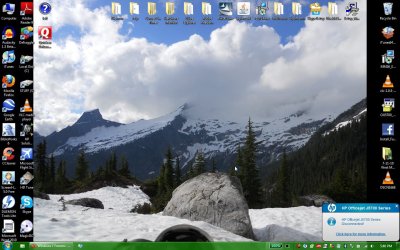
So......I'm new here and I couldn't find that this question had been answered (although it probably has been). What I want to do is remove the "balloon" pop-ups on the right side of the taskbar. I seem to have successfully removed the system pop-ups like: "new updates are ready to be installed". But I cannot remove program pop-ups like: "HP printer is ready". It pops up every time I turn my computer on or come out of stand by and I can't figure out how to get rid of it. There doesn't seem to be a setting to disable the pop ups in the actual HP program either. Short of disabling the service from starting and never opening the application, it will not go away.

Thanks for the help,
Jeff
ScreenHunter_01%20Jul.%2016%2017.40.jpg
 

Attachments

  • ScreenHunter_01 Jul. 16 17.40.jpg
    ScreenHunter_01 Jul. 16 17.40.jpg
    179.3 KB · Views: 13

My Computer

Computer Manufacturer/Model Number
Lenovo T400
OS
Windows 7 Professional 64 Bit
CPU
Intel Core 2 Duo 2.53 GHz (T9400)
Memory
4 GB DDR3
Graphics Card(s)
ADI Mobility Radeon HD 3400
Screen Resolution
1440 x 900
Hard Drives
64 GB Samsung SSD-Internal
500 GB 5400 RPM WD-Internal
250 GB 5400 RPM Seagate-External
Do you need HP's "software" to use the printer? If not I would just uninstall it.
 

My Computer

Computer type
PC/Desktop
Computer Manufacturer/Model Number
Alienware Aurora ALX R4
OS
Windows 10 Pro (x64)
CPU
Intel Core i7-3930K (3.2GHz - 4.5GHz)
Motherboard
Alienware Aurora-R4 x79
Memory
4x Samsung 4GB PC3-12800 DDR3 (16GB 1600MHz)
Graphics Card(s)
Nvidia Geforce GTX 690
Sound Card
SteelSeries Siberia Elite
Monitor(s) Displays
Dell UltraSharp U3011
Screen Resolution
2560x1600
Hard Drives
Samsung 850 Pro 256 GB, Seagate 1TB Desktop Hybrid HDD, 2x Western Digital 4TB Green HDD
PSU
875W Some Dell PSU <.<
Case
Alienware Aurora ALX
Cooling
Custom Liquid Cooling (EK CPU & GPU blocks) dual EK 480RAD
Keyboard
Logitech G710+ Mechanical
Mouse
Logitech G700s
Internet Speed
Verizon Fios (50 mbps average)
Other Info
Server: Intel NUC D54250WYK: i5-4250U, 16GB, 256 GB mSATA, Windows Server 2012 R2
Well, I don't need it installed but it does have some useful features and tools. (and I wouldn't be able to use the scanner very efficiently without the software)

~Jeff~
 

My Computer

Computer Manufacturer/Model Number
Lenovo T400
OS
Windows 7 Professional 64 Bit
CPU
Intel Core 2 Duo 2.53 GHz (T9400)
Memory
4 GB DDR3
Graphics Card(s)
ADI Mobility Radeon HD 3400
Screen Resolution
1440 x 900
Hard Drives
64 GB Samsung SSD-Internal
500 GB 5400 RPM WD-Internal
250 GB 5400 RPM Seagate-External
Anyone else have any ideas?
 

My Computer

Computer Manufacturer/Model Number
Lenovo T400
OS
Windows 7 Professional 64 Bit
CPU
Intel Core 2 Duo 2.53 GHz (T9400)
Memory
4 GB DDR3
Graphics Card(s)
ADI Mobility Radeon HD 3400
Screen Resolution
1440 x 900
Hard Drives
64 GB Samsung SSD-Internal
500 GB 5400 RPM WD-Internal
250 GB 5400 RPM Seagate-External
Set it to "Hide icon and notifications". You can still click the arrow and access the icon if you have to. I don't use my HP all in one very often so I just start the HP Digital Imaging Monitor when I need it and turn it off when I'm done. I don't let it run every time I start up windows.
 

My Computer

Computer type
PC/Desktop
Computer Manufacturer/Model Number
Home Built
OS
Windows 10 Education 64 bit
CPU
AMD Phenom II X4 980 Black Edition Deneb 3.7GHz
Motherboard
Asus M4N68T-M V2 µATX Motherboard
Memory
8GB 4GBx2 Kingston PC10600 DDR3 1333 Memory
Graphics Card(s)
Zotac NVIDIA Geforce GT640 2 Gig DDR3 PCIe
Sound Card
VIA VT1708s High Definition Audio 8-channel Onboard

Monitor(s) Displays
22" LG E2242 1080p and 2 19" I-INC AG191D
Screen Resolution
1280x1024 - 1920x1080 - 1280x1024
Hard Drives
Crucial M100 256 GB SSD and 500 GB WD Blue SATA
PSU
Thermaltake TR 620
Case
Power Up Black ATX Mid-Tower Case
Cooling
Stock heatsink and fan
Keyboard
Logitech Wireless K350 Wave
Mouse
Logitech Wireless M570 Trackman Wheel
Internet Speed
80 Mbps Down 30 Mbps Up
Antivirus
Windows Defender
Browser
Internet Explorer 11
Other Info
HP DVD1040e Lightscribe - External USB2
Back
Top