Solved Removing Quicktime plugin

graphomet

New member
Member
VIP
Local time
8:14 AM
Messages
100
Hi Forum.

Im trying to locate in my library the QuickTime folder but its not located anywhere.

I read in a forum to remove the plugins which is causing issues in my Adobe system programs. and saw the following:

Remove all third-party QuickTime importers and exporters from the Library/QuickTime directory and restart the application.

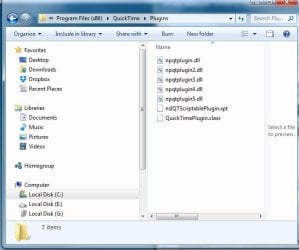
where is this folder?! I have only found this one here in my: program files. Quicktime (x86)>plugins


PS: my url image for some reason wont appear...
 
Last edited:

My Computer

Computer type
PC/Desktop
Computer Manufacturer/Model Number
Custom build
OS
windows 7 home premium 64bit
CPU
AMD Phenom(tm) II X4 955 Processor
Motherboard
ASRock M3A790GXH/128M
Memory
8.00 GB
Graphics Card(s)
NVIDIA GeForce GTX 650 Ti
Sound Card
(1) High Definition Audio Device (2) USB Audio Device (3

Antivirus
Avast Free
Browser
Chrome
this is what is in my plugins.
 

Attachments

  • w7.jpg
    w7.jpg
    64.1 KB · Views: 13

My Computer

Computer type
PC/Desktop
Computer Manufacturer/Model Number
Custom build
OS
windows 7 home premium 64bit
CPU
AMD Phenom(tm) II X4 955 Processor
Motherboard
ASRock M3A790GXH/128M
Memory
8.00 GB
Graphics Card(s)
NVIDIA GeForce GTX 650 Ti
Sound Card
(1) High Definition Audio Device (2) USB Audio Device (3
Antivirus
Avast Free
Browser
Chrome
Hi,
What exact Adobe software are you having issues with ? flash player/ reader/....
Which browser are you using ?
 

My Computer

Computer type
PC/Desktop
Computer Manufacturer/Model Number
Custom assembled by me :}
OS
Win-7-Pro64bit 7-H-Prem-64bit
CPU
i7-5930K 2nd i9-9940x both water blocked VRM's too
Motherboard
ASUS SABERTOOTH X99 2nd ASUS x299 Apex
Memory
Trident-z 3200C14 2nd Trident-z 3600C16
Graphics Card(s)
EVGA 1080ti ftw3 2nd Titan Xp both water blocked
Sound Card
Built-in Realtek
Monitor(s) Displays
1-AOC G2460PG 24"G-Sync 144Hz/ 2nd 1-ASUS VG248QE 24" 144Hz
Screen Resolution
1920 x 1080 144Hz
Hard Drives
2-Samsung M.2 Evo & Evo Plus
2-Samsung 850 EVO 500GB SSD's/ 3-2.5 W.D. Black 1tb-&3-1tb/3-3.5 WD Black 1tb hdd's
PSU
EVGA SuperNOVA 1000-P2 2nd 1200-P2
Case
2-Corsair Obsidian Series 450D Black ATX Mid Tower
Cooling
Custom water loops
Keyboard
Logitech G710+/ 2nd Logitech G910
Mouse
2-RedDragon M901 Perdition 16400 dpi Gaming mouse = wired
Internet Speed
Comcast Ping 19ms 89.31mbps download speed 6.12mbps upload
Antivirus
Malwarebytes Pro/ Superantispyware Pro
Browser
FireFox & Pale moon
Other Info
2nd ASUS X299 Apex/Intel i9-9940x with Custom water loop/7H-Prem-x64/Corsair 450D case/Ram Trident-z 3600C16 4x8gb / Samsung970Evo plus 500gb SSD/Dual ssd EZ swap evo/PSU EVGA SuperNova 1200w-P2 80+Platinum/GPU Titan Xp /8-ML-140 on push-pull on 2-280GTX rads
Hi Dirty rotten imbecile!

My after effects wouldnt load. So the solution to the problem was the following, but I got confused where to locate this Quicktime library file.


Solution 2: Remove third-party QuickTime importers and exporters.
The initialization process can fail if QuickTime gets stuck while attempting to load a bad third-party importer component.

Remove all third-party QuickTime importers and exporters from the Library/QuickTime directory and restart the application.
 

My Computer

Computer type
PC/Desktop
Computer Manufacturer/Model Number
Custom build
OS
windows 7 home premium 64bit
CPU
AMD Phenom(tm) II X4 955 Processor
Motherboard
ASRock M3A790GXH/128M
Memory
8.00 GB
Graphics Card(s)
NVIDIA GeForce GTX 650 Ti
Sound Card
(1) High Definition Audio Device (2) USB Audio Device (3
Antivirus
Avast Free
Browser
Chrome
Back
Top