Removing triple boot

edenforge

New member
Local time
5:59 AM
Messages
31
Location
Carlisle UK
Hi folks,
I need some advice please;
My machine is currently set up with 3 HD's as follows:
drive 0: has XP Pro on it
drive 1: has Win 7 32 bit on it
drive 2: has Win 7 64 bit on it
These are set up in a triple boot configuration, as I only use Win 7 64 bit now I would like to remove the other two OS's to recover some disk space if this is possible.
Can someone please advise on the easiest way to go about this??
Thanks in advance,
Bob
 

My Computer

Computer Manufacturer/Model Number
Self Build
OS
XP Pro and Windows 7
CPU
core2/quad Q9550 2.83GHz
Motherboard
Asustek P5E3
Memory
4 GB DDR3 1333MHz
Graphics Card(s)
?
Sound Card
on board
Monitor(s) Displays
1x 22" Wide + 1x 19"
Hard Drives
4x Hitachi 500Gb SATA-II
Case
Antec Sonata
Keyboard
MS
Mouse
MS
Please post back a screenshot of your maximized Disk Management drive map and listings:

1. Type Disk Management in Start Search box.
2. Open Disk Mgmt. window and maximize it.
3. Type Snipping Tool in Start Search box.
4. Open Snipping Tool, choose Rectangular Snip, draw a box around full map and all listings.
5, Save Snip, attach using paper clip in Reply Box.

Tell us what is on each partition.

Do you use a multi OS boot selection screen that lists all OS's every time you boot up?
Or, do you use the "one-time" BIOS boot selection screen by hitting a key at start up to choose the OS/HD to use?

I'm no install expert so i can't tell you what you need to do, but providing this info should help the experts here give you the best advice.
 

My Computer

Computer type
PC/Desktop
Computer Manufacturer/Model Number
home built
OS
Multi-Boot W7_Pro_x64 W8.1_Pro_x64 W10_Pro_x64 +Linux_VMs +Chromium_VM
CPU
AMD Athlon II x4 620
Motherboard
Gigabyte GA-MA785G-UD3H
Memory
6GB GSkill DDR2 800
Graphics Card(s)
AMD 4670 GPU + AMD 4200 IGP
Sound Card
on board Realtek ALC889A
Monitor(s) Displays
RCA 40" LCD TV, Insignia 32" LCD TV, HP 15" LCD monitor
Screen Resolution
1680 x 1050
Hard Drives
OCZ Vertex 3 120GB,
Samsung F3 1TB (3),
Several others - WD, Seagate, Hitachi, ...
PSU
Corsair 500 W
Case
Rosewill mid tower
Cooling
CM 90mm rifle
Keyboard
Gyration wireless, Logitech wireless, Dell USB wired
Mouse
Gyration wireless, Logitech wireless, V7 USB wired
Internet Speed
Spectrum - 100Mbps D / 10Mbps U
Antivirus
Avast, MBAM3, EMET, WinPatrol
Browser
Pale Moon, Firefox, IE
Other Info
2 multi-boot PC's
Mainly HTPC/Office/Gen purpose (no gaming).
Trendnet USB KVM.
LG DVD burner/Blue Ray Player.
Tray system for removable SATA backup drives.

Not currently OCd, under-volted.
I use Hybrid sleep, rarely re-boot or shutdown.

Hauppauge HD-PVR, Avermedia PCIe TV Tuner, Hauppauge PCI TV Tuner.
Please post back a screenshot of your maximized Disk Management drive map and listings:

1. Type Disk Management in Start Search box.
2. Open Disk Mgmt. window and maximize it.
3. Type Snipping Tool in Start Search box.
4. Open Snipping Tool, choose Rectangular Snip, draw a box around full map and all listings.
5, Save Snip, attach using paper clip in Reply Box.

Tell us what is on each partition.

Do you use a multi OS boot selection screen that lists all OS's every time you boot up?
Or, do you use the "one-time" BIOS boot selection screen by hitting a key at start up to choose the OS/HD to use?

I'm no install expert so i can't tell you what you need to do, but providing this info should help the experts here give you the best advice.
Yes please post that screenshot please. Did you copy important files from winx pro and win7 32bits to win7 bits already? I mean important documents, music, images etcetera. If not done yet... do it please if you wanna keep them.

Next thing to do (when booted in win7 64bits!) is http://www.sevenforums.com/tutorials/209885-bootmgr-move-c-easybcd.html
This moves the bootstuff (bootmgr and bootmenu) to the C drive (I think it was on winxp partition). If succesfull, reboot and post diskmanagement screenshot
 

My Computer

Computer type
Laptop
Computer Manufacturer/Model Number
ACER ASPIRE 5742G
OS
Microsoft Windows 7 Home Premium 64-bits 7601 Multiprocessor Free Service Pack 1
CPU
Intel(R) Core(TM) i3 CPU M 370 @ 2.40GHz
Motherboard
Acer Aspire 5742G
Memory
4,00 GB
Graphics Card(s)
ATI Mobility Radeon HD 5400 Series
Sound Card
(1) AMD High Definition Audio Device (2) Realtek High Defi
Screen Resolution
1366 x 768 x 32 bits (4294967296 colors) @ 60 Hz
Hard Drives
WDC WD5000BEVT-22ZAT0
Please post back a screenshot of your maximized Disk Management drive map and listings:

1. Type Disk Management in Start Search box.
2. Open Disk Mgmt. window and maximize it.
3. Type Snipping Tool in Start Search box.
4. Open Snipping Tool, choose Rectangular Snip, draw a box around full map and all listings.
5, Save Snip, attach using paper clip in Reply Box.

Tell us what is on each partition.

Do you use a multi OS boot selection screen that lists all OS's every time you boot up?
Or, do you use the "one-time" BIOS boot selection screen by hitting a key at start up to choose the OS/HD to use?

I'm no install expert so i can't tell you what you need to do, but providing this info should help the experts here give you the best advice.
Yes please post that screenshot please. Did you copy important files from winx pro and win7 32bits to win7 bits already? I mean important documents, music, images etcetera. If not done yet... do it please if you wanna keep them.

Next thing to do (when booted in win7 64bits!) is http://www.sevenforums.com/tutorials/209885-bootmgr-move-c-easybcd.html
This moves the bootstuff (bootmgr and bootmenu) to the C drive (I think it was on winxp partition). If succesfull, reboot and post diskmanagement screenshot

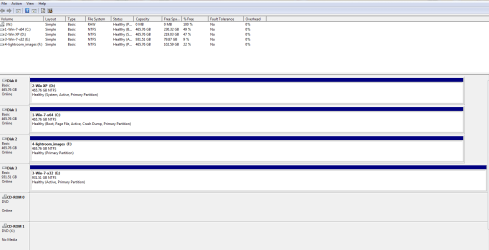
OK, screenshot (Bob.png) should be enclosed.
This was when booted into Win-7-64 which is shown as C but will be drive 1.
Documents folder is currently on Disk 0 wich is shown as D
The program folders for 64 bit are on C (drive 1)
XP is on Drive 0 (D)
The Windows multi boot menu comes up at startup.

Will documents etc be deleted?
Bob
 

Attachments

  • Bob.PNG
    Bob.PNG
    21.1 KB · Views: 14

My Computer

Computer Manufacturer/Model Number
Self Build
OS
XP Pro and Windows 7
CPU
core2/quad Q9550 2.83GHz
Motherboard
Asustek P5E3
Memory
4 GB DDR3 1333MHz
Graphics Card(s)
?
Sound Card
on board
Monitor(s) Displays
1x 22" Wide + 1x 19"
Hard Drives
4x Hitachi 500Gb SATA-II
Case
Antec Sonata
Keyboard
MS
Mouse
MS
Both Win7 OS's are booting off the the XP partition. To keep Win7 64bit, power down to unplug all HD's , swap XP HD data cable to Win7 64bit HD so it becomes Disk0 and remains HD set to boot first in BIOS setup (after DVD drive).

Then boot into Win7 DVD System Recovery Options or System Repair Disk to run Startup Repair - Run 3 Separate Times until Win7 64 bit starts up on its own and now holds the System flag.

You can then plug back in the other HD's, move the data off to wipe the other two OS HD's using Diskpart Clean Command, repartition in Disk Mgmt.
 
Now do: (when booted in Windows 7 64bits!) is Bootmgr - Move to C:\ with EasyBCD
This moves the bootstuff (bootmgr and bootmenu) to the C drive (it was on winxp partition). If succesfull don't reboot but post a new screenhsot of diskmanagement
 

My Computer

Computer type
Laptop
Computer Manufacturer/Model Number
ACER ASPIRE 5742G
OS
Microsoft Windows 7 Home Premium 64-bits 7601 Multiprocessor Free Service Pack 1
CPU
Intel(R) Core(TM) i3 CPU M 370 @ 2.40GHz
Motherboard
Acer Aspire 5742G
Memory
4,00 GB
Graphics Card(s)
ATI Mobility Radeon HD 5400 Series
Sound Card
(1) AMD High Definition Audio Device (2) Realtek High Defi
Screen Resolution
1366 x 768 x 32 bits (4294967296 colors) @ 60 Hz
Hard Drives
WDC WD5000BEVT-22ZAT0
Sorry greg... I forgot that
 

My Computer

Computer type
Laptop
Computer Manufacturer/Model Number
ACER ASPIRE 5742G
OS
Microsoft Windows 7 Home Premium 64-bits 7601 Multiprocessor Free Service Pack 1
CPU
Intel(R) Core(TM) i3 CPU M 370 @ 2.40GHz
Motherboard
Acer Aspire 5742G
Memory
4,00 GB
Graphics Card(s)
ATI Mobility Radeon HD 5400 Series
Sound Card
(1) AMD High Definition Audio Device (2) Realtek High Defi
Screen Resolution
1366 x 768 x 32 bits (4294967296 colors) @ 60 Hz
Hard Drives
WDC WD5000BEVT-22ZAT0
Hi all,
Many thanks for the advice, I've got some things to do before I can put it into practice so I'll hopefully get back with any more queries towards the end of the wekk.
Thanks again
Bob
 

My Computer

Computer Manufacturer/Model Number
Self Build
OS
XP Pro and Windows 7
CPU
core2/quad Q9550 2.83GHz
Motherboard
Asustek P5E3
Memory
4 GB DDR3 1333MHz
Graphics Card(s)
?
Sound Card
on board
Monitor(s) Displays
1x 22" Wide + 1x 19"
Hard Drives
4x Hitachi 500Gb SATA-II
Case
Antec Sonata
Keyboard
MS
Mouse
MS
Back
Top