Removing Vista Boot Completely

jljr222

New member
Local time
5:52 PM
Messages
2
Hello Guys,

I am new to the forums and I have tried searching for this but I can't find a clear way to do this. I have multiple hard drives (not partitions) on my system. My new RAID-0 SSD has the Windows 7 install on it while my old WD Raptor has my vista boot on it. I have been trying to find a way to remove the old Vista drive as I want to reformat it and turn it into a developers drive (for my various PHP projects).

Is there any way to remove this drive so it doesn't effect the W7 drive? I tried removing the drive and rebooting but it fails to boot. I can't reformat it regularly as Windows tells me it is a System Partition. I believe that since my system relies on the Vista disk to boot that this causes an issue right? Well how do I fix this issue if you don't mind me asking? Thanks!
 

My Computer

Computer Manufacturer/Model Number
Custom Build
OS
Windows 7 Ultimate x64
CPU
Intel Core 2 Quad Q9550 2.83GHz
Motherboard
GIGABYTE GA-EP45-UD3P
Memory
2 x 2GB OCZ Platinum 1066
Graphics Card(s)
EVGA nVidia GeForce 9800GT
Sound Card
Creative Fatal1ty XtremeGamer X-Fi
Monitor(s) Displays
23" LG LCD Widescreen 2MS 50000:1 HD
Hard Drives
2 x 64GB Kingston SSD RAID-0
1 x 74GB Western Digital Raptor
1 x 250GB Western Digital Caviar16
PSU
620W Corsair PSU
Case
Lian Li V1000B Mid-Size
Cooling
Various Zalman Fans
Keyboard
Saiteck Eclipse
Mouse
Logitec MX518
Internet Speed
Optimum Online Boost
Welcome to the Se7enforums! jljr222 and the world of dual/multibooting across multiple hard drives!

When first installing 7 on your system there you simply didn't allow for any changes by seeing 7 installed separately as a stand alone OS with the option of seeing Vista added into the 7 BCD store. Instead you performed a custom install to a second drive which unfortunately will need another clean install with the Vista host first removed.

When setting things up here for an array following a second install of 7 on the next available drive I unplugged the C host and D storage drive to see the next two turned into an array following the previous triple boot of the 64bit RC on the host and second and 32bit RC on the actual 4th drive creating the BCD entries for all three. Later once the array was made up the host had been unplugged leaving the same entry pointing to the array.

The array itself was a stand alone later removed for a split of the array to see another clean install of the 64bit there and a 3rd but with all drives plugged in. To preserve the 3rd installation booting without the host drive? A repair type upgrade install might work while a nice new clean stand alone installation would be the best option. That just happens to be your similar circumstance for the present 7 installation you have there where a repair might work while your best move would be following the same line of thinking once the Vista host is temporarily out of the equation.
 

My Computers

System One System Two

  • Computer type
    PC/Desktop
    Computer Manufacturer/Model Number
    Custom builds = 2
    OS
    W7 Ultimate x64/W10 Pro x64/W11 Pro Triple Boot - Main PC W7 Remote PC Micro ATX W7 Pro x64/W11 Pro
    CPU
    AMD Phenom II X4 975 Deneb 3.6ghz - 965 2nd remote pc
    Motherboard
    Gigabyte GA-790XTA-UD4-Gigabyte GA-880GM-D2H remote pc
    Memory
    Kingston Hyper X DDR3 1600 1.5v 16gb - Hyper X Fury 8gb 2nd
    Graphics Card(s)
    MSI HD Radeon 5750 1gb - MSI HD Radeon 6450 on mini tower
    Sound Card
    Creative Labs X-Fi Xtreme Audio P - Realtek onooard 2nd case
    Monitor(s) Displays
    ASUS VW199T-P 19" HP 2082a Main-HP 2082a 20" remote pc
    Screen Resolution
    Asus 1440x900 - HP 1600x900
    Hard Drives
    WD Black 1TB HD per OS W7, W10, and pending W11 presently on 500gb OS Drive - Pending Triple 1TB HDs for Spanned Storage/backup volume
    Single 2TB external USB enclosure, single 1TB System 7 Host/Boot drive, Pending 8TB external HD for system image b
    PSU
    Corsair 750TX - primary / Corsair CX600 - second
    Case
    Antec 900-2 - SSD compatible / NZXT Vulcan mini tower
    Cooling
    Zalman CNPS9900A
    Keyboard
    AZIO L70 Backlit Letters Gaming - ONN Cordless/USB
    Mouse
    MSI DS200 Programmable, Logitech Cordless
    Internet Speed
    30mbps upgrade - primary hard wired - mini tower usb WiFi
    Antivirus
    GFI VIPRE Internet Security 2014 on W7 2016 beta on W10,
    Browser
    Cyberfox, WaterFox 64bit FF variants, FireFox x64, Pale Moon
    Other Info
    Accomdata fan cooled usb 2.0 PIDE/Sata II, III external enclosure.
    Sambient usb/eSata PATA/Sata II, III external enclosure.
  • Computer type
    PC/Desktop
    System Manufacturer/Model Number
    CUSTOM ASSEMBLY
    OS
    W7 Pro x64/W11 Pro
    CPU
    AMD Deneb 3.6ghz - 965
    Motherboard
    Gigabyte GA-880GM-D2H remote pc
    Memory
    Kingston Hyper X Fury 8gb
    Graphics Card(s)
    MSI HD Radeon 6450 DVI Output
    Sound Card
    Realtek onooard Creative or Other separate PENDING
    Monitor(s) Displays
    VIZIO 32" LCD TV Separate LCD Pending
    Screen Resolution
    1600x1080
    Hard Drives
    WD 500GB OS Host/Boot WD Green 1TB Storage/Backup
    PSU
    Corsair 600W - THERMALTAKE 600W spare case
    Case
    NZXT Vulcan mini tower
    Cooling
    Twin 120mm Top Fans - 240mm Side Cover
    Keyboard
    ONN Cordless/USB Logitech Cordless
    Mouse
    ONN USB/Cordless - Logitech Cordless
    Internet Speed
    DSL 5G
    Browser
    MS Edge, FireFox, WaterFox x64, FireFox Nightly
    Other Info
    OS Testing-Remote Access to Main TeamViewer
My new RAID-0 SSD has the Windows 7 install on it while my old WD Raptor has my vista boot on it. *snip* I tried removing the drive and rebooting but it fails to boot.
Hi jljr;

I have worked with RAID some, never actually set one up to boot, so I won't try to describe how to make a raid bootable. That said, the Vista and 7 bootmgr was/is located in the bootsector code of the WD Raptor MBR. If you do not want to use that bootmgr (you can still use the hard drive space and just allow the bootmgr to manage booting) then you are going to have to put the bootsector code in the MBR of your raid.

Option one would be to shrink your raid by 100MB and use the 7 DVD to install its 100MB bootmanager and allow it to edit the bootsector as in a normal 7 install.

Option two is to forget the 100MB partition and just make the RAID bootable and update the RAID bootsector code with the bootmgr for Vista and 7.

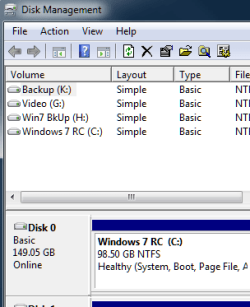
The computer I am presently using originally had 32 bit 7 in the first partition, and 64 bit 7 in the second. I deleted the 32 bit 7 and the boot partition and now have no 100MB boot partition. (When the retail arrives, I intend to install it with the boot partition if that is what the retail does) I am NOT recommending ANYONE do this, I am just saying it is possible to boot to 7 without the boot partition.

No_Boot_Part_01.png

Creating a bootable RAID involved more effort than I wanted to invest, but it can be done. EXPERIMENT AT YOUR OWN RISK. There is a tutorial here that will explain how to use bootsect.exe to add the Vista, 7 bootmgr to the hard drive's MBR, if that is what you choose to do.

Cheers!

Robert
 

My Computer

OS
...
Making an array is not any big problem since you use the first of the two matched drives as the host boot device there. If you don't already have a lot invested in the present installation the best move would simply be performing another clean install of 7 without the Vista plugged in and setting Drive 1 as the default in the bios setup.

Once you have the Vista drive unplugged you can use ports #1 + #2 of the secondary actually 3+4 for the array but making sure the Vista drive is replugged into Port #5 if you have more then 4 ports in the event Windows is reinstalled or repaired for some reason later like the 7 retail installation you will want so the installer again sees Drive #3 first of the array as the first drive.

The upgrade repair install is the option if you already have everything tied into the present 7 installation since that will preserve most everything while seeing the new mbr entries and boot files placed on the array's host drive.

Later if you decide to break the array up in order to use each separately you would need to reformat the first host boot drive without the second present. Otherwise that will still see the second drive as part of the no longer present array making it unusable.
 

My Computers

System One System Two

  • Computer type
    PC/Desktop
    Computer Manufacturer/Model Number
    Custom builds = 2
    OS
    W7 Ultimate x64/W10 Pro x64/W11 Pro Triple Boot - Main PC W7 Remote PC Micro ATX W7 Pro x64/W11 Pro
    CPU
    AMD Phenom II X4 975 Deneb 3.6ghz - 965 2nd remote pc
    Motherboard
    Gigabyte GA-790XTA-UD4-Gigabyte GA-880GM-D2H remote pc
    Memory
    Kingston Hyper X DDR3 1600 1.5v 16gb - Hyper X Fury 8gb 2nd
    Graphics Card(s)
    MSI HD Radeon 5750 1gb - MSI HD Radeon 6450 on mini tower
    Sound Card
    Creative Labs X-Fi Xtreme Audio P - Realtek onooard 2nd case
    Monitor(s) Displays
    ASUS VW199T-P 19" HP 2082a Main-HP 2082a 20" remote pc
    Screen Resolution
    Asus 1440x900 - HP 1600x900
    Hard Drives
    WD Black 1TB HD per OS W7, W10, and pending W11 presently on 500gb OS Drive - Pending Triple 1TB HDs for Spanned Storage/backup volume
    Single 2TB external USB enclosure, single 1TB System 7 Host/Boot drive, Pending 8TB external HD for system image b
    PSU
    Corsair 750TX - primary / Corsair CX600 - second
    Case
    Antec 900-2 - SSD compatible / NZXT Vulcan mini tower
    Cooling
    Zalman CNPS9900A
    Keyboard
    AZIO L70 Backlit Letters Gaming - ONN Cordless/USB
    Mouse
    MSI DS200 Programmable, Logitech Cordless
    Internet Speed
    30mbps upgrade - primary hard wired - mini tower usb WiFi
    Antivirus
    GFI VIPRE Internet Security 2014 on W7 2016 beta on W10,
    Browser
    Cyberfox, WaterFox 64bit FF variants, FireFox x64, Pale Moon
    Other Info
    Accomdata fan cooled usb 2.0 PIDE/Sata II, III external enclosure.
    Sambient usb/eSata PATA/Sata II, III external enclosure.
  • Computer type
    PC/Desktop
    System Manufacturer/Model Number
    CUSTOM ASSEMBLY
    OS
    W7 Pro x64/W11 Pro
    CPU
    AMD Deneb 3.6ghz - 965
    Motherboard
    Gigabyte GA-880GM-D2H remote pc
    Memory
    Kingston Hyper X Fury 8gb
    Graphics Card(s)
    MSI HD Radeon 6450 DVI Output
    Sound Card
    Realtek onooard Creative or Other separate PENDING
    Monitor(s) Displays
    VIZIO 32" LCD TV Separate LCD Pending
    Screen Resolution
    1600x1080
    Hard Drives
    WD 500GB OS Host/Boot WD Green 1TB Storage/Backup
    PSU
    Corsair 600W - THERMALTAKE 600W spare case
    Case
    NZXT Vulcan mini tower
    Cooling
    Twin 120mm Top Fans - 240mm Side Cover
    Keyboard
    ONN Cordless/USB Logitech Cordless
    Mouse
    ONN USB/Cordless - Logitech Cordless
    Internet Speed
    DSL 5G
    Browser
    MS Edge, FireFox, WaterFox x64, FireFox Nightly
    Other Info
    OS Testing-Remote Access to Main TeamViewer
Back
Top