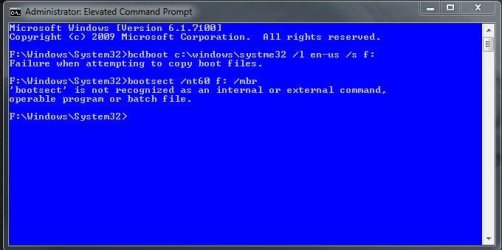
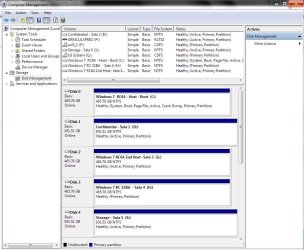
removing VISTA (c:\) with win7 (J:\) - how???

liquidmonkey

New member
Member
Local time
9:49 AM
Messages
27
hello,
i have recently installed win7 (which is AWESOME!!!) on J:\ and have my earlier VISTA (which is crap ;) installed on C:\ as shown below.

HDD1 - 1TB
C:\ - 200gig has VISTA
D:\ - 800gig has just files

HDD2 - 1TB
J:\ - 200gig has win7
H:\ - 800gig has just files

note that each installation is on a separate PHYSICAL hdd!!!

my machine is DUAL BOOT (meaning i can choose which OS to boot at startup)
and i DO NOT have a cd-drive.

so now i am running win7 and am trying to rid myself of the VISTA install but when i tried to format C:\ (in computer management), the 'format' option was not available or rather windows (7) would not let me format. i was also UNABLE to format c:\ drive in 'my computer' :(

my guess is that there are some files that are being shared between the 2 OS's but i'm not 100% sure.
i also read that the boot.ini or bootsqm.dat might have specific boot information that if formatted, would render my PC non-bootable. is that true? and if so, how can one avoid this problem?

and, if i do somehow manage to format C:\ drive (VISTA), will my windows drive (which is drive J:\) have an impact on my PC since its J: and not C:???

i can't be the only one in this situation since sooooo many have tried win7 the last few months.


1 - how can i best go about removing that partition and/or formating that partition????

2 - is there anything i need to do before removing the older VISTA installation? are there any shared files that maybe the new win7 install would use? i'm referring to documents and settings folders and such.


hope that wasn't too confusing, thanks for reading it all and thanks for any input!!!
 

My Computer My Computer

At a glance

win7
OS
win7
Hello liquidmonkey,

You can't format the Vista partition likely because the boot files are there. If you were to format it, your PC could no longer boot into Windows.

You can fix that by moving the boot manager to the Windows 7 partition. That is what the command-line tool bcdboot is for.
 

My Computer My Computer

At a glance

XP, Seven, 2008R2AMD, Intel, VIACorsair, Kingston, etc.ATI, NVIDIA
Computer Manufacturer/Model Number
Too many to list.
OS
XP, Seven, 2008R2
CPU
AMD, Intel, VIA
Motherboard
Various
Memory
Corsair, Kingston, etc.
Graphics Card(s)
ATI, NVIDIA
Monitor(s) Displays
Samsung
Hard Drives
Maxtor, Western Digital
Keyboard
qwerty
Internet Speed
22 Mb/s @ home, 1 Gb/s @ server
Other Info
All of my systems still run fastest on XP 32-bit for the most part. Win7 is fun to play with, but I still prefer XP for raw speed, security, and functionality.
i can't be the only one in this situation since sooooo many have tried win7 the last few months.
True. Welcome to Windows Seven Forums, liquidmonkey. There have been a couple of threads recently on this topic:

http://www.sevenforums.com/installation-setup/23612-changing-system-partition.html#post255210

You might be able to glean some helpful info there.

1 - how can i best go about removing that partition and/or formating that partition????
As you have Vista and 7 on separate hard drives, I suspect if you remove the Vista hard drive, your system will boot to 7. If true, you should have a 100 MB boot patition in the front of the 7 hard drive and can change the boot drive to the 7 drive in the motherboard BIOS and boot to 7.

If not, if you do not have the 100 MB boot partition, I would suggest you use the "Drive Management Utility" in 7 to shrink the 7 partition to leave 100 MB at the front of the hard drive. Then remove (at least temporarily) the Vista drive and do a start repair or repair install to restore the boot partition and enable booting to 7.

2 - is there anything i need to do before removing the older VISTA installation? are there any shared files that maybe the new win7 install would use? i'm referring to documents and settings folders and such
There are no files shared between the Vista and 7 partition. After you can successfully boot to 7, you can return the Vista drive and use the drive space as you wish.

BTW you can change the drive letter of the J: drive to C: from the 7 "Drive Management Utility". I prefer to configure my dual boots so that what ever OS I am booting to at the moment is seen as the C: drive.

Cheers!

Robert
 

My Computer My Computer

At a glance

...
OS
...
If you remove the Vista HD, I doubt it will automatically boot into 7.

Disk Management won't shrink from the lower address spaces. In any case, you don't need to create a 100mb partition.

Boot into 7, Unzip this and move/copy bootsect.exe into 7 Windows\system32

View attachment bootsect.zip

Open an elevated cmd prompt and type: ( press enter after each command)

J:\Windows\system32>bcdboot c:\windows /l en-us /s J:


Then type :

J:\Windows\system32>bootsect /nt60 J: /mbr

Updated NTFS filesystem bootcode. The update may be unreliable since the volume could not be locked during the update: Access is denied.

\??\PhysicalDrive1

Successfully updated disk bootcode.


Don't worry about the ntfs filesystem bootcode not being reliable - you already have it on that volume. As long as you get the "Successfully updated disk bootcode" you will be fine.

Ensure 7 partition is marked Active.

Go into Bios and set the 7 HD before the Vista HD in the Bios boot order.

Reboot. Check in Disk Management that 7 partition is now marked as System.
 
Last edited:

My Computers My Computers

  • At a glance

    7 X64i5 84002x8gb 3200mhz
    Computer type
    PC/Desktop
    OS
    7 X64
    CPU
    i5 8400
    Motherboard
    gigabyte b365m ds3h
    Memory
    2x8gb 3200mhz
    Hard Drives
    various
    PSU
    pure power 11 400w cm
    Case
    Coolermaster
    Cooling
    cryorig m9i
  • At a glance

    7x64g54008gb ddr4 2400
    Computer type
    PC/Desktop
    OS
    7x64
    CPU
    g5400
    Motherboard
    ga b365m ds3h
    Memory
    8gb ddr4 2400
    PSU
    xfx pro 450w
How did you install 7 on the second drive by usb key or mounting the iso image? One thought would be performing a custom install of 7 to replace the Vista installation on HD #0 and then use the Windows Easy Transfer option to backup the present 7 installation's files and settings to be restore on the Vista replacement installation of 7.

Why? and also a welcome to SF! liquidmonkey, you end up with a second working installation of 7 for other configurations or simply as one working main copy you can take your time while trying things out on the present installation.

If something goes wrong you can simply see that converted into one main storage drive later and still have a working copy of 7 on the first drive without ever touching the bios. When seeing more then one installation with one on the extra drive I added in for testing running into problems the second host I should install is now the actual host.

The replacement of Vista would still present the boot order by adding the first 7 install automatically into the new install's BCD store.
 

My Computers My Computers

  • At a glance

    W7 Ultimate x64/W10 Pro x64/W11 Pro Triple Bo...AMD Phenom II X4 975 Deneb 3.6ghz - 965 2nd r...Kingston Hyper X DDR3 1600 1.5v 16gb - Hyper ...MSI HD Radeon 5750 1gb - MSI HD Radeon 6450 o...
    Computer type
    PC/Desktop
    Computer Manufacturer/Model Number
    Custom builds = 2
    OS
    W7 Ultimate x64/W10 Pro x64/W11 Pro Triple Boot - Main PC W7 Remote PC Micro ATX W7 Pro x64/W11 Pro
    CPU
    AMD Phenom II X4 975 Deneb 3.6ghz - 965 2nd remote pc
    Motherboard
    Gigabyte GA-790XTA-UD4-Gigabyte GA-880GM-D2H remote pc
    Memory
    Kingston Hyper X DDR3 1600 1.5v 16gb - Hyper X Fury 8gb 2nd
    Graphics Card(s)
    MSI HD Radeon 5750 1gb - MSI HD Radeon 6450 on mini tower
    Sound Card
    Creative Labs X-Fi Xtreme Audio P - Realtek onooard 2nd case
    Monitor(s) Displays
    ASUS VW199T-P 19" HP 2082a Main-HP 2082a 20" remote pc
    Screen Resolution
    Asus 1440x900 - HP 1600x900
    Hard Drives
    WD Black 1TB HD per OS W7, W10, and pending W11 presently on 500gb OS Drive - Pending Triple 1TB HDs for Spanned Storage/backup volume
    Single 2TB external USB enclosure, single 1TB System 7 Host/Boot drive, Pending 8TB external HD for system image b
    PSU
    Corsair 750TX - primary / Corsair CX600 - second
    Case
    Antec 900-2 - SSD compatible / NZXT Vulcan mini tower
    Cooling
    Zalman CNPS9900A
    Keyboard
    AZIO L70 Backlit Letters Gaming - ONN Cordless/USB
    Mouse
    MSI DS200 Programmable, Logitech Cordless
    Internet Speed
    30mbps upgrade - primary hard wired - mini tower usb WiFi
    Antivirus
    GFI VIPRE Internet Security 2014 on W7 2016 beta on W10,
    Browser
    Cyberfox, WaterFox 64bit FF variants, FireFox x64, Pale Moon
    Other Info
    Accomdata fan cooled usb 2.0 PIDE/Sata II, III external enclosure.
    Sambient usb/eSata PATA/Sata II, III external enclosure.
  • At a glance

    W7 Pro x64/W11 ProAMD Deneb 3.6ghz - 965Kingston Hyper X Fury 8gbMSI HD Radeon 6450 DVI Output
    Computer type
    PC/Desktop
    System Manufacturer/Model Number
    CUSTOM ASSEMBLY
    OS
    W7 Pro x64/W11 Pro
    CPU
    AMD Deneb 3.6ghz - 965
    Motherboard
    Gigabyte GA-880GM-D2H remote pc
    Memory
    Kingston Hyper X Fury 8gb
    Graphics Card(s)
    MSI HD Radeon 6450 DVI Output
    Sound Card
    Realtek onooard Creative or Other separate PENDING
    Monitor(s) Displays
    VIZIO 32" LCD TV Separate LCD Pending
    Screen Resolution
    1600x1080
    Hard Drives
    WD 500GB OS Host/Boot WD Green 1TB Storage/Backup
    PSU
    Corsair 600W - THERMALTAKE 600W spare case
    Case
    NZXT Vulcan mini tower
    Cooling
    Twin 120mm Top Fans - 240mm Side Cover
    Keyboard
    ONN Cordless/USB Logitech Cordless
    Mouse
    ONN USB/Cordless - Logitech Cordless
    Internet Speed
    DSL 5G
    Browser
    MS Edge, FireFox, WaterFox x64, FireFox Nightly
    Other Info
    OS Testing-Remote Access to Main TeamViewer
If you remove the Vista HD, I doubt it will automatically boot into 7.
I doubt it will, too...

SIW2,
You got bootsec in sys32?
I ain't, need DVD.
EasyBCD put it there?
Or manual copy?
Or bcdboot cmd?
Thx
 

My Computer My Computer

At a glance

XP_Pro, W7_7201, W7RC.vhd, SciLinux5.3, Fedor...AMD 64x21 gigDunno
Computer Manufacturer/Model Number
Gateway GT5056
OS
XP_Pro, W7_7201, W7RC.vhd, SciLinux5.3, Fedora12, Fedora9_2x, OpenSolaris_09-06
CPU
AMD 64x2
Motherboard
Yes
Memory
1 gig
Graphics Card(s)
Dunno
Sound Card
Realtek something
Monitor(s) Displays
Samsung SyncMaster 940MW w/TV
Screen Resolution
1280x1024
Hard Drives
250 GB WD, USB Seagate Freedesk 1.5 T
Internet Speed
Cable modem
Other Info
1 + 1 = 10b,
7 + 7 = 16o,
a + b = 15h.
When seeing the first host drive for the 64bit RC while still having Vista installed on another drive I ended up replacing Vista with the 32bit RC on the second of two matching drives later for an array with the first seeing the second 64bit install there. The entries for both of those two were still intact on the host drive when later reformatting the pair to setup a temp array to sse how 7 worked out there.

Once that was broken up and the host was unplugged along with the ohters the first saw another clean stand alone install of the 64bit(and a good move as it turned out) now the default. When replugging the other drives back I could boot into that installation with the first host back as default again.

The BCD works the same for 7 as it did for Vista where a new install of 7 would simply be used to replace Vista on the default drive. The other option would be unplugging the Vista drive long enough to perform a repair install on 7 insuring that as a stand alone drive. Once the Vista drive is plugged back in the Vista primary is simply wiped.

The problem then seen however is now either having a second 7 install one for the 32bit or 64bit there or a second storage partition on a drive that could set aside for storage if not something else. For a single large storage parition the Vista would be removed, the second would need to be moved forward afterwards in order to expand that to fill the drive back in again.
 

My Computers My Computers

  • At a glance

    W7 Ultimate x64/W10 Pro x64/W11 Pro Triple Bo...AMD Phenom II X4 975 Deneb 3.6ghz - 965 2nd r...Kingston Hyper X DDR3 1600 1.5v 16gb - Hyper ...MSI HD Radeon 5750 1gb - MSI HD Radeon 6450 o...
    Computer type
    PC/Desktop
    Computer Manufacturer/Model Number
    Custom builds = 2
    OS
    W7 Ultimate x64/W10 Pro x64/W11 Pro Triple Boot - Main PC W7 Remote PC Micro ATX W7 Pro x64/W11 Pro
    CPU
    AMD Phenom II X4 975 Deneb 3.6ghz - 965 2nd remote pc
    Motherboard
    Gigabyte GA-790XTA-UD4-Gigabyte GA-880GM-D2H remote pc
    Memory
    Kingston Hyper X DDR3 1600 1.5v 16gb - Hyper X Fury 8gb 2nd
    Graphics Card(s)
    MSI HD Radeon 5750 1gb - MSI HD Radeon 6450 on mini tower
    Sound Card
    Creative Labs X-Fi Xtreme Audio P - Realtek onooard 2nd case
    Monitor(s) Displays
    ASUS VW199T-P 19" HP 2082a Main-HP 2082a 20" remote pc
    Screen Resolution
    Asus 1440x900 - HP 1600x900
    Hard Drives
    WD Black 1TB HD per OS W7, W10, and pending W11 presently on 500gb OS Drive - Pending Triple 1TB HDs for Spanned Storage/backup volume
    Single 2TB external USB enclosure, single 1TB System 7 Host/Boot drive, Pending 8TB external HD for system image b
    PSU
    Corsair 750TX - primary / Corsair CX600 - second
    Case
    Antec 900-2 - SSD compatible / NZXT Vulcan mini tower
    Cooling
    Zalman CNPS9900A
    Keyboard
    AZIO L70 Backlit Letters Gaming - ONN Cordless/USB
    Mouse
    MSI DS200 Programmable, Logitech Cordless
    Internet Speed
    30mbps upgrade - primary hard wired - mini tower usb WiFi
    Antivirus
    GFI VIPRE Internet Security 2014 on W7 2016 beta on W10,
    Browser
    Cyberfox, WaterFox 64bit FF variants, FireFox x64, Pale Moon
    Other Info
    Accomdata fan cooled usb 2.0 PIDE/Sata II, III external enclosure.
    Sambient usb/eSata PATA/Sata II, III external enclosure.
  • At a glance

    W7 Pro x64/W11 ProAMD Deneb 3.6ghz - 965Kingston Hyper X Fury 8gbMSI HD Radeon 6450 DVI Output
    Computer type
    PC/Desktop
    System Manufacturer/Model Number
    CUSTOM ASSEMBLY
    OS
    W7 Pro x64/W11 Pro
    CPU
    AMD Deneb 3.6ghz - 965
    Motherboard
    Gigabyte GA-880GM-D2H remote pc
    Memory
    Kingston Hyper X Fury 8gb
    Graphics Card(s)
    MSI HD Radeon 6450 DVI Output
    Sound Card
    Realtek onooard Creative or Other separate PENDING
    Monitor(s) Displays
    VIZIO 32" LCD TV Separate LCD Pending
    Screen Resolution
    1600x1080
    Hard Drives
    WD 500GB OS Host/Boot WD Green 1TB Storage/Backup
    PSU
    Corsair 600W - THERMALTAKE 600W spare case
    Case
    NZXT Vulcan mini tower
    Cooling
    Twin 120mm Top Fans - 240mm Side Cover
    Keyboard
    ONN Cordless/USB Logitech Cordless
    Mouse
    ONN USB/Cordless - Logitech Cordless
    Internet Speed
    DSL 5G
    Browser
    MS Edge, FireFox, WaterFox x64, FireFox Nightly
    Other Info
    OS Testing-Remote Access to Main TeamViewer
Thanks, Chuckr,

I forgot to attach it to the post - done it now.
 

My Computers My Computers

  • At a glance

    7 X64i5 84002x8gb 3200mhz
    Computer type
    PC/Desktop
    OS
    7 X64
    CPU
    i5 8400
    Motherboard
    gigabyte b365m ds3h
    Memory
    2x8gb 3200mhz
    Hard Drives
    various
    PSU
    pure power 11 400w cm
    Case
    Coolermaster
    Cooling
    cryorig m9i
  • At a glance

    7x64g54008gb ddr4 2400
    Computer type
    PC/Desktop
    OS
    7x64
    CPU
    g5400
    Motherboard
    ga b365m ds3h
    Memory
    8gb ddr4 2400
    PSU
    xfx pro 450w
Thanks, Chuckr,

I forgot to attach it to the post - done it now.

Substituting the letter H: for J: here I ended up seeing a different message on the screen for the 3rd 64bit RC still linked to the first host install's bcd there. Now to see if that drive is now bootable on it's own! :D
 

Attachments

  • Bootsect Transfer2.jpg
    Bootsect Transfer2.jpg
    35.7 KB · Views: 58
Last edited:

My Computers My Computers

  • At a glance

    W7 Ultimate x64/W10 Pro x64/W11 Pro Triple Bo...AMD Phenom II X4 975 Deneb 3.6ghz - 965 2nd r...Kingston Hyper X DDR3 1600 1.5v 16gb - Hyper ...MSI HD Radeon 5750 1gb - MSI HD Radeon 6450 o...
    Computer type
    PC/Desktop
    Computer Manufacturer/Model Number
    Custom builds = 2
    OS
    W7 Ultimate x64/W10 Pro x64/W11 Pro Triple Boot - Main PC W7 Remote PC Micro ATX W7 Pro x64/W11 Pro
    CPU
    AMD Phenom II X4 975 Deneb 3.6ghz - 965 2nd remote pc
    Motherboard
    Gigabyte GA-790XTA-UD4-Gigabyte GA-880GM-D2H remote pc
    Memory
    Kingston Hyper X DDR3 1600 1.5v 16gb - Hyper X Fury 8gb 2nd
    Graphics Card(s)
    MSI HD Radeon 5750 1gb - MSI HD Radeon 6450 on mini tower
    Sound Card
    Creative Labs X-Fi Xtreme Audio P - Realtek onooard 2nd case
    Monitor(s) Displays
    ASUS VW199T-P 19" HP 2082a Main-HP 2082a 20" remote pc
    Screen Resolution
    Asus 1440x900 - HP 1600x900
    Hard Drives
    WD Black 1TB HD per OS W7, W10, and pending W11 presently on 500gb OS Drive - Pending Triple 1TB HDs for Spanned Storage/backup volume
    Single 2TB external USB enclosure, single 1TB System 7 Host/Boot drive, Pending 8TB external HD for system image b
    PSU
    Corsair 750TX - primary / Corsair CX600 - second
    Case
    Antec 900-2 - SSD compatible / NZXT Vulcan mini tower
    Cooling
    Zalman CNPS9900A
    Keyboard
    AZIO L70 Backlit Letters Gaming - ONN Cordless/USB
    Mouse
    MSI DS200 Programmable, Logitech Cordless
    Internet Speed
    30mbps upgrade - primary hard wired - mini tower usb WiFi
    Antivirus
    GFI VIPRE Internet Security 2014 on W7 2016 beta on W10,
    Browser
    Cyberfox, WaterFox 64bit FF variants, FireFox x64, Pale Moon
    Other Info
    Accomdata fan cooled usb 2.0 PIDE/Sata II, III external enclosure.
    Sambient usb/eSata PATA/Sata II, III external enclosure.
  • At a glance

    W7 Pro x64/W11 ProAMD Deneb 3.6ghz - 965Kingston Hyper X Fury 8gbMSI HD Radeon 6450 DVI Output
    Computer type
    PC/Desktop
    System Manufacturer/Model Number
    CUSTOM ASSEMBLY
    OS
    W7 Pro x64/W11 Pro
    CPU
    AMD Deneb 3.6ghz - 965
    Motherboard
    Gigabyte GA-880GM-D2H remote pc
    Memory
    Kingston Hyper X Fury 8gb
    Graphics Card(s)
    MSI HD Radeon 6450 DVI Output
    Sound Card
    Realtek onooard Creative or Other separate PENDING
    Monitor(s) Displays
    VIZIO 32" LCD TV Separate LCD Pending
    Screen Resolution
    1600x1080
    Hard Drives
    WD 500GB OS Host/Boot WD Green 1TB Storage/Backup
    PSU
    Corsair 600W - THERMALTAKE 600W spare case
    Case
    NZXT Vulcan mini tower
    Cooling
    Twin 120mm Top Fans - 240mm Side Cover
    Keyboard
    ONN Cordless/USB Logitech Cordless
    Mouse
    ONN USB/Cordless - Logitech Cordless
    Internet Speed
    DSL 5G
    Browser
    MS Edge, FireFox, WaterFox x64, FireFox Nightly
    Other Info
    OS Testing-Remote Access to Main TeamViewer
If you remove the Vista HD, I doubt it will automatically boot into 7.

Disk Management won't shrink from the lower address spaces. In any case, you don't need to create a 100mb partition.

Boot into 7, Unzip this and move/copy bootsect.exe into 7 Windows\system32

View attachment 27019

Open an elevated cmd prompt and type: ( press enter after each command)

J:\Windows\system32>bcdboot c:\windows /l en-us /s J:


Then type :

J:\Windows\system32>bootsect /nt60 J: /mbr

Updated NTFS filesystem bootcode. The update may be unreliable since the volume could not be locked during the update: Access is denied.

\??\PhysicalDrive1

Successfully updated disk bootcode.


Don't worry about the ntfs filesystem bootcode not being reliable - you already have it on that volume. As long as you get the "Successfully updated disk bootcode" you will be fine.

Ensure 7 partition is marked Active.

Go into Bios and set the 7 HD before the Vista HD in the Bios boot order.

Reboot. Check in Disk Management that 7 partition is now marked as System.

wow, great advice everyone, thanks!

just curious before i proceed...
will changing my c: drive letter to another one screw things up? i would need to change c: to x: (for example), then i could change j: (where win7 is) to c:.
would that solve everything?

also, i'm not going to do a reinstall of anything as i'm sure there is a work around as point out by the above quote.

to answer 'how i installed win7?' - i mounted the iso image in daemon tools and went from there.

and at the moment, as shown in 'computer manager', my c: (vista) drive is shown as 'system, active, primary partition' and my j: (win7) drive is shown as 'boot, page file, crash dump, primary partition'.

not sure if that last bit helps but i just want to add tha before i proceed with the above quote as they made the most sense to me.


again, thanks everyone!!!
 

My Computer My Computer

At a glance

win7
OS
win7
thanks again everyone for the advice!!
i seem to have painted myself into a corner this time at it seems a tough problem to easily solve :(

since the win7 release is not that far away, i'll wait until i get the retail version and then just install that onto my c:\ drive and that should sort out all problems.....right?

i was hoping to avoid a reinstall but would have had to do it in 2010 anyway so i guess sooner is better than later ;)


ps, for the time being, i've gone back into VISTA and uninstalled EVERYTHING i could to get HDD space back.
 

My Computer My Computer

At a glance

win7
OS
win7
Hi NH,

BCDBOOT.exe :

The command is bcdboot c:\windows /l en-us /s F:

There is no \system32 in the bcdboot command.

C:\Windows is the source, and /s F: specifies the target.


7 BOOTSECT.exe:

To be able to run bootsect.exe, you need to get it on your machine. copy it off the dvd (it's in the Boot folder) and into F:\Windows\System 32. Then run the bootsect command.

bootsect /nt60 F: /mbr


[Neither bootsect.exe or bcdboot.exe need to be in system 32 - you can run them from just about anywhere - it is easier to put them in system32 as that is where the cmd prompt opens to.]


Keep us posted as to how it goes.

Thanks, Chuckr,

I forgot to attach it to the post - done it now.

Substituting the letter H: for J: here I ended up seeing a different message on the screen for the 3rd 64bit RC still linked to the first host install's bcd there. Now to see if that drive is now bootable on it's own! :D
 

My Computers My Computers

  • At a glance

    7 X64i5 84002x8gb 3200mhz
    Computer type
    PC/Desktop
    OS
    7 X64
    CPU
    i5 8400
    Motherboard
    gigabyte b365m ds3h
    Memory
    2x8gb 3200mhz
    Hard Drives
    various
    PSU
    pure power 11 400w cm
    Case
    Coolermaster
    Cooling
    cryorig m9i
  • At a glance

    7x64g54008gb ddr4 2400
    Computer type
    PC/Desktop
    OS
    7x64
    CPU
    g5400
    Motherboard
    ga b365m ds3h
    Memory
    8gb ddr4 2400
    PSU
    xfx pro 450w
Hi Liquid,

It is actually quite straightforward.

Boot into 7, Unzip the attached and put bootsect.exe into J:\ Windows\system32

http://www.sevenforums.com/attachme...0074-removing-vista-c-win7-j-how-bootsect.zip

Open an elevated cmd prompt and type:

bcdboot c:\windows /s J:

Then press Enter.

Next, type :

bootsect /nt60 J: /mbr

Then press enter.


That is it really.

Check in Disk Management the 7 partition is marked Active ( rt click it and select Mark as active).

Lastly, make sure 7 is the first Active partition Bios comes across - EITHER change the Boot order in Bios

OR swap the connectors to the motherboard - so the 7 HD is plugged in the socket where Vista is currently.

OR if you have a partition manager, just rt click the Vista partition and select Inactive.

Should take 5 mins. at most


N.B: I made it even easier - dropping the locale parameter /l en-us, it is not necessary.
 
Last edited:

My Computers My Computers

  • At a glance

    7 X64i5 84002x8gb 3200mhz
    Computer type
    PC/Desktop
    OS
    7 X64
    CPU
    i5 8400
    Motherboard
    gigabyte b365m ds3h
    Memory
    2x8gb 3200mhz
    Hard Drives
    various
    PSU
    pure power 11 400w cm
    Case
    Coolermaster
    Cooling
    cryorig m9i
  • At a glance

    7x64g54008gb ddr4 2400
    Computer type
    PC/Desktop
    OS
    7x64
    CPU
    g5400
    Motherboard
    ga b365m ds3h
    Memory
    8gb ddr4 2400
    PSU
    xfx pro 450w
Hi NH,

BCDBOOT.exe :

The command is bcdboot c:\windows /l en-us /s F:

There is no \system32 in the bcdboot command.

C:\Windows is the source, and /s F: specifies the target.


7 BOOTSECT.exe:

To be able to run bootsect.exe, you need to get it on your machine. copy it off the dvd (it's in the Boot folder) and into F:\Windows\System 32. Then run the bootsect command.

bootsect /nt60 F: /mbr


[Neither bootsect.exe or bcdboot.exe need to be in system 32 - you can run them from just about anywhere - it is easier to put them in system32 as that is where the cmd prompt opens to.]


Keep us posted as to how it goes.

Thanks, Chuckr,

I forgot to attach it to the post - done it now.

Substituting the letter H: for J: here I ended up seeing a different message on the screen for the 3rd 64bit RC still linked to the first host install's bcd there. Now to see if that drive is now bootable on it's own! :D

That was a typo there! :p Later I ran into the "missing bootmgr" error but still simply need now to rebuild the BCD store.
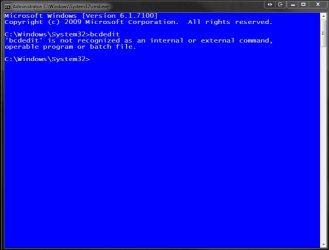
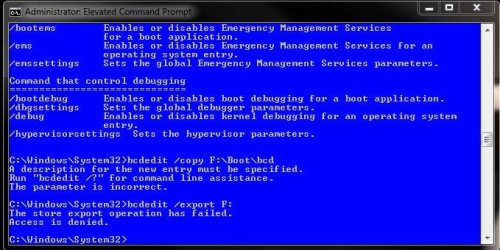
When trying to mock the host 7 stand alone installation I copied the boot folder over once I had the bootmgr problem taken care of that came up with the "boot\bcd" error.
 

My Computers My Computers

  • At a glance

    W7 Ultimate x64/W10 Pro x64/W11 Pro Triple Bo...AMD Phenom II X4 975 Deneb 3.6ghz - 965 2nd r...Kingston Hyper X DDR3 1600 1.5v 16gb - Hyper ...MSI HD Radeon 5750 1gb - MSI HD Radeon 6450 o...
    Computer type
    PC/Desktop
    Computer Manufacturer/Model Number
    Custom builds = 2
    OS
    W7 Ultimate x64/W10 Pro x64/W11 Pro Triple Boot - Main PC W7 Remote PC Micro ATX W7 Pro x64/W11 Pro
    CPU
    AMD Phenom II X4 975 Deneb 3.6ghz - 965 2nd remote pc
    Motherboard
    Gigabyte GA-790XTA-UD4-Gigabyte GA-880GM-D2H remote pc
    Memory
    Kingston Hyper X DDR3 1600 1.5v 16gb - Hyper X Fury 8gb 2nd
    Graphics Card(s)
    MSI HD Radeon 5750 1gb - MSI HD Radeon 6450 on mini tower
    Sound Card
    Creative Labs X-Fi Xtreme Audio P - Realtek onooard 2nd case
    Monitor(s) Displays
    ASUS VW199T-P 19" HP 2082a Main-HP 2082a 20" remote pc
    Screen Resolution
    Asus 1440x900 - HP 1600x900
    Hard Drives
    WD Black 1TB HD per OS W7, W10, and pending W11 presently on 500gb OS Drive - Pending Triple 1TB HDs for Spanned Storage/backup volume
    Single 2TB external USB enclosure, single 1TB System 7 Host/Boot drive, Pending 8TB external HD for system image b
    PSU
    Corsair 750TX - primary / Corsair CX600 - second
    Case
    Antec 900-2 - SSD compatible / NZXT Vulcan mini tower
    Cooling
    Zalman CNPS9900A
    Keyboard
    AZIO L70 Backlit Letters Gaming - ONN Cordless/USB
    Mouse
    MSI DS200 Programmable, Logitech Cordless
    Internet Speed
    30mbps upgrade - primary hard wired - mini tower usb WiFi
    Antivirus
    GFI VIPRE Internet Security 2014 on W7 2016 beta on W10,
    Browser
    Cyberfox, WaterFox 64bit FF variants, FireFox x64, Pale Moon
    Other Info
    Accomdata fan cooled usb 2.0 PIDE/Sata II, III external enclosure.
    Sambient usb/eSata PATA/Sata II, III external enclosure.
  • At a glance

    W7 Pro x64/W11 ProAMD Deneb 3.6ghz - 965Kingston Hyper X Fury 8gbMSI HD Radeon 6450 DVI Output
    Computer type
    PC/Desktop
    System Manufacturer/Model Number
    CUSTOM ASSEMBLY
    OS
    W7 Pro x64/W11 Pro
    CPU
    AMD Deneb 3.6ghz - 965
    Motherboard
    Gigabyte GA-880GM-D2H remote pc
    Memory
    Kingston Hyper X Fury 8gb
    Graphics Card(s)
    MSI HD Radeon 6450 DVI Output
    Sound Card
    Realtek onooard Creative or Other separate PENDING
    Monitor(s) Displays
    VIZIO 32" LCD TV Separate LCD Pending
    Screen Resolution
    1600x1080
    Hard Drives
    WD 500GB OS Host/Boot WD Green 1TB Storage/Backup
    PSU
    Corsair 600W - THERMALTAKE 600W spare case
    Case
    NZXT Vulcan mini tower
    Cooling
    Twin 120mm Top Fans - 240mm Side Cover
    Keyboard
    ONN Cordless/USB Logitech Cordless
    Mouse
    ONN USB/Cordless - Logitech Cordless
    Internet Speed
    DSL 5G
    Browser
    MS Edge, FireFox, WaterFox x64, FireFox Nightly
    Other Info
    OS Testing-Remote Access to Main TeamViewer
bcdedit /export F:\Boot\bcd

That will export a copy of the bcd hive currently on the System partition into the F:\Boot folder.


LOL to the typo - easily done.

The bcboot command would have copied all those boot files across to F: for you. Saves doing it by hand.
 

My Computers My Computers

  • At a glance

    7 X64i5 84002x8gb 3200mhz
    Computer type
    PC/Desktop
    OS
    7 X64
    CPU
    i5 8400
    Motherboard
    gigabyte b365m ds3h
    Memory
    2x8gb 3200mhz
    Hard Drives
    various
    PSU
    pure power 11 400w cm
    Case
    Coolermaster
    Cooling
    cryorig m9i
  • At a glance

    7x64g54008gb ddr4 2400
    Computer type
    PC/Desktop
    OS
    7x64
    CPU
    g5400
    Motherboard
    ga b365m ds3h
    Memory
    8gb ddr4 2400
    PSU
    xfx pro 450w
Which 7 installation should I be booted in? The first host install where the original bcd is found or the present default 7 on the actually 3rd sata drive.

The first host sata being the #1 sata until that gets removed also sees a boot entry there for the present default 7 as well as for the previous Vista and 32bit RC installations on the 3rd OS drive. The BCD store on the first sees 3 entries while the present was a stand alone which would seem to be the better of the two stores for this.

The present host sees the test 7 as H not F as seen with the original triple boot. Then I end up seeing "not a recgnised batch file command"? when simply going to type bcdedit at the elevated command prompt there.
 

Attachments

  • BCDEDIT Fails.jpg
    BCDEDIT Fails.jpg
    39.1 KB · Views: 6
Last edited:

My Computers My Computers

  • At a glance

    W7 Ultimate x64/W10 Pro x64/W11 Pro Triple Bo...AMD Phenom II X4 975 Deneb 3.6ghz - 965 2nd r...Kingston Hyper X DDR3 1600 1.5v 16gb - Hyper ...MSI HD Radeon 5750 1gb - MSI HD Radeon 6450 o...
    Computer type
    PC/Desktop
    Computer Manufacturer/Model Number
    Custom builds = 2
    OS
    W7 Ultimate x64/W10 Pro x64/W11 Pro Triple Boot - Main PC W7 Remote PC Micro ATX W7 Pro x64/W11 Pro
    CPU
    AMD Phenom II X4 975 Deneb 3.6ghz - 965 2nd remote pc
    Motherboard
    Gigabyte GA-790XTA-UD4-Gigabyte GA-880GM-D2H remote pc
    Memory
    Kingston Hyper X DDR3 1600 1.5v 16gb - Hyper X Fury 8gb 2nd
    Graphics Card(s)
    MSI HD Radeon 5750 1gb - MSI HD Radeon 6450 on mini tower
    Sound Card
    Creative Labs X-Fi Xtreme Audio P - Realtek onooard 2nd case
    Monitor(s) Displays
    ASUS VW199T-P 19" HP 2082a Main-HP 2082a 20" remote pc
    Screen Resolution
    Asus 1440x900 - HP 1600x900
    Hard Drives
    WD Black 1TB HD per OS W7, W10, and pending W11 presently on 500gb OS Drive - Pending Triple 1TB HDs for Spanned Storage/backup volume
    Single 2TB external USB enclosure, single 1TB System 7 Host/Boot drive, Pending 8TB external HD for system image b
    PSU
    Corsair 750TX - primary / Corsair CX600 - second
    Case
    Antec 900-2 - SSD compatible / NZXT Vulcan mini tower
    Cooling
    Zalman CNPS9900A
    Keyboard
    AZIO L70 Backlit Letters Gaming - ONN Cordless/USB
    Mouse
    MSI DS200 Programmable, Logitech Cordless
    Internet Speed
    30mbps upgrade - primary hard wired - mini tower usb WiFi
    Antivirus
    GFI VIPRE Internet Security 2014 on W7 2016 beta on W10,
    Browser
    Cyberfox, WaterFox 64bit FF variants, FireFox x64, Pale Moon
    Other Info
    Accomdata fan cooled usb 2.0 PIDE/Sata II, III external enclosure.
    Sambient usb/eSata PATA/Sata II, III external enclosure.
  • At a glance

    W7 Pro x64/W11 ProAMD Deneb 3.6ghz - 965Kingston Hyper X Fury 8gbMSI HD Radeon 6450 DVI Output
    Computer type
    PC/Desktop
    System Manufacturer/Model Number
    CUSTOM ASSEMBLY
    OS
    W7 Pro x64/W11 Pro
    CPU
    AMD Deneb 3.6ghz - 965
    Motherboard
    Gigabyte GA-880GM-D2H remote pc
    Memory
    Kingston Hyper X Fury 8gb
    Graphics Card(s)
    MSI HD Radeon 6450 DVI Output
    Sound Card
    Realtek onooard Creative or Other separate PENDING
    Monitor(s) Displays
    VIZIO 32" LCD TV Separate LCD Pending
    Screen Resolution
    1600x1080
    Hard Drives
    WD 500GB OS Host/Boot WD Green 1TB Storage/Backup
    PSU
    Corsair 600W - THERMALTAKE 600W spare case
    Case
    NZXT Vulcan mini tower
    Cooling
    Twin 120mm Top Fans - 240mm Side Cover
    Keyboard
    ONN Cordless/USB Logitech Cordless
    Mouse
    ONN USB/Cordless - Logitech Cordless
    Internet Speed
    DSL 5G
    Browser
    MS Edge, FireFox, WaterFox x64, FireFox Nightly
    Other Info
    OS Testing-Remote Access to Main TeamViewer
It will copy the bcd from the current System partition - so you will have all the same bcd entries on F:

So, assuming you want to copy bcd from System partition C: to F:
you can be booted into any o/s that sees C: as system.
 

My Computers My Computers

  • At a glance

    7 X64i5 84002x8gb 3200mhz
    Computer type
    PC/Desktop
    OS
    7 X64
    CPU
    i5 8400
    Motherboard
    gigabyte b365m ds3h
    Memory
    2x8gb 3200mhz
    Hard Drives
    various
    PSU
    pure power 11 400w cm
    Case
    Coolermaster
    Cooling
    cryorig m9i
  • At a glance

    7x64g54008gb ddr4 2400
    Computer type
    PC/Desktop
    OS
    7x64
    CPU
    g5400
    Motherboard
    ga b365m ds3h
    Memory
    8gb ddr4 2400
    PSU
    xfx pro 450w
I think you just missed the update on what comes when entering the bcdedit command. The copy of 7 set as default sees itself as C since it was a stand alone from the start. I can still boot into it however since the first drive still has the entries from the previous installations.
 

My Computers My Computers

  • At a glance

    W7 Ultimate x64/W10 Pro x64/W11 Pro Triple Bo...AMD Phenom II X4 975 Deneb 3.6ghz - 965 2nd r...Kingston Hyper X DDR3 1600 1.5v 16gb - Hyper ...MSI HD Radeon 5750 1gb - MSI HD Radeon 6450 o...
    Computer type
    PC/Desktop
    Computer Manufacturer/Model Number
    Custom builds = 2
    OS
    W7 Ultimate x64/W10 Pro x64/W11 Pro Triple Boot - Main PC W7 Remote PC Micro ATX W7 Pro x64/W11 Pro
    CPU
    AMD Phenom II X4 975 Deneb 3.6ghz - 965 2nd remote pc
    Motherboard
    Gigabyte GA-790XTA-UD4-Gigabyte GA-880GM-D2H remote pc
    Memory
    Kingston Hyper X DDR3 1600 1.5v 16gb - Hyper X Fury 8gb 2nd
    Graphics Card(s)
    MSI HD Radeon 5750 1gb - MSI HD Radeon 6450 on mini tower
    Sound Card
    Creative Labs X-Fi Xtreme Audio P - Realtek onooard 2nd case
    Monitor(s) Displays
    ASUS VW199T-P 19" HP 2082a Main-HP 2082a 20" remote pc
    Screen Resolution
    Asus 1440x900 - HP 1600x900
    Hard Drives
    WD Black 1TB HD per OS W7, W10, and pending W11 presently on 500gb OS Drive - Pending Triple 1TB HDs for Spanned Storage/backup volume
    Single 2TB external USB enclosure, single 1TB System 7 Host/Boot drive, Pending 8TB external HD for system image b
    PSU
    Corsair 750TX - primary / Corsair CX600 - second
    Case
    Antec 900-2 - SSD compatible / NZXT Vulcan mini tower
    Cooling
    Zalman CNPS9900A
    Keyboard
    AZIO L70 Backlit Letters Gaming - ONN Cordless/USB
    Mouse
    MSI DS200 Programmable, Logitech Cordless
    Internet Speed
    30mbps upgrade - primary hard wired - mini tower usb WiFi
    Antivirus
    GFI VIPRE Internet Security 2014 on W7 2016 beta on W10,
    Browser
    Cyberfox, WaterFox 64bit FF variants, FireFox x64, Pale Moon
    Other Info
    Accomdata fan cooled usb 2.0 PIDE/Sata II, III external enclosure.
    Sambient usb/eSata PATA/Sata II, III external enclosure.
  • At a glance

    W7 Pro x64/W11 ProAMD Deneb 3.6ghz - 965Kingston Hyper X Fury 8gbMSI HD Radeon 6450 DVI Output
    Computer type
    PC/Desktop
    System Manufacturer/Model Number
    CUSTOM ASSEMBLY
    OS
    W7 Pro x64/W11 Pro
    CPU
    AMD Deneb 3.6ghz - 965
    Motherboard
    Gigabyte GA-880GM-D2H remote pc
    Memory
    Kingston Hyper X Fury 8gb
    Graphics Card(s)
    MSI HD Radeon 6450 DVI Output
    Sound Card
    Realtek onooard Creative or Other separate PENDING
    Monitor(s) Displays
    VIZIO 32" LCD TV Separate LCD Pending
    Screen Resolution
    1600x1080
    Hard Drives
    WD 500GB OS Host/Boot WD Green 1TB Storage/Backup
    PSU
    Corsair 600W - THERMALTAKE 600W spare case
    Case
    NZXT Vulcan mini tower
    Cooling
    Twin 120mm Top Fans - 240mm Side Cover
    Keyboard
    ONN Cordless/USB Logitech Cordless
    Mouse
    ONN USB/Cordless - Logitech Cordless
    Internet Speed
    DSL 5G
    Browser
    MS Edge, FireFox, WaterFox x64, FireFox Nightly
    Other Info
    OS Testing-Remote Access to Main TeamViewer
I can't follow your complex drive arrangement from the descriptions - but you should be able do bcdedit /export F:\Boot\bcd when booted into the first 7 host where the original bcd is found.
 

My Computers My Computers

  • At a glance

    7 X64i5 84002x8gb 3200mhz
    Computer type
    PC/Desktop
    OS
    7 X64
    CPU
    i5 8400
    Motherboard
    gigabyte b365m ds3h
    Memory
    2x8gb 3200mhz
    Hard Drives
    various
    PSU
    pure power 11 400w cm
    Case
    Coolermaster
    Cooling
    cryorig m9i
  • At a glance

    7x64g54008gb ddr4 2400
    Computer type
    PC/Desktop
    OS
    7x64
    CPU
    g5400
    Motherboard
    ga b365m ds3h
    Memory
    8gb ddr4 2400
    PSU
    xfx pro 450w
Perhaps you need a grand tour! :roflmao: The bcd information along with a few screens here should give you a better idea. Note that the WD sata 1 being the first host for the triple is presenly in a close situation to the Vista drive we've been talking about since that will be removed or used as another temp storage device when the cables are swapped around. Sata #2 storage, sata #3 present host/boot, sata #4 destination for bcd store, sata #5 second storage.

Here's the bcd information with Xs substituting for the numbers on things for general reference.

PRESENT BCD STORE ON FIRST HOST:
Microsoft Windows [Version 6.1.7100]
Copyright (c) 2009 Microsoft Corporation. All rights reserved.
C:\Windows\System32>bcdedit /export f:\boot\bcd
The store export operation has failed.
The system cannot find the path specified.
C:\Windows\System32>bcdedit
Windows Boot Manager
--------------------
identifier {bootmgr}
device partition=C:
description Windows Boot Manager
locale en-US
inherit {globalsettings}
default {current}
resumeobject {xxxxxxxx-xxxx-xxxx-xxxx-xxxxxxxxxxxx}
displayorder {xxxxxxxx-xxxx-xxxx-xxxx-xxxxxxxxxxxx}
{current}
{xxxxxxxx-xxxx-xxxx-xxxx-xxxxxxxxxxxx}
toolsdisplayorder {memdiag}
timeout 5
Windows Boot Loader
-------------------
identifier {xxxxxxxx-xxxx-xxxx-xxxx-xxxxxxxxxxxx}
device partition=F:
path \Windows\system32\winload.exe
description Windows 7 RC64 3rd TEST - Sata 4
locale en-US
inherit {bootloadersettings}
recoverysequence {xxxxxxxx-xxxx-xxxx-xxxx-xxxxxxxxxxxx}
recoveryenabled Yes
osdevice partition=F:
systemroot \Windows
resumeobject {xxxxxxxx-xxxx-xxxx-xxxx-xxxxxxxxxxxx}
nx OptIn
Windows Boot Loader
-------------------
identifier {current}
device partition=C:
path \Windows\system32\winload.exe
description Windows 7 RC64 Host - Sata 1
locale en-US
inherit {bootloadersettings}
recoverysequence {xxxxxxxx-xxxx-xxxx-xxxx-xxxxxxxxxxxx}
recoveryenabled Yes
osdevice partition=C:
systemroot \Windows
resumeobject {xxxxxxxx-xxxx-xxxx-xxxx-xxxxxxxxxxxx}
nx OptIn
Windows Boot Loader
-------------------
identifier {xxxxxxxx-xxxx-xxxx-xxxx-xxxxxxxxxxxx}
device partition=E:
path \Windows\system32\winload.exe
description Windows 7 RC64 - 2ND HOST Sata 3
locale en-US
inherit {bootloadersettings}
recoverysequence {xxxxxxxx-xxxx-xxxx-xxxx-xxxxxxxxxxxx}
recoveryenabled Yes
osdevice partition=E:
systemroot \Windows
resumeobject {xxxxxxxx-xxxx-xxxx-xxxx-xxxxxxxxxxxx}
nx OptIn
C:\Windows\System32>
 

Attachments

  • BCDEDIT Fails2 Access Denied.jpg
    BCDEDIT Fails2 Access Denied.jpg
    60.7 KB · Views: 11
  • PARTITIONS PRESENT.jpg
    PARTITIONS PRESENT.jpg
    108.4 KB · Views: 12

My Computers My Computers

  • At a glance

    W7 Ultimate x64/W10 Pro x64/W11 Pro Triple Bo...AMD Phenom II X4 975 Deneb 3.6ghz - 965 2nd r...Kingston Hyper X DDR3 1600 1.5v 16gb - Hyper ...MSI HD Radeon 5750 1gb - MSI HD Radeon 6450 o...
    Computer type
    PC/Desktop
    Computer Manufacturer/Model Number
    Custom builds = 2
    OS
    W7 Ultimate x64/W10 Pro x64/W11 Pro Triple Boot - Main PC W7 Remote PC Micro ATX W7 Pro x64/W11 Pro
    CPU
    AMD Phenom II X4 975 Deneb 3.6ghz - 965 2nd remote pc
    Motherboard
    Gigabyte GA-790XTA-UD4-Gigabyte GA-880GM-D2H remote pc
    Memory
    Kingston Hyper X DDR3 1600 1.5v 16gb - Hyper X Fury 8gb 2nd
    Graphics Card(s)
    MSI HD Radeon 5750 1gb - MSI HD Radeon 6450 on mini tower
    Sound Card
    Creative Labs X-Fi Xtreme Audio P - Realtek onooard 2nd case
    Monitor(s) Displays
    ASUS VW199T-P 19" HP 2082a Main-HP 2082a 20" remote pc
    Screen Resolution
    Asus 1440x900 - HP 1600x900
    Hard Drives
    WD Black 1TB HD per OS W7, W10, and pending W11 presently on 500gb OS Drive - Pending Triple 1TB HDs for Spanned Storage/backup volume
    Single 2TB external USB enclosure, single 1TB System 7 Host/Boot drive, Pending 8TB external HD for system image b
    PSU
    Corsair 750TX - primary / Corsair CX600 - second
    Case
    Antec 900-2 - SSD compatible / NZXT Vulcan mini tower
    Cooling
    Zalman CNPS9900A
    Keyboard
    AZIO L70 Backlit Letters Gaming - ONN Cordless/USB
    Mouse
    MSI DS200 Programmable, Logitech Cordless
    Internet Speed
    30mbps upgrade - primary hard wired - mini tower usb WiFi
    Antivirus
    GFI VIPRE Internet Security 2014 on W7 2016 beta on W10,
    Browser
    Cyberfox, WaterFox 64bit FF variants, FireFox x64, Pale Moon
    Other Info
    Accomdata fan cooled usb 2.0 PIDE/Sata II, III external enclosure.
    Sambient usb/eSata PATA/Sata II, III external enclosure.
  • At a glance

    W7 Pro x64/W11 ProAMD Deneb 3.6ghz - 965Kingston Hyper X Fury 8gbMSI HD Radeon 6450 DVI Output
    Computer type
    PC/Desktop
    System Manufacturer/Model Number
    CUSTOM ASSEMBLY
    OS
    W7 Pro x64/W11 Pro
    CPU
    AMD Deneb 3.6ghz - 965
    Motherboard
    Gigabyte GA-880GM-D2H remote pc
    Memory
    Kingston Hyper X Fury 8gb
    Graphics Card(s)
    MSI HD Radeon 6450 DVI Output
    Sound Card
    Realtek onooard Creative or Other separate PENDING
    Monitor(s) Displays
    VIZIO 32" LCD TV Separate LCD Pending
    Screen Resolution
    1600x1080
    Hard Drives
    WD 500GB OS Host/Boot WD Green 1TB Storage/Backup
    PSU
    Corsair 600W - THERMALTAKE 600W spare case
    Case
    NZXT Vulcan mini tower
    Cooling
    Twin 120mm Top Fans - 240mm Side Cover
    Keyboard
    ONN Cordless/USB Logitech Cordless
    Mouse
    ONN USB/Cordless - Logitech Cordless
    Internet Speed
    DSL 5G
    Browser
    MS Edge, FireFox, WaterFox x64, FireFox Nightly
    Other Info
    OS Testing-Remote Access to Main TeamViewer
Back
Top