
Removing Vista from Dual Boot

guibord4

New member
Local time
6:22 PM
Messages
1
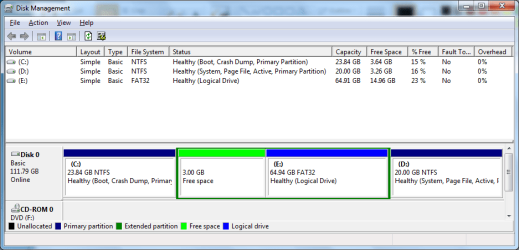
Just looking for some help with removing Vista so I can stop having to deal with low disk space. Here is what I want to do:

1. Erase partition D (Vista partition).
2. Backup partition E onto external drive
3. Erase partition E and the extended partition.
4. Extend drive C to take up the whole drive

I wasn't sure how to do it with the "System" flag being on partition D.

Thanks for the help!
 

Attachments
  • disk_mgmt.png
    disk_mgmt.png
    23 KB · Views: 47

My Computer My Computer

OS
Windows 7 Ultimate x64
Burn to CD free Partition Wizard bootable CD v.5.2: Partition Wizard

Now in Disk Management, mark C Active.

Reboot into Win7 DVD or Repair CD to Startup Repair - Run 3 Separate Times until Win7 starts on its own. System Repair Disc - Create

Boot the PW CD, confirm that C is now System Active. If so, rightclick E then D to Delete, click Ok after each. Now rightclick C to Resize, drag right grey border all the way to the right, click OK, Apply all steps.

In PW v.5.2 C should resize into Logical Free Space just like Primary Unallocated Space without Logical having to be converted to Primary first. If not, post back for further steps.
 
Hello guibord4, welcome to Seven Forums!


After you have copied out or made back-ups of the data you need to save to external media, I would do partition-specific wipes of the partitions you want to remove before you delete them; have a look at Option Three of this tutorial at the link below.

Partition Wizard : Use the Bootable CD


After the partitions have been deleted you can always extend the Windows partition to include the remaining unallocated space on the HDD / SSD or create additional Primary partitions or an Extended partition.


Be sure to post back with any further questions you may have and to keep us informed.
 

My Computer My Computer

Computer Manufacturer/Model Number
* BFK Customs *
OS
W 7 64-bit Ultimate
CPU
Intel Q9550 Yorkfield
Motherboard
ASUS P5Q Pro
Memory
8GB Dominator 8500C5D
Graphics Card(s)
ATI : XFX 5870
Sound Card
Realtek HD Audio 7-1
Monitor(s) Displays
1x 47" LCD HDMI & 3x 26" LCD HDMI
Screen Resolution
1920x1080P & 1920x1200
Hard Drives
1x 80GB Intel X25-M G2 SSD : 1x 500GB & 1x 640GB WD Caviar Black(s)
PSU
Corsair 620HX
Case
Cooler Master RC-690
Cooling
Tuniq Tower 120, 2x 140mm and 3x 120mm case fans
Keyboard
Microsoft 500
Mouse
Razer Diamondback 3G
Internet Speed
14 Mb/s
Other Info
1x Koutech 3Gb/s SATA HDD Hot Swap Rack
Back
Top