Solved Removing Windows 7 From Data Drive

al capowned

New member
Local time
3:49 PM
Messages
7
I am in the middle of fixing a machine that wouldn't boot. The bad windows 7 install is on an SSD (C:\). In order to fix it I had to do a new install on the Data Drive (D:\) and fix the install on the SSD (C:\) from that install. I am now having issues removing the install on the Data Drive (D:\). I am completely unfamiliar with BCD and was hoping someone here could give me some insight on how to remove the install from the Data Drive (D:\)

Thanks in advance
 

My Computer

OS
Windows 7 Home Premium 64bit
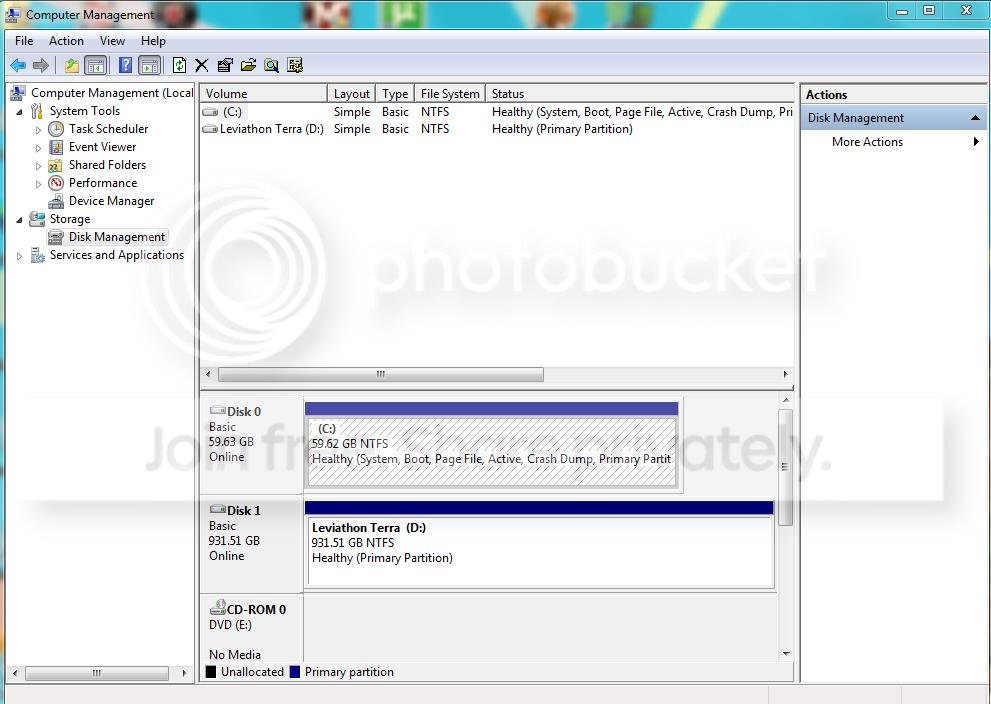
Please post back a screenshot of your full Disk Management drive map and listings, using Snipping Tool in Start Menu. We need to see it before we can give you the exact steps with certainty.
 
thanks for reply. Here is that SS you asked for.
DiskManagement.png
 

My Computer

OS
Windows 7 Home Premium 64bit
Hello al capowned, welcome to Seven Forums!


There should be no reason you could not just delete the install on the "Disk 1 D:" if you choose to do so in Windows disk management, just right click the D: and click delete as long as there is no data you need to save on that partition; and be sure to post back with any further questions you may have and to keep us informed.
 

My Computer

Computer Manufacturer/Model Number
* BFK Customs *
OS
W 7 64-bit Ultimate
CPU
Intel Q9550 Yorkfield
Motherboard
ASUS P5Q Pro
Memory
8GB Dominator 8500C5D
Graphics Card(s)
ATI : XFX 5870
Sound Card
Realtek HD Audio 7-1
Monitor(s) Displays
1x 47" LCD HDMI & 3x 26" LCD HDMI
Screen Resolution
1920x1080P & 1920x1200
Hard Drives
1x 80GB Intel X25-M G2 SSD : 1x 500GB & 1x 640GB WD Caviar Black(s)
PSU
Corsair 620HX
Case
Cooler Master RC-690
Cooling
Tuniq Tower 120, 2x 140mm and 3x 120mm case fans
Keyboard
Microsoft 500
Mouse
Razer Diamondback 3G
Internet Speed
14 Mb/s
Other Info
1x Koutech 3Gb/s SATA HDD Hot Swap Rack
Thanks for the reply.

The disk on D: has data that needs to be retained.
 

My Computer

OS
Windows 7 Home Premium 64bit
I thought you said you installed Windows 7 to that Hard Disk Drive (HDD) did you install Windows 7 over-top of that data or did you put the data there after the install.

If you installed Windows 7 to that HDD with the data already present the odds are very good that a lot of that data has been over-written by the Installation of Windows.
 

My Computer

Computer Manufacturer/Model Number
* BFK Customs *
OS
W 7 64-bit Ultimate
CPU
Intel Q9550 Yorkfield
Motherboard
ASUS P5Q Pro
Memory
8GB Dominator 8500C5D
Graphics Card(s)
ATI : XFX 5870
Sound Card
Realtek HD Audio 7-1
Monitor(s) Displays
1x 47" LCD HDMI & 3x 26" LCD HDMI
Screen Resolution
1920x1080P & 1920x1200
Hard Drives
1x 80GB Intel X25-M G2 SSD : 1x 500GB & 1x 640GB WD Caviar Black(s)
PSU
Corsair 620HX
Case
Cooler Master RC-690
Cooling
Tuniq Tower 120, 2x 140mm and 3x 120mm case fans
Keyboard
Microsoft 500
Mouse
Razer Diamondback 3G
Internet Speed
14 Mb/s
Other Info
1x Koutech 3Gb/s SATA HDD Hot Swap Rack
I have a new install on D: used to get the old install on C: to boot. Now I want to remove the windows install on D: using the install on C: I have verified that all data is on the drive.
 

My Computer

OS
Windows 7 Home Premium 64bit
Yes I read all that already.


What I would like to know is how you managed to install Windows to a single partition on a HDD that contained data and did not over-write the data that was previously there with the Windows installation process.


I'm not really sure trying to remove the Windows components on that HDD would be more destructive to the data that is there; the best bet may be to remove the boot entry from the Windows boot manager and leave well-enough alone.

In the "Disk 0 C:" Windows start menu type msconfig into the search box, under the "Boot" tab see if there is 2 Windows 7 entries.
 

My Computer

Computer Manufacturer/Model Number
* BFK Customs *
OS
W 7 64-bit Ultimate
CPU
Intel Q9550 Yorkfield
Motherboard
ASUS P5Q Pro
Memory
8GB Dominator 8500C5D
Graphics Card(s)
ATI : XFX 5870
Sound Card
Realtek HD Audio 7-1
Monitor(s) Displays
1x 47" LCD HDMI & 3x 26" LCD HDMI
Screen Resolution
1920x1080P & 1920x1200
Hard Drives
1x 80GB Intel X25-M G2 SSD : 1x 500GB & 1x 640GB WD Caviar Black(s)
PSU
Corsair 620HX
Case
Cooler Master RC-690
Cooling
Tuniq Tower 120, 2x 140mm and 3x 120mm case fans
Keyboard
Microsoft 500
Mouse
Razer Diamondback 3G
Internet Speed
14 Mb/s
Other Info
1x Koutech 3Gb/s SATA HDD Hot Swap Rack
If the unwanted Win7 Boot Menu listing is not showing in msconfig>Boot, then install EasyBCD 2.0 to remove it on the Edit Boot menu tab: http://neosmart.net/blog/2010/welcome-to-easybcd-2/

Then post back a screenshot of the contents of D: drive; we can tell you how to delete the remaining OS folders.

If you wish to relocate and link your Win7 User data folders to D so that you have enough space for OS and Programs on C, use this method: http://www.sevenforums.com/tutorials/18629-user-folders-change-default-location.html
 
Last edited:
There were originally 2 installs. I set c:\ to the default and deleted the other. But I can't delete the windows folder it keeps telling me that I need to provide Administrator credentials but never asks me for credentials. Just keeps giving me a Dialog Box with "Try again" "Cancel".
 

My Computer

OS
Windows 7 Home Premium 64bit
I merged the .reg files but don't get the "Take Ownership" option when right clicking the windows install on d:
 

My Computer

OS
Windows 7 Home Premium 64bit
Rightclick the D:Windows folder, look for Take Ownership choice on menu. If not, restart computer. Once you take ownership, rightclick to Delete.

It would be easier if we could see what you're working from.

Use the Snipping Tool in Start Menu, choose Rectangular snip to capture the D: drive contents in Details view, Save file to desktop, attach using paper clip in Reply Box.
 
thanks for the help guys. Got the registry keys merged properly and everything worked great.


thanks again
 

My Computer

OS
Windows 7 Home Premium 64bit
Hello again.


Good to see you have it sorted and thanks for the update.
 

My Computer

Computer Manufacturer/Model Number
* BFK Customs *
OS
W 7 64-bit Ultimate
CPU
Intel Q9550 Yorkfield
Motherboard
ASUS P5Q Pro
Memory
8GB Dominator 8500C5D
Graphics Card(s)
ATI : XFX 5870
Sound Card
Realtek HD Audio 7-1
Monitor(s) Displays
1x 47" LCD HDMI & 3x 26" LCD HDMI
Screen Resolution
1920x1080P & 1920x1200
Hard Drives
1x 80GB Intel X25-M G2 SSD : 1x 500GB & 1x 640GB WD Caviar Black(s)
PSU
Corsair 620HX
Case
Cooler Master RC-690
Cooling
Tuniq Tower 120, 2x 140mm and 3x 120mm case fans
Keyboard
Microsoft 500
Mouse
Razer Diamondback 3G
Internet Speed
14 Mb/s
Other Info
1x Koutech 3Gb/s SATA HDD Hot Swap Rack
Back
Top