Removing Windows 7 from the Primary partition of a Dual Boot system.

Mick47

New member
Local time
4:23 AM
Messages
5
I have two partitions on my HDD. A 'suspect' Windows 7 Home (that originally came with my 'refurbished' second hand laptop) is installed in the only Primary partition. A legitimate copy of Windows 7 Professional is (now) installed in an Extended Logical partition. My laptop boots up in Windows 7 Professional, if no other selection is made. I now wish to remove the suspect installation, and revert to having just one partition containing my Windows 7 Professional, without formatting the whole HDD and reinstallng/restoring everything currently on the second, logical partition. Is this possible, and if so, how?
 

My Computer My Computer

At a glance

Windows 7 Professional SP1 64bitAMD Turion 64 X24GBATI Radeon X1200
Computer type
Laptop
Computer Manufacturer/Model Number
Toshiba Satellite Pro
OS
Windows 7 Professional SP1 64bit
CPU
AMD Turion 64 X2
Motherboard
TL-58
Memory
4GB
Graphics Card(s)
ATI Radeon X1200
Hard Drives
Hitachi 120 GB
Antivirus
Avast
Browser
Firefox
What kind of BIOS you have? UEFI or Legacy (MBR)?
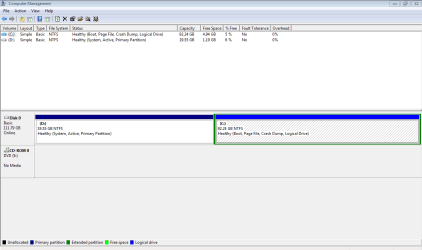
Can you give us a snapshot of disk manager?
Do you have a external HDD to make a backup image of your Win 7 pro partition?
 

My Computers My Computers

  • At a glance

    Windows 7 HP 64i5 6600K - 800MHz to 4200MHz4+4G GSkill DDR4 3000IG - Intel 530
    Computer type
    PC/Desktop
    Computer Manufacturer/Model Number
    custom build
    OS
    Windows 7 HP 64
    CPU
    i5 6600K - 800MHz to 4200MHz
    Motherboard
    GA-Z170-HD3P
    Memory
    4+4G GSkill DDR4 3000
    Graphics Card(s)
    IG - Intel 530
    Monitor(s) Displays
    Samsung 226BW
    Screen Resolution
    1680x1050
    Hard Drives
    (1) -1 SM951 – 128GB M.2 AHCI PCIe SSD drive for Windows 7 and Lubuntu
    (2) -1 WD SATA 3 - 1T for Data
    (3) -1 WD SATA 3 - 1T for backup
    PSU
    Thermaltake 450W TR2 gold
    Keyboard
    Old and good Chicony mechanical keyboard
    Mouse
    Logitech mX performance - 9 buttons (had to disable some)
    Internet Speed
    500Mb/s
    Browser
    Firefox 64
    Other Info
    TinyWall firewall
  • At a glance

    Windows 7 Proi7-4500U 800MHz to 3.0GHz(4+4)G DDR3 1600IG intel 4400 + NVIDIA GeForce GT 745M
    Computer type
    Laptop
    System Manufacturer/Model Number
    Asus Q550LF
    OS
    Windows 7 Pro
    CPU
    i7-4500U 800MHz to 3.0GHz
    Motherboard
    Asus Q550LF
    Memory
    (4+4)G DDR3 1600
    Graphics Card(s)
    IG intel 4400 + NVIDIA GeForce GT 745M
    Sound Card
    Realtek
    Monitor(s) Displays
    LG Display LP156WF4-SPH1
    Screen Resolution
    1920 x 1080
    Hard Drives
    BX500 120G SSD for Windows and programs +
    1T HDD for data
    Internet Speed
    500 Mb/s
    Browser
    Firefox
    Other Info
    TinyWall firewall
Hi Mick,
The easy way make a system image of your Pro set-up, using macrium or Acronis, both free.
Then just install it as a new but with only 1 partition

If you want to check the validity of your home premium, run this copy/paste the output
http://go.microsoft.com/fwlink/?LinkID=52012
note that comp would have come with W7 home if its 4+ years old.

Roy
 

My Computer My Computer

At a glance

W7 home premium 32bit/W7HP 64bit/w10 tp insid...E5300 dual core3gbNvidia Geforce 7100 Nforce 630i
Computer type
PC/Desktop
Computer Manufacturer/Model Number
medionl/Aspire 6930G/acer x55a
OS
W7 home premium 32bit/W7HP 64bit/w10 tp insider ring
CPU
E5300 dual core
Motherboard
medion MS7366
Memory
3gb
Graphics Card(s)
Nvidia Geforce 7100 Nforce 630i
Monitor(s) Displays
avixc
Internet Speed
n (isp resticted to 72)
Antivirus
mse/pands
Browser
palemoon
Other Info
Belkin Fd7050 n USB using Railink RT2870 drivers, more upto date
However you do it, W7 has to be installed on a Primary Partition, or you at least have to have a System Reserved partition remaining when you wipe the suspect W7 install, if not you`ll have to run a startup repair to get W7 booting again. And a startup repair does not always work.

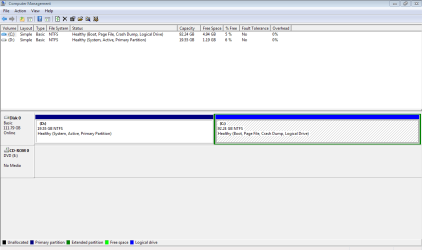
Post a shot of Disk Management before making any changes.
 

My Computer My Computer

At a glance

Windows 10 Pro x64Intel Core i7 6700KGSkill TridentZ RGB 16GB 3600 16-16-16-36EVGA GTX 980 Ti SC x2
Computer type
PC/Desktop
Computer Manufacturer/Model Number
Skylake Special #666
OS
Windows 10 Pro x64
CPU
Intel Core i7 6700K
Motherboard
Asus Sabertooth Z170 Mark 1
Memory
GSkill TridentZ RGB 16GB 3600 16-16-16-36
Graphics Card(s)
EVGA GTX 980 Ti SC x2
Sound Card
Realtek High Definition
Monitor(s) Displays
AOC G2460PG
Screen Resolution
1920 x 1080 144Hz
Hard Drives
Samsung 860 Pro 256GB, Seagate Barracuda 4TB x2
PSU
EVGA 1000 P2, EVGA White Custom Braided Cables
Case
Corsair Vengeance C70 Gunmetal Black
Cooling
Corsair H100i v2, Corsair ML120 x2, Thermal Grizzly Kryonaut
Keyboard
Logitech G910 Orion Spectrum
Mouse
Logitech G700s
Internet Speed
Verizon Fios Quantum Gateway 75/75
Antivirus
Windows Defender, Malwarebytes Free 3.8.3
Browser
Chrome
Other Info
Corsair SP120 x4, LG Blu-ray Drive, Durabrand HT-395 100 Watt Dolby Digital Amp, Corsair H2100 Wireless 7.1 Headset
Removing Windows 7 from the Primary partition of a Dual Boot system

Reply to Megahertz
"What kind of BIOS do you have? UEFI or Legacy (MBR)?
Can you give us a snapshot of disk manager?
Do you have a external HDD to make a backup image of your Win 7 pro partition?[/QUOTE]"

Until yesterday I had never heard of UEFI or GPT so I'm assuming that I'm using BIOS/MBR.
Disk Manager snapshot attached.
Yes I do have an external HDD.
 

Attachments

  • Disk Mangement Capture.PNG
    Disk Mangement Capture.PNG
    14.4 KB · Views: 5

My Computer My Computer

At a glance

Windows 7 Professional SP1 64bitAMD Turion 64 X24GBATI Radeon X1200
Computer type
Laptop
Computer Manufacturer/Model Number
Toshiba Satellite Pro
OS
Windows 7 Professional SP1 64bit
CPU
AMD Turion 64 X2
Motherboard
TL-58
Memory
4GB
Graphics Card(s)
ATI Radeon X1200
Hard Drives
Hitachi 120 GB
Antivirus
Avast
Browser
Firefox
Reply to:
"Hi Mick,
The easy way is to make a system image of your Pro set-up, using macrium or Acronis, both free.
Then just install it as new but with only 1 partition

If you want to check the validity of your home premium, run this copy/paste the output
http://go.microsoft.com/fwlink/?LinkID=52012
note that computer would have come with W7 home if its 4+ years old.

Roy"

Thanks Roy,
I was rather hoping to be able to do something 'simpler' like erasing/formatting the Primary partition (without deleting it) and then merging it with the other partition (using Partition Master), because I've never successfully restored anything using the Windows Backup process, and recently Backup has refused to work anyway (I'm now using EaseUS Todo). I'll investigate Macrium and/or Acronis.

I wasn't bothered about the 'suspect' Windows 7 (which Mocrosoft has already 'rejected' as not being genuine), as I already had a legitimate 64 bit Windows 7 Pro CD that I purchased to upgrade my laptop from the 32 bit Vista it came with.

Mick
 

My Computer My Computer

At a glance

Windows 7 Professional SP1 64bitAMD Turion 64 X24GBATI Radeon X1200
Computer type
Laptop
Computer Manufacturer/Model Number
Toshiba Satellite Pro
OS
Windows 7 Professional SP1 64bit
CPU
AMD Turion 64 X2
Motherboard
TL-58
Memory
4GB
Graphics Card(s)
ATI Radeon X1200
Hard Drives
Hitachi 120 GB
Antivirus
Avast
Browser
Firefox
Removing Windows 7 from the Primary partition of a Dual Boot system

Reply to:
AddRAM
"However you do it, W7 has to be installed on a Primary Partition, or you at least have to have a System Reserved partition remaining when you wipe the suspect W7 install, if not you`ll have to run a startup repair to get W7 booting again. And a startup repair does not always work.

Post a shot of Disk Management before making any changes."

I'm not sure about the creation/use of System Reserved partitions, but will investigate. My reason for asking for help is that I don't trust the Windows Backup/Restore process or their so called Startup Repair disk as I've never had any success with either, but thanks for the warning anyway.

Snapshot of Disk Manager attached.

Mick
 

Attachments

  • Disk Mangement Capture.PNG
    Disk Mangement Capture.PNG
    14.4 KB · Views: 2

My Computer My Computer

At a glance

Windows 7 Professional SP1 64bitAMD Turion 64 X24GBATI Radeon X1200
Computer type
Laptop
Computer Manufacturer/Model Number
Toshiba Satellite Pro
OS
Windows 7 Professional SP1 64bit
CPU
AMD Turion 64 X2
Motherboard
TL-58
Memory
4GB
Graphics Card(s)
ATI Radeon X1200
Hard Drives
Hitachi 120 GB
Antivirus
Avast
Browser
Firefox
Hi,
Not sure what is on D partition but the boot..... is all on C partition so that might be your 7 pro install.
Click Start and type in the search box
msconfig
Hit the enter key
On the boot section see if C say win-7 pro or not and is default os.
If it does you can format the D partition or out an out delete it into unallocated space.

You can move the os all the way to the left using free mini tool
Best Free Partition Manager for Windows | MiniTool Partition Free

Although not sure why the C partition is tagged as Logical :confused:
 

My Computer My Computer

At a glance

Win-7-Pro64bit 7-H-Prem-64biti7-5930K 2nd i9-9940x both water blocked VRM'...Trident-z 3200C14 2nd Trident-z 3600C16EVGA 1080ti ftw3 2nd Titan Xp both water blocked
Computer type
PC/Desktop
Computer Manufacturer/Model Number
Custom assembled by me :}
OS
Win-7-Pro64bit 7-H-Prem-64bit
CPU
i7-5930K 2nd i9-9940x both water blocked VRM's too
Motherboard
ASUS SABERTOOTH X99 2nd ASUS x299 Apex
Memory
Trident-z 3200C14 2nd Trident-z 3600C16
Graphics Card(s)
EVGA 1080ti ftw3 2nd Titan Xp both water blocked
Sound Card
Built-in Realtek
Monitor(s) Displays
1-AOC G2460PG 24"G-Sync 144Hz/ 2nd 1-ASUS VG248QE 24" 144Hz
Screen Resolution
1920 x 1080 144Hz
Hard Drives
2-Samsung M.2 Evo & Evo Plus
2-Samsung 850 EVO 500GB SSD's/ 3-2.5 W.D. Black 1tb-&3-1tb/3-3.5 WD Black 1tb hdd's
PSU
EVGA SuperNOVA 1000-P2 2nd 1200-P2
Case
2-Corsair Obsidian Series 450D Black ATX Mid Tower
Cooling
Custom water loops
Keyboard
Logitech G710+/ 2nd Logitech G910
Mouse
2-RedDragon M901 Perdition 16400 dpi Gaming mouse = wired
Internet Speed
Comcast Ping 19ms 89.31mbps download speed 6.12mbps upload
Antivirus
Malwarebytes Pro/ Superantispyware Pro
Browser
FireFox & Pale moon
Other Info
2nd ASUS X299 Apex/Intel i9-9940x with Custom water loop/7H-Prem-x64/Corsair 450D case/Ram Trident-z 3600C16 4x8gb / Samsung970Evo plus 500gb SSD/Dual ssd EZ swap evo/PSU EVGA SuperNova 1200w-P2 80+Platinum/GPU Titan Xp /8-ML-140 on push-pull on 2-280GTX rads
In Windows Disk Management
- The BOOT partition is where Windows is installed and running from, it can be Primary or Logical.
- The SYSTEM, ACTIVE partition is where the bootloader is, it must be Primary.

For Legacy BIOS / MBR the only partition that needs to be Primary is where the bootloader is.
A Windows OS can be installed on a Logical partition.
The Windows partition can have the Windows OS and the bootloader, and i think that is what the OP wants. If the [D] partition is deleted now, Windows will not startup. Before the [D] partition can be deleted, the bootloader needs to be moved to [C], and [C] must be a Primary Active partition. Also, there is very little free space now on C or D. Less than 10% free space can cause problems, some things may not work correctly, if at all. @Mick47 Can you get and attach a larger drive to your laptop ? I would get a larger drive and "migrate" the Win 7 Pro to the new drive. That way, you don't make any changes to the current drive, until you know everything works on the new drive. You would have to be able to replace the current drive with a new drive for this approach to work. I don't know how easy or possible that is with your laptop, or your hardware experience. If you can't "Build/Migrate" to a new larger drive, it gets complicated and risky, making these changes to your current drive. Make sure you have backup (images) of your current drives before making any changes. Backup to an external drive using the program you trust such as EaseUS Todo, Macrium, etc.
 

My Computer My Computer

At a glance

Multi-Boot W7_Pro_x64 W8.1_Pro_x64 W10_Pro_x6...AMD Athlon II x4 6206GB GSkill DDR2 800AMD 4670 GPU + AMD 4200 IGP
Computer type
PC/Desktop
Computer Manufacturer/Model Number
home built
OS
Multi-Boot W7_Pro_x64 W8.1_Pro_x64 W10_Pro_x64 +Linux_VMs +Chromium_VM
CPU
AMD Athlon II x4 620
Motherboard
Gigabyte GA-MA785G-UD3H
Memory
6GB GSkill DDR2 800
Graphics Card(s)
AMD 4670 GPU + AMD 4200 IGP
Sound Card
on board Realtek ALC889A
Monitor(s) Displays
RCA 40" LCD TV, Insignia 32" LCD TV, HP 15" LCD monitor
Screen Resolution
1680 x 1050
Hard Drives
OCZ Vertex 3 120GB,
Samsung F3 1TB (3),
Several others - WD, Seagate, Hitachi, ...
PSU
Corsair 500 W
Case
Rosewill mid tower
Cooling
CM 90mm rifle
Keyboard
Gyration wireless, Logitech wireless, Dell USB wired
Mouse
Gyration wireless, Logitech wireless, V7 USB wired
Internet Speed
Spectrum - 100Mbps D / 10Mbps U
Antivirus
Avast, MBAM3, EMET, WinPatrol
Browser
Pale Moon, Firefox, IE
Other Info
2 multi-boot PC's
Mainly HTPC/Office/Gen purpose (no gaming).
Trendnet USB KVM.
LG DVD burner/Blue Ray Player.
Tray system for removable SATA backup drives.

Not currently OCd, under-volted.
I use Hybrid sleep, rarely re-boot or shutdown.

Hauppauge HD-PVR, Avermedia PCIe TV Tuner, Hauppauge PCI TV Tuner.
Mick, as you're going to work on the disk, you MUST have a backup of your files before you begin.
Your system is legacy - MBR
Partitions only expand to a free space to the right. You will have to make an image of your Win 7 Pro partition, delete the partition, expand the first partition to the end, format the drive, restore the Win 7 pro image and run boot repair.
As your Win 7 pro partition is bigger than the other, you just can't copy one partition to the other.

This is what I would do:
- I recommend to use AOMEI Backupper- Best Free Backup Software for Windows 10, Windows 8.1/8, Windows 7, Vista, XP
- Make a backup of your files on an external HDD.
- If you use bitlocker, you must unlock all the Win 7 Pro drive.
- Under Win 7 Home, make an image of your Win 7 Pro partition on the external HDD. As you may have some problems on copying a working drive, I suggest you do under Win 7 home. Create a bootable disk of your image program. Test if it boots.
- Under Win 7 Home, go to disk manager and delete Win 7 pro partition (logical) and extend the active partition (win 7 Home) to the end of the drive.
- Boot from the image program disk, format the whole disk and restore the image of your Win 7 Pro partition.
- With the Win 7 installation disk, repair boot loader.
 
Last edited:

My Computers My Computers

  • At a glance

    Windows 7 HP 64i5 6600K - 800MHz to 4200MHz4+4G GSkill DDR4 3000IG - Intel 530
    Computer type
    PC/Desktop
    Computer Manufacturer/Model Number
    custom build
    OS
    Windows 7 HP 64
    CPU
    i5 6600K - 800MHz to 4200MHz
    Motherboard
    GA-Z170-HD3P
    Memory
    4+4G GSkill DDR4 3000
    Graphics Card(s)
    IG - Intel 530
    Monitor(s) Displays
    Samsung 226BW
    Screen Resolution
    1680x1050
    Hard Drives
    (1) -1 SM951 – 128GB M.2 AHCI PCIe SSD drive for Windows 7 and Lubuntu
    (2) -1 WD SATA 3 - 1T for Data
    (3) -1 WD SATA 3 - 1T for backup
    PSU
    Thermaltake 450W TR2 gold
    Keyboard
    Old and good Chicony mechanical keyboard
    Mouse
    Logitech mX performance - 9 buttons (had to disable some)
    Internet Speed
    500Mb/s
    Browser
    Firefox 64
    Other Info
    TinyWall firewall
  • At a glance

    Windows 7 Proi7-4500U 800MHz to 3.0GHz(4+4)G DDR3 1600IG intel 4400 + NVIDIA GeForce GT 745M
    Computer type
    Laptop
    System Manufacturer/Model Number
    Asus Q550LF
    OS
    Windows 7 Pro
    CPU
    i7-4500U 800MHz to 3.0GHz
    Motherboard
    Asus Q550LF
    Memory
    (4+4)G DDR3 1600
    Graphics Card(s)
    IG intel 4400 + NVIDIA GeForce GT 745M
    Sound Card
    Realtek
    Monitor(s) Displays
    LG Display LP156WF4-SPH1
    Screen Resolution
    1920 x 1080
    Hard Drives
    BX500 120G SSD for Windows and programs +
    1T HDD for data
    Internet Speed
    500 Mb/s
    Browser
    Firefox
    Other Info
    TinyWall firewall
Removing Windows 7 from the Primary partition of a Dual Boot system

Thanks Everyone: Megahertz07, DavidE, Thrash Zone, AddRAM, & Torchwood.

For lots of helpful, if sometimes conflicting :), advice which I'm trying to 'absorb'.

The reason for my desire to remove the Windows 7 Home partition was to increase space for the legitimate Windows 7 Pro OS on the C: partition. As someone who is old enough to remember my college's first multiuser 'mainframe' which had 2Mb of RAM and 40Mb of disk storage (yes, M for Mega!) and occupied a room bigger than an average double bedroom, it never ceases to amaze me how profligate Windows is with memory, and the excessive amount it needs to run in a half way decent manner.

Anyway, I've purchased a new external hard drive (rather than spending time clearing out old back-ups from my existing one), and am in the process of ensuring I've got a restorable backup of the Windows 7 Pro partition. I won't be posting again on this thread until I've achieved my aim.

PS I've also read the tutorials on this site concerned with this issue, and whilst finding them helpful too, they don't seem to address exactly the same 'problem' that I have, so I will report back on what I do next, and what was successful, in due course.

Mick
 

My Computer My Computer

At a glance

Windows 7 Professional SP1 64bitAMD Turion 64 X24GBATI Radeon X1200
Computer type
Laptop
Computer Manufacturer/Model Number
Toshiba Satellite Pro
OS
Windows 7 Professional SP1 64bit
CPU
AMD Turion 64 X2
Motherboard
TL-58
Memory
4GB
Graphics Card(s)
ATI Radeon X1200
Hard Drives
Hitachi 120 GB
Antivirus
Avast
Browser
Firefox

My Computers My Computers

  • At a glance

    Windows 7 HP 64i5 6600K - 800MHz to 4200MHz4+4G GSkill DDR4 3000IG - Intel 530
    Computer type
    PC/Desktop
    Computer Manufacturer/Model Number
    custom build
    OS
    Windows 7 HP 64
    CPU
    i5 6600K - 800MHz to 4200MHz
    Motherboard
    GA-Z170-HD3P
    Memory
    4+4G GSkill DDR4 3000
    Graphics Card(s)
    IG - Intel 530
    Monitor(s) Displays
    Samsung 226BW
    Screen Resolution
    1680x1050
    Hard Drives
    (1) -1 SM951 – 128GB M.2 AHCI PCIe SSD drive for Windows 7 and Lubuntu
    (2) -1 WD SATA 3 - 1T for Data
    (3) -1 WD SATA 3 - 1T for backup
    PSU
    Thermaltake 450W TR2 gold
    Keyboard
    Old and good Chicony mechanical keyboard
    Mouse
    Logitech mX performance - 9 buttons (had to disable some)
    Internet Speed
    500Mb/s
    Browser
    Firefox 64
    Other Info
    TinyWall firewall
  • At a glance

    Windows 7 Proi7-4500U 800MHz to 3.0GHz(4+4)G DDR3 1600IG intel 4400 + NVIDIA GeForce GT 745M
    Computer type
    Laptop
    System Manufacturer/Model Number
    Asus Q550LF
    OS
    Windows 7 Pro
    CPU
    i7-4500U 800MHz to 3.0GHz
    Motherboard
    Asus Q550LF
    Memory
    (4+4)G DDR3 1600
    Graphics Card(s)
    IG intel 4400 + NVIDIA GeForce GT 745M
    Sound Card
    Realtek
    Monitor(s) Displays
    LG Display LP156WF4-SPH1
    Screen Resolution
    1920 x 1080
    Hard Drives
    BX500 120G SSD for Windows and programs +
    1T HDD for data
    Internet Speed
    500 Mb/s
    Browser
    Firefox
    Other Info
    TinyWall firewall
Back
Top