Removing Windows XP from a dual boot with Windows 7

jayg999

New member
Local time
12:06 PM
Messages
3
Hi, for many years I had Windows XP installed on the hard drive. About a year ago I created a new partition and installed Windows 7 on it. I now no longer need Windows XP and would like to reformat the partiton to free up space.

I've searched around the forums and can find similar threads but I dont know much about this kind of thing and don't know if somebody else's solution applies to me and I don't want to take the risk. The easiest and most straight forward solution would be very much appreciated. I've still got the Windows 7 installation disk. Thanks in advance for your help
 

Attachments

  • Picture1.png
    Picture1.png
    60.8 KB · Views: 20

My Computer My Computer

At a glance

Windows 7
OS
Windows 7
Warning: Make sure you backup your Data first.
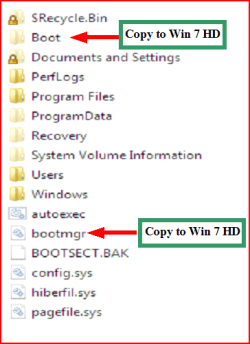
You may need to copy boot files from XP partition to your Win7 partition, before deleting the XP drive.

1) Make sure you have these files on the Windows 7 partition.

Capture3.PNG

2) Mark the Windows 7 partition ACTIVE,
http://www.sevenforums.com/tutorials/71432-partition-mark-active.html?ltr=P

3) Boot to DVD,& open a Command Prompt,
Boot DVD, & Press Shift+F10 (for command prompt)
or
Boot DVD, & http://www.sevenforums.com/tutorials/682-command-prompt-startup.html
(for command prompt)

4) Delete Win XP partition,
http://www.sevenforums.com/tutorials/2668-partition-volume-delete.html?ltr=P

5) Than do a startup repair.
http://www.sevenforums.com/tutorials/681-startup-repair.html?ltr=S
Note: You may need to do startup repair 3 to 4 times.
 

My Computer My Computer

At a glance

ME/XP/Vista/Win7
OS
ME/XP/Vista/Win7
Hell jayg999 Welcome to the Seven Forums!

I'll go a bit further from looking at your present partitioning scheme and advise backing everything up to another drive in order to wipe the present partitions off the XP/7 drive unless you want to continue with it split in two parts. Moving the 7 primary forward to front of the drive would be time consuming and doesn't always guaranty working results when going to expand it to fill in the vacant space where the second partition had been.

You woulc simply reformat the XP primary and simply nuke the present C primary 7 is on for a clean install on the old XP primary but run into problems expanding that to fill the drive after. The best option would be nuking both for the new single large primary to be created afterwards.

With a fresh new primary to work with you wouldn't have to worry about running into corrupted partition tables such as seen lately when the XP/7 RC saw the RC removed and the expanded XP primary failed! You would still want to see everything backed first however before making any drive changes.
 

My Computers My Computers

  • At a glance

    W7 Ultimate x64/W10 Pro x64/W11 Pro Triple Bo...AMD Phenom II X4 975 Deneb 3.6ghz - 965 2nd r...Kingston Hyper X DDR3 1600 1.5v 16gb - Hyper ...MSI HD Radeon 5750 1gb - MSI HD Radeon 6450 o...
    Computer type
    PC/Desktop
    Computer Manufacturer/Model Number
    Custom builds = 2
    OS
    W7 Ultimate x64/W10 Pro x64/W11 Pro Triple Boot - Main PC W7 Remote PC Micro ATX W7 Pro x64/W11 Pro
    CPU
    AMD Phenom II X4 975 Deneb 3.6ghz - 965 2nd remote pc
    Motherboard
    Gigabyte GA-790XTA-UD4-Gigabyte GA-880GM-D2H remote pc
    Memory
    Kingston Hyper X DDR3 1600 1.5v 16gb - Hyper X Fury 8gb 2nd
    Graphics Card(s)
    MSI HD Radeon 5750 1gb - MSI HD Radeon 6450 on mini tower
    Sound Card
    Creative Labs X-Fi Xtreme Audio P - Realtek onooard 2nd case
    Monitor(s) Displays
    ASUS VW199T-P 19" HP 2082a Main-HP 2082a 20" remote pc
    Screen Resolution
    Asus 1440x900 - HP 1600x900
    Hard Drives
    WD Black 1TB HD per OS W7, W10, and pending W11 presently on 500gb OS Drive - Pending Triple 1TB HDs for Spanned Storage/backup volume
    Single 2TB external USB enclosure, single 1TB System 7 Host/Boot drive, Pending 8TB external HD for system image b
    PSU
    Corsair 750TX - primary / Corsair CX600 - second
    Case
    Antec 900-2 - SSD compatible / NZXT Vulcan mini tower
    Cooling
    Zalman CNPS9900A
    Keyboard
    AZIO L70 Backlit Letters Gaming - ONN Cordless/USB
    Mouse
    MSI DS200 Programmable, Logitech Cordless
    Internet Speed
    30mbps upgrade - primary hard wired - mini tower usb WiFi
    Antivirus
    GFI VIPRE Internet Security 2014 on W7 2016 beta on W10,
    Browser
    Cyberfox, WaterFox 64bit FF variants, FireFox x64, Pale Moon
    Other Info
    Accomdata fan cooled usb 2.0 PIDE/Sata II, III external enclosure.
    Sambient usb/eSata PATA/Sata II, III external enclosure.
  • At a glance

    W7 Pro x64/W11 ProAMD Deneb 3.6ghz - 965Kingston Hyper X Fury 8gbMSI HD Radeon 6450 DVI Output
    Computer type
    PC/Desktop
    System Manufacturer/Model Number
    CUSTOM ASSEMBLY
    OS
    W7 Pro x64/W11 Pro
    CPU
    AMD Deneb 3.6ghz - 965
    Motherboard
    Gigabyte GA-880GM-D2H remote pc
    Memory
    Kingston Hyper X Fury 8gb
    Graphics Card(s)
    MSI HD Radeon 6450 DVI Output
    Sound Card
    Realtek onooard Creative or Other separate PENDING
    Monitor(s) Displays
    VIZIO 32" LCD TV Separate LCD Pending
    Screen Resolution
    1600x1080
    Hard Drives
    WD 500GB OS Host/Boot WD Green 1TB Storage/Backup
    PSU
    Corsair 600W - THERMALTAKE 600W spare case
    Case
    NZXT Vulcan mini tower
    Cooling
    Twin 120mm Top Fans - 240mm Side Cover
    Keyboard
    ONN Cordless/USB Logitech Cordless
    Mouse
    ONN USB/Cordless - Logitech Cordless
    Internet Speed
    DSL 5G
    Browser
    MS Edge, FireFox, WaterFox x64, FireFox Nightly
    Other Info
    OS Testing-Remote Access to Main TeamViewer
Thanks for the replies. Thanks Night Hawk, I think I'll keep the partitions how they are after reading that, it looks like the easiest thing to do and I don't fancy a clean install. I'll probably turn the XP drive into a drive for all my media stuff or something.

Thanks for the instructions theog. I don't really know much about this kind of thing so please could you tell me where to copy the boot folder and bootmgr from and to. Thanks
 

My Computer My Computer

At a glance

Windows 7
OS
Windows 7
Hello jayg999, welcome to Seven Forums.


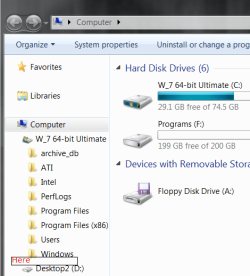
You would need to copy them to the Windows 7 root C: have a look at the snip below and don't put them in a folder/file, just copy them as they are.


click to enlarge
Here.png
 

My Computer My Computer

At a glance

W 7 64-bit UltimateIntel Q9550 Yorkfield8GB Dominator 8500C5DATI : XFX 5870
Computer Manufacturer/Model Number
* BFK Customs *
OS
W 7 64-bit Ultimate
CPU
Intel Q9550 Yorkfield
Motherboard
ASUS P5Q Pro
Memory
8GB Dominator 8500C5D
Graphics Card(s)
ATI : XFX 5870
Sound Card
Realtek HD Audio 7-1
Monitor(s) Displays
1x 47" LCD HDMI & 3x 26" LCD HDMI
Screen Resolution
1920x1080P & 1920x1200
Hard Drives
1x 80GB Intel X25-M G2 SSD : 1x 500GB & 1x 640GB WD Caviar Black(s)
PSU
Corsair 620HX
Case
Cooler Master RC-690
Cooling
Tuniq Tower 120, 2x 140mm and 3x 120mm case fans
Keyboard
Microsoft 500
Mouse
Razer Diamondback 3G
Internet Speed
14 Mb/s
Other Info
1x Koutech 3Gb/s SATA HDD Hot Swap Rack
Or ... you could install EasyBCD from the NeoSmart Technology website (get ver 2.0x, a free download), install it, and use it to transfer the boot folder and files from your XP partition to your Win7 partition.
 

My Computer My Computer

At a glance

Win7 Pro 32-bit, Win8 Pro 32-bitAMD Phenom II X6 1090T4GB ddr3 1300AMD HD 4290 onboard
Computer type
PC/Desktop
Computer Manufacturer/Model Number
Custom
OS
Win7 Pro 32-bit, Win8 Pro 32-bit
CPU
AMD Phenom II X6 1090T
Motherboard
Gigabyte
Memory
4GB ddr3 1300
Graphics Card(s)
AMD HD 4290 onboard
Sound Card
Builtin Realtek HD Audio
Monitor(s) Displays
Samsung 24" widescreen, LG 23" widescreen
Screen Resolution
1920x1200/1920x1080
Hard Drives
Kingston 256GB SSD
Keyboard
Logitech Illuminated Keyboard
Mouse
Logitech M705 wireless mouse
Antivirus
Norton Av 2013
Browser
IE v10
Thanks for the replies. Thanks Night Hawk, I think I'll keep the partitions how they are after reading that, it looks like the easiest thing to do and I don't fancy a clean install. I'll probably turn the XP drive into a drive for all my media stuff or something.

Thanks for the instructions theog. I don't really know much about this kind of thing so please could you tell me where to copy the boot folder and bootmgr from and to. Thanks

Hope this of help.

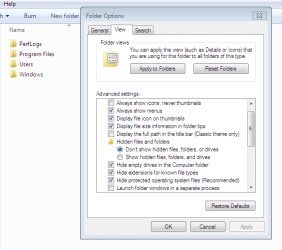
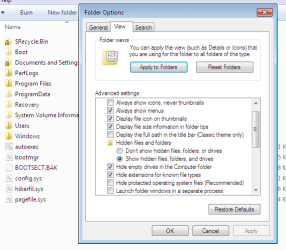
Capture1.PNG Capture2.PNG
 

My Computer My Computer

At a glance

ME/XP/Vista/Win7
OS
ME/XP/Vista/Win7
Thanks for the replies. Thanks Night Hawk, I think I'll keep the partitions how they are after reading that, it looks like the easiest thing to do and I don't fancy a clean install. I'll probably turn the XP drive into a drive for all my media stuff or something.

Thanks for the instructions theog. I don't really know much about this kind of thing so please could you tell me where to copy the boot folder and bootmgr from and to. Thanks

Thanks Ray, the "from" didn't resister with me I only saw the "to" part.


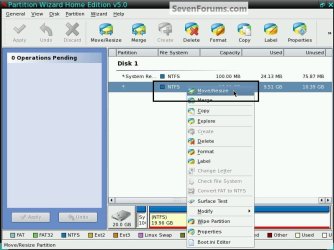
The Free Partition Wizard is very easy to use to resize partitions and very reliable, there's even a bootable version.


PW_Resize.jpgPW_Resize2.png
 

My Computer My Computer

At a glance

W 7 64-bit UltimateIntel Q9550 Yorkfield8GB Dominator 8500C5DATI : XFX 5870
Computer Manufacturer/Model Number
* BFK Customs *
OS
W 7 64-bit Ultimate
CPU
Intel Q9550 Yorkfield
Motherboard
ASUS P5Q Pro
Memory
8GB Dominator 8500C5D
Graphics Card(s)
ATI : XFX 5870
Sound Card
Realtek HD Audio 7-1
Monitor(s) Displays
1x 47" LCD HDMI & 3x 26" LCD HDMI
Screen Resolution
1920x1080P & 1920x1200
Hard Drives
1x 80GB Intel X25-M G2 SSD : 1x 500GB & 1x 640GB WD Caviar Black(s)
PSU
Corsair 620HX
Case
Cooler Master RC-690
Cooling
Tuniq Tower 120, 2x 140mm and 3x 120mm case fans
Keyboard
Microsoft 500
Mouse
Razer Diamondback 3G
Internet Speed
14 Mb/s
Other Info
1x Koutech 3Gb/s SATA HDD Hot Swap Rack
Hi, I've removed Windows XP and have turned the unallocated space back into a partition for my media stuff. Thanks a lot to everyone who helped me. I've been wanting to do this for a while now and it's put a right smile on my face. Thanks again.
 

My Computer My Computer

At a glance

Windows 7
OS
Windows 7
Well done. :thumbsup:

You are welcome, we are here 24/7 to help.
 

My Computer My Computer

At a glance

ME/XP/Vista/Win7
OS
ME/XP/Vista/Win7
Hello again Jay, Glad you found a solution; thanks for the update.
 

My Computer My Computer

At a glance

W 7 64-bit UltimateIntel Q9550 Yorkfield8GB Dominator 8500C5DATI : XFX 5870
Computer Manufacturer/Model Number
* BFK Customs *
OS
W 7 64-bit Ultimate
CPU
Intel Q9550 Yorkfield
Motherboard
ASUS P5Q Pro
Memory
8GB Dominator 8500C5D
Graphics Card(s)
ATI : XFX 5870
Sound Card
Realtek HD Audio 7-1
Monitor(s) Displays
1x 47" LCD HDMI & 3x 26" LCD HDMI
Screen Resolution
1920x1080P & 1920x1200
Hard Drives
1x 80GB Intel X25-M G2 SSD : 1x 500GB & 1x 640GB WD Caviar Black(s)
PSU
Corsair 620HX
Case
Cooler Master RC-690
Cooling
Tuniq Tower 120, 2x 140mm and 3x 120mm case fans
Keyboard
Microsoft 500
Mouse
Razer Diamondback 3G
Internet Speed
14 Mb/s
Other Info
1x Koutech 3Gb/s SATA HDD Hot Swap Rack
Back
Top