

tikinet
New member
- Local time
- 6:43 PM
- Messages
- 7
I know, I know ... this has been asked before, but I just can't seem to get this done. *sigh*
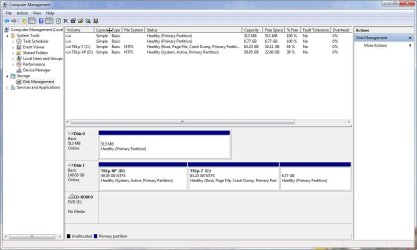
Have XP, then installed Win7 as Dual Boot. Now trying to get rid of XP. All is backed up in case of disaster.
I've tried 3 different procedures in these forums with no luck. Last thing I tried was using EasyBCD to remove the boot option. Now the computer just boots straight into Win7, but I noticed that the XP partition is still active. Made the Win7 partition active, but when I reboot, I just get a blinking cursor on the upper left of the screen and nothing happens. I've tried the Windows 7 installer/ Repair my computer/ and running Startup Repair 3 times and still no luck. just get the blinking cursor on the corner of the screen. I then have to boot from CD with Partition Wizard and reactivate the XP partition and I boot again into Win7.
The only thing I am hesitant to do is delete the XP partition. If I do and then I can't boot, I can't make XP active again to boot and would have to restore everything and would be where I started again.
Just need to get rid of XP safely. Any guidance is appreciated.
Thanks!
Have XP, then installed Win7 as Dual Boot. Now trying to get rid of XP. All is backed up in case of disaster.
I've tried 3 different procedures in these forums with no luck. Last thing I tried was using EasyBCD to remove the boot option. Now the computer just boots straight into Win7, but I noticed that the XP partition is still active. Made the Win7 partition active, but when I reboot, I just get a blinking cursor on the upper left of the screen and nothing happens. I've tried the Windows 7 installer/ Repair my computer/ and running Startup Repair 3 times and still no luck. just get the blinking cursor on the corner of the screen. I then have to boot from CD with Partition Wizard and reactivate the XP partition and I boot again into Win7.
The only thing I am hesitant to do is delete the XP partition. If I do and then I can't boot, I can't make XP active again to boot and would have to restore everything and would be where I started again.
Just need to get rid of XP safely. Any guidance is appreciated.
Thanks!
Attachments
My Computer
At a glance
7
- OS
- 7


