Removing XP Partition

peterN

New member
Member
Local time
7:58 PM
Messages
12
Location
here
I'm sure this has been asked before, but I can't seem to find an answer anywhere. I have a pc that came with XP Home preinstalled, and I installed Windows 7 Ultimate on a new partition. I haven't used XP in months, and I think it's safe to say I have no use for it anymore. Since XP is installed on the first partition on my hard drive, how can I safely delete it?
 

My Computer

Computer Manufacturer/Model Number
Compaq SR1630NX
OS
Windows 7 Ultimate
CPU
AMD Athlon 64 3500+ 2.2GHz
Motherboard
ASUS A8AE-LE
Memory
1.5GB (2x256MB + 2x512MB)
Graphics Card(s)
Integrated graphics
Sound Card
Realtek AC97 audio
Monitor(s) Displays
ATI Radeon Xpress 200 Integrated Graphics with 128MB Shared
Screen Resolution
1024x768
Hard Drives
200GB 7,200rpm ATA Hard Drive
PSU
350 Watts
Keyboard
Microsoft Comfort Curve 2000
Mouse
Logitech Optical Mouse
Internet Speed
7 Mbps/512 Kbps
I want to remove the entire XP partition to free up some extra space, but since it is the boot partition, will I be able to?
 

My Computer

Computer Manufacturer/Model Number
Compaq SR1630NX
OS
Windows 7 Ultimate
CPU
AMD Athlon 64 3500+ 2.2GHz
Motherboard
ASUS A8AE-LE
Memory
1.5GB (2x256MB + 2x512MB)
Graphics Card(s)
Integrated graphics
Sound Card
Realtek AC97 audio
Monitor(s) Displays
ATI Radeon Xpress 200 Integrated Graphics with 128MB Shared
Screen Resolution
1024x768
Hard Drives
200GB 7,200rpm ATA Hard Drive
PSU
350 Watts
Keyboard
Microsoft Comfort Curve 2000
Mouse
Logitech Optical Mouse
Internet Speed
7 Mbps/512 Kbps
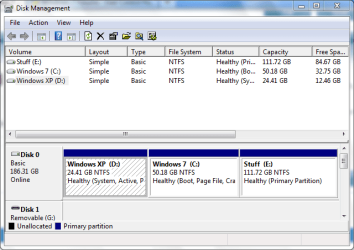
The boot files are probably on the XP partition. If you look at Disk Management and it shows "system" on that partition, or you look for Hidden, System files and see a bootmgr, that is more than likely the System Partition.

If you just delete the XP partition, you system will not boot. It can be repaired, however by making the Win 7 partition active and running a Startup repair 2 or three times.

If you post a snipping tool picture of your Disk Managment window, it might help.
 

My Computer

Computer Manufacturer/Model Number
Homebuilt
OS
Windows 7 x64
CPU
i7-2600K
Motherboard
Asus P8Z77-v Pro
Memory
8 G
Graphics Card(s)
GTX 480
Sound Card
Onboard
Monitor(s) Displays
LG W2753V
Screen Resolution
1920x1080
Hard Drives
Crucial M4 128 G SSD
I want to remove the Windows XP "D" Partition.
 

Attachments

  • disk.PNG
    disk.PNG
    20.3 KB · Views: 51
Last edited:

My Computer

Computer Manufacturer/Model Number
Compaq SR1630NX
OS
Windows 7 Ultimate
CPU
AMD Athlon 64 3500+ 2.2GHz
Motherboard
ASUS A8AE-LE
Memory
1.5GB (2x256MB + 2x512MB)
Graphics Card(s)
Integrated graphics
Sound Card
Realtek AC97 audio
Monitor(s) Displays
ATI Radeon Xpress 200 Integrated Graphics with 128MB Shared
Screen Resolution
1024x768
Hard Drives
200GB 7,200rpm ATA Hard Drive
PSU
350 Watts
Keyboard
Microsoft Comfort Curve 2000
Mouse
Logitech Optical Mouse
Internet Speed
7 Mbps/512 Kbps

My Computer

Computer Manufacturer/Model Number
Gateway GT5692
OS
Windows 7 Ulti. x64
CPU
AMD Phenom 8450 triple-core 2.10 ghz
Memory
4GB
Graphics Card(s)
ATI Radion HD 3200
Monitor(s) Displays
Gateway FPD1775W
Screen Resolution
1280x720
Hard Drives
465.6613 Gibibytes
It looks like that thread hit the nail on the head. I will give it a try, thanks!

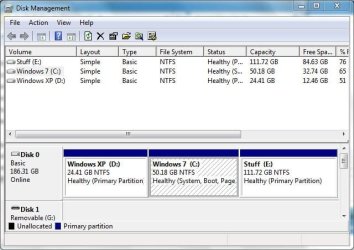
I used Partition Wizard to mark the Windows 7 Partition as active, then did startup repair twice, and everything is working great now. All that's left is to remove the partition. Thanks for your help!
 

Attachments

  • Disk2.JPG
    Disk2.JPG
    51.9 KB · Views: 23
Last edited:

My Computer

Computer Manufacturer/Model Number
Compaq SR1630NX
OS
Windows 7 Ultimate
CPU
AMD Athlon 64 3500+ 2.2GHz
Motherboard
ASUS A8AE-LE
Memory
1.5GB (2x256MB + 2x512MB)
Graphics Card(s)
Integrated graphics
Sound Card
Realtek AC97 audio
Monitor(s) Displays
ATI Radeon Xpress 200 Integrated Graphics with 128MB Shared
Screen Resolution
1024x768
Hard Drives
200GB 7,200rpm ATA Hard Drive
PSU
350 Watts
Keyboard
Microsoft Comfort Curve 2000
Mouse
Logitech Optical Mouse
Internet Speed
7 Mbps/512 Kbps
As resizing operations can fail, back up your files and a Win7 backup image externally.

Use Partition Wizard bootable CD, boot it, select 1 for screen resolution, right click XP partition to Delete, OK.

Now right click Win7 partition, select Resize, grab left border in grey area and drag over the deleted XP space up against the left side of HD, OK.

Next right click Win7 to Modify>Set Active, OK. Apply all steps.

Now boot into Win7 DVD Repair console, click through to recovery tools list and run Startup Repair up to 3 separate times if necessary to repair MBR after resize operation.
 
Everything was successful, I used Partition Wizard to change the active partition and GParted to resize the remaining disk space. Thanks again to everyone who helped.
 

Attachments

  • disk3.PNG
    disk3.PNG
    18 KB · Views: 23

My Computer

Computer Manufacturer/Model Number
Compaq SR1630NX
OS
Windows 7 Ultimate
CPU
AMD Athlon 64 3500+ 2.2GHz
Motherboard
ASUS A8AE-LE
Memory
1.5GB (2x256MB + 2x512MB)
Graphics Card(s)
Integrated graphics
Sound Card
Realtek AC97 audio
Monitor(s) Displays
ATI Radeon Xpress 200 Integrated Graphics with 128MB Shared
Screen Resolution
1024x768
Hard Drives
200GB 7,200rpm ATA Hard Drive
PSU
350 Watts
Keyboard
Microsoft Comfort Curve 2000
Mouse
Logitech Optical Mouse
Internet Speed
7 Mbps/512 Kbps
Thanks for posting your resolution. Thats a nice disk management picture. Two partitions OS and Data very good. Enjoy!
 

My Computer

Computer Manufacturer/Model Number
Gateway GT5692
OS
Windows 7 Ulti. x64
CPU
AMD Phenom 8450 triple-core 2.10 ghz
Memory
4GB
Graphics Card(s)
ATI Radion HD 3200
Monitor(s) Displays
Gateway FPD1775W
Screen Resolution
1280x720
Hard Drives
465.6613 Gibibytes
Back
Top