Rename boot entry?

cclloyd9785

Master of Technology
Power User
Local time
5:25 PM
Messages
662
Location
Boston, MA
Iv tried multiple times with Easybcd to rename a boot entry with no success.

On easy bcd, it shows up as the name I want but It doesnt under the bootloader.

I want to rename it from

Symantic Recovery Environment
Location=W:\boot.wim

to Windows 7 PreInstallation Environment

How do I do that with BCDedit?
 

My Computer

Computer Manufacturer/Model Number
Toshiba Satellite L505D-S9565
OS
Windows 7 Home Premium x64, Mac OS X 10.6.2 x64
CPU
AMD Athlon X2 Dual-Core 2.1 GHz
Motherboard
Toshiba Built-In with Insyde H20 BIOS 1.40
Memory
4 GB DDR2 800 MHz
Graphics Card(s)
ATI Radeon HD Mobility 3100 Graphics 256MB to 1468 MB Shared
Sound Card
Realtek Mobile ALC272 HD Audio
Monitor(s) Displays
15.6" TFT LCD with TruBrite, Samsung 1080p HDTV
Screen Resolution
1366x768, 1920x1080
Hard Drives
❶:Main: Toshiba 250 GB SATA 5400 RPM
PSU
N/A
Case
N/A
Cooling
Built-in/Open window in winter :P
Keyboard
Built-in
Mouse
Build-in Symantics SmartTouch Pad
Internet Speed
55 MB/sec Down, 9 MB/sec Up
Other Info
❷:Backup: Seagate FreeAgent Desk USB 2.0 5400 RPM
❸:Media: Toshiba 640 GB USB 2.0 5400 RPM Portable Edition
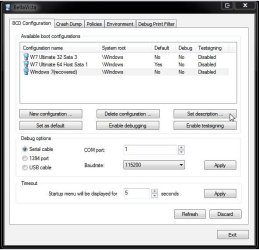
When not having EasyBCD at one point I found another useful smaller BCD editor(now called BellaVista) which sees the "set description" option for renaming the entry you have clicked on to highlight.

With that you can change the default OS, adjust the time the boot options screen is displayed, and even delete entries. You may only have to reinstall EasyBCD however since that is generally reliable plus offers quite a bit more then the free tool seen at System Tools - BellaVista
 

Attachments

  • BellaVista Set Description.jpg
    BellaVista Set Description.jpg
    49.9 KB · Views: 107

My Computers

System One System Two

  • Computer type
    PC/Desktop
    Computer Manufacturer/Model Number
    Custom builds = 2
    OS
    W7 Ultimate x64/W10 Pro x64/W11 Pro Triple Boot - Main PC W7 Remote PC Micro ATX W7 Pro x64/W11 Pro
    CPU
    AMD Phenom II X4 975 Deneb 3.6ghz - 965 2nd remote pc
    Motherboard
    Gigabyte GA-790XTA-UD4-Gigabyte GA-880GM-D2H remote pc
    Memory
    Kingston Hyper X DDR3 1600 1.5v 16gb - Hyper X Fury 8gb 2nd
    Graphics Card(s)
    MSI HD Radeon 5750 1gb - MSI HD Radeon 6450 on mini tower
    Sound Card
    Creative Labs X-Fi Xtreme Audio P - Realtek onooard 2nd case
    Monitor(s) Displays
    ASUS VW199T-P 19" HP 2082a Main-HP 2082a 20" remote pc
    Screen Resolution
    Asus 1440x900 - HP 1600x900
    Hard Drives
    WD Black 1TB HD per OS W7, W10, and pending W11 presently on 500gb OS Drive - Pending Triple 1TB HDs for Spanned Storage/backup volume
    Single 2TB external USB enclosure, single 1TB System 7 Host/Boot drive, Pending 8TB external HD for system image b
    PSU
    Corsair 750TX - primary / Corsair CX600 - second
    Case
    Antec 900-2 - SSD compatible / NZXT Vulcan mini tower
    Cooling
    Zalman CNPS9900A
    Keyboard
    AZIO L70 Backlit Letters Gaming - ONN Cordless/USB
    Mouse
    MSI DS200 Programmable, Logitech Cordless
    Internet Speed
    30mbps upgrade - primary hard wired - mini tower usb WiFi
    Antivirus
    GFI VIPRE Internet Security 2014 on W7 2016 beta on W10,
    Browser
    Cyberfox, WaterFox 64bit FF variants, FireFox x64, Pale Moon
    Other Info
    Accomdata fan cooled usb 2.0 PIDE/Sata II, III external enclosure.
    Sambient usb/eSata PATA/Sata II, III external enclosure.
  • Computer type
    PC/Desktop
    System Manufacturer/Model Number
    CUSTOM ASSEMBLY
    OS
    W7 Pro x64/W11 Pro
    CPU
    AMD Deneb 3.6ghz - 965
    Motherboard
    Gigabyte GA-880GM-D2H remote pc
    Memory
    Kingston Hyper X Fury 8gb
    Graphics Card(s)
    MSI HD Radeon 6450 DVI Output
    Sound Card
    Realtek onooard Creative or Other separate PENDING
    Monitor(s) Displays
    VIZIO 32" LCD TV Separate LCD Pending
    Screen Resolution
    1600x1080
    Hard Drives
    WD 500GB OS Host/Boot WD Green 1TB Storage/Backup
    PSU
    Corsair 600W - THERMALTAKE 600W spare case
    Case
    NZXT Vulcan mini tower
    Cooling
    Twin 120mm Top Fans - 240mm Side Cover
    Keyboard
    ONN Cordless/USB Logitech Cordless
    Mouse
    ONN USB/Cordless - Logitech Cordless
    Internet Speed
    DSL 5G
    Browser
    MS Edge, FireFox, WaterFox x64, FireFox Nightly
    Other Info
    OS Testing-Remote Access to Main TeamViewer
Can you post the results of the BCD and attach them to your reply. This is mine, to give you an idea of what I require.
Code:
Microsoft Windows [Version 6.1.7600]
Copyright (c) 2009 Microsoft Corporation.  All rights reserved.
C:\Windows\system32>bcdedit
Windows Boot Manager
--------------------
identifier              {bootmgr}
device                  partition=D:
description             Windows Boot Manager
locale                  en-US
inherit                 {globalsettings}
default                 {current}
resumeobject            {427d3eb8-4d34-11de-af38-d2fd5eee9bdb}
displayorder            {current}
                        {427d3eb5-4d34-11de-af38-d2fd5eee9bdb}
                        {04e874fd-4cc5-11de-a4b6-9306ff4e7520}
                        {0db4c38a-4bf4-11de-8a82-d3a442d052a3}
                        {427d3ebc-4d34-11de-af38-d2fd5eee9bdb}
toolsdisplayorder       {memdiag}
timeout                 10
Windows Boot Loader
-------------------
identifier              {current}
device                  partition=C:
path                    \Windows\system32\winload.exe
description             W7 Pro 64-bit
locale                  en-US
inherit                 {bootloadersettings}
recoverysequence        {427d3eba-4d34-11de-af38-d2fd5eee9bdb}
recoveryenabled         Yes
osdevice                partition=C:
systemroot              \Windows
resumeobject            {427d3eb8-4d34-11de-af38-d2fd5eee9bdb}
nx                      OptIn
Windows Boot Loader
-------------------
identifier              {427d3eb5-4d34-11de-af38-d2fd5eee9bdb}
device                  partition=F:
path                    \Windows\system32\winload.exe
description             W7 Pro 32-bit
locale                  en-US
inherit                 {bootloadersettings}
recoverysequence        {427d3eb6-4d34-11de-af38-d2fd5eee9bdb}
recoveryenabled         Yes
osdevice                partition=F:
systemroot              \Windows
resumeobject            {427d3eb4-4d34-11de-af38-d2fd5eee9bdb}
nx                      OptIn
Windows Boot Loader
-------------------
identifier              {04e874fd-4cc5-11de-a4b6-9306ff4e7520}
device                  partition=E:
path                    \Windows\system32\winload.exe
description             Windows Vista Ultimate SP2 64-bit
locale                  en-US
inherit                 {bootloadersettings}
osdevice                partition=E:
systemroot              \Windows
resumeobject            {04e874fe-4cc5-11de-a4b6-9306ff4e7520}
nx                      OptIn
Windows Boot Loader
-------------------
identifier              {0db4c38a-4bf4-11de-8a82-d3a442d052a3}
device                  partition=D:
path                    \Windows\system32\winload.exe
description             Windows Vista Home Premium SP2 32-bit
locale                  en-US
inherit                 {bootloadersettings}
osdevice                partition=D:
systemroot              \Windows
resumeobject            {0db4c38b-4bf4-11de-8a82-d3a442d052a3}
nx                      OptIn
Real-mode Boot Sector
---------------------
identifier              {427d3ebc-4d34-11de-af38-d2fd5eee9bdb}
device                  partition=C:
path                    \ubuntu\winboot\wubildr.mbr
description             Ubuntu
C:\Windows\system32>

For example, if I wanted to rename my OS currently in Partition F: I would enter the following.
Code:
bcdedit /set {427d3eb5-4d34-11de-af38-d2fd5eee9bdb} description "NewName"
 

My Computer

Computer type
PC/Desktop
Computer Manufacturer/Model Number
Dwarf Dwf/11/2012 r09/2013
OS
Windows 8.1 Pro RTM x64
CPU
Intel Core-i5-3570K 4-core @ 3.4GHz (Ivy Bridge) (OC 4.4GHz)
Motherboard
ASRock Z77 Extreme4-M
Memory
4 x 4GB DDR3-1600 Corsair Vengeance CMZ8GX3M2A1600C9B (16GB)
Graphics Card(s)
MSI GeForce GTX770 Gaming OC 2GB
Sound Card
Realtek High Definition on board solution (ALC 898)
Monitor(s) Displays
ViewSonic VA1912w Widescreen (VGA)
Screen Resolution
1440x900
Hard Drives
OCZ Agility 3 SSD 120GB SATA III x2 (RAID 0)
Samsung HD501LJ 500GB SATA II x2
Hitachi HDS721010CLA332 1TB SATA II
Iomega 1.5TB Ext USB 2.0
WD 2.0TB Ext USB 3.0
PSU
XFX Pro Series 850W Semi-Modular
Case
Gigabyte IF233
Cooling
1 x 120mm Front Inlet 1 x 120mm Rear Exhaust
Keyboard
Microsoft Comfort Curve Keyboard 3000 (USB)
Mouse
Microsoft Comfort Mouse 3000 for Business (USB)
Internet Speed
NetGear DG834Gv3 ADSL Modem/Router (Ethernet) ~4.0 Mb/s (O2)
Antivirus
Avast! 8.0.1497
Browser
IE 11
Other Info
Optical Drive: HL-DT-ST BD-RE BH10LS30 SATA Bluray
Lexmark S305 Printer/Scanner/Copier (USB)
WEI Score: 8.1/8.1/8.5/8.5/8.25
Asus Eee PC 1011PX Netbook (Windows 7 x86 Starter)
Back
Top