Rename Network Printer?

Stumptown Geek

New member
Local time
7:08 AM
Messages
1
Is it possible to use a user-friendly name for a network printer in Win7?

I've enabled the administrator user account and have logged in using it to try to take care of the printer renaming. In Control Panel > Hardware and Sound > Devices and Printers I see my networked printer as "aficiocl4000 on Rnp8ee1ff" which isn't exactly a user-friendly identification.

When I right click on the printer icon, choose Printer Properties and then the General tab I see "aficiocl4000" at the top. I can highlight that text but not change it.

On the Ports tab this printer is on the Port "\\Rnp8ee1ff\aficiocl4000" - when adding the printer I wasn't given an opportunity to choose a less awkward port name. The port's Description is given as "Client Side Rendering Provider".

I downloaded the printer driver from the printer's manufacturer. The printer's IP address is assigned by DHCP.

I'm using Windows 7 Professional 64-bit.
 

My Computer

OS
Win 7 Professional 64-bit

My Computer

Computer Manufacturer/Model Number
Dell XPS 15 L502x
OS
Windows 7 Ultimate x64 SP1
CPU
Core i7-2670QM
Memory
8GB DDR3 PC3-10600
Graphics Card(s)
Intel HD Graphics 3000 + GeForce GT 540M
Screen Resolution
1920x1080
Hard Drives
1TB 5400RPM Seagate
Is it possible to use a user-friendly name for a network printer in Win7?

I've enabled the administrator user account and have logged in using it to try to take care of the printer renaming. In Control Panel > Hardware and Sound > Devices and Printers I see my networked printer as "aficiocl4000 on Rnp8ee1ff" which isn't exactly a user-friendly identification.

When I right click on the printer icon, choose Printer Properties and then the General tab I see "aficiocl4000" at the top. I can highlight that text but not change it.

On the Ports tab this printer is on the Port "\\Rnp8ee1ff\aficiocl4000" - when adding the printer I wasn't given an opportunity to choose a less awkward port name. The port's Description is given as "Client Side Rendering Provider".

I downloaded the printer driver from the printer's manufacturer. The printer's IP address is assigned by DHCP.

I'm using Windows 7 Professional 64-bit.

If you have installed the software that comes with it, you should be able to loggin at IP page, Config Page and parameters to rename it.
 

My Computer

Computer type
PC/Desktop
Computer Manufacturer/Model Number
Custom Build
OS
Windows 7 Professional SP1 - x64 [Non-UEFI Boot]
CPU
Ivy Bridge Core i5 3570K (Delidded)
Motherboard
Asus P8Z77-V LE PLUS
Memory
G.Skill "Ares" DDR3 PC3-12800 - 1600MHz (16Gb)
Graphics Card(s)
Asus Dual-RX480-O4G
Sound Card
Creative Sound Blaster Z w/5.1 sound system
Monitor(s) Displays
Asus IPS 23"
Screen Resolution
16/9
Hard Drives
Internal:
500Go Sata 6Gb/s (x2)
500Go Sata 3Gb/s (x2)
SSD 60Go Sata 6Gb/s
PSU
In Win C 900W Series 80+ Platinum
Case
Thermaltake Chaser A71
Cooling
Custom Water Cooling Loop
Keyboard
Cooler Master QuickFire XTi
Mouse
Razer Imperator 2012 (4G)
Antivirus
MSE
Browser
IE 11.0.xxx Rtm
Other Info
"Raid0" with Intel Smart Response Technology (HDD/SSD)
To rename a printer, the common method is the "Printer Properties" not the bottom right-click link in Windows 7 "Properties"

Windows 7 has separated the properties of previous Windows versions into multiple sections.
 

My Computer

OS
Windows 98, Windows XP, Windows 7 32bit, Windows 7 64bit
Solved

When you get to "View devices and printers" and you select the printer you want to change the name of, you must then select printer properties (usually the 4th one down) not properties which is at the bottom. At this point you can only highlight text and not change it. You have to select Change Properties at the lower left corner to make any changes to the name. So if anyone else searches this their search can now end here. Hope I helped someone.

Is it possible to use a user-friendly name for a network printer in Win7?

I've enabled the administrator user account and have logged in using it to try to take care of the printer renaming. In Control Panel > Hardware and Sound > Devices and Printers I see my networked printer as "aficiocl4000 on Rnp8ee1ff" which isn't exactly a user-friendly identification.

When I right click on the printer icon, choose Printer Properties and then the General tab I see "aficiocl4000" at the top. I can highlight that text but not change it.

On the Ports tab this printer is on the Port "\\Rnp8ee1ff\aficiocl4000" - when adding the printer I wasn't given an opportunity to choose a less awkward port name. The port's Description is given as "Client Side Rendering Provider".

I downloaded the printer driver from the printer's manufacturer. The printer's IP address is assigned by DHCP.

I'm using Windows 7 Professional 64-bit.
 

My Computer

Computer Manufacturer/Model Number
Custom Built
OS
Windows 7 professional 64
CPU
Intel Core i5-750 Lynnfield 2.66GHz
Motherboard
ASRock P55 Extreme
Memory
G.SKILL 4GB Dual Channel Kit F3-12800CL9D-4GBNQ
Graphics Card(s)
2 X GeForce 9800 GTX's in SLI
Sound Card
HT | OMEGA CLARO Plus+ 7.1
Monitor(s) Displays
SAMSUNG 2494HM Glossy Black 24" 5ms HDMI
Hard Drives
2 X SAMSUNG Spinpoint F3 HD502HJ 500GB RAID 0
PSU
ZALMAN ZM750-HP 750W Continuous @ 45°C
Case
LIAN LI Lancool PC-K62 Black
Cooling
ARCTIC COOLING Freezer 7 Pro Rev.2 92mm Fluid Dynamic
***I highly discourage this unless your are completely comfortable with doing something that may cause permanent irreversible undesired consequences if done improperly***
Alright, now that the standard "Do this at your own risk, it is not my fault" disclaimer is out of the way...
I was having the same problem, and thought that the answer may lie in the registry. I did some browsing and discovered the solution. Navigate to "HKEY_LOCAL_MACHINE\SOFTWARE\Microsoft\Windows NT\CurrentVersion\Print\Printers\<name of your device>". Click on that folder and then look for value name "Name" on the right. (EDIT: The current value should be the network path of your device. Don't worry, it will not alter the functionality.) Right click on that value and click "Modify". In the new window change the value data to whatever you want the name to be. Restart the computer and voila!

Hope this helps someone.
 
Last edited:

My Computer

OS
Windows 7 Home Premium x64
to rglvoer1168
Your suggestion does not work.
 

My Computer

Computer Manufacturer/Model Number
Evesham (now obsolete)
OS
Windows 7 Professional 64 bit
CPU
Intel Quad core
Motherboard
Gigabyte EG41MF-US2H
Memory
4GB
Graphics Card(s)
nVidia 9500GT
Sound Card
Creative
Monitor(s) Displays
NEC Spectraview 2090 and NEC Multisync P221W
Hard Drives
2 x 320GB Seagate internal;
1 x 500GB Seagate external;
1 x 1 TB Western Digital external;
1 x 3 TB Western Digital external;
Netgear NAS - 2 x 750GB RAID 1
Cooling
fans only
Thanks

thanks, perfect. 2 propreties items on 1 dropdown. confusing.
 

My Computer

OS
windows 7 64bit
Fabulous

Thanks very much - Microsoft's answer pointed to the Properties at the bottom

When you get to "View devices and printers" and you select the printer you want to change the name of, you must then select printer properties (usually the 4th one down) not properties which is at the bottom. At this point you can only highlight text and not change it. You have to select Change Properties at the lower left corner to make any changes to the name. So if anyone else searches this their search can now end here. Hope I helped someone.

Is it possible to use a user-friendly name for a network printer in Win7?

I've enabled the administrator user account and have logged in using it to try to take care of the printer renaming. In Control Panel > Hardware and Sound > Devices and Printers I see my networked printer as "aficiocl4000 on Rnp8ee1ff" which isn't exactly a user-friendly identification.

When I right click on the printer icon, choose Printer Properties and then the General tab I see "aficiocl4000" at the top. I can highlight that text but not change it.

On the Ports tab this printer is on the Port "\\Rnp8ee1ff\aficiocl4000" - when adding the printer I wasn't given an opportunity to choose a less awkward port name. The port's Description is given as "Client Side Rendering Provider".

I downloaded the printer driver from the printer's manufacturer. The printer's IP address is assigned by DHCP.

I'm using Windows 7 Professional 64-bit.
 

My Computer

Computer Manufacturer/Model Number
Lenovo T420
OS
Windows 7 Professional 64 bit
CPU
Intel(R) Core(TM) i7-2640M CPU @ 2.80GHz, 2801 Mhz
Memory
4 GB
Graphics Card(s)
NVIDIA Optimus Graphics
Sound Card
Conexant 20672 SnartAudio HD
Monitor(s) Displays
ThinkPad Display
Screen Resolution
1600x900
Hard Drives
Hitachi HTS 448GB
Cooling
Fan
Keyboard
UK
Mouse
Touchpad and Trackpoint
Internet Speed
144 Mbps
Hi,

old thead but i solved this issue usung creating a LocalPort \\hostname\printershare and add a printer
using this new port. than you can use a user friendly Name.

regards
 

My Computer

Computer type
PC/Desktop
OS
Win7 Pro 32bit
......I was having the same problem, and thought that the answer may lie in the registry. I did some browsing and discovered the solution. Navigate to "HKEY_LOCAL_MACHINE\SOFTWARE\Microsoft\Windows NT\CurrentVersion\Print\Printers\<name of your device>". Click on that folder and then look for value name "Name" on the right. (EDIT: The current value should be the network path of your device. Don't worry, it will not alter the functionality.) Right click on that value and click "Modify". In the new window change the value data to whatever you want the name to be. Restart the computer and voila! Hope this helps someone.

Okay thanks. I was looking for a solution and without trying any other first, this this. Worked for me.

So I have a follow up or related question for anyone who might know the answer.

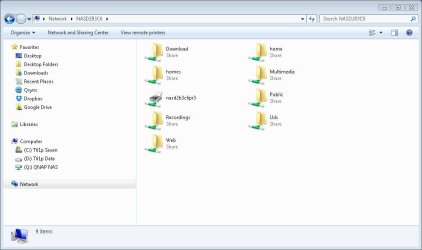
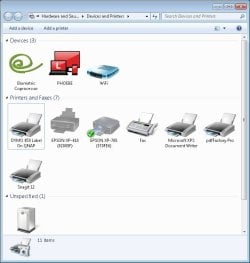
I have just successfully connected a DYMO 450 Duo Labelwriter as an external USB device to my QNAP NAS. This is preferable to a direct connection as it leaves my notebook as 'unwired' as possible. This printer however has two output or 'trays' one a label and the other a tape printer and so uses two drivers. When connected directly to shows in Windows as two separate printers.

Conversely when connected to the NAS it shows the web GUI as a single printer as it does also on the Windows PC under Network.

So far I suspect I could juggle between 'tape' and 'label' by changing the device driver both of which are not in my Windows system folder. This however is obviously not a very elegant solution.

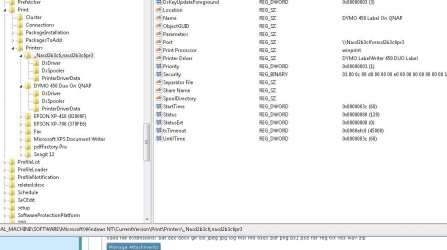
SO based on the registry solution above as because the key shows the selected driver, I wondered if it would be possible to copy the key but with a different name, reboot and then change the driver and so have both printer drivers loaded at the same time.

Any ideas?
 

Attachments

  • dymo in windows.JPG
    dymo in windows.JPG
    47.7 KB · Views: 0
  • dymo on qnap.JPG
    dymo on qnap.JPG
    63.1 KB · Views: 0
  • dymo in printers.JPG
    dymo in printers.JPG
    52.2 KB · Views: 0
  • dymo in regedit.JPG
    dymo in regedit.JPG
    73.7 KB · Views: 0

My Computer

Computer type
Laptop
Computer Manufacturer/Model Number
Lenovo ThinkPas T61p
OS
Windows XP SP3
Back
Top