
Renaming folders

kenC

New member
Pro User
Local time
10:43 PM
Messages
184
Started to have this problem a few days ago.

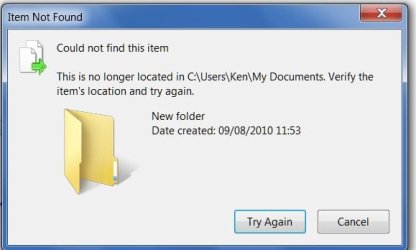
I make a New Folder, the folder appears highlighted, I rename it and get this message (see image) I click on Try Again and the folder renames.

I also get a similar problem dragging a file into a folder. This time the message says something like 'This file no longer exists' I click on 'try again' and the file moves into the folder.
 

Attachments
  • 2010-08-09_115421.jpg
    2010-08-09_115421.jpg
    20.3 KB · Views: 17

My Computer

Computer Manufacturer/Model Number
Acer 7738G
OS
Windows 7 Home Premium X64 SP1
CPU
Intel Core2 duo T6600
Memory
4gb
Graphics Card(s)
Nvidia GeForce GT 1gb
Hard Drives
2 X 500 gb

My Computer

Computer type
PC/Desktop
Computer Manufacturer/Model Number
Dell XPS 420
OS
Windows 10, Home Clean Install
CPU
Intel Core2 processsor Q8200(2.33Ghz 1333FSB) Quad Core Tech
Motherboard
Dell
Memory
6 gb
Graphics Card(s)
ATI Radeon 256MB HD3650
Sound Card
Intergrated 7.1 Channel Audio
Monitor(s) Displays
Dell SP2009W 20"
Hard Drives
640 GB Serial ATA Hard drive
Cooling
Fan
Keyboard
Dell USB Keyboard
Mouse
Dell Premium Optical USB
Internet Speed
DSL 2.85

My Computer

Computer Manufacturer/Model Number
Acer 7738G
OS
Windows 7 Home Premium X64 SP1
CPU
Intel Core2 duo T6600
Memory
4gb
Graphics Card(s)
Nvidia GeForce GT 1gb
Hard Drives
2 X 500 gb
.

No-one have any ideas ??
 

My Computer

Computer Manufacturer/Model Number
Acer 7738G
OS
Windows 7 Home Premium X64 SP1
CPU
Intel Core2 duo T6600
Memory
4gb
Graphics Card(s)
Nvidia GeForce GT 1gb
Hard Drives
2 X 500 gb
It might be useful to get a process monitor log of you attempting to modify the folder the first time, and then clicking try again and it working the second time. At least we could see the callstack and the return result on the file operation, that might help.
 

My Computer

Computer type
PC/Desktop
Computer Manufacturer/Model Number
Custom
OS
Windows 10 Pro x64
CPU
Intel Core i7 4790K @ 4.5GHz
Motherboard
Asus Maximus Hero VII
Memory
32GB DDR3
Graphics Card(s)
Nvidia GeForce GTX970
Sound Card
Realtek HD Audio
Screen Resolution
1920x1200
Hard Drives
1x Samsung 250GB SSD
4x WD RE 2TB (RAIDZ)
PSU
Corsair AX760i
Case
Fractal Design Define R4
Cooling
Noctua NH-D15

My Computer

Computer Manufacturer/Model Number
Acer 7738G
OS
Windows 7 Home Premium X64 SP1
CPU
Intel Core2 duo T6600
Memory
4gb
Graphics Card(s)
Nvidia GeForce GT 1gb
Hard Drives
2 X 500 gb
All you have to do is download/extract procmon, run it (it starts logging immediately), and reproduce the issue. Then, go back to procmon, press F12 (to stop the logging), and do a File > Save (All events, Native PML Format). That will save everything as a .pml file that you can compress and upload here or attach to a file sharing site, depending on the size of the zipped file.
 

My Computer

Computer type
PC/Desktop
Computer Manufacturer/Model Number
Custom
OS
Windows 10 Pro x64
CPU
Intel Core i7 4790K @ 4.5GHz
Motherboard
Asus Maximus Hero VII
Memory
32GB DDR3
Graphics Card(s)
Nvidia GeForce GTX970
Sound Card
Realtek HD Audio
Screen Resolution
1920x1200
Hard Drives
1x Samsung 250GB SSD
4x WD RE 2TB (RAIDZ)
PSU
Corsair AX760i
Case
Fractal Design Define R4
Cooling
Noctua NH-D15
When you say 'reproduce the issue' - where do I start and stop? From clicking on 'New Folder' to the point where the folder is actually made ?

It's one in the morning here now - I'll look in again when I've had a few hours sleep.
 

My Computer

Computer Manufacturer/Model Number
Acer 7738G
OS
Windows 7 Home Premium X64 SP1
CPU
Intel Core2 duo T6600
Memory
4gb
Graphics Card(s)
Nvidia GeForce GT 1gb
Hard Drives
2 X 500 gb
sometimes i have the same problem when renaming, just click cancel then refresh the folder and you will see the renamed folder or file, i know its not a solution, but tell me if that helps? i think when i reboot the computer it goes back to normal, and i dont know what it is that sets it off, because it only happens sometimes.
 

My Computer

Computer Manufacturer/Model Number
HP dv6519tx
OS
Windows 7 Ultimate x64
CPU
1.80 GHz Intel Core 2 Duo processor T7100
Memory
3 gig ddr2
Graphics Card(s)
NVIDIA GeForce 8400M GS
Sound Card
Realtek High Definition Audio
Monitor(s) Displays
15.4” WXGA High Definition BrightView Widescreen
Screen Resolution
1280 x 800
Hard Drives
Hitachi 320 GB (5400 rpm)
PSU
90 W AC Power Adapter
Cooling
Kitchen plate under the lappy
Keyboard
101 key compatible
Mouse
Touch Pad with On/Off button and dedicated vertical Scroll
Internet Speed
Three Wireless internet prepaid using E160G USB dongle
Ken,

Run SFC /Scannow from a command prompt in Safe Mode.
 

My Computer

Computer Manufacturer/Model Number
Toshiba Satellite S875D-S7239 laptop
OS
MS Windows 7 Ultimate SP1 64-bit
CPU
AMD A10-4600M
Motherboard
AMD Pumori (Socket FT1)
Memory
6.00 GB Dual-Channel DDR3 @ 798MHz (11-11-12-28)
Graphics Card(s)
AMD Radeon HD 7660G
Sound Card
High Definition Audio Device
Monitor(s) Displays
Generic PnP Monitor (1600x900@60Hz)
Screen Resolution
1600x900@60Hz
Hard Drives
SSD 119GB Corsair CSSD-V128GB2 ATA Device
Keyboard
Standard PS/2 Keyboard
Mouse
HP Wireless Optical Mobile Mouse Model FHA-3410
Internet Speed
What the local pub, local coffee shop offers.
Other Info
Optical Drive:MATSHITA BD-CMB UJ160B ATA Device


Also have an Asus ha1002xp netbook with Win 7 Ultimate installed.
When you say 'reproduce the issue' - where do I start and stop? From clicking on 'New Folder' to the point where the folder is actually made ?

It's one in the morning here now - I'll look in again when I've had a few hours sleep.

Read your original post - do that while process monitor is running, the whole thing.
 

My Computer

Computer type
PC/Desktop
Computer Manufacturer/Model Number
Custom
OS
Windows 10 Pro x64
CPU
Intel Core i7 4790K @ 4.5GHz
Motherboard
Asus Maximus Hero VII
Memory
32GB DDR3
Graphics Card(s)
Nvidia GeForce GTX970
Sound Card
Realtek HD Audio
Screen Resolution
1920x1200
Hard Drives
1x Samsung 250GB SSD
4x WD RE 2TB (RAIDZ)
PSU
Corsair AX760i
Case
Fractal Design Define R4
Cooling
Noctua NH-D15
Well, this problem went away as suddenly as it arrived. I've hung back from posting in case it came back - but so far, so good.

pusspa: Your solution didn't work for me.

karlsnooks: Tried scannow in safe mode, made no difference, but it did at least run.

Thanks to everyone for their help.
 

My Computer

Computer Manufacturer/Model Number
Acer 7738G
OS
Windows 7 Home Premium X64 SP1
CPU
Intel Core2 duo T6600
Memory
4gb
Graphics Card(s)
Nvidia GeForce GT 1gb
Hard Drives
2 X 500 gb
Back
Top