
You are using an out of date browser. It may not display this or other websites correctly.
You should upgrade or use an alternative browser.
You should upgrade or use an alternative browser.
Renaming Music Folder
- Thread starter Falcon57
- Start date

I don't think you can. As far as I know, if you rename or delete it, it will be recreated.
My Computer
- Computer type
- PC/Desktop
- Computer Manufacturer/Model Number
- Lenovo IdeaCenter 450
- OS
- Windows 10 Pro X64
- CPU
- Intel Quad Core i7-4770 @ 3.4Ghz
- Memory
- 16.0GB PC3-12800 DDR3 SDRAM 1600 MHz
- Graphics Card(s)
- Intel Integrated HD Graphics
- Sound Card
- Realtek HD Audio
- Monitor(s) Displays
- HP 22" LCD
- Screen Resolution
- 1680 x 1050
- Hard Drives
- 250GB Samsung EVO SATA-3 SSD
2TB Seagate ST2000DM001 SATA-2
1.5TB Seagate ST3150041AS SATA
- Keyboard
- Dell USB
- Mouse
- Lenovo USB
- Internet Speed
- Cable via Road Runner 3MB Upload, 30MB Download
- Antivirus
- Windows Defender, MBAM Pro, MBAE
- Browser
- Seamonkey
- Other Info
- UEFI/GPT
PLDS DVD-RW DH16AERSH

What are you trying to accomplish with the rename ?
My Computer
- Computer Manufacturer/Model Number
- HP, Dell, Gateway, Toshiba - 4 laptops and 2 desktops
- OS
- Vista, Windows7, Mint Mate, Zorin, Windows 8
- CPU
- from 1.6GHz Duo to i7
- Monitor(s) Displays
- 2x HP w2207
- Hard Drives
- 5x HDD, 7x SSD, 12x Externals
- Keyboard
- with trackball - no mices
- Mouse
- Trackball mice
- Internet Speed
- DSL 6000

Rename music folder
What do you mean by music folder?
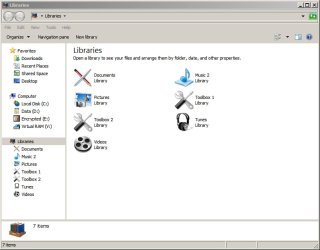
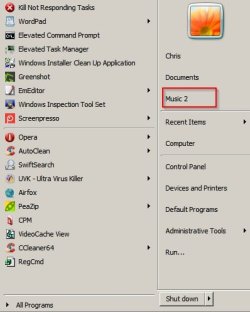
If you mean the music library and the entry labelled "Music" in the right click Start Menu you can just hold down "Shift + Right Click" to rename it.
Personally I use Library Manager software but I'm not exactly sure what you want to do.
See screenshot -Music remaned to Music 2
And here's the item you need to "Shift + Right Click"
What do you mean by music folder?
If you mean the music library and the entry labelled "Music" in the right click Start Menu you can just hold down "Shift + Right Click" to rename it.
Personally I use Library Manager software but I'm not exactly sure what you want to do.
See screenshot -Music remaned to Music 2
And here's the item you need to "Shift + Right Click"
My Computer
- Computer type
- Laptop
- Computer Manufacturer/Model Number
- ASUS
- OS
- Microsoft Windows 7 Home Premium 64-bit 7601 Multiprocessor Free Service Pack 1
- CPU
- AMD C-60 APU with Radeon(tm) HD Graphics
- Motherboard
- ASUSTeK COMPUTER INC. X501U
- Memory
- 4.00 GB
- Graphics Card(s)
- AMD Radeon HD 6290 Graphics
- Sound Card
- (1) AMD High Definition Audio Device (2) Realtek High Defi
- Screen Resolution
- 1366 x 768 x 32 bits (4294967296 colors) @ 60 Hz
- Hard Drives
- Hitachi HTS545050A7E380 SATA Disk Device
- Antivirus
- Comodo CIS & FW, SecureAplus App Whitelisting, Threatfire
- Browser
- Cyberfox 64bit, Opera 64bit, Airfox
- Other Info
- Spy-The-Spy, HitmanPro.Alert, Norton Connect Safe, MJRegWatcher, BitDefender TrafficLight, Voodoo Shield, Zemana AntiMalware
I believe he means C:\Users\userid\Music, not the Music under Libraries.
My Computer
- Computer type
- PC/Desktop
- Computer Manufacturer/Model Number
- Lenovo IdeaCenter 450
- OS
- Windows 10 Pro X64
- CPU
- Intel Quad Core i7-4770 @ 3.4Ghz
- Memory
- 16.0GB PC3-12800 DDR3 SDRAM 1600 MHz
- Graphics Card(s)
- Intel Integrated HD Graphics
- Sound Card
- Realtek HD Audio
- Monitor(s) Displays
- HP 22" LCD
- Screen Resolution
- 1680 x 1050
- Hard Drives
- 250GB Samsung EVO SATA-3 SSD
2TB Seagate ST2000DM001 SATA-2
1.5TB Seagate ST3150041AS SATA
- Keyboard
- Dell USB
- Mouse
- Lenovo USB
- Internet Speed
- Cable via Road Runner 3MB Upload, 30MB Download
- Antivirus
- Windows Defender, MBAM Pro, MBAE
- Browser
- Seamonkey
- Other Info
- UEFI/GPT
PLDS DVD-RW DH16AERSH

Pyprohly
New member
Hi Falcon,
Are you referring to the C:\Users\%Username%\Music folder? If so, you can change the display name of this folder by following these three simple steps:
1) Open the hidden desktop.ini file that resides in the Music folder by entering C:\Users\%Username%\Music\desktop.ini into the Explorer address bar.
2) In the text file that appears, there should be a key named LocalizedResourceName. Change it's value to whatever you wish. For example, LocalizedResourceName=My New Folder Name!
3) Logoff then log back on (to allow Windows to read the updated desktop.ini file). (Optionally you can just kill and restart the Explorer process through the command line.)
Are you referring to the C:\Users\%Username%\Music folder? If so, you can change the display name of this folder by following these three simple steps:
1) Open the hidden desktop.ini file that resides in the Music folder by entering C:\Users\%Username%\Music\desktop.ini into the Explorer address bar.
2) In the text file that appears, there should be a key named LocalizedResourceName. Change it's value to whatever you wish. For example, LocalizedResourceName=My New Folder Name!
3) Logoff then log back on (to allow Windows to read the updated desktop.ini file). (Optionally you can just kill and restart the Explorer process through the command line.)
My Computer
- Computer type
- PC/Desktop
- OS
- Windows 10, Windows 8.1 Pro, Windows 7 Professional, OS X El Capitan
Actually it is.I believe he means C:\Users\userid\Music, not the Music under Libraries.
My Computer
- OS
- Windows 7 64 bit
RobRudolph
New member
- Local time
- 1:58 PM
- Messages
- 1
Should I open it in Notepad?1) Open the hidden desktop.ini file that resides in the Music folder by entering C:\Users\%Username%\Music\desktop.ini into the Explorer address bar.
My Computer
- Computer type
- PC/Desktop
- OS
- Win 7 Enterprise x64
Pyprohly
New member
Yes. Notepad or absolutely any text editor you favour.Should I open it in Notepad?
Falcon could you clarify your last two posts?
My Computer
- Computer type
- PC/Desktop
- OS
- Windows 10, Windows 8.1 Pro, Windows 7 Professional, OS X El Capitan
Yes. Notepad or absolutely any text editor you favour.Should I open it in Notepad?
Falcon could you clarify your last two posts?
Sorry for any confusion. I have the folder "Music" as the default name in my Libraries. I just want to change the name to something else.
My Computer
- OS
- Windows 7 64 bit
Yes. Notepad or absolutely any text editor you favour.Should I open it in Notepad?
Falcon could you clarify your last two posts?
I don't know if my reply went through. Sorry for any confusion. I have a folder in my Libraries that has the default name of "Music." I simply want to rename it something else.
My Computer
- OS
- Windows 7 64 bit
Right click on it, select Rename, change it to whatever you want. I just tried in on Win 7 and that works.
My Computer
- Computer type
- PC/Desktop
- Computer Manufacturer/Model Number
- Lenovo IdeaCenter 450
- OS
- Windows 10 Pro X64
- CPU
- Intel Quad Core i7-4770 @ 3.4Ghz
- Memory
- 16.0GB PC3-12800 DDR3 SDRAM 1600 MHz
- Graphics Card(s)
- Intel Integrated HD Graphics
- Sound Card
- Realtek HD Audio
- Monitor(s) Displays
- HP 22" LCD
- Screen Resolution
- 1680 x 1050
- Hard Drives
- 250GB Samsung EVO SATA-3 SSD
2TB Seagate ST2000DM001 SATA-2
1.5TB Seagate ST3150041AS SATA
- Keyboard
- Dell USB
- Mouse
- Lenovo USB
- Internet Speed
- Cable via Road Runner 3MB Upload, 30MB Download
- Antivirus
- Windows Defender, MBAM Pro, MBAE
- Browser
- Seamonkey
- Other Info
- UEFI/GPT
PLDS DVD-RW DH16AERSH
Right click on it, select Rename, change it to whatever you want. I just tried in on Win 7 and that works.
I tried that and it keeps going back to "Music".
My Computer
- OS
- Windows 7 64 bit
Try booting to Safe Mode and renaming it, see if that works. Maybe some program you have running is maintaining the names of some folders. Norton and McAfee may do this, not sure.
Press F8 as soon as the manufacturers logo appears and keep tapping every second until you get the Advanced Boot Options menu. Select Safe Mode. Try renaming.
Press F8 as soon as the manufacturers logo appears and keep tapping every second until you get the Advanced Boot Options menu. Select Safe Mode. Try renaming.
My Computer
- Computer type
- PC/Desktop
- Computer Manufacturer/Model Number
- Lenovo IdeaCenter 450
- OS
- Windows 10 Pro X64
- CPU
- Intel Quad Core i7-4770 @ 3.4Ghz
- Memory
- 16.0GB PC3-12800 DDR3 SDRAM 1600 MHz
- Graphics Card(s)
- Intel Integrated HD Graphics
- Sound Card
- Realtek HD Audio
- Monitor(s) Displays
- HP 22" LCD
- Screen Resolution
- 1680 x 1050
- Hard Drives
- 250GB Samsung EVO SATA-3 SSD
2TB Seagate ST2000DM001 SATA-2
1.5TB Seagate ST3150041AS SATA
- Keyboard
- Dell USB
- Mouse
- Lenovo USB
- Internet Speed
- Cable via Road Runner 3MB Upload, 30MB Download
- Antivirus
- Windows Defender, MBAM Pro, MBAE
- Browser
- Seamonkey
- Other Info
- UEFI/GPT
PLDS DVD-RW DH16AERSH
Try booting to Safe Mode and renaming it, see if that works. Maybe some program you have running is maintaining the names of some folders. Norton and McAfee may do this, not sure.
Press F8 as soon as the manufacturers logo appears and keep tapping every second until you get the Advanced Boot Options menu. Select Safe Mode. Try renaming.
I tried Safe Mode and it still went back to the default name.
My Computer
- OS
- Windows 7 64 bit

Why do you want to change it ?
Leave it alone.
Leave it alone.
My Computer
- Computer type
- PC/Desktop
- Computer Manufacturer/Model Number
- Skylake Special #666
- OS
- Windows 10 Pro x64
- CPU
- Intel Core i7 6700K
- Motherboard
- Asus Sabertooth Z170 Mark 1
- Memory
- GSkill TridentZ RGB 16GB 3600 16-16-16-36
- Graphics Card(s)
- EVGA GTX 980 Ti SC x2
- Sound Card
- Realtek High Definition
- Monitor(s) Displays
- AOC G2460PG
- Screen Resolution
- 1920 x 1080 144Hz
- Hard Drives
- Samsung 860 Pro 256GB, Seagate Barracuda 4TB x2
- PSU
- EVGA 1000 P2, EVGA White Custom Braided Cables
- Case
- Corsair Vengeance C70 Gunmetal Black
- Cooling
- Corsair H100i v2, Corsair ML120 x2, Thermal Grizzly Kryonaut
- Keyboard
- Logitech G910 Orion Spectrum
- Mouse
- Logitech G700s
- Internet Speed
- Verizon Fios Quantum Gateway 75/75
- Antivirus
- Windows Defender, Malwarebytes Free 3.8.3
- Browser
- Chrome
- Other Info
- Corsair SP120 x4, LG Blu-ray Drive, Durabrand HT-395 100 Watt Dolby Digital Amp, Corsair H2100 Wireless 7.1 Headset
If he wants to change it why not? It should be doable and in fact works for me as I said earlier.
My Computer
- Computer type
- PC/Desktop
- Computer Manufacturer/Model Number
- Lenovo IdeaCenter 450
- OS
- Windows 10 Pro X64
- CPU
- Intel Quad Core i7-4770 @ 3.4Ghz
- Memory
- 16.0GB PC3-12800 DDR3 SDRAM 1600 MHz
- Graphics Card(s)
- Intel Integrated HD Graphics
- Sound Card
- Realtek HD Audio
- Monitor(s) Displays
- HP 22" LCD
- Screen Resolution
- 1680 x 1050
- Hard Drives
- 250GB Samsung EVO SATA-3 SSD
2TB Seagate ST2000DM001 SATA-2
1.5TB Seagate ST3150041AS SATA
- Keyboard
- Dell USB
- Mouse
- Lenovo USB
- Internet Speed
- Cable via Road Runner 3MB Upload, 30MB Download
- Antivirus
- Windows Defender, MBAM Pro, MBAE
- Browser
- Seamonkey
- Other Info
- UEFI/GPT
PLDS DVD-RW DH16AERSH