reorganizing hdd and mbr

set321go

New member
Local time
10:30 AM
Messages
9
hello

i purchased an upgrade version of 7 and i did a clean install on a new ssd i got for it. I have the backup cd my question is

can i reorganize my bios boot order so that the window 7 disk is primary disk?

can i delete all the old vista files of the old disk?
 

My Computer My Computer

OS
7
CPU
e6600
Motherboard
p5n32e-sli
Memory
2Gb PC2-8500
Graphics Card(s)
8800gts
Sound Card
audigy
Monitor(s) Displays
2xiiyama prolite
Welcome to Seven Forums.

Check in Disk Manager that the new SSD is marked as Active.
If it is marked active then you can.

First you need to remove Vista from the MBR.
This Seven Forums tutorial will show you how: How to Delete a Listed Operating System at Boot in Windows 7.

After this is completed you can delete all the old Vista files.
 

My Computer My Computer

Computer type
PC/Desktop
Computer Manufacturer/Model Number
76~2.0
OS
Windows 7 Ult x64 - SP1/ Windows 8 Pro x64
CPU
Intel Core i5-3570K 4.6GHz
Motherboard
Gigabyte GA-Z77X UD3H, f18
Memory
8GB (2X4GB) DDR3 1600 Corsair Vengeance CL8 1.5v
Graphics Card(s)
Sapphire HD 7770 Vapor-X OC 1GB DDR5
Sound Card
Onboard VIA VT2021
Monitor(s) Displays
22" LCD Dell
Screen Resolution
1680x1050
Hard Drives
Samsung 840Pro 128GB SSD,
Seagate Barracuda 500GB SATA2 7200rpm 32MB cache, Seagate Barracuda 1TB SATA2 7200rpm 32MB cache,
PSU
Corsair HX650W
Case
Cooler Master Storm Scout
Cooling
Corsair H80 2x12cm Noctua NF P12 , 2x14cm case fans
Keyboard
Logitech Wave
Mouse
CM Sentinel
Internet Speed
Dismal
Antivirus
Avast
Browser
Opera Next
Other Info
Haswell laptop: HP Envy 17t-j, i7-4700MQ, GeForce 740M 2GB DDR3, 17.3" Full HD 1920x1080, 16GB RAM, Samsung 840 Pro 128GB, 1TB Hitachi 7200 HDD,
Desktop: eSATA ports,
External eSATA Seagate 500GB SATA2 7200rpm,
External WD USB 500GB
thanks, what is an active partition?
 

My Computer My Computer

OS
7
CPU
e6600
Motherboard
p5n32e-sli
Memory
2Gb PC2-8500
Graphics Card(s)
8800gts
Sound Card
audigy
Monitor(s) Displays
2xiiyama prolite
right well that didnt work. i labled the windows 7 disk as active then rebooted and changed the hard disks so it boots of the windows 7 disk and it said boot manager missing popped in the dvd and hit repair told me i had a boot label missing for my vista os then repaired n tried to boot up but it hasnt moved the mbr to the windows 7 disk

I think this is probably a drive label problem windows doesnt like not being on the c disk does it? currenty 7 is on a drive labbled g
 

My Computer My Computer

OS
7
CPU
e6600
Motherboard
p5n32e-sli
Memory
2Gb PC2-8500
Graphics Card(s)
8800gts
Sound Card
audigy
Monitor(s) Displays
2xiiyama prolite
Send us a snip of the Disk Management.

Start button, Snipping Tool, save file somewhere.

How to Post a Screenshot in Seven Forums

When a partition is marked active it get a flag that tells BIOS where to look for the boot files.

When you boot to Win7 it should be Partition C:/
If you boot into Vista it should be Partition C:/

Did you follow the tutorial How to Delete a Listed Operating System at Boot in Windows 7?

You need to remove the boot files from pointing to Vista, then you can delete Vista.
When you follow the above tutorial your computer should boot directly into Win7. No dual boot options, then you can delete the Vista files.

Let us know how it's going.
 

My Computer My Computer

Computer type
PC/Desktop
Computer Manufacturer/Model Number
76~2.0
OS
Windows 7 Ult x64 - SP1/ Windows 8 Pro x64
CPU
Intel Core i5-3570K 4.6GHz
Motherboard
Gigabyte GA-Z77X UD3H, f18
Memory
8GB (2X4GB) DDR3 1600 Corsair Vengeance CL8 1.5v
Graphics Card(s)
Sapphire HD 7770 Vapor-X OC 1GB DDR5
Sound Card
Onboard VIA VT2021
Monitor(s) Displays
22" LCD Dell
Screen Resolution
1680x1050
Hard Drives
Samsung 840Pro 128GB SSD,
Seagate Barracuda 500GB SATA2 7200rpm 32MB cache, Seagate Barracuda 1TB SATA2 7200rpm 32MB cache,
PSU
Corsair HX650W
Case
Cooler Master Storm Scout
Cooling
Corsair H80 2x12cm Noctua NF P12 , 2x14cm case fans
Keyboard
Logitech Wave
Mouse
CM Sentinel
Internet Speed
Dismal
Antivirus
Avast
Browser
Opera Next
Other Info
Haswell laptop: HP Envy 17t-j, i7-4700MQ, GeForce 740M 2GB DDR3, 17.3" Full HD 1920x1080, 16GB RAM, Samsung 840 Pro 128GB, 1TB Hitachi 7200 HDD,
Desktop: eSATA ports,
External eSATA Seagate 500GB SATA2 7200rpm,
External WD USB 500GB
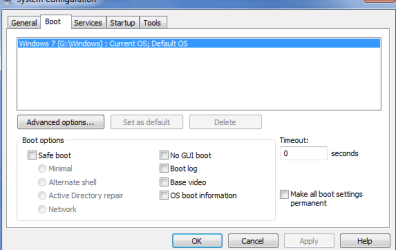
right well here are those screen shots and when i boot up in 7 my windows disk is not my c: disk. could this be something to do with it being an upgrade version? i installed it from the downloaded files from vista not the backup cd
 

Attachments

  • disk manager.PNG
    disk manager.PNG
    13.9 KB · Views: 28
  • msconfig.PNG
    msconfig.PNG
    9.3 KB · Views: 14

My Computer My Computer

OS
7
CPU
e6600
Motherboard
p5n32e-sli
Memory
2Gb PC2-8500
Graphics Card(s)
8800gts
Sound Card
audigy
Monitor(s) Displays
2xiiyama prolite
right well this i what i have tried and the results!!

with the settings as above i have reorderd the hdd in the bios so 7 disk is hdd0 then tried using the disk to move the mbr to that disk hdd0 this simly puts vista back on the boot loader menu

i have gone back to the settings above then shut down unplugged the disk with the boot manager on and tried using the cd to fix this. this fails with error partition table corrupt

i knew this wouldnt be simple windows is so dam fussy about where it is, i still remember the headaches trying to dual boot xp when not on the primary disk
 

My Computer My Computer

OS
7
CPU
e6600
Motherboard
p5n32e-sli
Memory
2Gb PC2-8500
Graphics Card(s)
8800gts
Sound Card
audigy
Monitor(s) Displays
2xiiyama prolite
Thanks for the snips.

According to the System Configuration window, your single booting into Win7.
Is this correct?
Any problems with booting?
Windows bootmanager is still in the old Vista C: drive.

I've never seen Win7 not call itself C:/, especially when dual booted with Vista. The upgrade version won't affect the drive letter.
Did you assign the letter C to Vista at any time?

Shouldn't be a problem.

Are you planning on formatting the old Vista C:/ drive, or are there some files you want to keep?

You want to remove Vista from your computer, correct?
 

My Computer My Computer

Computer type
PC/Desktop
Computer Manufacturer/Model Number
76~2.0
OS
Windows 7 Ult x64 - SP1/ Windows 8 Pro x64
CPU
Intel Core i5-3570K 4.6GHz
Motherboard
Gigabyte GA-Z77X UD3H, f18
Memory
8GB (2X4GB) DDR3 1600 Corsair Vengeance CL8 1.5v
Graphics Card(s)
Sapphire HD 7770 Vapor-X OC 1GB DDR5
Sound Card
Onboard VIA VT2021
Monitor(s) Displays
22" LCD Dell
Screen Resolution
1680x1050
Hard Drives
Samsung 840Pro 128GB SSD,
Seagate Barracuda 500GB SATA2 7200rpm 32MB cache, Seagate Barracuda 1TB SATA2 7200rpm 32MB cache,
PSU
Corsair HX650W
Case
Cooler Master Storm Scout
Cooling
Corsair H80 2x12cm Noctua NF P12 , 2x14cm case fans
Keyboard
Logitech Wave
Mouse
CM Sentinel
Internet Speed
Dismal
Antivirus
Avast
Browser
Opera Next
Other Info
Haswell laptop: HP Envy 17t-j, i7-4700MQ, GeForce 740M 2GB DDR3, 17.3" Full HD 1920x1080, 16GB RAM, Samsung 840 Pro 128GB, 1TB Hitachi 7200 HDD,
Desktop: eSATA ports,
External eSATA Seagate 500GB SATA2 7200rpm,
External WD USB 500GB
right well this i what i have tried and the results!!

with the settings as above i have reorderd the hdd in the bios so 7 disk is hdd0 then tried using the disk to move the mbr to that disk hdd0 this simly puts vista back on the boot loader menu

i have gone back to the settings above then shut down unplugged the disk with the boot manager on and tried using the cd to fix this. this fails with error partition table corrupt

i knew this wouldnt be simple windows is so dam fussy about where it is, i still remember the headaches trying to dual boot xp when not on the primary disk

Download EasyBCD 1.7.2, and start it, go to 'View Setting' button, take a snip there and post it.

Are you saying that you ran Start Up Repair from the Win7 installation DVD?

This should work, but you need to disconnect all HDs except the Win7 SSD, boot to the Win7 DVD and run Start Up Repair, Three Times. This will write the Windows bootmanager to the Win7 partition, but it can only do one BCEdit command at a time.
You can try that or you can do it with EasyBCD.

Send me the snip first.
 

My Computer My Computer

Computer type
PC/Desktop
Computer Manufacturer/Model Number
76~2.0
OS
Windows 7 Ult x64 - SP1/ Windows 8 Pro x64
CPU
Intel Core i5-3570K 4.6GHz
Motherboard
Gigabyte GA-Z77X UD3H, f18
Memory
8GB (2X4GB) DDR3 1600 Corsair Vengeance CL8 1.5v
Graphics Card(s)
Sapphire HD 7770 Vapor-X OC 1GB DDR5
Sound Card
Onboard VIA VT2021
Monitor(s) Displays
22" LCD Dell
Screen Resolution
1680x1050
Hard Drives
Samsung 840Pro 128GB SSD,
Seagate Barracuda 500GB SATA2 7200rpm 32MB cache, Seagate Barracuda 1TB SATA2 7200rpm 32MB cache,
PSU
Corsair HX650W
Case
Cooler Master Storm Scout
Cooling
Corsair H80 2x12cm Noctua NF P12 , 2x14cm case fans
Keyboard
Logitech Wave
Mouse
CM Sentinel
Internet Speed
Dismal
Antivirus
Avast
Browser
Opera Next
Other Info
Haswell laptop: HP Envy 17t-j, i7-4700MQ, GeForce 740M 2GB DDR3, 17.3" Full HD 1920x1080, 16GB RAM, Samsung 840 Pro 128GB, 1TB Hitachi 7200 HDD,
Desktop: eSATA ports,
External eSATA Seagate 500GB SATA2 7200rpm,
External WD USB 500GB
yes boot is fine no problems

yes bootmanager is still on drive c

no ive never actually assigned vista to c but i had problems with vista not assigning drive letters to removable disks and managed to get it to always give it the letter g so it might have carried this forced labeling across.

ive never had a windows installation willing to not be on the c drive!!!

I want to delete all the vista files off the old drive im concerned about doing it because they still seem to be connected somehow

i want to keep some files on the old vista disk

i dont want to format because then i wont be able to boot because it couldnt fix the boot loader with that disk unplugged.

I have had problems with the vista drive not being recognised on boot periodically its a hardware problem because it doesnt show in bios so i want to remove all non essential processes to improve the stability.

Questions
1. How do i reassign the system tag on the c: drive?
2. How can i remove any drive letter assignments?
 

My Computer My Computer

OS
7
CPU
e6600
Motherboard
p5n32e-sli
Memory
2Gb PC2-8500
Graphics Card(s)
8800gts
Sound Card
audigy
Monitor(s) Displays
2xiiyama prolite
Download EasyBCD 1.7.2, and start it, go to 'View Setting' button, take a snip there and post it.

Windows Boot Manager
--------------------
identifier {9dea862c-5cdd-4e70-acc1-f32b344d4795}
device partition=C:
path \bootmgr
description Windows Boot Manager
locale en-US
inherit {7ea2e1ac-2e61-4728-aaa3-896d9d0a9f0e}
default {d02188e1-bf6e-11de-b9f3-d47ab2305931}
resumeobject {d02188e0-bf6e-11de-b9f3-d47ab2305931}
displayorder {d02188e1-bf6e-11de-b9f3-d47ab2305931}
toolsdisplayorder {b2721d73-1db4-4c62-bf78-c548a880142d}
timeout 0

Windows Boot Loader
-------------------
identifier {d02188e1-bf6e-11de-b9f3-d47ab2305931}
device partition=G:
path \Windows\system32\winload.exe
description Windows 7
locale en-US
inherit {6efb52bf-1766-41db-a6b3-0ee5eff72bd7}
recoverysequence {d02188e2-bf6e-11de-b9f3-d47ab2305931}
recoveryenabled Yes
osdevice partition=G:
systemroot \Windows
resumeobject {d02188e0-bf6e-11de-b9f3-d47ab2305931}
nx OptIn
 

My Computer My Computer

OS
7
CPU
e6600
Motherboard
p5n32e-sli
Memory
2Gb PC2-8500
Graphics Card(s)
8800gts
Sound Card
audigy
Monitor(s) Displays
2xiiyama prolite
In EasyBCD, click the 'Manage Bootloader' button,

Make sure under 'Backup and Restore Bootloader Settings', in the File: box your G: partition is listed, if not browse to it.

Under 'Bootloader Installation Options', make sure the 'Reinstall the Vista Bootloader' is ticked,

Click 'Write MBR'

Check in the Disk Management, if the G partition has the 'System' tag.
 

My Computer My Computer

Computer type
PC/Desktop
Computer Manufacturer/Model Number
76~2.0
OS
Windows 7 Ult x64 - SP1/ Windows 8 Pro x64
CPU
Intel Core i5-3570K 4.6GHz
Motherboard
Gigabyte GA-Z77X UD3H, f18
Memory
8GB (2X4GB) DDR3 1600 Corsair Vengeance CL8 1.5v
Graphics Card(s)
Sapphire HD 7770 Vapor-X OC 1GB DDR5
Sound Card
Onboard VIA VT2021
Monitor(s) Displays
22" LCD Dell
Screen Resolution
1680x1050
Hard Drives
Samsung 840Pro 128GB SSD,
Seagate Barracuda 500GB SATA2 7200rpm 32MB cache, Seagate Barracuda 1TB SATA2 7200rpm 32MB cache,
PSU
Corsair HX650W
Case
Cooler Master Storm Scout
Cooling
Corsair H80 2x12cm Noctua NF P12 , 2x14cm case fans
Keyboard
Logitech Wave
Mouse
CM Sentinel
Internet Speed
Dismal
Antivirus
Avast
Browser
Opera Next
Other Info
Haswell laptop: HP Envy 17t-j, i7-4700MQ, GeForce 740M 2GB DDR3, 17.3" Full HD 1920x1080, 16GB RAM, Samsung 840 Pro 128GB, 1TB Hitachi 7200 HDD,
Desktop: eSATA ports,
External eSATA Seagate 500GB SATA2 7200rpm,
External WD USB 500GB
You will need to keep the G drive letter for 7 - that is fine.

Boot into 7

Open elevated cmd, type: ( press enter after each command)

Diskpart

sel vol c

inact

exi

close cmd prompt.

Make the ssd first in bios boot order .

Run startup repair.
 

My Computers My Computers

System One System Two

  • Computer type
    PC/Desktop
    OS
    7 X64
    CPU
    i5 8400
    Motherboard
    gigabyte b365m ds3h
    Memory
    2x8gb 3200mhz
    Hard Drives
    various
    PSU
    pure power 11 400w cm
    Case
    Coolermaster
    Cooling
    cryorig m9i
  • Computer type
    PC/Desktop
    OS
    7x64
    CPU
    g5400
    Motherboard
    ga b365m ds3h
    Memory
    8gb ddr4 2400
    PSU
    xfx pro 450w
i have no access to the boot folder on the 7 drive. I have attempted to change folder from read only but access denied, attempted to change access permissions but greyed out. Attempted to run bsd as admin attempted to run bsd from cmd running as admin

tried all this in safe mode to.
 

My Computer My Computer

OS
7
CPU
e6600
Motherboard
p5n32e-sli
Memory
2Gb PC2-8500
Graphics Card(s)
8800gts
Sound Card
audigy
Monitor(s) Displays
2xiiyama prolite
Why are you trying to get access to the Boot folder ?

What did you intend to do in there?

Leave it alone if I were you.

If you are already in7 - then just continue with the command as in my previous post.
 

My Computers My Computers

System One System Two

  • Computer type
    PC/Desktop
    OS
    7 X64
    CPU
    i5 8400
    Motherboard
    gigabyte b365m ds3h
    Memory
    2x8gb 3200mhz
    Hard Drives
    various
    PSU
    pure power 11 400w cm
    Case
    Coolermaster
    Cooling
    cryorig m9i
  • Computer type
    PC/Desktop
    OS
    7x64
    CPU
    g5400
    Motherboard
    ga b365m ds3h
    Memory
    8gb ddr4 2400
    PSU
    xfx pro 450w
Run the elevated cmd prompt, start button, right click Command Prompt, Run as Administrator.

Follow SIW2s instructions in the previous post.

He is our MBR expert and is very good at this.

He always gets it fixed.
 

My Computer My Computer

Computer type
PC/Desktop
Computer Manufacturer/Model Number
76~2.0
OS
Windows 7 Ult x64 - SP1/ Windows 8 Pro x64
CPU
Intel Core i5-3570K 4.6GHz
Motherboard
Gigabyte GA-Z77X UD3H, f18
Memory
8GB (2X4GB) DDR3 1600 Corsair Vengeance CL8 1.5v
Graphics Card(s)
Sapphire HD 7770 Vapor-X OC 1GB DDR5
Sound Card
Onboard VIA VT2021
Monitor(s) Displays
22" LCD Dell
Screen Resolution
1680x1050
Hard Drives
Samsung 840Pro 128GB SSD,
Seagate Barracuda 500GB SATA2 7200rpm 32MB cache, Seagate Barracuda 1TB SATA2 7200rpm 32MB cache,
PSU
Corsair HX650W
Case
Cooler Master Storm Scout
Cooling
Corsair H80 2x12cm Noctua NF P12 , 2x14cm case fans
Keyboard
Logitech Wave
Mouse
CM Sentinel
Internet Speed
Dismal
Antivirus
Avast
Browser
Opera Next
Other Info
Haswell laptop: HP Envy 17t-j, i7-4700MQ, GeForce 740M 2GB DDR3, 17.3" Full HD 1920x1080, 16GB RAM, Samsung 840 Pro 128GB, 1TB Hitachi 7200 HDD,
Desktop: eSATA ports,
External eSATA Seagate 500GB SATA2 7200rpm,
External WD USB 500GB
You will need to keep the G drive letter for 7 - that is fine.

Boot into 7

Open elevated cmd, type: ( press enter after each command)

Diskpart

sel vol c

inact

exi

close cmd prompt.

Make the ssd first in bios boot order .

Run startup repair.

this didnt work
did as you described
changed the ordering and got no bootloader found
rebboted put in the disk went to startup repair utility
no windows installations present in the list
selected the option to use tools to find and repair installation (not restore from previous image)

says it fixed it
rebooted
same error as above no boot manager

still boots if i reorder so old vista disk is first
 

My Computer My Computer

OS
7
CPU
e6600
Motherboard
p5n32e-sli
Memory
2Gb PC2-8500
Graphics Card(s)
8800gts
Sound Card
audigy
Monitor(s) Displays
2xiiyama prolite
You need to make sure C is NOT active.

Make sure G is active.

You need to run startup repair 3 times - it only fixes one thing at a time.
 

My Computers My Computers

System One System Two

  • Computer type
    PC/Desktop
    OS
    7 X64
    CPU
    i5 8400
    Motherboard
    gigabyte b365m ds3h
    Memory
    2x8gb 3200mhz
    Hard Drives
    various
    PSU
    pure power 11 400w cm
    Case
    Coolermaster
    Cooling
    cryorig m9i
  • Computer type
    PC/Desktop
    OS
    7x64
    CPU
    g5400
    Motherboard
    ga b365m ds3h
    Memory
    8gb ddr4 2400
    PSU
    xfx pro 450w
Back
Top