Repair boot manager

2002z06

New member
Local time
5:33 PM
Messages
38
Location
Northeast
What a mess, did a XP install on my 350 GB drive, then win 7 install on my 1TB drive, everything was working fine could boot to either XP or win 7 at boot screen. Then I decided to setup up 0 raid with 2 TB drives for win 7, that worked fine, but have to change boot drives in bios to work correctly. I hosed my bootmgr file in XP, I had to rename it in win 7 so I could get XP to work. How can I restore the boot manager so I don't have to change boot drives in bios to access each version of windows.
 

My Computer

Computer Manufacturer/Model Number
My build
OS
xp pro Win 7
CPU
Intel Core i7-920 Bloomfield 2.66GHz 4 x 256KB L2 Cache 8MB
Motherboard
GIGABYTE GA-EX58-UD5 LGA 1366 Intel X58 ATX Intel
Memory
Crucial Ballistix 6GB (3 x 2GB) 240-Pin DDR3 SDRAM DDR3 1600
Graphics Card(s)
XFX HD-577A-ZNFC Radeon HD 5770 (Juniper XT) 1GB 128-bit GDD
Sound Card
On Board Audio Channels 8 Channels
Monitor(s) Displays
Dell 2407WFP
Screen Resolution
1900x1200
Hard Drives
2 Seagate Barracuda ES.2 ST31000340NS 1TB 7200 RPM 32MB Cache SATA 3.0Gb Raid 0, WD 350 GB, Maxtor 160 GB
PSU
CORSAIR CMPSU-1000HX 1000W ATX12V 2.2 / EPS12V 2.91 SLI Read
Case
Lian Lia Aluminum
Cooling
Noctua NH-U12P SE2 120mm SSO CPU Cooler, Several case fans
Keyboard
Logitech
Mouse
Logitech Track ball
Internet Speed
Comcast Hi Speed
Other Info
Dual boot XP Pro Win 7
2002z06, have you tried to do a repair install with Win7 install disc, with both HDs connected? It should recognize the XP install and create a new boot manageer in Win7 that would allow you to access XP (will probalby be called "Earlier versions of windows") and Win7.
 

My Computer

Computer Manufacturer/Model Number
Wally, Innc.
OS
Windows 7 x64 finally!
CPU
AMD Athlon II X2 240
Motherboard
Biostar TA790GX XE
Memory
OCZ Platinum 4GB DDR2 1066 (will not work past 800MHz)
Graphics Card(s)
MSI R4670-MD1G Radeon HD 4670 1GB 128-bit GDDR3
Sound Card
ATI High Definition Audio Device Realtek ALC888
Monitor(s) Displays
HP w19e
Screen Resolution
1440x900
Hard Drives
Western Digital Caviar Green WD5000AADS 500GB SATA
Western Digital Caviar Blue WD5000AAKS 500GB SATA
PSU
Athena Power Micro ATX 400W
Case
HEC 6T 6T10BB Black MicroATX Mini Tower
Cooling
stock
Keyboard
wired, many keys
Mouse
HP wireless, 2 buttons, 1 wheel
Internet Speed
DSL 2Mb (recently getting 1.65M!)
I did a fresh Win 7 install but no luck, I think I have to figure a way to get of the old boomgr files for win 7 in xp first.
 

My Computer

Computer Manufacturer/Model Number
My build
OS
xp pro Win 7
CPU
Intel Core i7-920 Bloomfield 2.66GHz 4 x 256KB L2 Cache 8MB
Motherboard
GIGABYTE GA-EX58-UD5 LGA 1366 Intel X58 ATX Intel
Memory
Crucial Ballistix 6GB (3 x 2GB) 240-Pin DDR3 SDRAM DDR3 1600
Graphics Card(s)
XFX HD-577A-ZNFC Radeon HD 5770 (Juniper XT) 1GB 128-bit GDD
Sound Card
On Board Audio Channels 8 Channels
Monitor(s) Displays
Dell 2407WFP
Screen Resolution
1900x1200
Hard Drives
2 Seagate Barracuda ES.2 ST31000340NS 1TB 7200 RPM 32MB Cache SATA 3.0Gb Raid 0, WD 350 GB, Maxtor 160 GB
PSU
CORSAIR CMPSU-1000HX 1000W ATX12V 2.2 / EPS12V 2.91 SLI Read
Case
Lian Lia Aluminum
Cooling
Noctua NH-U12P SE2 120mm SSO CPU Cooler, Several case fans
Keyboard
Logitech
Mouse
Logitech Track ball
Internet Speed
Comcast Hi Speed
Other Info
Dual boot XP Pro Win 7
It will probably be easier to edit Win7's boot manager using BCDEdit (check this tutorial) than messing with boot.ini in XP.
 

My Computer

Computer Manufacturer/Model Number
Wally, Innc.
OS
Windows 7 x64 finally!
CPU
AMD Athlon II X2 240
Motherboard
Biostar TA790GX XE
Memory
OCZ Platinum 4GB DDR2 1066 (will not work past 800MHz)
Graphics Card(s)
MSI R4670-MD1G Radeon HD 4670 1GB 128-bit GDDR3
Sound Card
ATI High Definition Audio Device Realtek ALC888
Monitor(s) Displays
HP w19e
Screen Resolution
1440x900
Hard Drives
Western Digital Caviar Green WD5000AADS 500GB SATA
Western Digital Caviar Blue WD5000AAKS 500GB SATA
PSU
Athena Power Micro ATX 400W
Case
HEC 6T 6T10BB Black MicroATX Mini Tower
Cooling
stock
Keyboard
wired, many keys
Mouse
HP wireless, 2 buttons, 1 wheel
Internet Speed
DSL 2Mb (recently getting 1.65M!)
I thought the boot files have to be in XP for a dual boot 7 and XP.
 

My Computer

Computer Manufacturer/Model Number
My build
OS
xp pro Win 7
CPU
Intel Core i7-920 Bloomfield 2.66GHz 4 x 256KB L2 Cache 8MB
Motherboard
GIGABYTE GA-EX58-UD5 LGA 1366 Intel X58 ATX Intel
Memory
Crucial Ballistix 6GB (3 x 2GB) 240-Pin DDR3 SDRAM DDR3 1600
Graphics Card(s)
XFX HD-577A-ZNFC Radeon HD 5770 (Juniper XT) 1GB 128-bit GDD
Sound Card
On Board Audio Channels 8 Channels
Monitor(s) Displays
Dell 2407WFP
Screen Resolution
1900x1200
Hard Drives
2 Seagate Barracuda ES.2 ST31000340NS 1TB 7200 RPM 32MB Cache SATA 3.0Gb Raid 0, WD 350 GB, Maxtor 160 GB
PSU
CORSAIR CMPSU-1000HX 1000W ATX12V 2.2 / EPS12V 2.91 SLI Read
Case
Lian Lia Aluminum
Cooling
Noctua NH-U12P SE2 120mm SSO CPU Cooler, Several case fans
Keyboard
Logitech
Mouse
Logitech Track ball
Internet Speed
Comcast Hi Speed
Other Info
Dual boot XP Pro Win 7
Not necessarily. You can have Win7 boot manager manage it, which should be the set up when you install Win7 last or do the repair install. That might be something to try since it is not complicated (just follow instructions on the tutorial I listed above) and it should not mess up your data. I say should because it is always a risk when you do this that you might end up with a bigger problem that requires you to wipe your drive off, and then loose your data. Therefore, before you do that I strongly recommend you backup any personal files you have in XP or Win7

Let us know if it works or if you need additional help
 

My Computer

Computer Manufacturer/Model Number
Wally, Innc.
OS
Windows 7 x64 finally!
CPU
AMD Athlon II X2 240
Motherboard
Biostar TA790GX XE
Memory
OCZ Platinum 4GB DDR2 1066 (will not work past 800MHz)
Graphics Card(s)
MSI R4670-MD1G Radeon HD 4670 1GB 128-bit GDDR3
Sound Card
ATI High Definition Audio Device Realtek ALC888
Monitor(s) Displays
HP w19e
Screen Resolution
1440x900
Hard Drives
Western Digital Caviar Green WD5000AADS 500GB SATA
Western Digital Caviar Blue WD5000AAKS 500GB SATA
PSU
Athena Power Micro ATX 400W
Case
HEC 6T 6T10BB Black MicroATX Mini Tower
Cooling
stock
Keyboard
wired, many keys
Mouse
HP wireless, 2 buttons, 1 wheel
Internet Speed
DSL 2Mb (recently getting 1.65M!)
I did edit bcd in win 7 it reads like this

Windows Legacy OS Loader
--------------------------
Identifier {ntldr}
device partition=D:
path \ntldr
description Windows XP Professional

D is the assinged drive in Win 7, but it is C: in XP, I get the boot screen but cannot boot to XP, system restarts, Win7 boots fine, what am I missing.
 

My Computer

Computer Manufacturer/Model Number
My build
OS
xp pro Win 7
CPU
Intel Core i7-920 Bloomfield 2.66GHz 4 x 256KB L2 Cache 8MB
Motherboard
GIGABYTE GA-EX58-UD5 LGA 1366 Intel X58 ATX Intel
Memory
Crucial Ballistix 6GB (3 x 2GB) 240-Pin DDR3 SDRAM DDR3 1600
Graphics Card(s)
XFX HD-577A-ZNFC Radeon HD 5770 (Juniper XT) 1GB 128-bit GDD
Sound Card
On Board Audio Channels 8 Channels
Monitor(s) Displays
Dell 2407WFP
Screen Resolution
1900x1200
Hard Drives
2 Seagate Barracuda ES.2 ST31000340NS 1TB 7200 RPM 32MB Cache SATA 3.0Gb Raid 0, WD 350 GB, Maxtor 160 GB
PSU
CORSAIR CMPSU-1000HX 1000W ATX12V 2.2 / EPS12V 2.91 SLI Read
Case
Lian Lia Aluminum
Cooling
Noctua NH-U12P SE2 120mm SSO CPU Cooler, Several case fans
Keyboard
Logitech
Mouse
Logitech Track ball
Internet Speed
Comcast Hi Speed
Other Info
Dual boot XP Pro Win 7
Install EasyBCD and post back a screenshot of its front panel listings. Use Snipping Tool in Start menu, attach files using paper clip in reply box.

You should be able to add XP if it's missing in the Add/Remove tab by drive letter.

Automated method would be to run a repair install from the Win7 desktop (upgrade over itself) as it will reconfigure the boot correctly while reinstalling the OS, yet save the programs, files and settings in place.

View attachment 41050
 
I am not to happy with bcd, after trying to remove it from XP, it left files I cannot remove.
 

My Computer

Computer Manufacturer/Model Number
My build
OS
xp pro Win 7
CPU
Intel Core i7-920 Bloomfield 2.66GHz 4 x 256KB L2 Cache 8MB
Motherboard
GIGABYTE GA-EX58-UD5 LGA 1366 Intel X58 ATX Intel
Memory
Crucial Ballistix 6GB (3 x 2GB) 240-Pin DDR3 SDRAM DDR3 1600
Graphics Card(s)
XFX HD-577A-ZNFC Radeon HD 5770 (Juniper XT) 1GB 128-bit GDD
Sound Card
On Board Audio Channels 8 Channels
Monitor(s) Displays
Dell 2407WFP
Screen Resolution
1900x1200
Hard Drives
2 Seagate Barracuda ES.2 ST31000340NS 1TB 7200 RPM 32MB Cache SATA 3.0Gb Raid 0, WD 350 GB, Maxtor 160 GB
PSU
CORSAIR CMPSU-1000HX 1000W ATX12V 2.2 / EPS12V 2.91 SLI Read
Case
Lian Lia Aluminum
Cooling
Noctua NH-U12P SE2 120mm SSO CPU Cooler, Several case fans
Keyboard
Logitech
Mouse
Logitech Track ball
Internet Speed
Comcast Hi Speed
Other Info
Dual boot XP Pro Win 7
I am not to happy with bcd, after trying to remove it from XP, it left files I cannot remove.

EasyBCD is one of the most reputable tools around. If it somehow left remnants when uninstalling, then reinstalling it now to give us a screenshot and possibly make repairs will give you another shot at a clean uninstall which we can help you with.

Otherwise can you post a screenshot of your full Disk Management map so we can see what has blocked the Win7 installer from correctly configuring a dual boot as it always does?

Use Snipping Tool in Start menu, attach file using paper clip in reply box.
 
install in xp, or win7
 

My Computer

Computer Manufacturer/Model Number
My build
OS
xp pro Win 7
CPU
Intel Core i7-920 Bloomfield 2.66GHz 4 x 256KB L2 Cache 8MB
Motherboard
GIGABYTE GA-EX58-UD5 LGA 1366 Intel X58 ATX Intel
Memory
Crucial Ballistix 6GB (3 x 2GB) 240-Pin DDR3 SDRAM DDR3 1600
Graphics Card(s)
XFX HD-577A-ZNFC Radeon HD 5770 (Juniper XT) 1GB 128-bit GDD
Sound Card
On Board Audio Channels 8 Channels
Monitor(s) Displays
Dell 2407WFP
Screen Resolution
1900x1200
Hard Drives
2 Seagate Barracuda ES.2 ST31000340NS 1TB 7200 RPM 32MB Cache SATA 3.0Gb Raid 0, WD 350 GB, Maxtor 160 GB
PSU
CORSAIR CMPSU-1000HX 1000W ATX12V 2.2 / EPS12V 2.91 SLI Read
Case
Lian Lia Aluminum
Cooling
Noctua NH-U12P SE2 120mm SSO CPU Cooler, Several case fans
Keyboard
Logitech
Mouse
Logitech Track ball
Internet Speed
Comcast Hi Speed
Other Info
Dual boot XP Pro Win 7
Windows 7, post Disk Management screenshot and Easy BCD if u can. Snipping Tool on Start menu, attach file using paper clip in reply boxc.
 
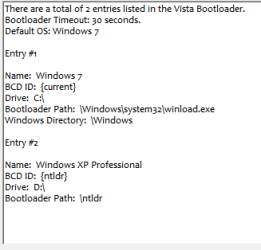
This is from Win 7 using easybcd Capture.PNG
 

My Computer

Computer Manufacturer/Model Number
My build
OS
xp pro Win 7
CPU
Intel Core i7-920 Bloomfield 2.66GHz 4 x 256KB L2 Cache 8MB
Motherboard
GIGABYTE GA-EX58-UD5 LGA 1366 Intel X58 ATX Intel
Memory
Crucial Ballistix 6GB (3 x 2GB) 240-Pin DDR3 SDRAM DDR3 1600
Graphics Card(s)
XFX HD-577A-ZNFC Radeon HD 5770 (Juniper XT) 1GB 128-bit GDD
Sound Card
On Board Audio Channels 8 Channels
Monitor(s) Displays
Dell 2407WFP
Screen Resolution
1900x1200
Hard Drives
2 Seagate Barracuda ES.2 ST31000340NS 1TB 7200 RPM 32MB Cache SATA 3.0Gb Raid 0, WD 350 GB, Maxtor 160 GB
PSU
CORSAIR CMPSU-1000HX 1000W ATX12V 2.2 / EPS12V 2.91 SLI Read
Case
Lian Lia Aluminum
Cooling
Noctua NH-U12P SE2 120mm SSO CPU Cooler, Several case fans
Keyboard
Logitech
Mouse
Logitech Track ball
Internet Speed
Comcast Hi Speed
Other Info
Dual boot XP Pro Win 7
You ran a Windows 7 repair install or reinstall since this happened and it didn't configure the dual boot properly? This is rare.

Did you make any BCD edits after you reinstalled/repair installed Win7?

Can you post a screenshot of your full Disk Management map?
 
where is it ?
 

My Computer

Computer Manufacturer/Model Number
My build
OS
xp pro Win 7
CPU
Intel Core i7-920 Bloomfield 2.66GHz 4 x 256KB L2 Cache 8MB
Motherboard
GIGABYTE GA-EX58-UD5 LGA 1366 Intel X58 ATX Intel
Memory
Crucial Ballistix 6GB (3 x 2GB) 240-Pin DDR3 SDRAM DDR3 1600
Graphics Card(s)
XFX HD-577A-ZNFC Radeon HD 5770 (Juniper XT) 1GB 128-bit GDD
Sound Card
On Board Audio Channels 8 Channels
Monitor(s) Displays
Dell 2407WFP
Screen Resolution
1900x1200
Hard Drives
2 Seagate Barracuda ES.2 ST31000340NS 1TB 7200 RPM 32MB Cache SATA 3.0Gb Raid 0, WD 350 GB, Maxtor 160 GB
PSU
CORSAIR CMPSU-1000HX 1000W ATX12V 2.2 / EPS12V 2.91 SLI Read
Case
Lian Lia Aluminum
Cooling
Noctua NH-U12P SE2 120mm SSO CPU Cooler, Several case fans
Keyboard
Logitech
Mouse
Logitech Track ball
Internet Speed
Comcast Hi Speed
Other Info
Dual boot XP Pro Win 7
where is it ?

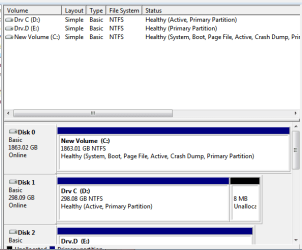
Start>rightclick Computer>Manage>Disk Management.

Drag window large enough to get full map of drives with all wording in partitions.

Please answer:
You ran a Windows 7 repair install or reinstall since this happened and it didn't configure the dual boot properly? This is rare.

Did you make any BCD edits after you reinstalled/repair installed Win7?
 
Disk management in Win 7Capture.PNG
 

My Computer

Computer Manufacturer/Model Number
My build
OS
xp pro Win 7
CPU
Intel Core i7-920 Bloomfield 2.66GHz 4 x 256KB L2 Cache 8MB
Motherboard
GIGABYTE GA-EX58-UD5 LGA 1366 Intel X58 ATX Intel
Memory
Crucial Ballistix 6GB (3 x 2GB) 240-Pin DDR3 SDRAM DDR3 1600
Graphics Card(s)
XFX HD-577A-ZNFC Radeon HD 5770 (Juniper XT) 1GB 128-bit GDD
Sound Card
On Board Audio Channels 8 Channels
Monitor(s) Displays
Dell 2407WFP
Screen Resolution
1900x1200
Hard Drives
2 Seagate Barracuda ES.2 ST31000340NS 1TB 7200 RPM 32MB Cache SATA 3.0Gb Raid 0, WD 350 GB, Maxtor 160 GB
PSU
CORSAIR CMPSU-1000HX 1000W ATX12V 2.2 / EPS12V 2.91 SLI Read
Case
Lian Lia Aluminum
Cooling
Noctua NH-U12P SE2 120mm SSO CPU Cooler, Several case fans
Keyboard
Logitech
Mouse
Logitech Track ball
Internet Speed
Comcast Hi Speed
Other Info
Dual boot XP Pro Win 7
First: Have you completely removed the RAID which borked your Dual Boot? Check the SATA controller settings in BIOS: SATA, IDE, AHCI or RAID?

I don't think you should make any more BCD edits as the boot has been thoroughly scrambled by it.

Instead let's take the automated path:

Back up your files and/or save to another HD a Win7 backup image.

Boot into Windows 7, place the Win7 DVD in the DVD drive, Run the DVD either using Autoplay or Setup file.

Select language/keyboard, then Install Now

next connect ethernet cable and select "Connect to Internet during Install" to get drivers/updates during install from MS

Select Upgrade (repair) install. Post back any serious compatibility issues found by Wizard or resolve simple ones.

This will keep all of your programs, files and settings in place while reinstalling the OS and reconfiguring the Dual boot correctly.

Afterward you will need to reactivate at Computer>Properties.
 
Greg, you have more experience than me with the repair installs, but I think in this scenario he will have to run it more than once, right?
I suspect that might have been what didn't work the first time, it was weird the repair install didn't fix it then.
And the only thing I find strange in the EasyBCD pic is that it says "Vista Bootloader". I think there could be some old files there messing things up (?), or is it coming from EasyBCD?
 

My Computer

Computer Manufacturer/Model Number
Wally, Innc.
OS
Windows 7 x64 finally!
CPU
AMD Athlon II X2 240
Motherboard
Biostar TA790GX XE
Memory
OCZ Platinum 4GB DDR2 1066 (will not work past 800MHz)
Graphics Card(s)
MSI R4670-MD1G Radeon HD 4670 1GB 128-bit GDDR3
Sound Card
ATI High Definition Audio Device Realtek ALC888
Monitor(s) Displays
HP w19e
Screen Resolution
1440x900
Hard Drives
Western Digital Caviar Green WD5000AADS 500GB SATA
Western Digital Caviar Blue WD5000AAKS 500GB SATA
PSU
Athena Power Micro ATX 400W
Case
HEC 6T 6T10BB Black MicroATX Mini Tower
Cooling
stock
Keyboard
wired, many keys
Mouse
HP wireless, 2 buttons, 1 wheel
Internet Speed
DSL 2Mb (recently getting 1.65M!)
Back
Top