
Repair Install Error

Jazzfan08

New member
Local time
12:21 AM
Messages
9
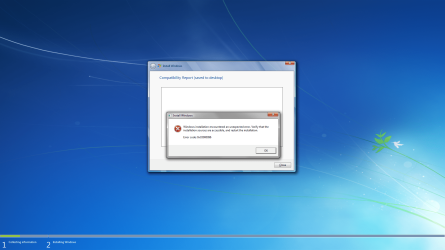
I tried to do a repair install and it said:
Windows installation encountered an unexpected error. verify that the installation sources are accessable, and restart the installation.
Error Code 0xC0000096

Can someone help me with this problem, I want to avoid doing a full install
 

Attachments
  • Repair Install.png
    Repair Install.png
    446.2 KB · Views: 403
Last edited:

My Computer

OS
Windows 7
How are you running the repair: DVD, flash, ISO, files?

Have you used it to install succesfully recently?

Check DVD for scratches or dirt. Wipe or wash clean with soft cloth if necessary.
 
Try copying the files from the DVD to desktop and running Setup from there. Works sometimes since it doesn't depend on DVD drive.
 
I cleaned the disk and I still got the error
I also tried to put it on the desktop and it would start up but when I clicked "Install Now" nothing happened
 

My Computer

OS
Windows 7
What are you trying to repair?

How was the OS originally installed on this machine, and when? With this DVD? Anything change?

Try shrinking WIn7 in Disk Mgmt enough to make a test partiition.

Boot DVD, try installing to that partition.
 
I'm trying to repair windows 7 professional 64 bit.
I figured out that I can drag the error message out of the way and continue with the installation.
I have had another problem though. I can't seem to get past the "expanding windows" phase of the installation. It'll stop at around 18% and just go back to the desktop or it will say windows needs to restart and it goes back to the desktop without restarting. When it said windows needs to restart and didn't restart, I tried to manually restart the computer and when I did that, it said that the windows installation process could not begin.
 

My Computer

OS
Windows 7
You didn't answer if this is the same DVD you used to install Win7? If not then it needs to be verified using ImgBurn. If so, make sure it is clean without any smudges, scratches.

Select Verify Disk, load ISO in to make sure "bootable" is given in text at left, then add DVD and Verify against ISO.

If the DVD doesn't verify then burn another DVD at 4x speed with Verify. If the DVD verifies, then consider the source of your ISO as it's HASH checksum might need to be tested if there is a question.

You can also extract the ISO again directly to the desktop to try running the Repair Install. If it will not run Setup then you need to download the ISO again, or checksum its HASH.

If you cannot start Win7 now, boot into DVD Repair console, click through to Recovery Tools and run Startup Repair up to 3 separate times with reboot.
 
I verified the dvd and even made a new one and got the same error (I get the error at the end of the compatibility check)
Windows 7 will start up just not after forced shutdown.
When I run Start up repair I get the message, "Boot Cause Found: Boot configuration is corrupt. Error Code=0x490
 

My Computer

OS
Windows 7
You could look at the compatibility report that the message says was saved to the desktop.
 

My Computers

System One System Two

  • Computer type
    PC/Desktop
    OS
    7 X64
    CPU
    i5 8400
    Motherboard
    gigabyte b365m ds3h
    Memory
    2x8gb 3200mhz
    Hard Drives
    various
    PSU
    pure power 11 400w cm
    Case
    Coolermaster
    Cooling
    cryorig m9i
  • Computer type
    PC/Desktop
    OS
    7x64
    CPU
    g5400
    Motherboard
    ga b365m ds3h
    Memory
    8gb ddr4 2400
    PSU
    xfx pro 450w
Try extracting the ISO and running Setup, thus eliminating the DVD altogether.
 
Back
Top