Solved Repair Install Win 7 Pro from Non SP1 Disc using a new Win 7 Pro SP1 d

boeingaviation

New member
Local time
1:31 PM
Messages
61
Following on from my other topic about the OEM download I managed to get, I had some questions to ask regarding doing a repair install of my windows 7 pro using my new OEM win 7 pro Sp1 disc.

I installed windows about 2 months ago, using my original OEM disc (pre sp1) and then the first update I installed manually (via download from Microsoft site) was service pack 1, then continued with the rest of the updates.

I would just like to know since I already have SP1 installed can I just use my new disc to do a repair install of the windows, or would I need to use my original non sp1 disc?

I also am aware I may need to reinstall device drivers, and windows updates again.

Look forward to a response as I've never done a repair install.....but would like to avoid a full reinstall.

Cheers
 

My Computer My Computer

At a glance

Windows 7 Pro 64-bitIntel i7 4790K Haswell Devils CanyonKingston Hyper X Savage Red 1600MHZ/16GBEVGA GTX970 FTW ACX 2.0
Computer type
PC/Desktop
OS
Windows 7 Pro 64-bit
CPU
Intel i7 4790K Haswell Devils Canyon
Motherboard
Asus Maximus VII Ranger ROG
Memory
Kingston Hyper X Savage Red 1600MHZ/16GB
Graphics Card(s)
EVGA GTX970 FTW ACX 2.0
Sound Card
On Board
Monitor(s) Displays
Asus 22" LCD, AOC 17" CRT
Screen Resolution
1680x1050
Hard Drives
Samsung 840EVO 250GB SSD (Windows Driver)
WD Elements 640GB External
WD Elements Portable 2TB External
WD Caviar Blue 500GB
WD Caviar Black 1TB
PSU
EVGA Supernova G2 750W Fully Modular
Case
Antect 1200 V3
Cooling
Corsair H80i Liquid Cooling
Keyboard
Genius Keyboard
Mouse
Logitech Wireless Mouse
Internet Speed
Cable
Antivirus
Nod32 Antivirus
Browser
Google Chrome
Actually you need to use the newer one to do a repair install, if you tried with the non SP1 disc it would just tell you the windows versions are different and it can't continue.

Windows 7 (Non SP1) and Windows 7 SP1 are two separate versions when it comes to doing a repair install.

You shouldn't need to install drivers when doing a repair install, it is as the name says repairing your installation.

http://www.sevenforums.com/tutorials/3413-repair-install.html
 

My Computer My Computer

At a glance

Win 10 Pro x64Intel I5-2500K @3.3GHz16GB G.Skill Ripjaws X (4x4GB)EVGA GeForce 750 Ti SC 2GB
Computer type
PC/Desktop
Computer Manufacturer/Model Number
Self Built
OS
Win 10 Pro x64
CPU
Intel I5-2500K @3.3GHz
Motherboard
Asrock P67 Extreme4
Memory
16GB G.Skill Ripjaws X (4x4GB)
Graphics Card(s)
EVGA GeForce 750 Ti SC 2GB
Sound Card
ASUS Xonar DG 5.1 Channels 24-bit 96KHz PCI Interface Sound
Monitor(s) Displays
auria eq2367
Screen Resolution
1920 x 1080
Hard Drives
250GB Samsung 850 EVO SSD
1TB WD Blue
1TB Hitachi
PSU
SeaSonic X 650W 80 Plus Gold
Case
Corsair Obsidian 750D
Cooling
Corsair H60, Three 140mm case fans
Keyboard
Logitech Wireless Keyboard K520
Mouse
Logitech Wireless Mouse M310
Internet Speed
Wave Broadband ~ 100 dn 5 up
Antivirus
Windows Defender, Malwarebytes Premium
Browser
Edge, IE11, Chrome
Other Info
Laptop specs: HP g7-1365dx /
CPU: AMD A6-3420M APU with Radeon(tm) HD Graphics /
RAM: Crucial 8Gb (2x4Gb) /
SSD: Crucial M4-CT128M4SSD2 ATA Device/ FW 000F /
GFX: AMD Radeon HD 6520G /
OS: Windows 10 Pro x64
So even though I originally installed with windows 7 non sp1 and manually installed the service pack, I can go ahead with the new disc and repair my current install even though I'm not using the original disc I installed windows with which was windows 7 64 bit pro OEM and new one from Microsoft I download is same name but includes SP1.....I just entered my product key and download the newer version.
 

My Computer My Computer

At a glance

Windows 7 Pro 64-bitIntel i7 4790K Haswell Devils CanyonKingston Hyper X Savage Red 1600MHZ/16GBEVGA GTX970 FTW ACX 2.0
Computer type
PC/Desktop
OS
Windows 7 Pro 64-bit
CPU
Intel i7 4790K Haswell Devils Canyon
Motherboard
Asus Maximus VII Ranger ROG
Memory
Kingston Hyper X Savage Red 1600MHZ/16GB
Graphics Card(s)
EVGA GTX970 FTW ACX 2.0
Sound Card
On Board
Monitor(s) Displays
Asus 22" LCD, AOC 17" CRT
Screen Resolution
1680x1050
Hard Drives
Samsung 840EVO 250GB SSD (Windows Driver)
WD Elements 640GB External
WD Elements Portable 2TB External
WD Caviar Blue 500GB
WD Caviar Black 1TB
PSU
EVGA Supernova G2 750W Fully Modular
Case
Antect 1200 V3
Cooling
Corsair H80i Liquid Cooling
Keyboard
Genius Keyboard
Mouse
Logitech Wireless Mouse
Internet Speed
Cable
Antivirus
Nod32 Antivirus
Browser
Google Chrome
Yes, as soon as you installed SP1 your Windows 7 went from build 7600 to build 7601 so you need to use the same version when doing a repair install, the disc needs to be the same version as whats currently installed.
 

My Computer My Computer

At a glance

Win 10 Pro x64Intel I5-2500K @3.3GHz16GB G.Skill Ripjaws X (4x4GB)EVGA GeForce 750 Ti SC 2GB
Computer type
PC/Desktop
Computer Manufacturer/Model Number
Self Built
OS
Win 10 Pro x64
CPU
Intel I5-2500K @3.3GHz
Motherboard
Asrock P67 Extreme4
Memory
16GB G.Skill Ripjaws X (4x4GB)
Graphics Card(s)
EVGA GeForce 750 Ti SC 2GB
Sound Card
ASUS Xonar DG 5.1 Channels 24-bit 96KHz PCI Interface Sound
Monitor(s) Displays
auria eq2367
Screen Resolution
1920 x 1080
Hard Drives
250GB Samsung 850 EVO SSD
1TB WD Blue
1TB Hitachi
PSU
SeaSonic X 650W 80 Plus Gold
Case
Corsair Obsidian 750D
Cooling
Corsair H60, Three 140mm case fans
Keyboard
Logitech Wireless Keyboard K520
Mouse
Logitech Wireless Mouse M310
Internet Speed
Wave Broadband ~ 100 dn 5 up
Antivirus
Windows Defender, Malwarebytes Premium
Browser
Edge, IE11, Chrome
Other Info
Laptop specs: HP g7-1365dx /
CPU: AMD A6-3420M APU with Radeon(tm) HD Graphics /
RAM: Crucial 8Gb (2x4Gb) /
SSD: Crucial M4-CT128M4SSD2 ATA Device/ FW 000F /
GFX: AMD Radeon HD 6520G /
OS: Windows 10 Pro x64
Ok thank you for your advice. Will I need to reinstall the majority of windows updates again if I do a repair install as after installing SP1 I had some 150 important updates and about 50 optional
 

My Computer My Computer

At a glance

Windows 7 Pro 64-bitIntel i7 4790K Haswell Devils CanyonKingston Hyper X Savage Red 1600MHZ/16GBEVGA GTX970 FTW ACX 2.0
Computer type
PC/Desktop
OS
Windows 7 Pro 64-bit
CPU
Intel i7 4790K Haswell Devils Canyon
Motherboard
Asus Maximus VII Ranger ROG
Memory
Kingston Hyper X Savage Red 1600MHZ/16GB
Graphics Card(s)
EVGA GTX970 FTW ACX 2.0
Sound Card
On Board
Monitor(s) Displays
Asus 22" LCD, AOC 17" CRT
Screen Resolution
1680x1050
Hard Drives
Samsung 840EVO 250GB SSD (Windows Driver)
WD Elements 640GB External
WD Elements Portable 2TB External
WD Caviar Blue 500GB
WD Caviar Black 1TB
PSU
EVGA Supernova G2 750W Fully Modular
Case
Antect 1200 V3
Cooling
Corsair H80i Liquid Cooling
Keyboard
Genius Keyboard
Mouse
Logitech Wireless Mouse
Internet Speed
Cable
Antivirus
Nod32 Antivirus
Browser
Google Chrome

My Computer My Computer

At a glance

Win 10 Pro x64Intel I5-2500K @3.3GHz16GB G.Skill Ripjaws X (4x4GB)EVGA GeForce 750 Ti SC 2GB
Computer type
PC/Desktop
Computer Manufacturer/Model Number
Self Built
OS
Win 10 Pro x64
CPU
Intel I5-2500K @3.3GHz
Motherboard
Asrock P67 Extreme4
Memory
16GB G.Skill Ripjaws X (4x4GB)
Graphics Card(s)
EVGA GeForce 750 Ti SC 2GB
Sound Card
ASUS Xonar DG 5.1 Channels 24-bit 96KHz PCI Interface Sound
Monitor(s) Displays
auria eq2367
Screen Resolution
1920 x 1080
Hard Drives
250GB Samsung 850 EVO SSD
1TB WD Blue
1TB Hitachi
PSU
SeaSonic X 650W 80 Plus Gold
Case
Corsair Obsidian 750D
Cooling
Corsair H60, Three 140mm case fans
Keyboard
Logitech Wireless Keyboard K520
Mouse
Logitech Wireless Mouse M310
Internet Speed
Wave Broadband ~ 100 dn 5 up
Antivirus
Windows Defender, Malwarebytes Premium
Browser
Edge, IE11, Chrome
Other Info
Laptop specs: HP g7-1365dx /
CPU: AMD A6-3420M APU with Radeon(tm) HD Graphics /
RAM: Crucial 8Gb (2x4Gb) /
SSD: Crucial M4-CT128M4SSD2 ATA Device/ FW 000F /
GFX: AMD Radeon HD 6520G /
OS: Windows 10 Pro x64
Yea I've looked at that but was a bit confused I went to the guide as I do have a SP1 OEM copy which I did download from the Microsoft site using my product key.....so I'm a bit confused whether I can or can't do a repair install.
 

My Computer My Computer

At a glance

Windows 7 Pro 64-bitIntel i7 4790K Haswell Devils CanyonKingston Hyper X Savage Red 1600MHZ/16GBEVGA GTX970 FTW ACX 2.0
Computer type
PC/Desktop
OS
Windows 7 Pro 64-bit
CPU
Intel i7 4790K Haswell Devils Canyon
Motherboard
Asus Maximus VII Ranger ROG
Memory
Kingston Hyper X Savage Red 1600MHZ/16GB
Graphics Card(s)
EVGA GTX970 FTW ACX 2.0
Sound Card
On Board
Monitor(s) Displays
Asus 22" LCD, AOC 17" CRT
Screen Resolution
1680x1050
Hard Drives
Samsung 840EVO 250GB SSD (Windows Driver)
WD Elements 640GB External
WD Elements Portable 2TB External
WD Caviar Blue 500GB
WD Caviar Black 1TB
PSU
EVGA Supernova G2 750W Fully Modular
Case
Antect 1200 V3
Cooling
Corsair H80i Liquid Cooling
Keyboard
Genius Keyboard
Mouse
Logitech Wireless Mouse
Internet Speed
Cable
Antivirus
Nod32 Antivirus
Browser
Google Chrome
Yes, you can do a repair install with the SP1 copy you just downloaded. You have to use it. :)

If you want to try using your old original disc you'll see what I mean, it won't let you continue.

Repair installs have to be done from within windows, you do not boot from the disc.
 

My Computer My Computer

At a glance

Win 10 Pro x64Intel I5-2500K @3.3GHz16GB G.Skill Ripjaws X (4x4GB)EVGA GeForce 750 Ti SC 2GB
Computer type
PC/Desktop
Computer Manufacturer/Model Number
Self Built
OS
Win 10 Pro x64
CPU
Intel I5-2500K @3.3GHz
Motherboard
Asrock P67 Extreme4
Memory
16GB G.Skill Ripjaws X (4x4GB)
Graphics Card(s)
EVGA GeForce 750 Ti SC 2GB
Sound Card
ASUS Xonar DG 5.1 Channels 24-bit 96KHz PCI Interface Sound
Monitor(s) Displays
auria eq2367
Screen Resolution
1920 x 1080
Hard Drives
250GB Samsung 850 EVO SSD
1TB WD Blue
1TB Hitachi
PSU
SeaSonic X 650W 80 Plus Gold
Case
Corsair Obsidian 750D
Cooling
Corsair H60, Three 140mm case fans
Keyboard
Logitech Wireless Keyboard K520
Mouse
Logitech Wireless Mouse M310
Internet Speed
Wave Broadband ~ 100 dn 5 up
Antivirus
Windows Defender, Malwarebytes Premium
Browser
Edge, IE11, Chrome
Other Info
Laptop specs: HP g7-1365dx /
CPU: AMD A6-3420M APU with Radeon(tm) HD Graphics /
RAM: Crucial 8Gb (2x4Gb) /
SSD: Crucial M4-CT128M4SSD2 ATA Device/ FW 000F /
GFX: AMD Radeon HD 6520G /
OS: Windows 10 Pro x64
Ahh got ya thanks, when I installed windows fresh a few months ago SP1 was manually installed first before any other update.

It only took about 10mins for the service pack to be installed and pc back up and running again.

Sorry for the questions, I'm a bit of a novice with repairing 7 XP was a lot different.
 

My Computer My Computer

At a glance

Windows 7 Pro 64-bitIntel i7 4790K Haswell Devils CanyonKingston Hyper X Savage Red 1600MHZ/16GBEVGA GTX970 FTW ACX 2.0
Computer type
PC/Desktop
OS
Windows 7 Pro 64-bit
CPU
Intel i7 4790K Haswell Devils Canyon
Motherboard
Asus Maximus VII Ranger ROG
Memory
Kingston Hyper X Savage Red 1600MHZ/16GB
Graphics Card(s)
EVGA GTX970 FTW ACX 2.0
Sound Card
On Board
Monitor(s) Displays
Asus 22" LCD, AOC 17" CRT
Screen Resolution
1680x1050
Hard Drives
Samsung 840EVO 250GB SSD (Windows Driver)
WD Elements 640GB External
WD Elements Portable 2TB External
WD Caviar Blue 500GB
WD Caviar Black 1TB
PSU
EVGA Supernova G2 750W Fully Modular
Case
Antect 1200 V3
Cooling
Corsair H80i Liquid Cooling
Keyboard
Genius Keyboard
Mouse
Logitech Wireless Mouse
Internet Speed
Cable
Antivirus
Nod32 Antivirus
Browser
Google Chrome
Ahh got ya thanks, when I installed windows fresh a few months ago SP1 was manually installed first before any other update.

It only took about 10mins for the service pack to be installed and pc back up and running again.

Sorry for the questions, I'm a bit of a novice with repairing 7 XP was a lot different.

Don't worry...we all were novices. Once you do it a few times (really twice) it just becomes a part of the process...

You've got it.
 

My Computer My Computer

At a glance

Windows 7 Home Premium x64Athlon X2 4200+3GB DDR2nVidia 9400GT, 128-bit 1GB DDR2
Computer Manufacturer/Model Number
Modded Gateway GT5034
OS
Windows 7 Home Premium x64
CPU
Athlon X2 4200+
Memory
3GB DDR2
Graphics Card(s)
nVidia 9400GT, 128-bit 1GB DDR2
Sound Card
SB Audigy 2 LS
Monitor(s) Displays
40" Sony Bravia 2
Hard Drives
500GB Seagate Barricuda 7200.11 (System)
750GB Seagate Barricuda 7200.12 (Data)
No problem, better to ask first anyway if you're not sure.

I'm surprised it was the first update though, there are usually some precursors to install before it gets offered.

As long as it all gets installed successfully it doesn't matter.

Are you having problems already with your install or just asking for future reference?
 

My Computer My Computer

At a glance

Win 10 Pro x64Intel I5-2500K @3.3GHz16GB G.Skill Ripjaws X (4x4GB)EVGA GeForce 750 Ti SC 2GB
Computer type
PC/Desktop
Computer Manufacturer/Model Number
Self Built
OS
Win 10 Pro x64
CPU
Intel I5-2500K @3.3GHz
Motherboard
Asrock P67 Extreme4
Memory
16GB G.Skill Ripjaws X (4x4GB)
Graphics Card(s)
EVGA GeForce 750 Ti SC 2GB
Sound Card
ASUS Xonar DG 5.1 Channels 24-bit 96KHz PCI Interface Sound
Monitor(s) Displays
auria eq2367
Screen Resolution
1920 x 1080
Hard Drives
250GB Samsung 850 EVO SSD
1TB WD Blue
1TB Hitachi
PSU
SeaSonic X 650W 80 Plus Gold
Case
Corsair Obsidian 750D
Cooling
Corsair H60, Three 140mm case fans
Keyboard
Logitech Wireless Keyboard K520
Mouse
Logitech Wireless Mouse M310
Internet Speed
Wave Broadband ~ 100 dn 5 up
Antivirus
Windows Defender, Malwarebytes Premium
Browser
Edge, IE11, Chrome
Other Info
Laptop specs: HP g7-1365dx /
CPU: AMD A6-3420M APU with Radeon(tm) HD Graphics /
RAM: Crucial 8Gb (2x4Gb) /
SSD: Crucial M4-CT128M4SSD2 ATA Device/ FW 000F /
GFX: AMD Radeon HD 6520G /
OS: Windows 10 Pro x64
Just another quick question.

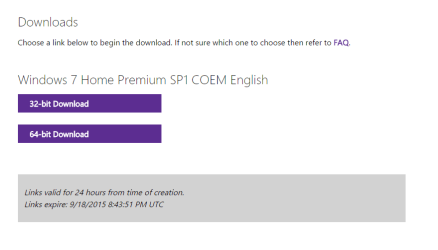
What does "COEM" mean, as when I downloaded my new windows it was called COEM, wouldn't it just be OEM. That's just the download I got from my product key.
 

My Computer My Computer

At a glance

Windows 7 Pro 64-bitIntel i7 4790K Haswell Devils CanyonKingston Hyper X Savage Red 1600MHZ/16GBEVGA GTX970 FTW ACX 2.0
Computer type
PC/Desktop
OS
Windows 7 Pro 64-bit
CPU
Intel i7 4790K Haswell Devils Canyon
Motherboard
Asus Maximus VII Ranger ROG
Memory
Kingston Hyper X Savage Red 1600MHZ/16GB
Graphics Card(s)
EVGA GTX970 FTW ACX 2.0
Sound Card
On Board
Monitor(s) Displays
Asus 22" LCD, AOC 17" CRT
Screen Resolution
1680x1050
Hard Drives
Samsung 840EVO 250GB SSD (Windows Driver)
WD Elements 640GB External
WD Elements Portable 2TB External
WD Caviar Blue 500GB
WD Caviar Black 1TB
PSU
EVGA Supernova G2 750W Fully Modular
Case
Antect 1200 V3
Cooling
Corsair H80i Liquid Cooling
Keyboard
Genius Keyboard
Mouse
Logitech Wireless Mouse
Internet Speed
Cable
Antivirus
Nod32 Antivirus
Browser
Google Chrome
Good question. I don't know the answer to that. Mine have that too from there. The OEM part is Original Equipment Manufacturer.

2015-09-17_13h44_46.png

I notice my retail key didn't say that,

2015-09-17_15h01_04.png

The installers are the same anyway, that is just referring to the key.
 

My Computer My Computer

At a glance

Win 10 Pro x64Intel I5-2500K @3.3GHz16GB G.Skill Ripjaws X (4x4GB)EVGA GeForce 750 Ti SC 2GB
Computer type
PC/Desktop
Computer Manufacturer/Model Number
Self Built
OS
Win 10 Pro x64
CPU
Intel I5-2500K @3.3GHz
Motherboard
Asrock P67 Extreme4
Memory
16GB G.Skill Ripjaws X (4x4GB)
Graphics Card(s)
EVGA GeForce 750 Ti SC 2GB
Sound Card
ASUS Xonar DG 5.1 Channels 24-bit 96KHz PCI Interface Sound
Monitor(s) Displays
auria eq2367
Screen Resolution
1920 x 1080
Hard Drives
250GB Samsung 850 EVO SSD
1TB WD Blue
1TB Hitachi
PSU
SeaSonic X 650W 80 Plus Gold
Case
Corsair Obsidian 750D
Cooling
Corsair H60, Three 140mm case fans
Keyboard
Logitech Wireless Keyboard K520
Mouse
Logitech Wireless Mouse M310
Internet Speed
Wave Broadband ~ 100 dn 5 up
Antivirus
Windows Defender, Malwarebytes Premium
Browser
Edge, IE11, Chrome
Other Info
Laptop specs: HP g7-1365dx /
CPU: AMD A6-3420M APU with Radeon(tm) HD Graphics /
RAM: Crucial 8Gb (2x4Gb) /
SSD: Crucial M4-CT128M4SSD2 ATA Device/ FW 000F /
GFX: AMD Radeon HD 6520G /
OS: Windows 10 Pro x64
Ok, also do I need to disconnect all HDDs (except OS Drive) and my 2nd optical drive like I did when I did a fresh install of windows or will it be OK to leave everything connected for the repair install.
 

My Computer My Computer

At a glance

Windows 7 Pro 64-bitIntel i7 4790K Haswell Devils CanyonKingston Hyper X Savage Red 1600MHZ/16GBEVGA GTX970 FTW ACX 2.0
Computer type
PC/Desktop
OS
Windows 7 Pro 64-bit
CPU
Intel i7 4790K Haswell Devils Canyon
Motherboard
Asus Maximus VII Ranger ROG
Memory
Kingston Hyper X Savage Red 1600MHZ/16GB
Graphics Card(s)
EVGA GTX970 FTW ACX 2.0
Sound Card
On Board
Monitor(s) Displays
Asus 22" LCD, AOC 17" CRT
Screen Resolution
1680x1050
Hard Drives
Samsung 840EVO 250GB SSD (Windows Driver)
WD Elements 640GB External
WD Elements Portable 2TB External
WD Caviar Blue 500GB
WD Caviar Black 1TB
PSU
EVGA Supernova G2 750W Fully Modular
Case
Antect 1200 V3
Cooling
Corsair H80i Liquid Cooling
Keyboard
Genius Keyboard
Mouse
Logitech Wireless Mouse
Internet Speed
Cable
Antivirus
Nod32 Antivirus
Browser
Google Chrome
It's good practice to disconnect all non essential drives so boot files don't get written to them. Repair or clean install.
 

My Computer My Computer

At a glance

Win 10 Pro x64Intel I5-2500K @3.3GHz16GB G.Skill Ripjaws X (4x4GB)EVGA GeForce 750 Ti SC 2GB
Computer type
PC/Desktop
Computer Manufacturer/Model Number
Self Built
OS
Win 10 Pro x64
CPU
Intel I5-2500K @3.3GHz
Motherboard
Asrock P67 Extreme4
Memory
16GB G.Skill Ripjaws X (4x4GB)
Graphics Card(s)
EVGA GeForce 750 Ti SC 2GB
Sound Card
ASUS Xonar DG 5.1 Channels 24-bit 96KHz PCI Interface Sound
Monitor(s) Displays
auria eq2367
Screen Resolution
1920 x 1080
Hard Drives
250GB Samsung 850 EVO SSD
1TB WD Blue
1TB Hitachi
PSU
SeaSonic X 650W 80 Plus Gold
Case
Corsair Obsidian 750D
Cooling
Corsair H60, Three 140mm case fans
Keyboard
Logitech Wireless Keyboard K520
Mouse
Logitech Wireless Mouse M310
Internet Speed
Wave Broadband ~ 100 dn 5 up
Antivirus
Windows Defender, Malwarebytes Premium
Browser
Edge, IE11, Chrome
Other Info
Laptop specs: HP g7-1365dx /
CPU: AMD A6-3420M APU with Radeon(tm) HD Graphics /
RAM: Crucial 8Gb (2x4Gb) /
SSD: Crucial M4-CT128M4SSD2 ATA Device/ FW 000F /
GFX: AMD Radeon HD 6520G /
OS: Windows 10 Pro x64
Ok cool thanks.
 

My Computer My Computer

At a glance

Windows 7 Pro 64-bitIntel i7 4790K Haswell Devils CanyonKingston Hyper X Savage Red 1600MHZ/16GBEVGA GTX970 FTW ACX 2.0
Computer type
PC/Desktop
OS
Windows 7 Pro 64-bit
CPU
Intel i7 4790K Haswell Devils Canyon
Motherboard
Asus Maximus VII Ranger ROG
Memory
Kingston Hyper X Savage Red 1600MHZ/16GB
Graphics Card(s)
EVGA GTX970 FTW ACX 2.0
Sound Card
On Board
Monitor(s) Displays
Asus 22" LCD, AOC 17" CRT
Screen Resolution
1680x1050
Hard Drives
Samsung 840EVO 250GB SSD (Windows Driver)
WD Elements 640GB External
WD Elements Portable 2TB External
WD Caviar Blue 500GB
WD Caviar Black 1TB
PSU
EVGA Supernova G2 750W Fully Modular
Case
Antect 1200 V3
Cooling
Corsair H80i Liquid Cooling
Keyboard
Genius Keyboard
Mouse
Logitech Wireless Mouse
Internet Speed
Cable
Antivirus
Nod32 Antivirus
Browser
Google Chrome
And will my installed programs remain install when I reconnect my drives?

Also currently my c drive is 106gb free from 209, when I do the repair install obviously that free space will increase coz all the windows updates would have been wiped and need to be reinstalled.

What I'm trying to say is the repair install won't take up even more disk space and drop my c drive's free space down from what it is currently
 

My Computer My Computer

At a glance

Windows 7 Pro 64-bitIntel i7 4790K Haswell Devils CanyonKingston Hyper X Savage Red 1600MHZ/16GBEVGA GTX970 FTW ACX 2.0
Computer type
PC/Desktop
OS
Windows 7 Pro 64-bit
CPU
Intel i7 4790K Haswell Devils Canyon
Motherboard
Asus Maximus VII Ranger ROG
Memory
Kingston Hyper X Savage Red 1600MHZ/16GB
Graphics Card(s)
EVGA GTX970 FTW ACX 2.0
Sound Card
On Board
Monitor(s) Displays
Asus 22" LCD, AOC 17" CRT
Screen Resolution
1680x1050
Hard Drives
Samsung 840EVO 250GB SSD (Windows Driver)
WD Elements 640GB External
WD Elements Portable 2TB External
WD Caviar Blue 500GB
WD Caviar Black 1TB
PSU
EVGA Supernova G2 750W Fully Modular
Case
Antect 1200 V3
Cooling
Corsair H80i Liquid Cooling
Keyboard
Genius Keyboard
Mouse
Logitech Wireless Mouse
Internet Speed
Cable
Antivirus
Nod32 Antivirus
Browser
Google Chrome
Ok so my repair install completed successfully, now just going through the process of reinstalling updates, which is going pretty smoothly.

I have a couple of questions though.
1. I have 2 locked directories on my C Drive now, 1 is called inline repair install I think, the other is something else. They have a locked symbol, & and both are bout 8-900mb in size. (Are these created by the repair install process).
2. Under my Device Manager, under sound I only have 2 devices listed there now called "nvidia high definition audio device & realtek high definition audio device (I used to have about 4 things listed there.
3. Under System devices I have " 2" listings for high definition audio device or driver can't remember which one it is.

Just want to make sure all is OK, haven't had a chance to test gaming as still installing updates.

Many Thanks
 

My Computer My Computer

At a glance

Windows 7 Pro 64-bitIntel i7 4790K Haswell Devils CanyonKingston Hyper X Savage Red 1600MHZ/16GBEVGA GTX970 FTW ACX 2.0
Computer type
PC/Desktop
OS
Windows 7 Pro 64-bit
CPU
Intel i7 4790K Haswell Devils Canyon
Motherboard
Asus Maximus VII Ranger ROG
Memory
Kingston Hyper X Savage Red 1600MHZ/16GB
Graphics Card(s)
EVGA GTX970 FTW ACX 2.0
Sound Card
On Board
Monitor(s) Displays
Asus 22" LCD, AOC 17" CRT
Screen Resolution
1680x1050
Hard Drives
Samsung 840EVO 250GB SSD (Windows Driver)
WD Elements 640GB External
WD Elements Portable 2TB External
WD Caviar Blue 500GB
WD Caviar Black 1TB
PSU
EVGA Supernova G2 750W Fully Modular
Case
Antect 1200 V3
Cooling
Corsair H80i Liquid Cooling
Keyboard
Genius Keyboard
Mouse
Logitech Wireless Mouse
Internet Speed
Cable
Antivirus
Nod32 Antivirus
Browser
Google Chrome
Also one of the updates to pop-up under important after running the repair install was windows 7 SP1 but I am already on SP1 so I have just selected to hide that update.
 

My Computer My Computer

At a glance

Windows 7 Pro 64-bitIntel i7 4790K Haswell Devils CanyonKingston Hyper X Savage Red 1600MHZ/16GBEVGA GTX970 FTW ACX 2.0
Computer type
PC/Desktop
OS
Windows 7 Pro 64-bit
CPU
Intel i7 4790K Haswell Devils Canyon
Motherboard
Asus Maximus VII Ranger ROG
Memory
Kingston Hyper X Savage Red 1600MHZ/16GB
Graphics Card(s)
EVGA GTX970 FTW ACX 2.0
Sound Card
On Board
Monitor(s) Displays
Asus 22" LCD, AOC 17" CRT
Screen Resolution
1680x1050
Hard Drives
Samsung 840EVO 250GB SSD (Windows Driver)
WD Elements 640GB External
WD Elements Portable 2TB External
WD Caviar Blue 500GB
WD Caviar Black 1TB
PSU
EVGA Supernova G2 750W Fully Modular
Case
Antect 1200 V3
Cooling
Corsair H80i Liquid Cooling
Keyboard
Genius Keyboard
Mouse
Logitech Wireless Mouse
Internet Speed
Cable
Antivirus
Nod32 Antivirus
Browser
Google Chrome
I'm not sure about those locked directories you're talking about, there should be a Windows.old which was created by the repair install.

The SP1 update you just hid is probably just the updated wrapper that was released, it should be fairly small and is safe to install.

I'm not sure about your device manager questions, can you post a screenshot?
 

My Computer My Computer

At a glance

Win 10 Pro x64Intel I5-2500K @3.3GHz16GB G.Skill Ripjaws X (4x4GB)EVGA GeForce 750 Ti SC 2GB
Computer type
PC/Desktop
Computer Manufacturer/Model Number
Self Built
OS
Win 10 Pro x64
CPU
Intel I5-2500K @3.3GHz
Motherboard
Asrock P67 Extreme4
Memory
16GB G.Skill Ripjaws X (4x4GB)
Graphics Card(s)
EVGA GeForce 750 Ti SC 2GB
Sound Card
ASUS Xonar DG 5.1 Channels 24-bit 96KHz PCI Interface Sound
Monitor(s) Displays
auria eq2367
Screen Resolution
1920 x 1080
Hard Drives
250GB Samsung 850 EVO SSD
1TB WD Blue
1TB Hitachi
PSU
SeaSonic X 650W 80 Plus Gold
Case
Corsair Obsidian 750D
Cooling
Corsair H60, Three 140mm case fans
Keyboard
Logitech Wireless Keyboard K520
Mouse
Logitech Wireless Mouse M310
Internet Speed
Wave Broadband ~ 100 dn 5 up
Antivirus
Windows Defender, Malwarebytes Premium
Browser
Edge, IE11, Chrome
Other Info
Laptop specs: HP g7-1365dx /
CPU: AMD A6-3420M APU with Radeon(tm) HD Graphics /
RAM: Crucial 8Gb (2x4Gb) /
SSD: Crucial M4-CT128M4SSD2 ATA Device/ FW 000F /
GFX: AMD Radeon HD 6520G /
OS: Windows 10 Pro x64
Back
Top