
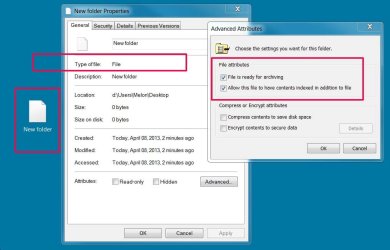
I am new to Windows 7 and somehow corrupted my right-click context menu. I lost the command for "New>Folder" altogether, used a registry key entry found online to get it back, but now when I click "New>Folder" I get a generic looking FILE icon. When I click Properties for this "folder" it is named "New Folder" but Type of file: shows File. Description is New Folder. I cannot place anything in this (because it's a file, not a folder.) This behavior occurs also when hitting the New Folder button in an explorer window. I have attached a screen shot (I think!) Hope someone can help.
Attachments
Last edited:
My Computer
- Computer type
- PC/Desktop
- Computer Manufacturer/Model Number
- custom build
- OS
- Windows 7 Professional
- CPU
- Intel Core i7 950 3.2GHz
- Motherboard
- Gigabyte - X58A-UD3R
- Memory
- Corsair XMS3 12GB (3x4GB) 1333mhz
- Graphics Card(s)
- Radeon HD 6670 1GB 128 bit DDR3 PCI Express 2.1 x16 HDCP Rea
- Hard Drives
- Crucial M4 CT064M4SSD2 2,5" 64GB SATA III MLC Internal SSD
Samsung 1T HD 103SJ 32M 7K
- Antivirus
- Microsoft Security Essentials Free
- Browser
- Firefox and IE9


