
Repair Your Computer option results in Error: 0xc000000f

Modifyinc

New member
Local time
2:27 AM
Messages
38
I have a Inspiron 5759 and I just recovered my Dell Factory Restore partition by using a PE Boot Disc with Imagex. Thankfully, by doing this, I was able to get my laptop back to the way when I bought it. Yes, I know, most will say why, but I have my reasons for this laptop.

Anyhow, I can boot into Windows with no problems. The issue is now when I hit F8 to enter the Advanced Boot Options and select the first option "Repair Your Computer" I get the following error:

Windows failed to start. Status: 0xc000000f
Info: The boot selection failed because a required device is inaccessible.

I can run a Startup Repair from my Windows disc, but since Windows loads without any issues, it always reports that no issues could be detected.

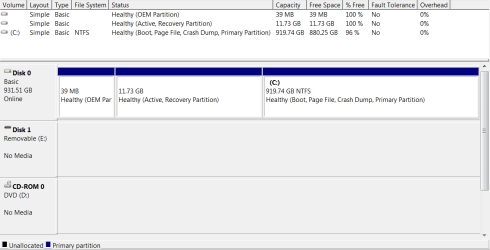
I have attached a screenshot of the drive partitions in disk management, if that will help resolve this.

Thank you
Mike
 

Attachments
  • Disk Partitions.PNG
    Disk Partitions.PNG
    14.2 KB · Views: 0

My Computer My Computer

At a glance

Windows 7AMD Athlon 64 X2 Dual Core Processor 5000 2.6...4GBRadeon 3200
Computer Manufacturer/Model Number
Custom Built
OS
Windows 7
CPU
AMD Athlon 64 X2 Dual Core Processor 5000 2.6 Ghz
Motherboard
Gigabyte MA78GM
Memory
4GB
Graphics Card(s)
Radeon 3200
Sound Card
RealTek HD
Monitor(s) Displays
Samsung LCD
Hard Drives
1TB WD
600GB WD
320GB WD
320GB WD
Hmmm..........that's a picture of a booted Win 7 PC with no sign of boot files on any partition? I can't recall seeing anything like that---no "system" flag on any partition.

The partitions other than C appear to be empty or near empty.
 

My Computer My Computer

At a glance

Windows 7 Home Premium SP1, 64-bitIntel Skylake i5-6600K, not overclocked8 GB HyperX DDR4-2666 (2 x 4 GB)none; graphics are integrated on CPU
Computer type
PC/Desktop
Computer Manufacturer/Model Number
Ignatz Special; 4 speed manual gearbox; factory air conditioning; one of one
OS
Windows 7 Home Premium SP1, 64-bit
CPU
Intel Skylake i5-6600K, not overclocked
Motherboard
AsRock Z170M Extreme 4, micro ATX
Memory
8 GB HyperX DDR4-2666 (2 x 4 GB)
Graphics Card(s)
none; graphics are integrated on CPU
Sound Card
onboard: Realtek ALC1150; external: USB Behringer UF0-202
Monitor(s) Displays
Dell S2340M 23 inch IPS
Screen Resolution
1600 x 900
Hard Drives
System: Crucial MX100 series SSD, 128 GB;
Data: Samsung Spinpoint 103SJ, 1 TB;
Backup: WD Caviar Green WD30EZRX-00D8PB0, 3 TB
PSU
Rosewill SilentNight 500 watt fanless, semi-modular
Case
Antec Solo II
Cooling
Noctua NH-U12S; Noctua F12 intake, Noctua S12A exhaust
Keyboard
Microsoft 200 6JH-00001 USB
Mouse
Dell or Microsoft optical wired; USB
Antivirus
Microsoft Security Essentials and Malwarebytes Premium
Browser
Pale Moon
Other Info
All fans PWM; speeds at idle: CPU circa 500 rpm; intake circa 600 rpm; exhaust circa 600 rpm; CPU temps 27 idle and 47 C load in a warm room (27 C/81 F) when running Intel Extreme Tuning Utility stress test.
Hmmm..........that's a picture of a booted Win 7 PC with no sign of boot files on any partition? I can't recall seeing anything like that---no "system" flag on any partition.

The partitions other than C appear to be empty or near empty.

The Recovery partition is not empty for sure, because I used it to image the C: (OS) partition and restore the laptop to its current working state. I don't know much about the OEM partition and why it's only 37MB rather than 100MB. I assume b/c it is a custom OEM from Dell maybe.

So, is there anyway to fix the F8, "Repair Your Computer" error? Could I just make a Windows Recovery partition or convert the OEM 37MB to a standard Windows Recovery somehow?
 

My Computer My Computer

At a glance

Windows 7AMD Athlon 64 X2 Dual Core Processor 5000 2.6...4GBRadeon 3200
Computer Manufacturer/Model Number
Custom Built
OS
Windows 7
CPU
AMD Athlon 64 X2 Dual Core Processor 5000 2.6 Ghz
Motherboard
Gigabyte MA78GM
Memory
4GB
Graphics Card(s)
Radeon 3200
Sound Card
RealTek HD
Monitor(s) Displays
Samsung LCD
Hard Drives
1TB WD
600GB WD
320GB WD
320GB WD
I have the same laptop as the OP. The 3 partitions are identical in size and naming as yours. Might I suggest that you have a file corruption issue. Dell offers a Windows 7 image file based on your Service Tag number. All things considered, I would wipe and run that to fully reset the machine. True - you will get whatever Dell adds, but that can be dealt with later.
Good luck
 

My Computer My Computer

At a glance

Windows 7 Enterprise 64bit Desktops; Windows ...AMD Athlon 2 X3; I5-6200 6th gen (Dell)8 Gig Desktop, 8Gig Laptop, 16Gig LaptopRadeon R5450 1Gig
Computer type
PC/Desktop
Computer Manufacturer/Model Number
Custom Desktop (2 alike) Dell inspiron 13" W10 Laptop Dell Inspiron 17 5759
OS
Windows 7 Enterprise 64bit Desktops; Windows 7 Professional 64Bit 17"Laptop
CPU
AMD Athlon 2 X3; I5-6200 6th gen (Dell)
Motherboard
Gigabyte GA 78LMT-USB3 (2 Desktops)
Memory
8 Gig Desktop, 8Gig Laptop, 16Gig Laptop
Graphics Card(s)
Radeon R5450 1Gig
Sound Card
Creative SB X-Fi Titanium Extreme Audio Desktop 1
Monitor(s) Displays
Dell 2419
Screen Resolution
1920x1080
Hard Drives
Crucial M500 500GB SSD Desktop 1 and Laptops
Samsung 850EVO 250GB - Desktop 2
PSU
Thermaltake 600watt
Case
Rosewill
Cooling
Scythe Typhoon 120mm
Keyboard
Kensington
Mouse
Logitech M310
Internet Speed
50/50
Antivirus
Avast
Browser
Firefox 68
Back
Top