
I have a Inspiron 5759 and I just recovered my Dell Factory Restore partition by using a PE Boot Disc with Imagex. Thankfully, by doing this, I was able to get my laptop back to the way when I bought it. Yes, I know, most will say why, but I have my reasons for this laptop.
Anyhow, I can boot into Windows with no problems. The issue is now when I hit F8 to enter the Advanced Boot Options and select the first option "Repair Your Computer" I get the following error:
Windows failed to start. Status: 0xc000000f
Info: The boot selection failed because a required device is inaccessible.
I can run a Startup Repair from my Windows disc, but since Windows loads without any issues, it always reports that no issues could be detected.
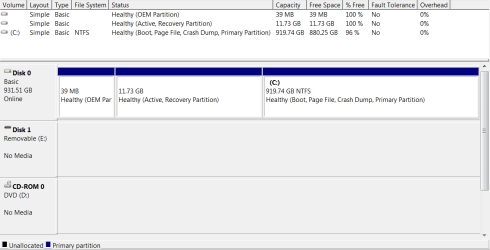
I have attached a screenshot of the drive partitions in disk management, if that will help resolve this.
Thank you
Mike
Anyhow, I can boot into Windows with no problems. The issue is now when I hit F8 to enter the Advanced Boot Options and select the first option "Repair Your Computer" I get the following error:
Windows failed to start. Status: 0xc000000f
Info: The boot selection failed because a required device is inaccessible.
I can run a Startup Repair from my Windows disc, but since Windows loads without any issues, it always reports that no issues could be detected.
I have attached a screenshot of the drive partitions in disk management, if that will help resolve this.
Thank you
Mike
Attachments
My Computer
At a glance
Windows 7AMD Athlon 64 X2 Dual Core Processor 5000 2.6...4GBRadeon 3200
- Computer Manufacturer/Model Number
- Custom Built
- OS
- Windows 7
- CPU
- AMD Athlon 64 X2 Dual Core Processor 5000 2.6 Ghz
- Motherboard
- Gigabyte MA78GM
- Memory
- 4GB
- Graphics Card(s)
- Radeon 3200
- Sound Card
- RealTek HD
- Monitor(s) Displays
- Samsung LCD
- Hard Drives
- 1TB WD
600GB WD
320GB WD
320GB WD


