My main issue is output of sfc /scannow: Windows Resource Protection found corrupt files but was unable to fix some of them.
The result of sfc /scanhealth is OK without errors. I also did chkdsk C: /F /R. In the attached log you can see there is many "Move File" but i do not see there errors, it seems the files was moved. But weird is these files are in the log repeatedly after each next run of sfc, dunno what is going on.
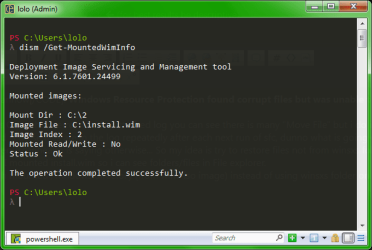
I have a suspicion winsxs folder is corrupt, even /scanhealth is saying otherwise... So my idea is try to restore files not from winsxs folder in my win7 installed on ssd, but from bootable ISO. I mounted install.wim so i can see folders/files in File explorer.
My question is how can i force sfc to use fresh mounted /windows directory (from win7 iso image) instead of using winsxs folder on my disk, which seems to be somehow corrupted?
The result of sfc /scanhealth is OK without errors. I also did chkdsk C: /F /R. In the attached log you can see there is many "Move File" but i do not see there errors, it seems the files was moved. But weird is these files are in the log repeatedly after each next run of sfc, dunno what is going on.
I have a suspicion winsxs folder is corrupt, even /scanhealth is saying otherwise... So my idea is try to restore files not from winsxs folder in my win7 installed on ssd, but from bootable ISO. I mounted install.wim so i can see folders/files in File explorer.
My question is how can i force sfc to use fresh mounted /windows directory (from win7 iso image) instead of using winsxs folder on my disk, which seems to be somehow corrupted?
My Computers
-
At a glance
Windows 7 Ultimate x64AMD Ryzen 332 GB DDR4NVIDIA GeForce GTX 1060 3GB- Computer type
- PC/Desktop
- OS
- Windows 7 Ultimate x64
- CPU
- AMD Ryzen 3
- Motherboard
- ASUS PRIME A320M-K
- Memory
- 32 GB DDR4
- Graphics Card(s)
- NVIDIA GeForce GTX 1060 3GB
- Screen Resolution
- 1920x1080
- Hard Drives
- NVMe
- Browser
- Firefox
-
- Computer type
- PC/Desktop