Repairing Windows Defender

Emcee

New member
Local time
11:42 PM
Messages
55
Location
Oregon
I'm having a problem with Windows Defender (x64) and can't find an exact fix for it. Every time I boot up, I get a "service could not initiate" type issue, although I don't get the error code everyone else seems to get.

I can immediately hit "restart service" and it's good to go, but it's a little annoying every time I boot up.

Defender isn't listed as a program to uninstall, and if I try running an installer from MS's site it just tells me Defender is already installed.

I've tried searching around but can't find a duplicate issue, nor do any of the suggested fixes for the similar problems work. I've already made sure the service is set to automatically start on boot.

Any idea how to repair it on 7? FYI, I don't have a recent restore point that I can use, so that's a no go.

Many thanks.
 

My Computer

OS
7 Professional x64 - SP1
CPU
Phenom II x4 955BE
Motherboard
Asus M4A88TD-V
Memory
2 x 4GB GSkill Ripjaws DDR3-1333
Graphics Card(s)
XFX Radeon 5770
Monitor(s) Displays
Samsung P2770HD - 27"; Samsung 953BW - 19"
Screen Resolution
1920x1080; 1440x900
Hard Drives
Corsair Force Series 3 180 GB; Samsung 7200RPM/500GB; Samsung 5400RPM/2TB (Backup)
PSU
Antec BP550 (80+ Cert.)
Case
Cooler Master HAF 912
Cooling
Cooler Master Hyper 212 Plus + 5x120mm fans
Keyboard
Logitech K750 Solar
Mouse
Razer Mamba
Why not use the simple approach. Download and install Microsoft Security Essentials as your AV. Defender is part of MSE. Defender will be turned off by default.
And you will have one of the best AV.

or

In lieu of Defender you could use Malwarebytes, rated one of the best

I use MSE and Malwarbytes for super protection.
 

My Computer

Computer type
PC/Desktop
Computer Manufacturer/Model Number
Dell XPS 420
OS
Windows 10, Home Clean Install
CPU
Intel Core2 processsor Q8200(2.33Ghz 1333FSB) Quad Core Tech
Motherboard
Dell
Memory
6 gb
Graphics Card(s)
ATI Radeon 256MB HD3650
Sound Card
Intergrated 7.1 Channel Audio
Monitor(s) Displays
Dell SP2009W 20"
Hard Drives
640 GB Serial ATA Hard drive
Cooling
Fan
Keyboard
Dell USB Keyboard
Mouse
Dell Premium Optical USB
Internet Speed
DSL 2.85
Thanks for the quick reply.

Will having Avast installed too conflict or complement?
 

My Computer

OS
7 Professional x64 - SP1
CPU
Phenom II x4 955BE
Motherboard
Asus M4A88TD-V
Memory
2 x 4GB GSkill Ripjaws DDR3-1333
Graphics Card(s)
XFX Radeon 5770
Monitor(s) Displays
Samsung P2770HD - 27"; Samsung 953BW - 19"
Screen Resolution
1920x1080; 1440x900
Hard Drives
Corsair Force Series 3 180 GB; Samsung 7200RPM/500GB; Samsung 5400RPM/2TB (Backup)
PSU
Antec BP550 (80+ Cert.)
Case
Cooler Master HAF 912
Cooling
Cooler Master Hyper 212 Plus + 5x120mm fans
Keyboard
Logitech K750 Solar
Mouse
Razer Mamba
Avast will conflict with MSE, they are both Anti Virus
Why not make a system restore point before any uninstall, just in case you do not like MSE
If Avast has an uninstall tool be sure to use it.

They do have an uninstall tool and I have found it for you
http://www.avast.com/uninstall-utility
 

My Computer

Computer type
PC/Desktop
Computer Manufacturer/Model Number
Dell XPS 420
OS
Windows 10, Home Clean Install
CPU
Intel Core2 processsor Q8200(2.33Ghz 1333FSB) Quad Core Tech
Motherboard
Dell
Memory
6 gb
Graphics Card(s)
ATI Radeon 256MB HD3650
Sound Card
Intergrated 7.1 Channel Audio
Monitor(s) Displays
Dell SP2009W 20"
Hard Drives
640 GB Serial ATA Hard drive
Cooling
Fan
Keyboard
Dell USB Keyboard
Mouse
Dell Premium Optical USB
Internet Speed
DSL 2.85
Many thanks, I'll try it out.
 

My Computer

OS
7 Professional x64 - SP1
CPU
Phenom II x4 955BE
Motherboard
Asus M4A88TD-V
Memory
2 x 4GB GSkill Ripjaws DDR3-1333
Graphics Card(s)
XFX Radeon 5770
Monitor(s) Displays
Samsung P2770HD - 27"; Samsung 953BW - 19"
Screen Resolution
1920x1080; 1440x900
Hard Drives
Corsair Force Series 3 180 GB; Samsung 7200RPM/500GB; Samsung 5400RPM/2TB (Backup)
PSU
Antec BP550 (80+ Cert.)
Case
Cooler Master HAF 912
Cooling
Cooler Master Hyper 212 Plus + 5x120mm fans
Keyboard
Logitech K750 Solar
Mouse
Razer Mamba
Great dont forget the System Restore first. What I like you may not.
 

My Computer

Computer type
PC/Desktop
Computer Manufacturer/Model Number
Dell XPS 420
OS
Windows 10, Home Clean Install
CPU
Intel Core2 processsor Q8200(2.33Ghz 1333FSB) Quad Core Tech
Motherboard
Dell
Memory
6 gb
Graphics Card(s)
ATI Radeon 256MB HD3650
Sound Card
Intergrated 7.1 Channel Audio
Monitor(s) Displays
Dell SP2009W 20"
Hard Drives
640 GB Serial ATA Hard drive
Cooling
Fan
Keyboard
Dell USB Keyboard
Mouse
Dell Premium Optical USB
Internet Speed
DSL 2.85
Thanks for the quick reply. Will having Avast installed too conflict or complement?
If both have realtime protection on, then very likely, will conflict. May be Avast is producing that problem..Seems that You've both of them to run at startup.Disable Avast from autostart (Win+R>msconfig>Startup tab>Uncheck Avast. Also go to the services tab and uncheck it's services. Apply and OK). Restart and see if the same pop-up comes again or not..EDIT: Oh i thought you were talking about the Avast+Defender combo.Go ahead and uninstall it if you wanna use MSE.Having two realtime protection from two resident programs of same category will very likely conflicts and pc lockups/freezes.
 

My Computer

Computer Manufacturer/Model Number
HCL
OS
Winbdows 7 ultimate x64 | Ubuntu 12.04 x64 LTS
CPU
Core 2 Duo e7400 @ 2.90GHz
Motherboard
Gigabyte G31M-ES2L
Memory
3GB DDR2
Graphics Card(s)
Asus Nvidia GTX 560Ti 1GB
Sound Card
On-board
Monitor(s) Displays
HCL eZeeBee 18.5" LCD
Screen Resolution
1366x768 @ 60Hz
Hard Drives
Western Digital 320GB
PSU
Corsair CX500 V2 500W
Cooling
Stock
Keyboard
Stock
Mouse
Stock
Internet Speed
15-25kBps D/L | 10kBps U/L | Hey Don't laugh
Sorry to dig this back out of the grave, but I keep forgetting to come back for another question.

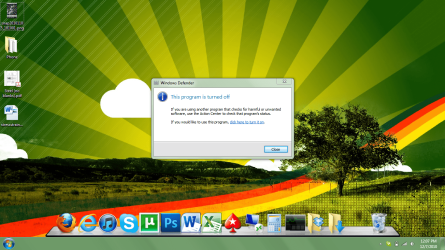
Every time I start up now, Windows Defender displays a message saying another program has been installed so it has been turned off, and gives me an option to turn it back on.

It's a small annoyance, but I'd still love to disable those startup notices.

EDIT: Got a pic for more info. I'll try the clean boot method.
 

Attachments

  • Error.png
    Error.png
    393 KB · Views: 86
Last edited:

My Computer

OS
7 Professional x64 - SP1
CPU
Phenom II x4 955BE
Motherboard
Asus M4A88TD-V
Memory
2 x 4GB GSkill Ripjaws DDR3-1333
Graphics Card(s)
XFX Radeon 5770
Monitor(s) Displays
Samsung P2770HD - 27"; Samsung 953BW - 19"
Screen Resolution
1920x1080; 1440x900
Hard Drives
Corsair Force Series 3 180 GB; Samsung 7200RPM/500GB; Samsung 5400RPM/2TB (Backup)
PSU
Antec BP550 (80+ Cert.)
Case
Cooler Master HAF 912
Cooling
Cooler Master Hyper 212 Plus + 5x120mm fans
Keyboard
Logitech K750 Solar
Mouse
Razer Mamba

My Computer

Computer type
PC/Desktop
Computer Manufacturer/Model Number
Dell XPS 420
OS
Windows 10, Home Clean Install
CPU
Intel Core2 processsor Q8200(2.33Ghz 1333FSB) Quad Core Tech
Motherboard
Dell
Memory
6 gb
Graphics Card(s)
ATI Radeon 256MB HD3650
Sound Card
Intergrated 7.1 Channel Audio
Monitor(s) Displays
Dell SP2009W 20"
Hard Drives
640 GB Serial ATA Hard drive
Cooling
Fan
Keyboard
Dell USB Keyboard
Mouse
Dell Premium Optical USB
Internet Speed
DSL 2.85
Sorry to dig this back out of the grave, but I keep forgetting to come back for another question.

Every time I start up now, Windows Defender displays a message saying another program has been installed so it has been turned off, and gives me an option to turn it back on.

It's a small annoyance, but I'd still love to disable those startup notices.

EDIT: Got a pic for more info. I'll try the clean boot method.

Make sure anything pertaining to defender is unchecked here.
View attachment 121555
Common problem easy fix.
 
Last edited:

My Computer

Computer type
PC/Desktop
Computer Manufacturer/Model Number
Acer M5641
OS
Windows 7 Home Premium 64bit
CPU
Q6600
Motherboard
Nvidia MCP73PV
Memory
4GB.
Graphics Card(s)
Sapphire Vapor-X 5750
Sound Card
XFI Extreem music
Monitor(s) Displays
Acer X223W
Screen Resolution
1680x1050
Hard Drives
WD10 02FAEX
WD64 00AAKS
PSU
stock 450w
Case
acer
Cooling
stock
Keyboard
Microsoft Digital Media Pro.
Mouse
Logitech MX620
Internet Speed
49.51Mbs down 4.98Mbs up 17.6ms ping
Antivirus
MSE
Browser
Waterfox
Other Info
Shaw Cable
Netgear R6200
Make sure anything pertaining to defender is unchecked here.
View attachment 121555
Common problem easy fix.

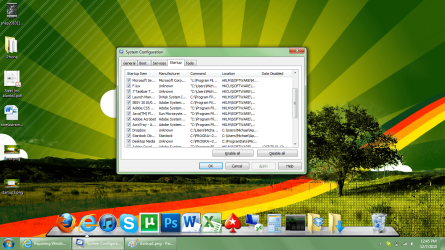
The only one relevant in the startup list is MS Security Essentials. Defender is obviously disabled in services, too. It just feels I need to know it's disabled.
 

My Computer

OS
7 Professional x64 - SP1
CPU
Phenom II x4 955BE
Motherboard
Asus M4A88TD-V
Memory
2 x 4GB GSkill Ripjaws DDR3-1333
Graphics Card(s)
XFX Radeon 5770
Monitor(s) Displays
Samsung P2770HD - 27"; Samsung 953BW - 19"
Screen Resolution
1920x1080; 1440x900
Hard Drives
Corsair Force Series 3 180 GB; Samsung 7200RPM/500GB; Samsung 5400RPM/2TB (Backup)
PSU
Antec BP550 (80+ Cert.)
Case
Cooler Master HAF 912
Cooling
Cooler Master Hyper 212 Plus + 5x120mm fans
Keyboard
Logitech K750 Solar
Mouse
Razer Mamba
Show me a capture of your system config screen. There is one in there that is pretty obscure.
Can't recall the name off hand, I'll do some digging in the mean time.
 

My Computer

Computer type
PC/Desktop
Computer Manufacturer/Model Number
Acer M5641
OS
Windows 7 Home Premium 64bit
CPU
Q6600
Motherboard
Nvidia MCP73PV
Memory
4GB.
Graphics Card(s)
Sapphire Vapor-X 5750
Sound Card
XFI Extreem music
Monitor(s) Displays
Acer X223W
Screen Resolution
1680x1050
Hard Drives
WD10 02FAEX
WD64 00AAKS
PSU
stock 450w
Case
acer
Cooling
stock
Keyboard
Microsoft Digital Media Pro.
Mouse
Logitech MX620
Internet Speed
49.51Mbs down 4.98Mbs up 17.6ms ping
Antivirus
MSE
Browser
Waterfox
Other Info
Shaw Cable
Netgear R6200
Here ya are.
 

Attachments

  • startup1.png
    startup1.png
    361.3 KB · Views: 34
  • startup2.png
    startup2.png
    362.4 KB · Views: 17

My Computer

OS
7 Professional x64 - SP1
CPU
Phenom II x4 955BE
Motherboard
Asus M4A88TD-V
Memory
2 x 4GB GSkill Ripjaws DDR3-1333
Graphics Card(s)
XFX Radeon 5770
Monitor(s) Displays
Samsung P2770HD - 27"; Samsung 953BW - 19"
Screen Resolution
1920x1080; 1440x900
Hard Drives
Corsair Force Series 3 180 GB; Samsung 7200RPM/500GB; Samsung 5400RPM/2TB (Backup)
PSU
Antec BP550 (80+ Cert.)
Case
Cooler Master HAF 912
Cooling
Cooler Master Hyper 212 Plus + 5x120mm fans
Keyboard
Logitech K750 Solar
Mouse
Razer Mamba
I unfortunately can't see all startup items.I had posted a solution here months ago
but do you think I could find it?
 

My Computer

Computer type
PC/Desktop
Computer Manufacturer/Model Number
Acer M5641
OS
Windows 7 Home Premium 64bit
CPU
Q6600
Motherboard
Nvidia MCP73PV
Memory
4GB.
Graphics Card(s)
Sapphire Vapor-X 5750
Sound Card
XFI Extreem music
Monitor(s) Displays
Acer X223W
Screen Resolution
1680x1050
Hard Drives
WD10 02FAEX
WD64 00AAKS
PSU
stock 450w
Case
acer
Cooling
stock
Keyboard
Microsoft Digital Media Pro.
Mouse
Logitech MX620
Internet Speed
49.51Mbs down 4.98Mbs up 17.6ms ping
Antivirus
MSE
Browser
Waterfox
Other Info
Shaw Cable
Netgear R6200
I unfortunately can't see all startup items.I had posted a solution here months ago
but do you think I could find it?

All others on the list have been unchecked. I figured they weren't relevant.

I'll look around for your fix.
 

My Computer

OS
7 Professional x64 - SP1
CPU
Phenom II x4 955BE
Motherboard
Asus M4A88TD-V
Memory
2 x 4GB GSkill Ripjaws DDR3-1333
Graphics Card(s)
XFX Radeon 5770
Monitor(s) Displays
Samsung P2770HD - 27"; Samsung 953BW - 19"
Screen Resolution
1920x1080; 1440x900
Hard Drives
Corsair Force Series 3 180 GB; Samsung 7200RPM/500GB; Samsung 5400RPM/2TB (Backup)
PSU
Antec BP550 (80+ Cert.)
Case
Cooler Master HAF 912
Cooling
Cooler Master Hyper 212 Plus + 5x120mm fans
Keyboard
Logitech K750 Solar
Mouse
Razer Mamba
Now that I think about it more it was MSASCui.exe that needed to be disabled
in system config.
 

My Computer

Computer type
PC/Desktop
Computer Manufacturer/Model Number
Acer M5641
OS
Windows 7 Home Premium 64bit
CPU
Q6600
Motherboard
Nvidia MCP73PV
Memory
4GB.
Graphics Card(s)
Sapphire Vapor-X 5750
Sound Card
XFI Extreem music
Monitor(s) Displays
Acer X223W
Screen Resolution
1680x1050
Hard Drives
WD10 02FAEX
WD64 00AAKS
PSU
stock 450w
Case
acer
Cooling
stock
Keyboard
Microsoft Digital Media Pro.
Mouse
Logitech MX620
Internet Speed
49.51Mbs down 4.98Mbs up 17.6ms ping
Antivirus
MSE
Browser
Waterfox
Other Info
Shaw Cable
Netgear R6200
Back
Top