
Solved Replace Windows Vista Calender with a suitable Windows 7 program

iko22

New member
Pro User
VIP
Local time
12:22 AM
Messages
2,031
Is there a program available for Windows 7 that can read and modify iCalendar Files? Microsoft depreciated Vista's Calendar program when the company rolled out the Windows 7 operating system.

I really find the Vista calendar program very useful and I want something similar to that for the Windows 7 OS. I particularly liked the Aero Glass look and feel, scheduling features, and ability to run program at startup without requiring an Internet connection.

Currently I am using the Office 2013 Lesson Plan template to define a month. The difficulty with that is I can't schedule it to run at start up and automatically update and notify recurring tasks after the user session starts; plus the Word document retains clutter and superfluous menu ribbons
that are not that necessary in maintaining an up to date calendar file.
 

My Computer

Computer type
PC/Desktop
OS
Windows 7 x64, Vista x64, 8.1 smartphone
CPU
Intel E8400 65W 64-bit
Motherboard
Gigabyte EP45-UD3LR
Memory
DDR2 2 x 2GB, 1GB x 2
Graphics Card(s)
XFX Radeon HD5750
Sound Card
AMD High Definition Audio; Realtek High Definition Audio
Monitor(s) Displays
iiyama prolite X2377HDS
Screen Resolution
1920 x 1080
Hard Drives
500GB 7200 rpm Seagate ST3500413AS 16MB, 500GB 5400 rpm Toshiba MQ02ABF050H 32MB, 200GB 7200 rpm Seagate ST3200820AS 8MB, 2TB 7200 rpm Western Digital WD20EZRX 64MB
PSU
Enermax Liberty Modular
Case
Antec P193 Midi Tower
Keyboard
Mionix ZIBAL 60
Mouse
Razer USB 2.0 Diamondback Mouse or Huion Graphics Tablet
Browser
Internet Explorer, Lunascape, Firefox, Opera, Avast Safezone
Yes the Vista calendar was nice, but there is no equivalent for Windows 7, unless you look for a 3rd party one. The only alternative is the calendar in Outlook, which is part of Office 2013 that you seem to have.
 

My Computer

Computer type
PC/Desktop
Computer Manufacturer/Model Number
Self built using existing case
OS
Windows 7 Home Premium 64 bit sp1
CPU
Intel i5 3570 3.4Ghz Ivy Bridge SKT 1155 quad core
Motherboard
Gigabyte Z77-HD3 SKT 1155 2xSata 3, 4x USB 3.0
Memory
G-Skill Rip Jaws 16Gb (8x2) DDR3 -1600 PC3 12800 CL 10 red
Graphics Card(s)
Gigabyte NVIDIA GT610 1Gb DDR3 810/1200 PCI-E 2.0 Silent
Sound Card
NVIDIA High Definition & Realtech High Definition Audio
Monitor(s) Displays
2 x Philips 226V4L 16:9 aspect ratio
Screen Resolution
1920 x 1080 HD
Hard Drives
Samsung 840 Pro 256gb SSD, SATA 3.
Hitachi Touro Portable 1tb, USB 3.0 HDD used for image b/ups.
PSU
Corsair VS450
Case
Codeng
Cooling
PSU fan & CPU fan
Keyboard
Logitech
Mouse
Logitech Wireless trackball M570
Internet Speed
Wireless 3G. 3mg down & 550kb up.
Antivirus
Bitdefender Internet Security 2020
Browser
Opera (Current Version) & Firefox
Other Info
MS Office 2013 Pro. Davis weather station software. MGE Nova 600 avr UPS.
Yes, hello Ranger4, what third party programs would you recommend? If they would support import or open of iCalendar files then that would be excellent, and better still if they had Aero Glass UI themes.

The programs I looked at seemed to implement XP theme or are more like hour schedulers than month planners. I don't know how many programs there are out there. I wondered if anyone else knew any better from their own experience?

Also considered Outlook before starting this thread. Outlook is another program that Microsoft have started depreciating, and now is only available on some editions of Office.

Regardless, I don't particularly like Outlook for some reason; its email dependent and it has too much 'attitude' me thinks. Although Outlook is pitched as a web-based calendar program, I don't personally find it a replacement for either Word Templates or Windows Calendar.

So, I'm still looking for a suitable Windows 7 compatible program, featuring Aero Glass theme, monthly planning and independent of the Internet.
 

My Computer

Computer type
PC/Desktop
OS
Windows 7 x64, Vista x64, 8.1 smartphone
CPU
Intel E8400 65W 64-bit
Motherboard
Gigabyte EP45-UD3LR
Memory
DDR2 2 x 2GB, 1GB x 2
Graphics Card(s)
XFX Radeon HD5750
Sound Card
AMD High Definition Audio; Realtek High Definition Audio
Monitor(s) Displays
iiyama prolite X2377HDS
Screen Resolution
1920 x 1080
Hard Drives
500GB 7200 rpm Seagate ST3500413AS 16MB, 500GB 5400 rpm Toshiba MQ02ABF050H 32MB, 200GB 7200 rpm Seagate ST3200820AS 8MB, 2TB 7200 rpm Western Digital WD20EZRX 64MB
PSU
Enermax Liberty Modular
Case
Antec P193 Midi Tower
Keyboard
Mionix ZIBAL 60
Mouse
Razer USB 2.0 Diamondback Mouse or Huion Graphics Tablet
Browser
Internet Explorer, Lunascape, Firefox, Opera, Avast Safezone
Have you tried the Vista calendar in 7? It seems to work. I just reached over to my vista partition and clicked wincal.exe.
 

My Computers

System One System Two

  • Computer type
    PC/Desktop
    OS
    7 X64
    CPU
    i5 8400
    Motherboard
    gigabyte b365m ds3h
    Memory
    2x8gb 3200mhz
    Hard Drives
    various
    PSU
    pure power 11 400w cm
    Case
    Coolermaster
    Cooling
    cryorig m9i
  • Computer type
    PC/Desktop
    OS
    7x64
    CPU
    g5400
    Motherboard
    ga b365m ds3h
    Memory
    8gb ddr4 2400
    PSU
    xfx pro 450w
Vista calendar Works in win7. It is quite easy.
 

My Computers

System One System Two

  • Computer type
    PC/Desktop
    OS
    7 X64
    CPU
    i5 8400
    Motherboard
    gigabyte b365m ds3h
    Memory
    2x8gb 3200mhz
    Hard Drives
    various
    PSU
    pure power 11 400w cm
    Case
    Coolermaster
    Cooling
    cryorig m9i
  • Computer type
    PC/Desktop
    OS
    7x64
    CPU
    g5400
    Motherboard
    ga b365m ds3h
    Memory
    8gb ddr4 2400
    PSU
    xfx pro 450w
Hello SIW2,

Windows 7 took out the Calendar program after I upgraded from Vista, and I've not been able to try Windows Calender in 7.

I once encountered various people discussing replacing windows calender in 7 on some forum site or other. Only, when I clicked on their link provided to download the wincal program, I discovered that this link had been broken on the corresponding Microsoft site.


Thats a neat idea, I'll have a go at your suggestion. Currently, my Vista system drive does not run as a virtual machine or in a dual boot configuration. However, I considered there would be no harm in re-wiring this HD drive into a spare SATA slot and retain the Windows 7 boot order, and retrieve the wincal program that way.

When starting the computer, Windows 7 requested to run CHKDSK on the HDD. ... well, CHKDSK is taking an absolute age in completing ... never seen it take so long before.

I'll report back when CHKDSK has completed and I am able to copy the wincal program across.
 

My Computer

Computer type
PC/Desktop
OS
Windows 7 x64, Vista x64, 8.1 smartphone
CPU
Intel E8400 65W 64-bit
Motherboard
Gigabyte EP45-UD3LR
Memory
DDR2 2 x 2GB, 1GB x 2
Graphics Card(s)
XFX Radeon HD5750
Sound Card
AMD High Definition Audio; Realtek High Definition Audio
Monitor(s) Displays
iiyama prolite X2377HDS
Screen Resolution
1920 x 1080
Hard Drives
500GB 7200 rpm Seagate ST3500413AS 16MB, 500GB 5400 rpm Toshiba MQ02ABF050H 32MB, 200GB 7200 rpm Seagate ST3200820AS 8MB, 2TB 7200 rpm Western Digital WD20EZRX 64MB
PSU
Enermax Liberty Modular
Case
Antec P193 Midi Tower
Keyboard
Mionix ZIBAL 60
Mouse
Razer USB 2.0 Diamondback Mouse or Huion Graphics Tablet
Browser
Internet Explorer, Lunascape, Firefox, Opera, Avast Safezone

My Computers

System One System Two

  • Computer type
    PC/Desktop
    OS
    7 X64
    CPU
    i5 8400
    Motherboard
    gigabyte b365m ds3h
    Memory
    2x8gb 3200mhz
    Hard Drives
    various
    PSU
    pure power 11 400w cm
    Case
    Coolermaster
    Cooling
    cryorig m9i
  • Computer type
    PC/Desktop
    OS
    7x64
    CPU
    g5400
    Motherboard
    ga b365m ds3h
    Memory
    8gb ddr4 2400
    PSU
    xfx pro 450w
That's what I thought was odd. I clean installed Windows 8 x64 Pro, and I have the Calendar program, just like as in Vista.
:)
 

My Computer

Computer type
PC/Desktop
Computer Manufacturer/Model Number
HP xw8600 Workstation
OS
Windows 8 Pro x64
CPU
Two Xeon Core2 Quad 3.2 GHz Processors
Motherboard
Proprietary
Memory
16 GB DDR2 800 MHz
Graphics Card(s)
nVidia Quadro FX 3800 PCI
Sound Card
Realtek HD Audio
Monitor(s) Displays
Samsung SyncMaster 213T 21" 4x3 Flat Screen
Screen Resolution
1600x1200
Hard Drives
Two Seagate Cheetah 300 GB SAS Disks
PSU
Proprietary
Case
HP xw8600 Workstation Case
Cooling
Two CPU Fans and a Larger Case Fan
Keyboard
PS/2 Keyboard
Mouse
Microsoft USB Optical Mouse
Internet Speed
7 mbps
Antivirus
Windows Defender
Browser
Firefox ESR 102
Other Info
Two LSI 3000 SAS Adapters
He is using win7, not win8.
:confused:
 

My Computers

System One System Two

  • Computer type
    PC/Desktop
    OS
    7 X64
    CPU
    i5 8400
    Motherboard
    gigabyte b365m ds3h
    Memory
    2x8gb 3200mhz
    Hard Drives
    various
    PSU
    pure power 11 400w cm
    Case
    Coolermaster
    Cooling
    cryorig m9i
  • Computer type
    PC/Desktop
    OS
    7x64
    CPU
    g5400
    Motherboard
    ga b365m ds3h
    Memory
    8gb ddr4 2400
    PSU
    xfx pro 450w
He is using win7, not win8.
:confused:

No I understood that. What I mean to say is, if I have it in Windows 8, he'd surely have it in Windows 7, no?
 

My Computer

Computer type
PC/Desktop
Computer Manufacturer/Model Number
HP xw8600 Workstation
OS
Windows 8 Pro x64
CPU
Two Xeon Core2 Quad 3.2 GHz Processors
Motherboard
Proprietary
Memory
16 GB DDR2 800 MHz
Graphics Card(s)
nVidia Quadro FX 3800 PCI
Sound Card
Realtek HD Audio
Monitor(s) Displays
Samsung SyncMaster 213T 21" 4x3 Flat Screen
Screen Resolution
1600x1200
Hard Drives
Two Seagate Cheetah 300 GB SAS Disks
PSU
Proprietary
Case
HP xw8600 Workstation Case
Cooling
Two CPU Fans and a Larger Case Fan
Keyboard
PS/2 Keyboard
Mouse
Microsoft USB Optical Mouse
Internet Speed
7 mbps
Antivirus
Windows Defender
Browser
Firefox ESR 102
Other Info
Two LSI 3000 SAS Adapters
It's not in 7.
 

My Computers

System One System Two

  • Computer type
    PC/Desktop
    OS
    7 X64
    CPU
    i5 8400
    Motherboard
    gigabyte b365m ds3h
    Memory
    2x8gb 3200mhz
    Hard Drives
    various
    PSU
    pure power 11 400w cm
    Case
    Coolermaster
    Cooling
    cryorig m9i
  • Computer type
    PC/Desktop
    OS
    7x64
    CPU
    g5400
    Motherboard
    ga b365m ds3h
    Memory
    8gb ddr4 2400
    PSU
    xfx pro 450w
There are a few reg entries as well. No need to install Vista.

View attachment 398523

View attachment 398524

OK I give up with searching Vista , I'll implement your reg entries as my Windows 7 wont have those.


What file permissions do I need to assign to the wincal.exe and wincal.exe.mui files, once they'd been transfered across, would you know?
 

My Computer

Computer type
PC/Desktop
OS
Windows 7 x64, Vista x64, 8.1 smartphone
CPU
Intel E8400 65W 64-bit
Motherboard
Gigabyte EP45-UD3LR
Memory
DDR2 2 x 2GB, 1GB x 2
Graphics Card(s)
XFX Radeon HD5750
Sound Card
AMD High Definition Audio; Realtek High Definition Audio
Monitor(s) Displays
iiyama prolite X2377HDS
Screen Resolution
1920 x 1080
Hard Drives
500GB 7200 rpm Seagate ST3500413AS 16MB, 500GB 5400 rpm Toshiba MQ02ABF050H 32MB, 200GB 7200 rpm Seagate ST3200820AS 8MB, 2TB 7200 rpm Western Digital WD20EZRX 64MB
PSU
Enermax Liberty Modular
Case
Antec P193 Midi Tower
Keyboard
Mionix ZIBAL 60
Mouse
Razer USB 2.0 Diamondback Mouse or Huion Graphics Tablet
Browser
Internet Explorer, Lunascape, Firefox, Opera, Avast Safezone
I only used what is in those zip files.

Then wincal should be under control panel>Default programs.

wincaldefaults.jpg
 

My Computers

System One System Two

  • Computer type
    PC/Desktop
    OS
    7 X64
    CPU
    i5 8400
    Motherboard
    gigabyte b365m ds3h
    Memory
    2x8gb 3200mhz
    Hard Drives
    various
    PSU
    pure power 11 400w cm
    Case
    Coolermaster
    Cooling
    cryorig m9i
  • Computer type
    PC/Desktop
    OS
    7x64
    CPU
    g5400
    Motherboard
    ga b365m ds3h
    Memory
    8gb ddr4 2400
    PSU
    xfx pro 450w
Open File - Security Warning : Without Digital Signature

That is fantastic!!! Thats more than I could have hoped for. The original Vista program now launches from my Windows 7.

There is a slight snag, or perhaps I'm still missing something. Problem seems to be I get an "Open File - Security Warning. The publisher could not be verified. Are you sure you want to run this program?" dialog box, every time wincal is launched.

What would be needed to register in order that the publisher be verified?
 

My Computer

Computer type
PC/Desktop
OS
Windows 7 x64, Vista x64, 8.1 smartphone
CPU
Intel E8400 65W 64-bit
Motherboard
Gigabyte EP45-UD3LR
Memory
DDR2 2 x 2GB, 1GB x 2
Graphics Card(s)
XFX Radeon HD5750
Sound Card
AMD High Definition Audio; Realtek High Definition Audio
Monitor(s) Displays
iiyama prolite X2377HDS
Screen Resolution
1920 x 1080
Hard Drives
500GB 7200 rpm Seagate ST3500413AS 16MB, 500GB 5400 rpm Toshiba MQ02ABF050H 32MB, 200GB 7200 rpm Seagate ST3200820AS 8MB, 2TB 7200 rpm Western Digital WD20EZRX 64MB
PSU
Enermax Liberty Modular
Case
Antec P193 Midi Tower
Keyboard
Mionix ZIBAL 60
Mouse
Razer USB 2.0 Diamondback Mouse or Huion Graphics Tablet
Browser
Internet Explorer, Lunascape, Firefox, Opera, Avast Safezone
Rt click>ProPerties>check unblock>Apply>OK
 

My Computers

System One System Two

  • Computer type
    PC/Desktop
    OS
    7 X64
    CPU
    i5 8400
    Motherboard
    gigabyte b365m ds3h
    Memory
    2x8gb 3200mhz
    Hard Drives
    various
    PSU
    pure power 11 400w cm
    Case
    Coolermaster
    Cooling
    cryorig m9i
  • Computer type
    PC/Desktop
    OS
    7x64
    CPU
    g5400
    Motherboard
    ga b365m ds3h
    Memory
    8gb ddr4 2400
    PSU
    xfx pro 450w
Yes the files from each directories had needed unblocking from another computer.

Having unblocked each file, I still receive the Signature verification error. What could be the matter? I re-did (re-merged) the registry entries too.
 

My Computer

Computer type
PC/Desktop
OS
Windows 7 x64, Vista x64, 8.1 smartphone
CPU
Intel E8400 65W 64-bit
Motherboard
Gigabyte EP45-UD3LR
Memory
DDR2 2 x 2GB, 1GB x 2
Graphics Card(s)
XFX Radeon HD5750
Sound Card
AMD High Definition Audio; Realtek High Definition Audio
Monitor(s) Displays
iiyama prolite X2377HDS
Screen Resolution
1920 x 1080
Hard Drives
500GB 7200 rpm Seagate ST3500413AS 16MB, 500GB 5400 rpm Toshiba MQ02ABF050H 32MB, 200GB 7200 rpm Seagate ST3200820AS 8MB, 2TB 7200 rpm Western Digital WD20EZRX 64MB
PSU
Enermax Liberty Modular
Case
Antec P193 Midi Tower
Keyboard
Mionix ZIBAL 60
Mouse
Razer USB 2.0 Diamondback Mouse or Huion Graphics Tablet
Browser
Internet Explorer, Lunascape, Firefox, Opera, Avast Safezone
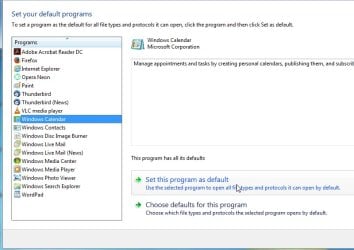
I don't have that issue.

wincla-compat.jpg
 

My Computers

System One System Two

  • Computer type
    PC/Desktop
    OS
    7 X64
    CPU
    i5 8400
    Motherboard
    gigabyte b365m ds3h
    Memory
    2x8gb 3200mhz
    Hard Drives
    various
    PSU
    pure power 11 400w cm
    Case
    Coolermaster
    Cooling
    cryorig m9i
  • Computer type
    PC/Desktop
    OS
    7x64
    CPU
    g5400
    Motherboard
    ga b365m ds3h
    Memory
    8gb ddr4 2400
    PSU
    xfx pro 450w
Ah, wait a moment: I restarted the computer, and noticed at the beginning of the user session that wincal starts up automatically.

After wincal starts automatically at the beginning of the user session then the publisher digital signage dialogue is not present.

However, should wincal be run manually from the Start Menu, then that is when the computer prompts the user with the warning.

---------
Edit: The computer re-blocks wincal.exe when exiting the Properties window too. If I unblock wincal.exe, click accept, then click OK to exit, then immediately return to wincal.exe Properties, I find the system has blocked the program again, even before the user has had chance at running program again.
 
Last edited:

My Computer

Computer type
PC/Desktop
OS
Windows 7 x64, Vista x64, 8.1 smartphone
CPU
Intel E8400 65W 64-bit
Motherboard
Gigabyte EP45-UD3LR
Memory
DDR2 2 x 2GB, 1GB x 2
Graphics Card(s)
XFX Radeon HD5750
Sound Card
AMD High Definition Audio; Realtek High Definition Audio
Monitor(s) Displays
iiyama prolite X2377HDS
Screen Resolution
1920 x 1080
Hard Drives
500GB 7200 rpm Seagate ST3500413AS 16MB, 500GB 5400 rpm Toshiba MQ02ABF050H 32MB, 200GB 7200 rpm Seagate ST3200820AS 8MB, 2TB 7200 rpm Western Digital WD20EZRX 64MB
PSU
Enermax Liberty Modular
Case
Antec P193 Midi Tower
Keyboard
Mionix ZIBAL 60
Mouse
Razer USB 2.0 Diamondback Mouse or Huion Graphics Tablet
Browser
Internet Explorer, Lunascape, Firefox, Opera, Avast Safezone
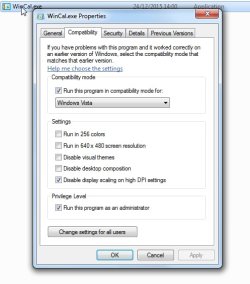
Works fine here.

Use the settings in my screenshot in my previous post

Did you also adjust the properties on wincal .exe in programfiles (x86)
 

My Computers

System One System Two

  • Computer type
    PC/Desktop
    OS
    7 X64
    CPU
    i5 8400
    Motherboard
    gigabyte b365m ds3h
    Memory
    2x8gb 3200mhz
    Hard Drives
    various
    PSU
    pure power 11 400w cm
    Case
    Coolermaster
    Cooling
    cryorig m9i
  • Computer type
    PC/Desktop
    OS
    7x64
    CPU
    g5400
    Motherboard
    ga b365m ds3h
    Memory
    8gb ddr4 2400
    PSU
    xfx pro 450w
What file permissions do I need to assign ?

I think I mean the file attributes.

Works fine here.

Use the settings in my screenshot in my previous post

Did you also adjust the properties on wincal .exe in programfiles (x86)

Doesn't work when I run program from start menu. OK when program auto starts as a scheduled task.

Perhaps I did things in wrong order? I'll rollback system to point before reg enteries were merged. Then I'll try unblovking files in download folder before they are finally copied to the program folders. Then I'll merge the reg enteries AFTER the files exist in the program folders.

I'll use your settings shown in the screenshot.
 

My Computer

Computer type
PC/Desktop
OS
Windows 7 x64, Vista x64, 8.1 smartphone
CPU
Intel E8400 65W 64-bit
Motherboard
Gigabyte EP45-UD3LR
Memory
DDR2 2 x 2GB, 1GB x 2
Graphics Card(s)
XFX Radeon HD5750
Sound Card
AMD High Definition Audio; Realtek High Definition Audio
Monitor(s) Displays
iiyama prolite X2377HDS
Screen Resolution
1920 x 1080
Hard Drives
500GB 7200 rpm Seagate ST3500413AS 16MB, 500GB 5400 rpm Toshiba MQ02ABF050H 32MB, 200GB 7200 rpm Seagate ST3200820AS 8MB, 2TB 7200 rpm Western Digital WD20EZRX 64MB
PSU
Enermax Liberty Modular
Case
Antec P193 Midi Tower
Keyboard
Mionix ZIBAL 60
Mouse
Razer USB 2.0 Diamondback Mouse or Huion Graphics Tablet
Browser
Internet Explorer, Lunascape, Firefox, Opera, Avast Safezone
Back
Top