Replacing a failing hard drive while keeping my OS, software etc.

Gi1919

New member
Local time
12:09 AM
Messages
20
Hi everyone,

The hard drive on my HP Pavilion g6-1331sf laptop is failing and I would like to replace it.

I would like to :

  • image to an external hard drive before buying the new internal drive: I will only get one if the imaging procedure works all the way through
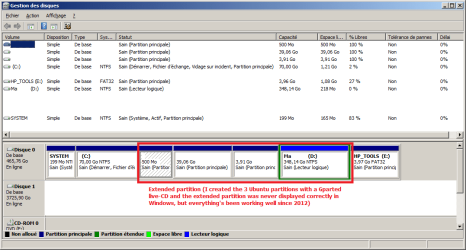
  • image all the partitions except the biggest one, D:, so as not to tire the drive out too much (I'm attaching a screencap of Disk Management)
Is it possible? Which tool should I use? Do you have a list of things I should check before I get started?


(I'm planning to get a regular hard drive, probably a 1 TB.)


Thanks! :)
 

Attachments

  • DrivesGi1919.png
    DrivesGi1919.png
    23 KB · Views: 5

My Computer My Computer

At a glance

Windows 7 Home Premium 64 bits
Computer type
PC/Desktop
Computer Manufacturer/Model Number
HP Pavilion g6-1331sf laptop
OS
Windows 7 Home Premium 64 bits
The free version of Macrium Reflect will image the drive to a new drive. Image the entire drive, not just certain partitions. It won't cause a problem with the old drive. Do a disc "Image" and not a "clone" as bad blocks and data get transferred along with good data with a clone.
Macrium Software | Macrium Reflect Free
 

My Computer My Computer

At a glance

Windows 10 64 bitIntel i7 6700K16GB Corsair DominatorIntel CPU Graphics
Computer type
PC/Desktop
Computer Manufacturer/Model Number
My Own Build
OS
Windows 10 64 bit
CPU
Intel i7 6700K
Motherboard
ASUS ROG Maximus VIII Hero
Memory
16GB Corsair Dominator
Graphics Card(s)
Intel CPU Graphics
Sound Card
RealTek
Monitor(s) Displays
27" Dell S2719dgf
Screen Resolution
2560X1440
Hard Drives
1 TB Samsung 850 EVO SSD for Win 10 Pro
500GB Samsung 850 EVO SSD for Win 10 Insider
2 TB drive for backup
PSU
EVGA Supernova 750G2
Case
BeQuiet Silent Base 600
Cooling
Deepcool Captain 120EX
Keyboard
Microsoft Wireless 2000
Mouse
Microsoft wireless
Internet Speed
100 MB/sec (Cable)
Antivirus
Microsoft Defender and Malwarebytes
Browser
Edge/Firefox
Other Info
Cakewalk (Sonar) by BandLab and Studio One 4.1 Pro recording studio software. MOTU 896Mk3 Hybrid recording interface, Frontier Tranzport wireless control unit, Behringer X-Touch Control Surface.
Five USB connected optical drives for CD Audio production using Nero BurningROM
I would do a clean install often bad blocks will be written to the new hard drive second you don't know the state of Windows if the disk is faulty
 

My Computer My Computer

At a glance

win 8 32 bit
Computer type
PC/Desktop
OS
win 8 32 bit
Thanks guys.

I would do a clean install often bad blocks will be written to the new hard drive second you don't know the state of Windows if the disk is faulty
Interesting. It would mean a lot more work though... Maybe I can try the imaging-restoring first, then, if it doesn't live up to my expectations, do a clean install instead?

Image the entire drive, not just certain partitions. It won't cause a problem with the old drive.
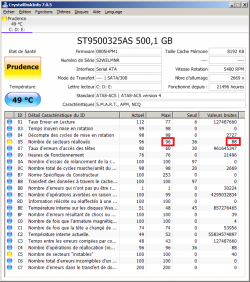
Really? Because I am in the process of backing up my data again, and I already have 2 more reallocated sectors than I did a few hours ago... And if I'm understanding the attached screencap correctly, I'm getting dangerously close to the end of the reserve. I don't think the drive will enjoy the imaging process at all, I'm honestly afraid it just won't work all the way... That's why I wanted to image as little stuff as I could. Is that not possible?
 

Attachments

  • CrystalDiskInfo20170709.png
    CrystalDiskInfo20170709.png
    38.5 KB · Views: 1

My Computer My Computer

At a glance

Windows 7 Home Premium 64 bits
Computer type
PC/Desktop
Computer Manufacturer/Model Number
HP Pavilion g6-1331sf laptop
OS
Windows 7 Home Premium 64 bits
I hope you are doing a one-pass full image of each of the necessary partitions of that increasingly problematic hard-drive. Back in the old days, Windows 3.1 - Windows 98SE, I would suspect a fork in the road -- either a physically-failing hard-drive or an under-powered hard-drive 'cause the power supply is not giving the HD enough juice to run efficiently. I'm not sure if this fork in the road applies to your computer.
 

My Computer My Computer

At a glance

Windows 7 Professional 64-bitDesktop i5; Acers i5 & i7desktop 16GB; 1 Acer 8GB & 1 Acer 16GB
Computer type
PC/Desktop
Computer Manufacturer/Model Number
Antec desktop; Acer Aspire laptops
OS
Windows 7 Professional 64-bit
CPU
Desktop i5; Acers i5 & i7
Memory
desktop 16GB; 1 Acer 8GB & 1 Acer 16GB
Hard Drives
1TB split into 2 equal partitions [OS and data] usable by RJS
Internet Speed
AT&T DSL
Browser
FF, GChrome, msIE
Other Info
Windows 7 Firewall, Emsisoft AM/AV, MSE [scan-only], SpywareBlaster, Ruiware/BillP combine
If it records bad blocks it will write those to the new drive and there is no simple fix it's just not the risk
 

My Computer My Computer

At a glance

win 8 32 bit
Computer type
PC/Desktop
OS
win 8 32 bit
So... a full year later, I actually did this! The hard drive behaved for close to a year, and then started losing a few more sectors, and it seemed to accelerate a bit, so I cloned it to a new one this week. I'm discussing that there.

Anyway, I was rereading my previous threads today, and this comment made me go "huh" in a way it hadn't last year! A bit of a lightbulb moment...

I hope you are doing a one-pass full image of each of the necessary partitions of that increasingly problematic hard-drive. Back in the old days, Windows 3.1 - Windows 98SE, I would suspect a fork in the road -- either a physically-failing hard-drive or an under-powered hard-drive 'cause the power supply is not giving the HD enough juice to run efficiently. I'm not sure if this fork in the road applies to your computer.

The thing is, the trouble seemed to start when I bought a Wd external hard drive last year. I stupidly tried to copy some system and program files that were in use to it, and it created some instability. Several times, it seemed I lost sectors not long after using that drive. And it was a 2.5'', a so-called "self-powered" drive that my laptop was actually powering, the only 2.5'' drive I ever used on that laptop too! Needless to say, I haven't used it in over a year now.

Even in the year since, in which I have used a newer 3.5'' external hard drive instead, I wonder if trouble didn't mostly happen around the times I was using it...

So, Roland, could you tell me more? Could there be any link between the use of those external hard drives and the damage to my internal drive? What do you think might have happened? Did some power issue damage my old hard drive? And... could the same thing happen to the new one now? :eek:
 

My Computer My Computer

At a glance

Windows 7 Home Premium 64 bits
Computer type
PC/Desktop
Computer Manufacturer/Model Number
HP Pavilion g6-1331sf laptop
OS
Windows 7 Home Premium 64 bits
"...So, Roland, could you tell me more? Could there be any link between the use of those external hard drives and the damage to my internal drive? What do you think might have happened? Did some power issue damage my old hard drive? And... could the same thing happen to the new one now?"
Excellent questions! From here, I have no idea on exactly what and how things happened. I hope you have a local data recovery person who can walk you through recovering what can be recovered and move forward. The only link I see is: the more the problematic HDD is used, the more likely an increase of re-allocated sectors, approaching the max limit.
 
Last edited:

My Computer My Computer

At a glance

Windows 7 Professional 64-bitDesktop i5; Acers i5 & i7desktop 16GB; 1 Acer 8GB & 1 Acer 16GB
Computer type
PC/Desktop
Computer Manufacturer/Model Number
Antec desktop; Acer Aspire laptops
OS
Windows 7 Professional 64-bit
CPU
Desktop i5; Acers i5 & i7
Memory
desktop 16GB; 1 Acer 8GB & 1 Acer 16GB
Hard Drives
1TB split into 2 equal partitions [OS and data] usable by RJS
Internet Speed
AT&T DSL
Browser
FF, GChrome, msIE
Other Info
Windows 7 Firewall, Emsisoft AM/AV, MSE [scan-only], SpywareBlaster, Ruiware/BillP combine
Thanks, Roland.
I hope you have a local data recovery person who can walk you through recovering what can be recovered and move forward.
No need for that luckily, I have the full image of the drive plus backups, including older versions... Since I had indeed gone beyond the reserve, I suspect there's a handful of corrupt files, which I'd quite like to identify to replace them with versions from the old backups... But hopefully, nothing was lost completely. :)
 

My Computer My Computer

At a glance

Windows 7 Home Premium 64 bits
Computer type
PC/Desktop
Computer Manufacturer/Model Number
HP Pavilion g6-1331sf laptop
OS
Windows 7 Home Premium 64 bits
I'm so glad you had backups, as long as such are restorable. :)
 

My Computer My Computer

At a glance

Windows 7 Professional 64-bitDesktop i5; Acers i5 & i7desktop 16GB; 1 Acer 8GB & 1 Acer 16GB
Computer type
PC/Desktop
Computer Manufacturer/Model Number
Antec desktop; Acer Aspire laptops
OS
Windows 7 Professional 64-bit
CPU
Desktop i5; Acers i5 & i7
Memory
desktop 16GB; 1 Acer 8GB & 1 Acer 16GB
Hard Drives
1TB split into 2 equal partitions [OS and data] usable by RJS
Internet Speed
AT&T DSL
Browser
FF, GChrome, msIE
Other Info
Windows 7 Firewall, Emsisoft AM/AV, MSE [scan-only], SpywareBlaster, Ruiware/BillP combine
Back
Top