Hi,
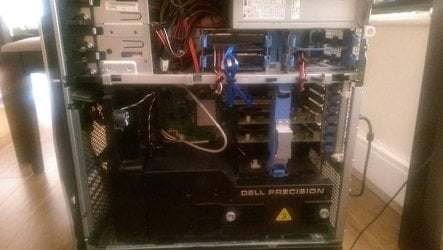
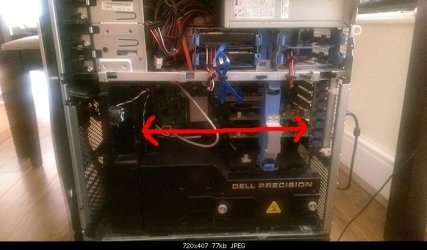
[FONT="]Computer - Dell Precision T7400 purchased in May 2008 with 2 screen monitors.[/FONT]
[FONT="]Base, Dual Intel Xeon E5420 (2.50GHz,1333FSB,2x6MB,Quad Core), [/FONT]
[FONT="]Memory, 8GB, 667MHz, ECC Memory (8x1GB),[/FONT]
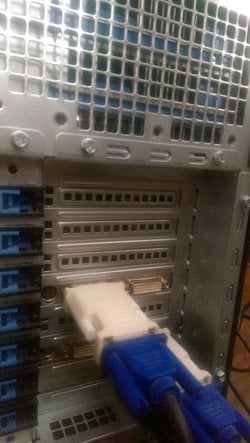
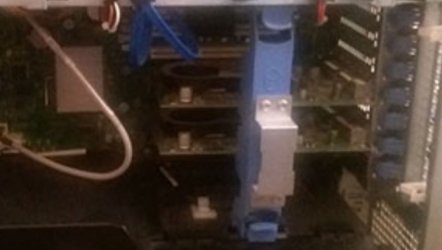
[FONT="]Video Card, 512MB PCIe x16 nVidia Quadro FX 1700 (MRGA14L), Dual Monitor DVI or VGA Graphics Card,[/FONT]
[FONT="]Hard Drive, 320GB (7,200 rpm) SATA 3.0Gb/s Hard Drive with NCQ and 16MB DataBurst Cache x 2[/FONT]
[FONT="]Network Cards, Dell Wireless 1505 (802.11a/b/g/n dual band) PCIe Card with Antenna,[/FONT]
[FONT="]Modem, Dell 56.6k Internal Data/Fax Modem, 129091, [530-11771][/FONT]
[FONT="]Raid Connectivity, C21- All SAS drives, RAID 1, 2 drive total configuration[/FONT]
[FONT="]I run Autodesk Softimage/Maya, Zbrush, Photoshop and Lightroom. [/FONT]
[FONT="]Was originally [/FONT][FONT="]XP Professional x64 Edition SP2 and [/FONT][FONT="]I upgraded it to Win 7 professional. [/FONT]
[FONT="] [/FONT]
[FONT="]I’ve the notification saying that is ready for Win 10 but can’t find an upgrade test for Win 10 only 8.1, which I ran and the graphic cards did pass. I think though I need to replace the graphic cards, I have two of them. Specs - nVidia Quadro FX 1700 Video Card - Reviews, Specifications, and Pictures - GPUReview.com. [/FONT]
[FONT="]Probably a silly question but do I need to still get 2 to replace the 2 I have or will 1 good one run both monitors? [/FONT]
[FONT="]Is it worth me spending money on new graphics card(s), will my computer last me much longer, I think it will but I am not sure. I’ve always had these random blue screens of death. I didn’t have one since Microsoft said I was Win10 ready until I upgraded ITunes and QuickTime, blamed them and promptly removed. I can’t figure out what is causing the BSODs, I’ve a long list, event viewer is currently saying 97 errors in the last 7 days. (All drivers and software are up to date).[/FONT]
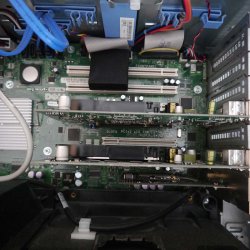
[FONT="]Another thing that has me put off about changing the graphics cards is the actual replacement. Dell’s manual has me petrified with making sure I’ve myself grounded and all talk about not get electrocuted! Are the cards easy to replace? [/FONT]
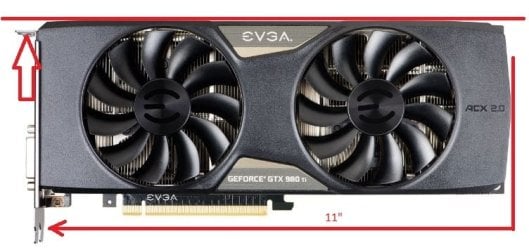
[FONT="]Silly question 2 - how do I know if a new graphics card fits in the current computer, from the manual:[/FONT]
[FONT="]In a configuration [/FONT][FONT="]without [/FONT][FONT="]dual graphics and the associated graphics riser[/FONT]
[FONT="]Card [/FONT][FONT="]Your Dell™ computer provides the following slots for PCI and PCI[/FONT]
[FONT="]Express cards:[/FONT]
[FONT="]• One PCI card slot[/FONT]
[FONT="]• One PCI Express x16 card slot[/FONT]
[FONT="]• Three PCI Express x8 card slots (wired as x4)[/FONT]
[FONT="]• Two PCI-X card slots[/FONT]
[FONT="]In a configuration [/FONT][FONT="]with [/FONT][FONT="]dual graphics and the associated graphics riser card:[/FONT]
[FONT="]Your Dell™ computer provides the following slots for PCI and PCI Express[/FONT]
[FONT="]cards:[/FONT]
[FONT="]• Two PCI Express x16 card slots (reserved for dual-graphics cards)[/FONT]
[FONT="]• One PCI Express x8 card slot (wired as x4)[/FONT]
[FONT="]• Two PCI-X card slots[/FONT][FONT="][/FONT]
[FONT="] [/FONT]
[FONT="]As another comment, the thing that is also putting me off replacing the graphic cards is that this desktop is a tank weighting in at 55lbs/24.94kgs, I’ve an upcoming apartment move and it is on the only thing that I’m worried about being transported. Maybe easier to replace it with a laptop, but I’d have to save for that first, but I think it has more years in it and don’t really want to get rid of it. [/FONT]
[FONT="] Thanks
[/FONT]
[FONT="]Computer - Dell Precision T7400 purchased in May 2008 with 2 screen monitors.[/FONT]
[FONT="]Base, Dual Intel Xeon E5420 (2.50GHz,1333FSB,2x6MB,Quad Core), [/FONT]
[FONT="]Memory, 8GB, 667MHz, ECC Memory (8x1GB),[/FONT]
[FONT="]Video Card, 512MB PCIe x16 nVidia Quadro FX 1700 (MRGA14L), Dual Monitor DVI or VGA Graphics Card,[/FONT]
[FONT="]Hard Drive, 320GB (7,200 rpm) SATA 3.0Gb/s Hard Drive with NCQ and 16MB DataBurst Cache x 2[/FONT]
[FONT="]Network Cards, Dell Wireless 1505 (802.11a/b/g/n dual band) PCIe Card with Antenna,[/FONT]
[FONT="]Modem, Dell 56.6k Internal Data/Fax Modem, 129091, [530-11771][/FONT]
[FONT="]Raid Connectivity, C21- All SAS drives, RAID 1, 2 drive total configuration[/FONT]
[FONT="]I run Autodesk Softimage/Maya, Zbrush, Photoshop and Lightroom. [/FONT]
[FONT="]Was originally [/FONT][FONT="]XP Professional x64 Edition SP2 and [/FONT][FONT="]I upgraded it to Win 7 professional. [/FONT]
[FONT="] [/FONT]
[FONT="]I’ve the notification saying that is ready for Win 10 but can’t find an upgrade test for Win 10 only 8.1, which I ran and the graphic cards did pass. I think though I need to replace the graphic cards, I have two of them. Specs - nVidia Quadro FX 1700 Video Card - Reviews, Specifications, and Pictures - GPUReview.com. [/FONT]
[FONT="]Probably a silly question but do I need to still get 2 to replace the 2 I have or will 1 good one run both monitors? [/FONT]
[FONT="]Is it worth me spending money on new graphics card(s), will my computer last me much longer, I think it will but I am not sure. I’ve always had these random blue screens of death. I didn’t have one since Microsoft said I was Win10 ready until I upgraded ITunes and QuickTime, blamed them and promptly removed. I can’t figure out what is causing the BSODs, I’ve a long list, event viewer is currently saying 97 errors in the last 7 days. (All drivers and software are up to date).[/FONT]
[FONT="]Another thing that has me put off about changing the graphics cards is the actual replacement. Dell’s manual has me petrified with making sure I’ve myself grounded and all talk about not get electrocuted! Are the cards easy to replace? [/FONT]
[FONT="]Silly question 2 - how do I know if a new graphics card fits in the current computer, from the manual:[/FONT]
[FONT="]In a configuration [/FONT][FONT="]without [/FONT][FONT="]dual graphics and the associated graphics riser[/FONT]
[FONT="]Card [/FONT][FONT="]Your Dell™ computer provides the following slots for PCI and PCI[/FONT]
[FONT="]Express cards:[/FONT]
[FONT="]• One PCI card slot[/FONT]
[FONT="]• One PCI Express x16 card slot[/FONT]
[FONT="]• Three PCI Express x8 card slots (wired as x4)[/FONT]
[FONT="]• Two PCI-X card slots[/FONT]
[FONT="]In a configuration [/FONT][FONT="]with [/FONT][FONT="]dual graphics and the associated graphics riser card:[/FONT]
[FONT="]Your Dell™ computer provides the following slots for PCI and PCI Express[/FONT]
[FONT="]cards:[/FONT]
[FONT="]• Two PCI Express x16 card slots (reserved for dual-graphics cards)[/FONT]
[FONT="]• One PCI Express x8 card slot (wired as x4)[/FONT]
[FONT="]• Two PCI-X card slots[/FONT][FONT="][/FONT]
[FONT="] [/FONT]
[FONT="]As another comment, the thing that is also putting me off replacing the graphic cards is that this desktop is a tank weighting in at 55lbs/24.94kgs, I’ve an upcoming apartment move and it is on the only thing that I’m worried about being transported. Maybe easier to replace it with a laptop, but I’d have to save for that first, but I think it has more years in it and don’t really want to get rid of it. [/FONT]
[FONT="] Thanks
[/FONT]
My Computer
At a glance
Microsoft Windows 7 Ultimate 64-bit 7601 Mult...(1) Intel(R) Xeon(R) CPU E5420 @ 2.50GHz (2) In8.00 GB(1) NVIDIA Quadro FX 1700 (2) NVIDIA Quadro F...
- Computer type
- PC/Desktop
- Computer Manufacturer/Model Number
- Dell Precision T7400
- OS
- Microsoft Windows 7 Ultimate 64-bit 7601 Multiprocessor Free Service Pack 1
- CPU
- (1) Intel(R) Xeon(R) CPU E5420 @ 2.50GHz (2) In
- Motherboard
- Dell Inc. 0RW199
- Memory
- 8.00 GB
- Graphics Card(s)
- (1) NVIDIA Quadro FX 1700 (2) NVIDIA Quadro FX 1700
- Sound Card
- High Definition Audio Device
- Screen Resolution
- (1) 1680 x 1050 x 32 bits (4294967296 colors) @ 59 Hz (2)
- Hard Drives
- (1) ATA WDC WD3200AAKS-7 SCSI Disk Device (2) ATA WDC WD3200AAKS-7 SCSI Disk Device (3) Seagate External USB Device (4) TEAC USB HS-CF Card USB Device (5) TEAC USB HS-MS Card USB Device (6) TEAC USB HS-SD Card USB Device (7) TEAC US