Replacing internal hard drive/disc with new one

nofttss

New member
Local time
8:24 PM
Messages
13
Hi,

I have a quick question and I'd love some input on it if possible.

After I format my current hard drive which is running win7, I want to remove it and add a new SATA hard drive, do I just remove the existing, add the new, put the windows installation disc in the tray and boot up?

I don't have a copy of the current windows 7, but I bought a new one so I'll add that.

Is there more to it that I'm missing?

Thanks!
 

My Computer My Computer

At a glance

windows 7 home 64bit
OS
windows 7 home 64bit

My Computer My Computer

At a glance

Windows 7 64 Bit Home Premium SP1i7-3820GSkill F3-14900CL9Q - 16GBEVGA GeForce GTX660 - Driver 352.86
Computer type
PC/Desktop
Computer Manufacturer/Model Number
Home Built - Jan 2013
OS
Windows 7 64 Bit Home Premium SP1
CPU
i7-3820
Motherboard
Asus P9X79-PRO - Bios 4608
Memory
GSkill F3-14900CL9Q - 16GB
Graphics Card(s)
EVGA GeForce GTX660 - Driver 352.86
Sound Card
On board Realtek ALC898
Monitor(s) Displays
Acer S271HL
Screen Resolution
1920 x 1080
Hard Drives
#1- Samsung 840 Pro Series
#2- Western Digital WD1002FAEX Sata3 Black
#3- Western Digital WD1002FAEX Sata3 Black
PSU
Corsair CMPSU-850TX-V2 - 850 watt (by Seasonic)
Case
Corsair Obsidian 550D
Cooling
Standard 3 120mm case fans, Cooler Master Hyper 212 EVO
Keyboard
MS KC-0405
Mouse
Intellimouse 5-button
Internet Speed
56 Mbits/Sec (on a good day)
Antivirus
Avast & Malwarebytes
Browser
Firefox
Other Info
Asus DVD - DRW-24B1ST 24X
Pretty much that is all there is to it.

I would wait to format my old drive until I had success with the new one.

Tip: when clean installing windows, be sure to have only the target drive and optical disk connected - no other hard disks.

Good tutorial here:
http://www.sevenforums.com/tutorials/1649-clean-install-windows-7-a.html
http://www.sevenforums.com/tutorials/31402-clean-install-upgrade-windows-7-version.html

OK great, thanks for your reply.

So I should add the new hard drive to my PC, move wires from old to new. Boot up with win7 disc in, install on new hard drive. When that's successful, move wires to old, then format and remove?
 

My Computer My Computer

At a glance

windows 7 home 64bit
OS
windows 7 home 64bit
What's actually wrong with the old hard drive? And you don't need a copy of your existing Windows (as in a disk), as long as you have the product key you can download the relevant ISO and create your own bootable media. You could then keep the new copy you bought as a spare or return it for a refund. It's pointless losing a perfectly good license for Windows 7 which is exactly what you'll be doing.
 

My Computer My Computer

At a glance

W7 Pro x64 SP1 | W10 Pro IP x64 | W8.1 Pro x6...i7-4790k @ 4GHz (4.4GHz Boost)16GB DDR3 Kingston HyperX Fury @ 1600MHz CL 9...EVGA GTX 980 Classified
Computer type
PC/Desktop
Computer Manufacturer/Model Number
Custom Build
OS
W7 Pro x64 SP1 | W10 Pro IP x64 | W8.1 Pro x64 VM | Linux Mint VM
CPU
i7-4790k @ 4GHz (4.4GHz Boost)
Motherboard
ASUS Sabertooth Z87 (BIOS Rev 2004)
Memory
16GB DDR3 Kingston HyperX Fury @ 1600MHz CL 9-9-9-27
Graphics Card(s)
EVGA GTX 980 Classified
Sound Card
Realtek Onboard
Monitor(s) Displays
Samsung S27D390
Screen Resolution
1920 x 1080
Hard Drives
240GB Intel 520 Series SSD |
Samsung 850 EVO 120GB SSD |
2TB WD Caviar Black |
2TB WD Caviar Green
PSU
Corsair HX850-80 Gold Modular
Case
Cooler Master Silencio 650
Cooling
Corsair H80i w/2 x Corsair SP120 | 2 x 120mm Noctua NF-S12B
Keyboard
Microsoft Sidewinder X4
Mouse
Gigabyte M6900 optical
Internet Speed
152mb
Antivirus
F-Secure
Browser
Firefox 38.0
Other Info
Backup Rig: Win 7 Pro 64-bit | AMD A10-5800k | ASUS F2A85-V Pro | 8GB Samsung DDR3 @1600MHz | 120GB Toshiba SDD | 2TB Seagate HDD | Cooler Master Silencio 550
What's actually wrong with the old hard drive? And you don't need a copy of your existing Windows (as in a disk), as long as you have the product key you can download the relevant ISO and create your own bootable media. You could then keep the new copy you bought as a spare or return it for a refund. It's pointless losing a perfectly good license for Windows 7 which is exactly what you'll be doing.

Just want to replace the hard drive. Not big enough either. I bought the new windows 7 just over 2 years ago, I don't have the current license key.

My plan was to format current hard drive, replace with new one, put in windows disc and boot up and install. The above poster said it was better to install new hard drive before I format current one. Is that how I should do it, switch the wires from old to new then back to old?

And do I need to download drivers or anything like that for the new hard drive? Or just install windows and I'm good to go?

Apologies for the newb questions
 

My Computer My Computer

At a glance

windows 7 home 64bit
OS
windows 7 home 64bit
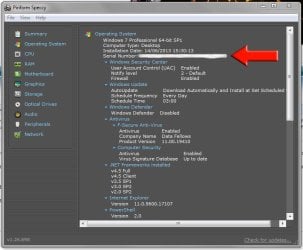
You can get your license key from your current install before you wipe the drive, just download Speccy, install and run it and check the Operating System tab on the left. That will show you your current license key.

Capture.JPG

You can re-use that key on your machine, it would be the best thing to do especially if it is the same version of Windows that you've bought.

How big is your current hard drive and what is the speed of it? Again, Speccy will give you this information (click on the Storage tab). I'm just thinking you could format your current drive, install Windows on it and keep it as a dedicated OS drive then add your new drive as a storage drive.
 

My Computer My Computer

At a glance

W7 Pro x64 SP1 | W10 Pro IP x64 | W8.1 Pro x6...i7-4790k @ 4GHz (4.4GHz Boost)16GB DDR3 Kingston HyperX Fury @ 1600MHz CL 9...EVGA GTX 980 Classified
Computer type
PC/Desktop
Computer Manufacturer/Model Number
Custom Build
OS
W7 Pro x64 SP1 | W10 Pro IP x64 | W8.1 Pro x64 VM | Linux Mint VM
CPU
i7-4790k @ 4GHz (4.4GHz Boost)
Motherboard
ASUS Sabertooth Z87 (BIOS Rev 2004)
Memory
16GB DDR3 Kingston HyperX Fury @ 1600MHz CL 9-9-9-27
Graphics Card(s)
EVGA GTX 980 Classified
Sound Card
Realtek Onboard
Monitor(s) Displays
Samsung S27D390
Screen Resolution
1920 x 1080
Hard Drives
240GB Intel 520 Series SSD |
Samsung 850 EVO 120GB SSD |
2TB WD Caviar Black |
2TB WD Caviar Green
PSU
Corsair HX850-80 Gold Modular
Case
Cooler Master Silencio 650
Cooling
Corsair H80i w/2 x Corsair SP120 | 2 x 120mm Noctua NF-S12B
Keyboard
Microsoft Sidewinder X4
Mouse
Gigabyte M6900 optical
Internet Speed
152mb
Antivirus
F-Secure
Browser
Firefox 38.0
Other Info
Backup Rig: Win 7 Pro 64-bit | AMD A10-5800k | ASUS F2A85-V Pro | 8GB Samsung DDR3 @1600MHz | 120GB Toshiba SDD | 2TB Seagate HDD | Cooler Master Silencio 550
The above poster suggests waiting to format your old hard drive because things do go wrong sometimes despite all the best precautions. If you got a defective hard drive and had to return it you could recover quickly by just reinstalling the old hard drive and having a Windows installation to use while you wait.

To clarify what Boozad is saying: If the Windows installation you have on your old hard is legitimate (activated) then you have a paid-for License Key. This may be an OEM (manufacturer) License Key for a pre-installed version of Windows that came with your computer, but as long as it is the same computer, that key is still good to install the same version of Windows again (and again).
 

My Computer My Computer

At a glance

Windows 7 64 Bit Home Premium SP1i7-3820GSkill F3-14900CL9Q - 16GBEVGA GeForce GTX660 - Driver 352.86
Computer type
PC/Desktop
Computer Manufacturer/Model Number
Home Built - Jan 2013
OS
Windows 7 64 Bit Home Premium SP1
CPU
i7-3820
Motherboard
Asus P9X79-PRO - Bios 4608
Memory
GSkill F3-14900CL9Q - 16GB
Graphics Card(s)
EVGA GeForce GTX660 - Driver 352.86
Sound Card
On board Realtek ALC898
Monitor(s) Displays
Acer S271HL
Screen Resolution
1920 x 1080
Hard Drives
#1- Samsung 840 Pro Series
#2- Western Digital WD1002FAEX Sata3 Black
#3- Western Digital WD1002FAEX Sata3 Black
PSU
Corsair CMPSU-850TX-V2 - 850 watt (by Seasonic)
Case
Corsair Obsidian 550D
Cooling
Standard 3 120mm case fans, Cooler Master Hyper 212 EVO
Keyboard
MS KC-0405
Mouse
Intellimouse 5-button
Internet Speed
56 Mbits/Sec (on a good day)
Antivirus
Avast & Malwarebytes
Browser
Firefox
Other Info
Asus DVD - DRW-24B1ST 24X
You can get your license key from your current install before you wipe the drive, just download Speccy, install and run it and check the Operating System tab on the left. That will show you your current license key.

View attachment 319356

You can re-use that key on your machine, it would be the best thing to do especially if it is the same version of Windows that you've bought.

How big is your current hard drive and what is the speed of it? Again, Speccy will give you this information (click on the Storage tab). I'm just thinking you could format your current drive, install Windows on it and keep it as a dedicated OS drive then add your new drive as a storage drive.

Thanks for the reply. I'll do that, my previous copy came with the computer I bought. But as for hard drives, I want to replace the current one. I go to format my current hard drive, and there's a C and D drive. They have equal capacity but 1 is 100% capacity left and the C drive is 28%. Do I have to format them seperately?

The above poster suggests waiting to format your old hard drive because things do go wrong sometimes despite all the best precautions. If you got a defective hard drive and had to return it you could recover quickly by just reinstalling the old hard drive and having a Windows installation to use while you wait.

To clarify what Boozad is saying: If the Windows installation you have on your old hard is legitimate (activated) then you have a paid-for License Key. This may be an OEM (manufacturer) License Key for a pre-installed version of Windows that came with your computer, but as long as it is the same computer, that key is still good to install the same version of Windows again (and again).

Thanks for the reply. Yes, my license key is legitimate and came with the computer. I'll just paste what I said to boozad:

"I go to format my current hard drive, and there's a C and D drive. They have equal capacity but 1 is 100% capacity left and the C drive is 28%. Do I have to format them seperately?"

First time doing this so a bit confused.
 

My Computer My Computer

At a glance

windows 7 home 64bit
OS
windows 7 home 64bit
It depends.

You can delete one or both partitions which will leave you with Unallocated Space (blank space). You can then create and format partitions of any size you want from the Unallocated Space, or use all of it for one big partition.

Or, if you want to use the partitions that are there the size they are, then yes, you would format each partition separately.
 

My Computer My Computer

At a glance

Windows 7 64 Bit Home Premium SP1i7-3820GSkill F3-14900CL9Q - 16GBEVGA GeForce GTX660 - Driver 352.86
Computer type
PC/Desktop
Computer Manufacturer/Model Number
Home Built - Jan 2013
OS
Windows 7 64 Bit Home Premium SP1
CPU
i7-3820
Motherboard
Asus P9X79-PRO - Bios 4608
Memory
GSkill F3-14900CL9Q - 16GB
Graphics Card(s)
EVGA GeForce GTX660 - Driver 352.86
Sound Card
On board Realtek ALC898
Monitor(s) Displays
Acer S271HL
Screen Resolution
1920 x 1080
Hard Drives
#1- Samsung 840 Pro Series
#2- Western Digital WD1002FAEX Sata3 Black
#3- Western Digital WD1002FAEX Sata3 Black
PSU
Corsair CMPSU-850TX-V2 - 850 watt (by Seasonic)
Case
Corsair Obsidian 550D
Cooling
Standard 3 120mm case fans, Cooler Master Hyper 212 EVO
Keyboard
MS KC-0405
Mouse
Intellimouse 5-button
Internet Speed
56 Mbits/Sec (on a good day)
Antivirus
Avast & Malwarebytes
Browser
Firefox
Other Info
Asus DVD - DRW-24B1ST 24X
It depends.

You can delete one or both partitions which will leave you with Unallocated Space (blank space). You can then create and format partitions of any size you want from the Unallocated Space, or use all of it for one big partition.

Or, if you want to use the partitions that are there the size they are, then yes, you would format each partition separately.

I just want to delete everything off the drive, then I'm going to replace the drive.

Having an issue right now. I right click the C drive, and format is greyed out I can't click it. It's available for the D drive though.
 

My Computer My Computer

At a glance

windows 7 home 64bit
OS
windows 7 home 64bit
You cannot format the drive you booted from. You will need to get the new drive running and boot from it, then you will be able to delete the partitions from the old drive and format it.

If your system is running fine with your old drive and all that you want to do is upgrade to a new, larger drive there is no need to re-install Windows. You can "clone" the original drive to the new drive and keep everything in tact. If you re-install Windows you will also need to re-install all of your programs and you will need to backup/backup restore all of your data. Cloning eliminates all of that additional work.

You could use the free tool, Macrium Reflect FREE Edition - Information and download, to do the cloning.
 

My Computer My Computer

At a glance

W10 Pro desktop, W11 laptop, W11 Pro tablet (...3.7Ghz 8700K i7, i7-11800H, i7-1065G716G desktop, 16G laptop, 4G tabletAMD Radeon RX580, RTX 3060, Intel Iris Plus
Computer type
PC/Desktop
Computer Manufacturer/Model Number
Home Built desktop, Dell G15 5511 Gaming laptop,MS Surface Pro 7 tablet
OS
W10 Pro desktop, W11 laptop, W11 Pro tablet (all 64-bit)
CPU
3.7Ghz 8700K i7, i7-11800H, i7-1065G7
Motherboard
ASUS TUF Z370-Pro Gaming in desktop
Memory
16G desktop, 16G laptop, 4G tablet
Graphics Card(s)
AMD Radeon RX580, RTX 3060, Intel Iris Plus
Sound Card
High Definition Audio (Built-in to mobo)
Monitor(s) Displays
Samsung U32J59 32" (2x), 15.6", 12"
Screen Resolution
3840x2160, 3840x2160, 1920x1080, 2160x1440
Hard Drives
500G SSD for OS; 2T, 10T & 15T HDDs for Data on Desktop, 1TB SSD laptop, 128G SSD tablet.
PSU
Corsair CX 750M
Case
Antec 100
Cooling
CM 212+
Keyboard
IBM Model M - used continuously since 1986
Mouse
Microsoft Pro IntelliMouse
Internet Speed
400M down 8M up
Antivirus
Windows Defender
Browser
FireFox
Other Info
Built my first computer (8Mhz 8088cpu, 640K RAM, 20MB HDD, 2 360K floppy drives) in 1985 and have been building them for myself, relatives and friends ever since.
You cannot format the drive you booted from. You will need to get the new drive running and boot from it, then you will be able to delete the partitions from the old drive and format it.

If your system is running fine with your old drive and all that you want to do is upgrade to a new, larger drive there is no need to re-install Windows. You can "clone" the original drive to the new drive and keep everything in tact. If you re-install Windows you will also need to re-install all of your programs and you will need to backup/backup restore all of your data. Cloning eliminates all of that additional work.

You could use the free tool, Macrium Reflect FREE Edition - Information and download, to do the cloning.

I want to remove everything off my current drive and replace it with a new drive. The problem I'm having is not being able to right click the C drive to format it, and that theres 2 drives the C and D which have equal capacity which I want to format, but not sure how to format them both together.
 

My Computer My Computer

At a glance

windows 7 home 64bit
OS
windows 7 home 64bit
You can't format the C: drive as that's what Windows is installed onto and it can't format itself. As mentioned, you'll have to install Windows on your new drive, then attach the old drive and format it that way.
 

My Computer My Computer

At a glance

W7 Pro x64 SP1 | W10 Pro IP x64 | W8.1 Pro x6...i7-4790k @ 4GHz (4.4GHz Boost)16GB DDR3 Kingston HyperX Fury @ 1600MHz CL 9...EVGA GTX 980 Classified
Computer type
PC/Desktop
Computer Manufacturer/Model Number
Custom Build
OS
W7 Pro x64 SP1 | W10 Pro IP x64 | W8.1 Pro x64 VM | Linux Mint VM
CPU
i7-4790k @ 4GHz (4.4GHz Boost)
Motherboard
ASUS Sabertooth Z87 (BIOS Rev 2004)
Memory
16GB DDR3 Kingston HyperX Fury @ 1600MHz CL 9-9-9-27
Graphics Card(s)
EVGA GTX 980 Classified
Sound Card
Realtek Onboard
Monitor(s) Displays
Samsung S27D390
Screen Resolution
1920 x 1080
Hard Drives
240GB Intel 520 Series SSD |
Samsung 850 EVO 120GB SSD |
2TB WD Caviar Black |
2TB WD Caviar Green
PSU
Corsair HX850-80 Gold Modular
Case
Cooler Master Silencio 650
Cooling
Corsair H80i w/2 x Corsair SP120 | 2 x 120mm Noctua NF-S12B
Keyboard
Microsoft Sidewinder X4
Mouse
Gigabyte M6900 optical
Internet Speed
152mb
Antivirus
F-Secure
Browser
Firefox 38.0
Other Info
Backup Rig: Win 7 Pro 64-bit | AMD A10-5800k | ASUS F2A85-V Pro | 8GB Samsung DDR3 @1600MHz | 120GB Toshiba SDD | 2TB Seagate HDD | Cooler Master Silencio 550
You can't format the C: drive as that's what Windows is installed onto and it can't format itself. As mentioned, you'll have to install Windows on your new drive, then attach the old drive and format it that way.

Ah yes this makes sense, thanks.

Ok, last question- and I appreciate the help so far- what I'm going to do is open up my PC, add the new hard drive and attach wires from old to new, install windows, then switch wires back to old hard drive and format the C and D drives, then remove and dispose of old HD. Have I got that right?
 

My Computer My Computer

At a glance

windows 7 home 64bit
OS
windows 7 home 64bit
No. You're good up to this point:

what I'm going to do is open up my PC, add the new hard drive and attach wires from old to new, install windows

What you can't do is this:

then switch wires back to old hard drive and format the C and D drives, then remove and dispose of old HD. Have I got that right?

If you switch the wires back you'll be booting from your old drive again. You'll need to add the old drive as well as your new drive, you'd have to boot from the new with the old one attached as a secondary drive to be able to format it.
 

My Computer My Computer

At a glance

W7 Pro x64 SP1 | W10 Pro IP x64 | W8.1 Pro x6...i7-4790k @ 4GHz (4.4GHz Boost)16GB DDR3 Kingston HyperX Fury @ 1600MHz CL 9...EVGA GTX 980 Classified
Computer type
PC/Desktop
Computer Manufacturer/Model Number
Custom Build
OS
W7 Pro x64 SP1 | W10 Pro IP x64 | W8.1 Pro x64 VM | Linux Mint VM
CPU
i7-4790k @ 4GHz (4.4GHz Boost)
Motherboard
ASUS Sabertooth Z87 (BIOS Rev 2004)
Memory
16GB DDR3 Kingston HyperX Fury @ 1600MHz CL 9-9-9-27
Graphics Card(s)
EVGA GTX 980 Classified
Sound Card
Realtek Onboard
Monitor(s) Displays
Samsung S27D390
Screen Resolution
1920 x 1080
Hard Drives
240GB Intel 520 Series SSD |
Samsung 850 EVO 120GB SSD |
2TB WD Caviar Black |
2TB WD Caviar Green
PSU
Corsair HX850-80 Gold Modular
Case
Cooler Master Silencio 650
Cooling
Corsair H80i w/2 x Corsair SP120 | 2 x 120mm Noctua NF-S12B
Keyboard
Microsoft Sidewinder X4
Mouse
Gigabyte M6900 optical
Internet Speed
152mb
Antivirus
F-Secure
Browser
Firefox 38.0
Other Info
Backup Rig: Win 7 Pro 64-bit | AMD A10-5800k | ASUS F2A85-V Pro | 8GB Samsung DDR3 @1600MHz | 120GB Toshiba SDD | 2TB Seagate HDD | Cooler Master Silencio 550
No. You're good up to this point:

what I'm going to do is open up my PC, add the new hard drive and attach wires from old to new, install windows

What you can't do is this:

then switch wires back to old hard drive and format the C and D drives, then remove and dispose of old HD. Have I got that right?

If you switch the wires back you'll be booting from your old drive again. You'll need to add the old drive as well as your new drive, you'd have to boot from the new with the old one attached as a secondary drive to be able to format it.

This makes sense too.

I haven't opened up my PC yet, are there wires for an additional hard drive in there?

And how do I choose which one to boot from when I turn on the PC (assuming both are attached)?
 

My Computer My Computer

At a glance

windows 7 home 64bit
OS
windows 7 home 64bit
There should be a power cable from your PSU for the drive, you may have to add an extra SATA data cable to connect the second drive. As long as you plug the existing cables into your current HDD and install Windows that should be established as the primary boot drive, your old drive should then show up in My Computer and you'll be able to format.
 

My Computer My Computer

At a glance

W7 Pro x64 SP1 | W10 Pro IP x64 | W8.1 Pro x6...i7-4790k @ 4GHz (4.4GHz Boost)16GB DDR3 Kingston HyperX Fury @ 1600MHz CL 9...EVGA GTX 980 Classified
Computer type
PC/Desktop
Computer Manufacturer/Model Number
Custom Build
OS
W7 Pro x64 SP1 | W10 Pro IP x64 | W8.1 Pro x64 VM | Linux Mint VM
CPU
i7-4790k @ 4GHz (4.4GHz Boost)
Motherboard
ASUS Sabertooth Z87 (BIOS Rev 2004)
Memory
16GB DDR3 Kingston HyperX Fury @ 1600MHz CL 9-9-9-27
Graphics Card(s)
EVGA GTX 980 Classified
Sound Card
Realtek Onboard
Monitor(s) Displays
Samsung S27D390
Screen Resolution
1920 x 1080
Hard Drives
240GB Intel 520 Series SSD |
Samsung 850 EVO 120GB SSD |
2TB WD Caviar Black |
2TB WD Caviar Green
PSU
Corsair HX850-80 Gold Modular
Case
Cooler Master Silencio 650
Cooling
Corsair H80i w/2 x Corsair SP120 | 2 x 120mm Noctua NF-S12B
Keyboard
Microsoft Sidewinder X4
Mouse
Gigabyte M6900 optical
Internet Speed
152mb
Antivirus
F-Secure
Browser
Firefox 38.0
Other Info
Backup Rig: Win 7 Pro 64-bit | AMD A10-5800k | ASUS F2A85-V Pro | 8GB Samsung DDR3 @1600MHz | 120GB Toshiba SDD | 2TB Seagate HDD | Cooler Master Silencio 550
Since you don't seem to be interested at all in my suggestion to clone your existing drive and are determined to install Win 7 fresh on the new drive, I recommend that you remove the old drive from your system, install Windows, all your programs, Windows updates, etc... Once that is all up and running, then worry about putting the old drive back in the system and formatting it so that you can restore your data to that drive.
 

My Computer My Computer

At a glance

W10 Pro desktop, W11 laptop, W11 Pro tablet (...3.7Ghz 8700K i7, i7-11800H, i7-1065G716G desktop, 16G laptop, 4G tabletAMD Radeon RX580, RTX 3060, Intel Iris Plus
Computer type
PC/Desktop
Computer Manufacturer/Model Number
Home Built desktop, Dell G15 5511 Gaming laptop,MS Surface Pro 7 tablet
OS
W10 Pro desktop, W11 laptop, W11 Pro tablet (all 64-bit)
CPU
3.7Ghz 8700K i7, i7-11800H, i7-1065G7
Motherboard
ASUS TUF Z370-Pro Gaming in desktop
Memory
16G desktop, 16G laptop, 4G tablet
Graphics Card(s)
AMD Radeon RX580, RTX 3060, Intel Iris Plus
Sound Card
High Definition Audio (Built-in to mobo)
Monitor(s) Displays
Samsung U32J59 32" (2x), 15.6", 12"
Screen Resolution
3840x2160, 3840x2160, 1920x1080, 2160x1440
Hard Drives
500G SSD for OS; 2T, 10T & 15T HDDs for Data on Desktop, 1TB SSD laptop, 128G SSD tablet.
PSU
Corsair CX 750M
Case
Antec 100
Cooling
CM 212+
Keyboard
IBM Model M - used continuously since 1986
Mouse
Microsoft Pro IntelliMouse
Internet Speed
400M down 8M up
Antivirus
Windows Defender
Browser
FireFox
Other Info
Built my first computer (8Mhz 8088cpu, 640K RAM, 20MB HDD, 2 360K floppy drives) in 1985 and have been building them for myself, relatives and friends ever since.
Back
Top