Replacing Mobo like for like

TheNorthTerror

New member
Local time
12:27 AM
Messages
5
Afternoon. What it is I've got x3 Asus 1025 netbooks and all have blown charger circuits. I.e. still work on a charged battery and mains, but won't charge. I've decided replacing the power jack on the motherboard is beyond me, but want to try swapping the board with the same model and keeping the rest of the hardware. I'm used to taking my netbooks apart for general maintainence etc, but never replaced a motherboard before.

I'm looking for advice on what issues I'm going to face doing this and how to overcome them. I believe I might need to reactivate windows(Read about speaking to someone on the phone, but isn't support for 7 over?). I've read also I might have boot issues which I'm totally unsure how to deal with and will I be able to use the Hard drive as is without re-installing windows. Other things like will the suboards be compatibe etc

I have x1 Asus 1025CE and x2 Asus 1025C, All are Windows 7 Starter - OEM. They are pretty much idenitcal although the 1025CE has a faster CPU

For the 1025CE - the model number is 60-OA3FMB2000 - C051025C (0801).
The other 2 which have a model no of 60-OA3FMB1000 - C051025C (0801)

Now It's been difficult to source motherboards as the netbook is getting very old, but at the moment I've sourced x2 that are identical models to my main netbook the 1025CE(The faster one). I'm not touching that one until I know I've got what to do down.

So I have a 60-OA3FMB2000 model motherboard to fit into a machine that orginally came with a 60-OA3FMB1000. Please advise what problems I will face and some guidance to try and help overcome them.
 

My Computers

System One System Two

  • OS
    Windows 7
  • Computer type
    PC/Desktop
I believe I might need to reactivate windows
Oem slp activation depends on bios having an Asus slic table. So that shouldnt be an issue and shouldnt need phone call.

Have you been able to find anything documenting what the difference is between those two?

I see some for sale. The seller seems to indicate 60-OA3FMB2000 can be for either the 1025C or the 1025CE.

So it seems likely the 60-OA3FMB2000 supports the faster cpu and possibly more ram,unless you can find any documentataion you will have to try and see.

Asus Eee PC 1025C 1025CE 1025CE-PUR014S Motherboard 60-OA3FMB2000-C05


Asus Eee PC 1025C 1025CE 1025CE-PUR014S Motherboard 60-OA3FMB2000-C05 | eBay


GENUINE ORIGINAL ASUS SYSTEM BOARD INTEL EEE PC 1025C (AA55)60-OA3FMB1000 | eBay

- - - Updated - - -

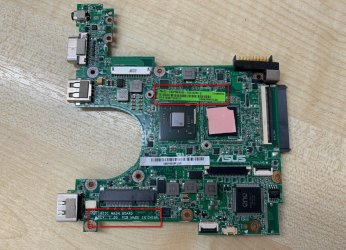
If you examine the picture, at the bottom it says 1025C and the green label indicates it is the 60-OA3FMB2000.

So it looks like you would end up with the faster cpu on the 1025C machine. I am assuming it can take more ram as well.

2021-09-17_141438.jpg

Also here indicates the 2000 can go in the 1025C
Материнская плата для ноутбука Asus 1025C 90R-OA3JMBB000Q купить по цене 2 052 руб.

Iirc Atom (N2800) can support 4gb ram which is more than the feebler atom you had.

You might also be able to run win10 on that with 4gb, but it wont support win11.

Disassembly doesn't look too difficult. Worth replacing the spinning disk with an ssd if you havent already
ASUS Eee PC 1025c RAM Upgrade - How to Install NetBook Memory - YouTube

ddr3 1066mhz 204 pin

CeX (UK): - Buy, Sell, Donate

https://www.fixya.com/support/t24977113-asus_eee_pc_1025ce_service


You will have fun replacing the mobo , let us know you get on.:-)
 
Last edited:

My Computers

System One System Two

  • Computer type
    PC/Desktop
    OS
    7 X64
    CPU
    i5 8400
    Motherboard
    gigabyte b365m ds3h
    Memory
    2x8gb 3200mhz
    Hard Drives
    various
    PSU
    pure power 11 400w cm
    Case
    Coolermaster
    Cooling
    cryorig m9i
  • Computer type
    PC/Desktop
    OS
    7x64
    CPU
    g5400
    Motherboard
    ga b365m ds3h
    Memory
    8gb ddr4 2400
    PSU
    xfx pro 450w
You will have fun replacing the mobo , let us know you get on.:-)

Thanks for the reply dude, I've got a few things on my plate so will get round to doing this as I need time to concentrate

plus the pc thankfully still works. Now...

"Oem slp activation depends on bios having an Asus slic table. So that shouldnt be an issue and shouldnt need phone call."

What does that mean? Main PC(faster one) OS is OEM_COA_SLP. Does not having to reactivate windows mean I shouldn't have any boot issues or need to reinstall windows?

"Have you been able to find anything documenting what the difference is between those two?"

No it's been difficult,checking the asus website was not helpful and the manual I found online for the laptop was a poor user guide with no technical specs. So no idea if firmware is different or it's just production run numbers. My main one has a N2800 cpu and the others one with N2600. See they look identical it's only the label that tells you anything. Hang on...(been checking my research). I'd found a website review comparing the 1025C and 1025CE, but I'd put it out my mind since I felt it didn't tell me anything really distinct(other than faster CPU).

Asus 1025CE vs 1025C vs X101CH EEE PC comparison - battle of 2012 netbooks

In this it says "while the 1025C will be offered with either an Atom N2600 or an N2800 processor, the 1025CE only comes with the faster option" - That sentences bodes well for my enterprise. All depends if the system files on the HDD and the subboard are happy with a sudden change.

"GENUINE ORIGINAL ASUS SYSTEM BOARD INTEL EEE PC 1025C (AA55)60-OA3FMB1000 | eBay"

That listing I'd seen when searching, but the layout of the chips looked different and you can just make out on the label it's for a 1015 which I believe is a later model in the EEE PC series.

"Iirc Atom (N2800) can support 4gb ram which is more than the feebler atom you had.You might also be able to run win10 on that with 4gb, but it wont support win11."

I'm not that keen on upgrading to windows 10 especially on this machine which I feel might struggle plus I like the way 7 works. Interesting thing about the Asus 1025C and it's been ages since I looked into it, but yes you're right it can take 4GB of RAM but from what I can remember Windows 7 Starter only supports 2GB RAM so it would need upgraded to Home/Pro etc and maybe some more tinkering. I'm at the point where I have this PC setup exactly as I want it and happy to expend zero thought into it other than using it. Looking into the mobo does make me think what else I can do, but atm I just need it working fully.

Thanks again btw I appreciate all help and When I get started I will reply.
 

My Computers

System One System Two

  • OS
    Windows 7
  • Computer type
    PC/Desktop
Keep us posted, it looks like a fun project.
 

My Computers

System One System Two

  • Computer type
    PC/Desktop
    OS
    7 X64
    CPU
    i5 8400
    Motherboard
    gigabyte b365m ds3h
    Memory
    2x8gb 3200mhz
    Hard Drives
    various
    PSU
    pure power 11 400w cm
    Case
    Coolermaster
    Cooling
    cryorig m9i
  • Computer type
    PC/Desktop
    OS
    7x64
    CPU
    g5400
    Motherboard
    ga b365m ds3h
    Memory
    8gb ddr4 2400
    PSU
    xfx pro 450w
Ok I've installed a mobo into one of my secondary laptops the one that previously had the slower board.Took the old cmos battery, fan and heatsink from mobo I was replacing and attached new board(Bit of new thermal paste over the CPU) and without booting it up have been using it succesfully to charge batteries.

Decided to boot it today to see what happens. Ok so it booted fine except the keyboard was not working. Managed to log in with the disability tools and everything seems ok. The desktop is as before and I can access the files in the hard drive. Taking it slow so not fully tested much, but I loaded a video file to see and it worked, but the sound was funny. Bit tinning and funny sounding. Will look into that, but hoping it's not the sub-board not keeping up with the now faster main board.

Now checking the system page from the control panel it seems ok spec wise, but it says 3 days until automatic activation. Activate now. Checked out hardware section and it says the keyboard is working normally, but it would not let me update the driver. Closed down after that. Will maybe continue tomorrow.
Oh and I set the system time correctly
 

My Computers

System One System Two

  • OS
    Windows 7
  • Computer type
    PC/Desktop
:-)
 

My Computers

System One System Two

  • Computer type
    PC/Desktop
    OS
    7 X64
    CPU
    i5 8400
    Motherboard
    gigabyte b365m ds3h
    Memory
    2x8gb 3200mhz
    Hard Drives
    various
    PSU
    pure power 11 400w cm
    Case
    Coolermaster
    Cooling
    cryorig m9i
  • Computer type
    PC/Desktop
    OS
    7x64
    CPU
    g5400
    Motherboard
    ga b365m ds3h
    Memory
    8gb ddr4 2400
    PSU
    xfx pro 450w
Ok the secondary is now fully working and activated. It's whether to give to use it a few days before attempting on the main one. All pretty simple in the end and surprisely very simple.

The keyboard not working was the strip cable not fully in the socket. I also broke one of the clips on the casing which is always annoying. Two rare mistakes.Sound issue seems to have resolved it after I used a different media player. Internet works, USB ports work.

In regards to activation. I went to system within the control panel and clicked on activate now. Selected phone activation and it gave me the drop down to select my country code(Number I got was UK 0800 018 8354). I got the screen with the 9 groups of numbers you end up keying in. Now it talked about Windows 10 a lot as I selected options in the vein of me not having this or that so to activate in the most basic way. Anyway luckily it never said nothing we can do and I entered the 9 groups and got the activation numbers back in return. Worked without having to speak to someone.
 

My Computers

System One System Two

  • OS
    Windows 7
  • Computer type
    PC/Desktop
The keyboard not working was the strip cable not fully in the socket. I also broke one of the clips on the casing which is always annoying. Two rare mistakes.Sound issue seems to have resolved it after I used a different media player. Internet works, USB ports work.
:-)


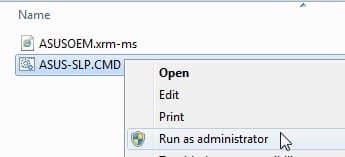
You could have used slp activation. The asus OEM.xrm-ms file matches with the asus slic table in bios, and the slp key activates offline. They are included in the oem recovery media. Similar for dell, hp, lenovo, acer, etc though each has a specific manufacturer OEM.xrm-ms file.

In case you ever need to reinstall from standard ms media - you wont need to do the phone thing again, you could just skip entering a key during installation, then after you have got to the desktop run this:

ASUS.jpg

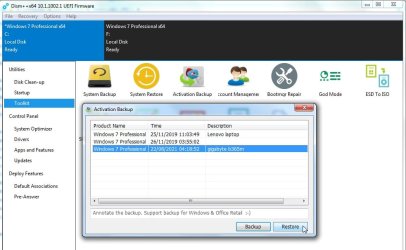
And/Or you could back up your current working activation with dism++ which will restore fine for the same edition on the same machine.

dism++-ActiveBackup.jpg
 
Last edited:

My Computers

System One System Two

  • Computer type
    PC/Desktop
    OS
    7 X64
    CPU
    i5 8400
    Motherboard
    gigabyte b365m ds3h
    Memory
    2x8gb 3200mhz
    Hard Drives
    various
    PSU
    pure power 11 400w cm
    Case
    Coolermaster
    Cooling
    cryorig m9i
  • Computer type
    PC/Desktop
    OS
    7x64
    CPU
    g5400
    Motherboard
    ga b365m ds3h
    Memory
    8gb ddr4 2400
    PSU
    xfx pro 450w
Well it's done now. I'd set aside the whole day incase of any problems so decided to crack on and swap the mobo and my main one and it's worked perfectly. It activated(or showed as activated) on the first boot. Must be because the model number is identical to what was there before while the other one had a slight difference.
 

My Computers

System One System Two

  • OS
    Windows 7
  • Computer type
    PC/Desktop
Back
Top