Require some assistance, please

Steve Leigh

New member
Local time
2:02 AM
Messages
8
Location
Tampa, FL
Hi All,
This is my 1st post - my, what a great forum!

I have W7Pro installed, working well on my 1st HD (SSD). I can disconnect this drive instantly if needed.

I would like to quickly and easily (due to my ignorance) install XP Pro on a PARTITION of my 2nd HD. This drive is a 2GB, divided into 4 equal partitions.

I certainly would appreciate any help. I have many old programs which ran perfectly w/XP, but won't run at all w/W7.

Thank you for your help.

Steve
 
Last edited by a moderator:

My Computer

Computer type
PC/Desktop
Computer Manufacturer/Model Number
Custom
OS
W7 Pro-64 bit
CPU
i5
Motherboard
Asus
Memory
16GB
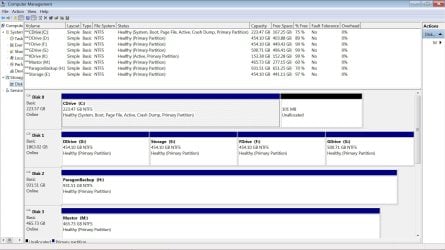
Post screenshot of disk management please
 

My Computer

Computer type
Laptop
Computer Manufacturer/Model Number
ACER ASPIRE 5742G
OS
Microsoft Windows 7 Home Premium 64-bits 7601 Multiprocessor Free Service Pack 1
CPU
Intel(R) Core(TM) i3 CPU M 370 @ 2.40GHz
Motherboard
Acer Aspire 5742G
Memory
4,00 GB
Graphics Card(s)
ATI Mobility Radeon HD 5400 Series
Sound Card
(1) AMD High Definition Audio Device (2) Realtek High Defi
Screen Resolution
1366 x 768 x 32 bits (4294967296 colors) @ 60 Hz
Hard Drives
WDC WD5000BEVT-22ZAT0
Disk.jpg
www.sl-prokeys.com/Disk.jpg

Don't know how to post image. Link above.

Thank you,
Steve
 
Last edited:

My Computer

Computer type
PC/Desktop
Computer Manufacturer/Model Number
Custom
OS
W7 Pro-64 bit
CPU
i5
Motherboard
Asus
Memory
16GB

My Computer

Computer type
Laptop
Computer Manufacturer/Model Number
ACER ASPIRE 5742G
OS
Microsoft Windows 7 Home Premium 64-bits 7601 Multiprocessor Free Service Pack 1
CPU
Intel(R) Core(TM) i3 CPU M 370 @ 2.40GHz
Motherboard
Acer Aspire 5742G
Memory
4,00 GB
Graphics Card(s)
ATI Mobility Radeon HD 5400 Series
Sound Card
(1) AMD High Definition Audio Device (2) Realtek High Defi
Screen Resolution
1366 x 768 x 32 bits (4294967296 colors) @ 60 Hz
Hard Drives
WDC WD5000BEVT-22ZAT0
Doew winxp have all drivers for you hardware? winxp is very old... I don't think so. What programs work only on winxp?
 

My Computer

Computer type
Laptop
Computer Manufacturer/Model Number
ACER ASPIRE 5742G
OS
Microsoft Windows 7 Home Premium 64-bits 7601 Multiprocessor Free Service Pack 1
CPU
Intel(R) Core(TM) i3 CPU M 370 @ 2.40GHz
Motherboard
Acer Aspire 5742G
Memory
4,00 GB
Graphics Card(s)
ATI Mobility Radeon HD 5400 Series
Sound Card
(1) AMD High Definition Audio Device (2) Realtek High Defi
Screen Resolution
1366 x 768 x 32 bits (4294967296 colors) @ 60 Hz
Hard Drives
WDC WD5000BEVT-22ZAT0
I use the Virtual PC and XP from Microsoft which works fine as a XP machine.

I also run DOS 6.2 and Windows 3.1 as well as windows 2000. I just copy the .vhd's to any new machine which
works fine.
I like an older version of QuickBooks ver 5. works fine in the xp box..
As long as your machine will run virtual machines.
Rich
 

My Computer

Computer type
Laptop
Computer Manufacturer/Model Number
Toshiba Laptop Qosimo X870
OS
Windows 7 Pro x64 SP1
CPU
Intel Core I7
Motherboard
Toshiba Qosmio
Memory
16 Gigs
Graphics Card(s)
NVIDIA GeForce GTX 670M
Monitor(s) Displays
17.7" laptop
Screen Resolution
1600 x 900
Hard Drives
256 Gig SanDisk SSD for C
256 Gig Intel SSD for D
Internet Speed
50/25 FIOS
Antivirus
Vipre (all you can eat for 10 machines)
Browser
IE and FF
Other Info
I have dos 6.22, wfwg 3.11, win98, 2000 and xp VHD's available for testing. MS's Virtual PC works great.

My Computer

Computer type
PC/Desktop
Computer Manufacturer/Model Number
Custom
OS
W7 Pro-64 bit
CPU
i5
Motherboard
Asus
Memory
16GB
Hi,

I have several old programs, 3 in particular, which worked fine on XP.
Two of them were written by a friend in Turbo Pascal. They are "On Today's Date" which uses the old "List" pgm to display results, one is a biorhythm pgm - home made - and a few others which came from the days of DOS.

I guess I can live without them, but I'd sure like to have them. They're the first thing I check in the morning.

Thank you,
Steve
 

My Computer

Computer type
PC/Desktop
Computer Manufacturer/Model Number
Custom
OS
W7 Pro-64 bit
CPU
i5
Motherboard
Asus
Memory
16GB
Hi,

I have several old programs, 3 in particular, which worked fine on XP.
Two of them were written by a friend in Turbo Pascal. They are "On Today's Date" which uses the old "List" pgm to display results, one is a biorhythm pgm - home made - and a few others which came from the days of DOS.

I guess I can live without them, but I'd sure like to have them. They're the first thing I check in the morning.

Thank you,
Steve
They are most likely 16 bits programs(?) Can you recompile them to 32 bits?
 

My Computer

Computer type
Laptop
Computer Manufacturer/Model Number
ACER ASPIRE 5742G
OS
Microsoft Windows 7 Home Premium 64-bits 7601 Multiprocessor Free Service Pack 1
CPU
Intel(R) Core(TM) i3 CPU M 370 @ 2.40GHz
Motherboard
Acer Aspire 5742G
Memory
4,00 GB
Graphics Card(s)
ATI Mobility Radeon HD 5400 Series
Sound Card
(1) AMD High Definition Audio Device (2) Realtek High Defi
Screen Resolution
1366 x 768 x 32 bits (4294967296 colors) @ 60 Hz
Hard Drives
WDC WD5000BEVT-22ZAT0
Hi,
I got this link to work:

http://sl-prokeys.com/diskm.jpg

They are 16 bit pgms. The author is no longer living, and I don't have source code. But I sure loved those pgms.!

Thank you,
Steve

Oh NO! I can get the dumb picture in Firefox, but I get the 403 error too if I click the link.
I'm really sorry - I'm just not as literate as I might be.


I tried it again - if you back in the address bar up to /error403, and type in diskm.jpg, it comes up.

Apologies,
Steve
 
Last edited:

My Computer

Computer type
PC/Desktop
Computer Manufacturer/Model Number
Custom
OS
W7 Pro-64 bit
CPU
i5
Motherboard
Asus
Memory
16GB
Use virtual box or other virtual machine and install winxp in it
 

My Computer

Computer type
Laptop
Computer Manufacturer/Model Number
ACER ASPIRE 5742G
OS
Microsoft Windows 7 Home Premium 64-bits 7601 Multiprocessor Free Service Pack 1
CPU
Intel(R) Core(TM) i3 CPU M 370 @ 2.40GHz
Motherboard
Acer Aspire 5742G
Memory
4,00 GB
Graphics Card(s)
ATI Mobility Radeon HD 5400 Series
Sound Card
(1) AMD High Definition Audio Device (2) Realtek High Defi
Screen Resolution
1366 x 768 x 32 bits (4294967296 colors) @ 60 Hz
Hard Drives
WDC WD5000BEVT-22ZAT0
Hi,
Thank you for the suggestion.
After hours of (ignorant) confusion, I just gave up.

I think a lot of this new technology is just so far over my head ..... I'll rename myself "Dinosaur".

Thank you all ....
Steve
 

My Computer

Computer type
PC/Desktop
Computer Manufacturer/Model Number
Custom
OS
W7 Pro-64 bit
CPU
i5
Motherboard
Asus
Memory
16GB
Hi,
I just found the paperclip attachment. I'd like to move data off the F: and install XP there.
Also, my 1st post was wrong: the 2nd HD is 2 TB not 2 GB.
 

Attachments

  • diskm.jpg
    diskm.jpg
    215.8 KB · Views: 4
Last edited:

My Computer

Computer type
PC/Desktop
Computer Manufacturer/Model Number
Custom
OS
W7 Pro-64 bit
CPU
i5
Motherboard
Asus
Memory
16GB
Hi Steve -

Well you can try installing XP but first you must unplug the Win7 HD or it will steal its boot away requiring special repairs to restart it.

If you can unplug WIn7 HD, then boot the XP CD to try install to your chosen partition on the larger HD.

I'd move the files off first, or you could shrink one of those partitions to create a new partition for XP - but first we 'd have to help you convert it to Logical since you can only have four Primary Partitions and you have that now. You can have as many Logical partitions grouped together as you want.

So if you want to try and have a partition you've emptied out there boot the XP CD to see if it can see the HD, choose the partition and try install. If it works afterwards plug back in the Win7 HD, set it first to boot in BIOS, then when you need to boot XP trigger its HD using the BIOS Boot Menu key given on first screen.

If XP installer when booted won't see the HD it requires inserting the SATA Drivers - Load in Windows XP Setup on Dual Boot. If you don't have floppy support it requires merging them into the XP CD: SATA Drivers - Slipstream into Windows XP CD

So you see now why its easier to virtualize XP with a free program like VMWare, Virtual Player, Virtual Box.

We;ll help you achieve whichever you decide.
 
Hi Greg,

Is there a way I can private email you, and we can exchange phone #s?

I don't know the rules of this forum.

I'd like you to help me through this, if possible?

Thank you,
Steve
 

My Computer

Computer type
PC/Desktop
Computer Manufacturer/Model Number
Custom
OS
W7 Pro-64 bit
CPU
i5
Motherboard
Asus
Memory
16GB
Steve -

We like to keep the help in the thread, so it can help others.

It's actually more interactive than messaging, especially since others can jump in with observations and clarifications.
 
Back
Top