Requiring user name\password when accessing a machine over the network

Jamal NUMAN

New member
Member
VIP
Local time
4:13 AM
Messages
144
Requiring user name\password when accessing a machine over the network\router,

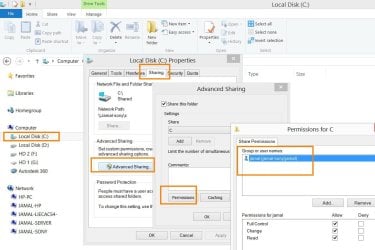
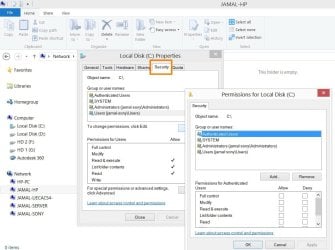
I have multiple machines connected by switch\router. What I want is to let the system ask any user for the “network password” when wanting to access any machine via the network (attached). This message (Enter network passwords) sometimes is available and others is not. how to make it appear all the time?

At which level this property is set?

[FONT=&quot]1. [/FONT]At the level of sharing\security of a folder?
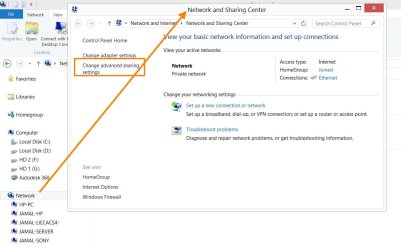
[FONT=&quot]2. [/FONT]At level of network sharing?


How to manage this issue? To share a partition\folder but to allow accessing it with user name and password?


Thank you

Best

Jamal

Best

Jamal
 

Attachments

  • Clip_51.jpg
    Clip_51.jpg
    81.6 KB · Views: 0
  • Clip_58.jpg
    Clip_58.jpg
    92.2 KB · Views: 0
  • Clip_59.jpg
    Clip_59.jpg
    94.7 KB · Views: 0
  • Clip_60.jpg
    Clip_60.jpg
    75.1 KB · Views: 0
  • Clip_61.jpg
    Clip_61.jpg
    100.8 KB · Views: 0

My Computer My Computer

OS
Windows 7 Ultimate x64
The problem is that Windows remembers these user names and passwords unless you tell Windows not to remember them.

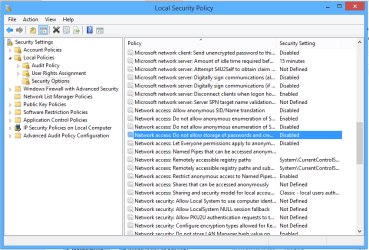
I haven't tested out this Security Policy yet but it does tell Windows not to not allow storage of passwords and credentials so it may have the desired effect you seem to be looking for.

Just go to Control Panel, > Administrative tools,> Local Policies,> Security Options,>Network Access, Do not allow Storage of Passwords and Credentials per the picture below. Enabled should restrict Storage of Credentials.
 

Attachments

  • Do not store passwords Local Security Policy.PNG
    Do not store passwords Local Security Policy.PNG
    21.1 KB · Views: 1

My Computer My Computer

Computer type
PC/Desktop
Computer Manufacturer/Model Number
Home built
OS
Windows 7 Ult, Windows 8.1 Pro,
CPU
Q9650-4.275GHz, E8600 4.5GHz, E6750-3.8GHz
Motherboard
Evga 780i FTW
Memory
G.Skill PC2 9600 1200Mhz 5 5 5 15 2T
Graphics Card(s)
GTX480
Sound Card
Asus Xonar D2
Monitor(s) Displays
HannsG
Screen Resolution
1680X1050
Hard Drives
GSkill Phoenix Pro 120GB SSD
PSU
ThermalTake Toughpower 1000Watt modular
Case
ThermalTake XaserV
Cooling
Xigmatek S1283
Keyboard
Logitech G15
Mouse
Logitech G9
Internet Speed
T1
The problem is that Windows remembers these user names and passwords unless you tell Windows not to remember them.

I haven't tested out this Security Policy yet but it does tell Windows not to not allow storage of passwords and credentials so it may have the desired effect you seem to be looking for.

Just go to Control Panel, > Administrative tools,> Local Policies,> Security Options,>Network Access, Do not allow Storage of Passwords and Credentials per the picture below. Enabled should restrict Storage of Credentials.

Many thanks chev65 for the help,

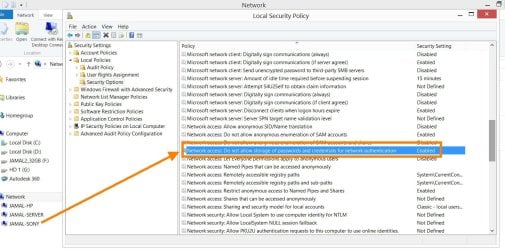
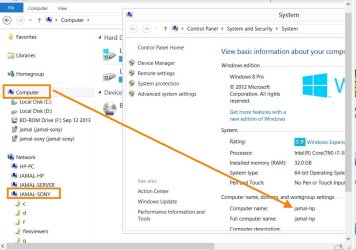
The “don’t allow storage of password….” is enabled in the windows of “jamal-sony” machine, nevertheless, this machine can be accessed from “jamal-hp” without the need to provide the user name and password


What might be the issue here?
 

Attachments

  • Clip_153.jpg
    Clip_153.jpg
    136.6 KB · Views: 0
  • Clip_154.jpg
    Clip_154.jpg
    82.8 KB · Views: 0

My Computer My Computer

OS
Windows 7 Ultimate x64
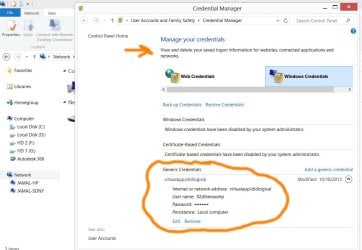
Try going into the Control Panel then to Credential Manger, remove the credentials for the machine that you require to sign in.

I believe if the credentials are already stored then the setting I showed you won't help until the credentials are removed.
 

My Computer My Computer

Computer type
PC/Desktop
Computer Manufacturer/Model Number
Home built
OS
Windows 7 Ult, Windows 8.1 Pro,
CPU
Q9650-4.275GHz, E8600 4.5GHz, E6750-3.8GHz
Motherboard
Evga 780i FTW
Memory
G.Skill PC2 9600 1200Mhz 5 5 5 15 2T
Graphics Card(s)
GTX480
Sound Card
Asus Xonar D2
Monitor(s) Displays
HannsG
Screen Resolution
1680X1050
Hard Drives
GSkill Phoenix Pro 120GB SSD
PSU
ThermalTake Toughpower 1000Watt modular
Case
ThermalTake XaserV
Cooling
Xigmatek S1283
Keyboard
Logitech G15
Mouse
Logitech G9
Internet Speed
T1
Try going into the Control Panel then to Credential Manger, remove the credentials for the machine that you require to sign in.

I believe if the credentials are already stored then the setting I showed you won't help until the credentials are removed.


Many thanks chev65 for the prompt help,

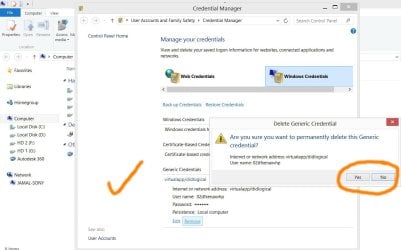
I tried it, but sounds other machines are accessing mine without asking for permissions


What other ideas can be considered?
 

Attachments

  • Clip_158.jpg
    Clip_158.jpg
    82.2 KB · Views: 0
  • Clip_159.jpg
    Clip_159.jpg
    85.8 KB · Views: 0

My Computer My Computer

OS
Windows 7 Ultimate x64
This password protected sharing never seems to work right but those are the best options I can find.

I'm sure you checked that password protected sharing is turned on for all Networks in the Advanced Sharing settings.
 

My Computer My Computer

Computer type
PC/Desktop
Computer Manufacturer/Model Number
Home built
OS
Windows 7 Ult, Windows 8.1 Pro,
CPU
Q9650-4.275GHz, E8600 4.5GHz, E6750-3.8GHz
Motherboard
Evga 780i FTW
Memory
G.Skill PC2 9600 1200Mhz 5 5 5 15 2T
Graphics Card(s)
GTX480
Sound Card
Asus Xonar D2
Monitor(s) Displays
HannsG
Screen Resolution
1680X1050
Hard Drives
GSkill Phoenix Pro 120GB SSD
PSU
ThermalTake Toughpower 1000Watt modular
Case
ThermalTake XaserV
Cooling
Xigmatek S1283
Keyboard
Logitech G15
Mouse
Logitech G9
Internet Speed
T1
This password protected sharing never seems to work right but those are the best options I can find.

I'm sure you checked that password protected sharing is turned on for all Networks in the Advanced Sharing settings.


Very much appreciated.

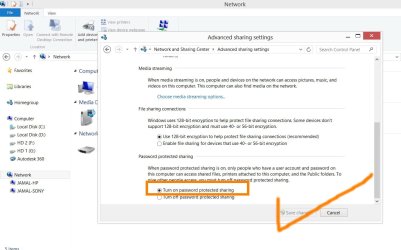
“Turn on password protected sharing” is checked, nevertheless, others can access my machines with no username\password

Best

Jamal
 

Attachments

  • Clip_160.jpg
    Clip_160.jpg
    98.8 KB · Views: 0

My Computer My Computer

OS
Windows 7 Ultimate x64
I would think that removing the credentials for each client would force them to type in the credentials each time because the Local Security Policy should prevent your machine from saving those credentials. Not sure as I've not tested this out myself

There are other ways to keep clients from accessing shares by setting up a Homegroup then keeping the restricted access clients from joining the Homegroup. I can give more details on this if you want to go that route.
 

My Computer My Computer

Computer type
PC/Desktop
Computer Manufacturer/Model Number
Home built
OS
Windows 7 Ult, Windows 8.1 Pro,
CPU
Q9650-4.275GHz, E8600 4.5GHz, E6750-3.8GHz
Motherboard
Evga 780i FTW
Memory
G.Skill PC2 9600 1200Mhz 5 5 5 15 2T
Graphics Card(s)
GTX480
Sound Card
Asus Xonar D2
Monitor(s) Displays
HannsG
Screen Resolution
1680X1050
Hard Drives
GSkill Phoenix Pro 120GB SSD
PSU
ThermalTake Toughpower 1000Watt modular
Case
ThermalTake XaserV
Cooling
Xigmatek S1283
Keyboard
Logitech G15
Mouse
Logitech G9
Internet Speed
T1
I would think that removing the credentials for each client would force them to type in the credentials each time because the Local Security Policy should prevent your machine from saving those credentials. Not sure as I've not tested this out myself

There are other ways to keep clients from accessing shares by setting up a Homegroup then keeping the restricted access clients from joining the Homegroup. I can give more details on this if you want to go that route.


Thank you chev65 for the help.

But how come that the “Turn on password protected sharing” is checked while other users still can access the machine

Best

Jamal
 

My Computer My Computer

OS
Windows 7 Ultimate x64
I would think that removing the credentials for each client would force them to type in the credentials each time because the Local Security Policy should prevent your machine from saving those credentials. Not sure as I've not tested this out myself

There are other ways to keep clients from accessing shares by setting up a Homegroup then keeping the restricted access clients from joining the Homegroup. I can give more details on this if you want to go that route.


Thank you chev65 for the help.

But how come that the “Turn on password protected sharing” is checked while other users still can access the machine

Best

Jamal

Did you try removing the saved credentials from the Credential Manager in the Control Panel?

I believe the Local Security Policy does work to keep Windows from saving credentials but if they are already saved then it may be required to remove them manually.
 

My Computer My Computer

Computer type
PC/Desktop
Computer Manufacturer/Model Number
Home built
OS
Windows 7 Ult, Windows 8.1 Pro,
CPU
Q9650-4.275GHz, E8600 4.5GHz, E6750-3.8GHz
Motherboard
Evga 780i FTW
Memory
G.Skill PC2 9600 1200Mhz 5 5 5 15 2T
Graphics Card(s)
GTX480
Sound Card
Asus Xonar D2
Monitor(s) Displays
HannsG
Screen Resolution
1680X1050
Hard Drives
GSkill Phoenix Pro 120GB SSD
PSU
ThermalTake Toughpower 1000Watt modular
Case
ThermalTake XaserV
Cooling
Xigmatek S1283
Keyboard
Logitech G15
Mouse
Logitech G9
Internet Speed
T1
I would think that removing the credentials for each client would force them to type in the credentials each time because the Local Security Policy should prevent your machine from saving those credentials. Not sure as I've not tested this out myself

There are other ways to keep clients from accessing shares by setting up a Homegroup then keeping the restricted access clients from joining the Homegroup. I can give more details on this if you want to go that route.


Thank you chev65 for the help.

But how come that the “Turn on password protected sharing” is checked while other users still can access the machine

Best

Jamal

Did you try removing the saved credentials from the Credential Manager in the Control Panel?

I believe the Local Security Policy does work to keep Windows from saving credentials but if they are already saved then it may be required to remove them manually.


Thanks chev65,

I did remove credentials. Please have a look on post #5

Best

Jamal
 

My Computer My Computer

OS
Windows 7 Ultimate x64
Back
Top