
Rescue/Recovery DVD fails to boot

You can try this;
A23x86.iso
boot it up, then use nt6repair to reveal the shadow copies. Find the shadow copies first.
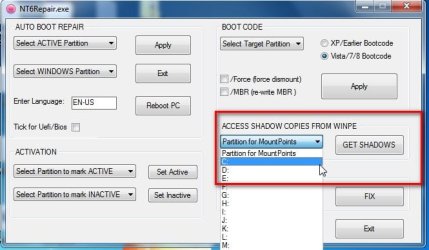
GETSHADOWS.jpg


Then rt click the sick windows partition , select "bypass permissions". Then delete the following from the partition ( one at a time).

Program files
Program Files (x86)
Program Data
Users
Windows


You can copy the same named directories back onto the partition from the shadow copy ( do it one at a time, coz some may be quite big )

If nothing in the shadow is damaged, you should be back to the point when the shadow was created. I have done it several times.
 

My Computers My Computers

  • At a glance

    7 X64i5 84002x8gb 3200mhz
    Computer type
    PC/Desktop
    OS
    7 X64
    CPU
    i5 8400
    Motherboard
    gigabyte b365m ds3h
    Memory
    2x8gb 3200mhz
    Hard Drives
    various
    PSU
    pure power 11 400w cm
    Case
    Coolermaster
    Cooling
    cryorig m9i
  • At a glance

    7x64g54008gb ddr4 2400
    Computer type
    PC/Desktop
    OS
    7x64
    CPU
    g5400
    Motherboard
    ga b365m ds3h
    Memory
    8gb ddr4 2400
    PSU
    xfx pro 450w
Si, would this be an effective workaround for when System Restore is not functioning from WinRE?
 
You can try this;
A23x86.iso
boot it up, then use nt6repair to reveal the shadow copies. Find the shadow copies first.

View attachment 362854


Then rt click the sick windows partition , select "bypass permissions". Then delete the following from the partition ( one at a time).

Program files
Program Files (x86)
Program Data
Users
Windows


You can copy the same named directories back onto the partition from the shadow copy ( do it one at a time, coz some may be quite big )

If nothing in the shadow is damaged, you should be back to the point when the shadow was created. I have done it several times.

I didn't get an opportunity to try this for this time, but appreciate your help.
 

My Computer My Computer

At a glance

Windows 7 Home Premium
Computer type
PC/Desktop
OS
Windows 7 Home Premium

Greg, I eventually got it to work. I posted this on my BSOD post, and thought it would be helpful for you here too.


I figured it out. After performing a Recovery and the system not working, and after thoroughly checking the hard disk for virus and consistency (surface check, etc), I figured I would try and determine the OEM license number from the system to use during a clean install. I even used bootrec from the command-line during a repair session, it still didn't work. It would just blue-screen with 0x7B.

I downloaded this program:

Download Lazesoft Products

It creates a bootable image (DVD, CDROM, USB key) that can be used to do all sorts of cool things, including recovering license key information. It also has a boot recovery app built into it. Clicking the icons to rebuild the BCD, boot sector, and MBR fixed it, and now it boots successfully. So despite running these commands using bootrec and it not working, perhaps there was something else in this rescue CDROM that was performed that eventually fixed it.

Using this from the working system before I performed the Recovery probably would have worked as well.

I'd encourage you guys to direct your users to this lazesoft product page as part of your "Troubleshooting windows booting" document.
 

My Computer My Computer

At a glance

Windows 7 Home Premium
Computer type
PC/Desktop
OS
Windows 7 Home Premium
Everything that's in that disc is in Troubleshooting Failure to Boot tutorial, but you need to actually do the steps.

I asked you about a bunch of the steps you said you had done but you could not reply with any results. This lack of interaction almost always means the work is not getting done.
 
Everything that's in that disc is in Troubleshooting Failure to Boot tutorial, but you need to actually do the steps.

I asked you about a bunch of the steps you said you had done but you could not reply with any results. This lack of interaction almost always means the work is not getting done.

As I mentioned, I did those steps, and have a good enough understanding of how things work to know that the commands succeeded. Despite this, the steps weren't sufficient, and only this rescue CDROM was apparently able to fix it. I just don't do it everyday any more.

I think part of the confusion may come from the fact that it's uncommon for a support forum to have such a dedicated support staff - I'm very thankful and appreciative you stuck with this throughout the entire procedure. Often times, responses are given but then no follow-through, and it becomes a waste of everyone's time.

I've been building PCs and servers for decades, going back to being the technical lead for a company with 300 WfW systems. It doesn't make me an expert, but I'm very familiar with the procedures and customizing windows. It's perhaps just the individual release nuances I have difficulty with.
 
Last edited:

My Computer My Computer

At a glance

Windows 7 Home Premium
Computer type
PC/Desktop
OS
Windows 7 Home Premium
Back
Top