Reserved partition - moved

jamrash

New member
Local time
4:53 AM
Messages
6
I have been running an Acer laptop with Win 7 & Ubuntu dual boot with easy bcd controlling boot for 6 months with no problems. Setup included Win7 in 50 gig resized partition and a shared data partition of 200 gig.

Recently, I ran out of space in the Windows partition, so decided to adjust things. The Windows partition is at the end of the drive with the reserved partition just before it. I used GParted to make the changes.

I reduced the data partition to 150 gig, leaving 50 gigs of unused space. I intended to resize Windows to 100 gig. However, the reserved partition was in the way. I copied and pasted the reserved partition to a new location, just after the data partition. I then deleted the original reserved partition. I used GParted to flag the new partition as "boot".

I expected things not to boot, so I booted with the Windows repair disk cd. I thought this would fix things; so far, nothing is working. Message says "Missing operating system", "No bootable device". I have thought of deleting the new reserved partition and then running the Windows 7 repair disk. Any thoughts at this point?
 

My Computer

OS
Windows 7 Home Premium 64 bit
As you install Linux, your reserved partition & Acer Recovery partition are unusable.
Did you make your Acer Recovery Disks?
 

My Computer

OS
ME/XP/Vista/Win7
Moved reserved partition - missing operating system

Theog:
Thanks for replying. Windows 7 was factory installed. I resized the partition and then installed Ubuntu. Everything worked fine and booted fine until this last change. I do have the Acer Recovery Disks; however, they restore factory settings, including all the junkware. Are you suggesting that my latest change is irriversible?

It appears as though the reserved partition is critical for booting. Can I delete the partition wth GParted, and then use the Windows repair disk to build a new set of boot instructions?
 

My Computer

OS
Windows 7 Home Premium 64 bit
Windows 7 reserved partition - delete and rebuild?

I wish to keep my dual boot configuration. I need to have both Windows and Ubuntu. I simply wanted to resize my windows 7 partition. I attempting this, I have moved the reserved partition and now the computer will not boot. I can restore a backup as a last resort. In the mean time, is it possible to delete the reserved partition and then use the Windows 7 repair disk to rebuild the boot instructions for Windows?
 

My Computer

OS
Windows 7 Home Premium 64 bit

My Computer

Computer Manufacturer/Model Number
HP Pavilion Elite 495UK
OS
Windows 7 Ultimate SP1 64-Bit
CPU
Intel Core i7 870 @ 2.93GHz
Motherboard
MSI 2A9C (CPU1)
Memory
8Gb Dual-Channel DDR3 @ 664MHz
Graphics Card(s)
nVidia GeForce GTX 460 1024MB dedicated RAM
Sound Card
Realtek HD Audio
Monitor(s) Displays
HP2310i
Screen Resolution
1920 x 1080
Hard Drives
1x1954GB Hitachi HDS22020ALA 330 (RAID), 1x1954GB Hitachi External for backup and storage
PSU
460W
Case
HP Elite
Cooling
Air cooled
Keyboard
Logitech K750 solar-powered keyboard
Mouse
Logitech Wireless M180 mouse
Internet Speed
2Mb
Other Info
Pure Avanti Flow Internet Radio with iPod Dock, 64Gb iPod, HP USB Speakers, Sony MDR-V500 Headphones, Sony Vaio F-Series Laptop
The System Reserved boot partition is too sensitive to copy and paste. It will need to be rebuilt if it won't repair after making sure it's marked Active and running Startup Repair up to 3 separate times with reboots.

To rebuild it, delete and recreate it using free Partition Wizard bootable CD or Diskpart from DVD Command Line: DiskPart Command-Line Options
DISKPART At PC Startup

Then mark Active using PW CD or Diskpart and run 3 Startup Repairs from DVD to write the System boot files to it, until Win7 starts. Partition - Mark as Active

If this fails, you likely have GRUB corruption interfering. You can try moving the Active flag to Win7 partition itself to run the Repairs to see if it will start, or you'll need to use GRUB bootloader for Win7 or wipe GRUB partition completely from the HD to avoid it's corruption of Win7.
 
I wish to keep my dual boot configuration. I need to have both Windows and Ubuntu. I simply wanted to resize my windows 7 partition. I attempting this, I have moved the reserved partition and now the computer will not boot. I can restore a backup as a last resort. In the mean time, is it possible to delete the reserved partition and then use the Windows 7 repair disk to rebuild the boot instructions for Windows?

You could try reinstalling GRUB.
 

My Computer

OS
ME/XP/Vista/Win7
Moved reserved partition - missing operating system - solved

Thanks everyone for the replies. I am back up and running in dual boot. Gregrocker, deleting the reserved partition and rebuilding it worked perfectly. I did not need to delve into Grub. I used Windows repair disk Diskpart to delete the partition from the command line and then rebooted with the Windows repair disk which detected the problem and fixed the boot sequence. Windows repair disk should be shipped with every Windows 7 computer!
 

My Computer

OS
Windows 7 Home Premium 64 bit
Thanks everyone for the replies. I am back up and running in dual boot. Gregrocker, deleting the reserved partition and rebuilding it worked perfectly. I did not need to delve into Grub. I used Windows repair disk Diskpart to delete the partition from the command line and then rebooted with the Windows repair disk which detected the problem and fixed the boot sequence. Windows repair disk should be shipped with every Windows 7 computer!

It is.
http://www.sevenforums.com/tutorials/2083-system-repair-disc-create.html
 

My Computer

OS
ME/XP/Vista/Win7
If you didn't create a new SysReserved partition marked Active then it's unsure where your System Active boot files were placed.

Let us see a screenshot of your full maximized Disk Mgmt drive map with listings, using the Snipping Tool in Start Menu to check it over to avoid potential problems.
 
Reserved Partition - system back to normal

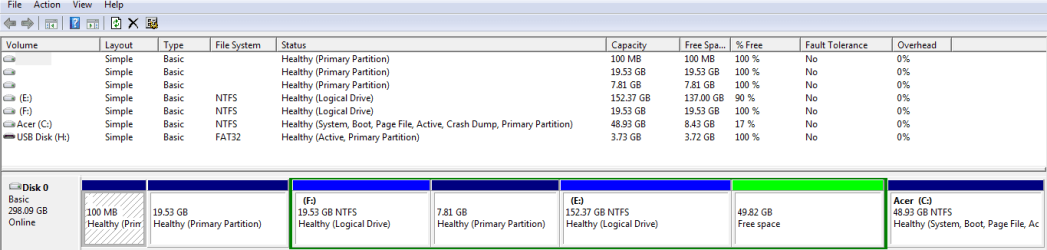
Attached is a picture of my partitions:
grub?
Ubuntu
F: backup partition with FSArchiver
linux swap disk
E: shared data partition
free space
Windows 7

Originally, I had hoped to increase windows partition by taking 50 gig from the shared data partition. Now, I am not sure I can actually do that.
Thanks for reviewing.
Regards,
jamrash
 

Attachments

  • jamrashdisk.PNG
    jamrashdisk.PNG
    23.6 KB · Views: 14

My Computer

OS
Windows 7 Home Premium 64 bit
If you're booting via GRUB then you'll have to check your settings there. Disk Mgmt doesn't show any Linux.

Since the listings are cut off of the in the Status column, we can't see how the normal 100mb Win7 System Reserved partition is marked, but it appears C contains the boot files for Win7 if it is being used to boot Win7 and not GRUB. I doubt the 100mb is even used. But again if Linux is in the mix all it means to us here is potential corruption of Win7.

Can't see why you couldn't use Disk Mgmt to extend E into the Free space at it's right. Free Space is made to use for Logical partitions, whereas Unallocatd is for Primaries. Partition or Volume - Extend
 
Gregrocker:
Thanks for the analysis. Here is another pic of my partition with all details showing. Easy BCD controls the boot process; I choose either Win7 or Ubuntu. If I choose Ubuntu, Grub loads next.

As for the free space, I created it by taking away from E:. My intention was to double the size of the Windows partition. When I planned out my partitions, I thought that 50 GB for Windows would be more than enough as that number was recommended by some of the dual boot how-to sites. As it turns out, Windows 7, with all the programs I am using, seems to want far more than 50 GB - certainly a lot more than ubuntu.

I don't know if I can fix the problem at this point. I may have to live within the constraints I have created.
 

Attachments

  • jamrashdisk.PNG
    jamrashdisk.PNG
    13.1 KB · Views: 4

My Computer

OS
Windows 7 Home Premium 64 bit
In order to extend C to the left you'll need to boot free Partition Wizard version 5.2 which treats Free Space and Unallocated space the same for resizing purposes and can Resize to the left.

Boot PW CD, rightclick C to Resize, slide left grey border to the left to take up the Free Space, OK, Apply.

All of the System boot files are in C so the 100mb System Reserved partition is not booting Win7. The 19.53 partition shows empty so unless it is the Linux both of those could be deleted to resize the Logical to the left or create another Primary partition there. In the future this is where I would reinstall Win7. Reinstalling Windows 7
 
Back
Top