
CorneliusWin7
New member
- Local time
- 2:57 PM
- Messages
- 2
Hey guys,
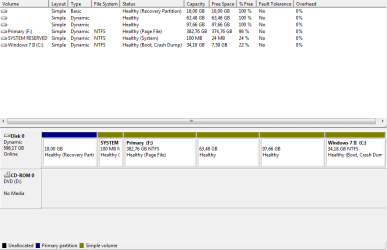
I am frustrated. I wanted to dual-boot Windows 10 on my Windows 7 Home Premium laptop and shrinked my disk by about 100GB. I went on to create a new volume, as you can see in the screenshot below. I actually re-installed Windows 7 and succesfully managed to do so, but now when I boot the Windows 10 installer I get to the "select volume" part and the only option I can choose is my Windows 7 volume (Windows II in the screenshot). For every other volume all the options like formatting, deleting and creating a new one are greyed out. Trying to install on unallocated space also does not work.
Now I have almost given up, I have got almost no space left on my active volume and can not increase it, nor can I install a new operating system because it doesn't work any of the virtual volumes.
What I would like to do now is to either be able to extend my active volume or to reset the whole harddrive and to re-install Windows all over again.
Please help me sevenforums!
I am frustrated. I wanted to dual-boot Windows 10 on my Windows 7 Home Premium laptop and shrinked my disk by about 100GB. I went on to create a new volume, as you can see in the screenshot below. I actually re-installed Windows 7 and succesfully managed to do so, but now when I boot the Windows 10 installer I get to the "select volume" part and the only option I can choose is my Windows 7 volume (Windows II in the screenshot). For every other volume all the options like formatting, deleting and creating a new one are greyed out. Trying to install on unallocated space also does not work.
Now I have almost given up, I have got almost no space left on my active volume and can not increase it, nor can I install a new operating system because it doesn't work any of the virtual volumes.
What I would like to do now is to either be able to extend my active volume or to reset the whole harddrive and to re-install Windows all over again.
Please help me sevenforums!
Attachments
My Computer
- Computer type
- PC/Desktop
- OS
- Windows 7 Home Premium 64bit


