deltawaters31
New member
- Local time
- 11:50 AM
- Messages
- 1
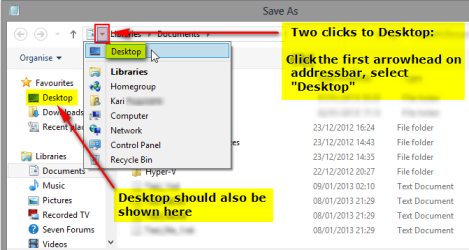
Hi -- it use to be when I tried to save a file (e.g., a file received over email) that when I did a "save as" the window that opened was my Desktop (where I have all my working files). Quick and easy to save the file to the correct folder. Now, when I do the same thing, the window that opens is my Documents (a library). So to starting saving the file, I have to click on my hard drive, then Users, then (my user file), then Desktop. 4 clicks to do what use to be automatic to my Desktop. Any advice of how to reconfigure for my former experience would be helpful.
Thank you.
Thank you.
My Computer
- OS
- Windows 7 64bit