Resizing Display

Giovanni85014

New member
Local time
9:51 AM
Messages
10
Is there a way to make permanent the RESIZE option to Maximum, when opening Internet Explorer. I know you can resize at top right hand corner. That is only temporary. I wanted to make it permanent, so I don't need to resize each time I open a page.
 

My Computer

Computer type
PC/Desktop
Computer Manufacturer/Model Number
HP G62
OS
Microsoft Windows 7 Home Premium 64-bit 7601 Multiprocessor Free Service Pack 1
CPU
AMD Athlon(tm) II P340 Dual-Core Processor
Motherboard
Hewlett-Packard 1444
Memory
3.00 GB
Graphics Card(s)
AMD M880G with ATI Mobility Radeon HD 4250
Sound Card
(1) Realtek High Definition Audio (2) ATI High Definition
Screen Resolution
1366 x 768 x 32 bits (4294967296 colors) @ 59 Hz
Hard Drives
(1) WDC WD32 00BEVT-60A23T0 SATA Disk Device (2) WD Ext HDD 1021 USB Device (3) WD Ext HDD 1021 USB Device (4) WD Ext HDD 1021 USB Device
Hello Giovanni, and welcome to Seven Forums.

Normally you could maximize (middle square button at top right corner) the Internet Explorer window, and close it. IE should open maxmized the next time you open it. IE will open the same size as it was last closed by default.

Hope this helps,
Shawn
 

My Computer

Computer type
PC/Desktop
Computer Manufacturer/Model Number
Self built custom
OS
64-bit Windows 11 Pro for Workstations
CPU
Intel i7-8700K OC'd to 5 GHz
Motherboard
ASUS ROG Maximus XI Formula Z390
Memory
64 GB (4x16GB) G.SKILL TridentZ RGB DDR4 3600 MHz
Graphics Card(s)
ASUS ROG-STRIX-GTX1080TI-O11G-GAMING
Sound Card
Integrated
Monitor(s) Displays
2 x Samsung Odyssey G7 27"
Screen Resolution
2560x1440
Hard Drives
1TB Samsung 990 PRO M.2,
4TB Samsung 990 PRO PRO M.2,
TerraMaster F8 SSD Plus NAS
PSU
Seasonic Prime Titanium 850W
Case
Thermaltake Core P3
Cooling
Corsair Hydro H115i
Keyboard
Logitech wireless K800
Mouse
Logitech MX Master 4
Internet Speed
2 Gb/s Download and 100 Mb/s Upload
Antivirus
Malwarebyte Anti-Malware Premium
Browser
Google Chrome
Other Info
Logitech Z625 speaker system,
Logitech BRIO 4K Pro webcam,
HP Color LaserJet Pro MFP M477fdn,
APC SMART-UPS RT 1000 XL - SURT1000XLI,
Galaxy S23 Plus phone
Is there another way to MAXIMIZE the display screen, permanently, besides hitting the CLOSE button? Many times, depending on the last site visited, I have to resize the screen to maximum setting.
 

My Computer

Computer type
PC/Desktop
Computer Manufacturer/Model Number
HP G62
OS
Microsoft Windows 7 Home Premium 64-bit 7601 Multiprocessor Free Service Pack 1
CPU
AMD Athlon(tm) II P340 Dual-Core Processor
Motherboard
Hewlett-Packard 1444
Memory
3.00 GB
Graphics Card(s)
AMD M880G with ATI Mobility Radeon HD 4250
Sound Card
(1) Realtek High Definition Audio (2) ATI High Definition
Screen Resolution
1366 x 768 x 32 bits (4294967296 colors) @ 59 Hz
Hard Drives
(1) WDC WD32 00BEVT-60A23T0 SATA Disk Device (2) WD Ext HDD 1021 USB Device (3) WD Ext HDD 1021 USB Device (4) WD Ext HDD 1021 USB Device
Hi Giovanni, welcome to the Seven Forums.

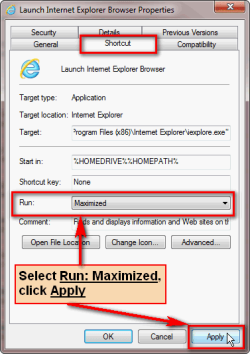
Close IE. Right click IE shortcut, select Properties. In Shortcut tab, select Run: Maximized, click Apply, click OK. Now your IE always opens maximized to full screen.

Shortcut_run_maximized.png

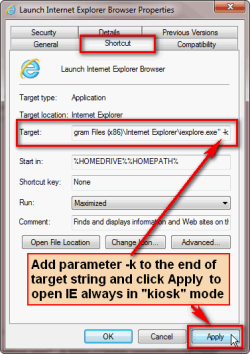
If you want IE to open in so called kiosk mode (borderless full screen, as if F11 was pressed), add parameter -k to the end of Target string, click Apply, click OK. This opens IE always in borderless full screen mode.

Shortcut_run_kiosk_mode.png

Kari
 

My Computer

Computer type
Laptop
Computer Manufacturer/Model Number
HP ENVY 17-1150eg
OS
Windows 10 Pro x64 EN-GB
CPU
1.6 GHz Intel Core i7-720QM Processor
Memory
6 GB
Graphics Card(s)
ATI Mobility Radeon HD 5850 Graphics
Sound Card
Beats sound system with integrated subwoofer
Monitor(s) Displays
17" laptop display, 22" LED and 32" Full HD TV through HDMI
Screen Resolution
1600*900 (1), 1920*1080 (2&3)
Hard Drives
Internal: 2 x 500 GB SATA Hard Disk Drive 7200 rpm
External: 2TB for backups, 3TB USB3 network drive for media
Cooling
As Envy runs a bit warm, I have it on a Cooler Master pad
Keyboard
Logitech diNovo Media Desktop Laser (bluetooth)
Mouse
Logitech Performance Mouse MX
Internet Speed
50/10 Mbps VDSL
Antivirus
Windows Defender 4.3.9431.0
Browser
Maxthon 3.5.2., IE11
Thanks. That helped. Another issue related to that is when I open a .pdf file or document within that maximum setting, the document opens in a much smaller window. I tried stretching the edges out, to fill the screen, and click CLOSE, in an effort to permanently resize the document. It returns to the small window each time it is opened. Any suggestions in keeping that window a certain size?
 

My Computer

Computer type
PC/Desktop
Computer Manufacturer/Model Number
HP G62
OS
Microsoft Windows 7 Home Premium 64-bit 7601 Multiprocessor Free Service Pack 1
CPU
AMD Athlon(tm) II P340 Dual-Core Processor
Motherboard
Hewlett-Packard 1444
Memory
3.00 GB
Graphics Card(s)
AMD M880G with ATI Mobility Radeon HD 4250
Sound Card
(1) Realtek High Definition Audio (2) ATI High Definition
Screen Resolution
1366 x 768 x 32 bits (4294967296 colors) @ 59 Hz
Hard Drives
(1) WDC WD32 00BEVT-60A23T0 SATA Disk Device (2) WD Ext HDD 1021 USB Device (3) WD Ext HDD 1021 USB Device (4) WD Ext HDD 1021 USB Device
...Another issue related to that is when I open a .pdf file or document within that maximum setting, the document opens in a much smaller window...
I use 2 different sized screens with the same computer, so I often have to stretch the size for the big one. I open IE8 to the small window and stretch it. Then find a link inside the window, right-click on it and select "open in new window". If the new window opens too small I stretch it and File/Exit that window followed by File/Exit in the first window.
 

My Computer

Computer type
PC/Desktop
Computer Manufacturer/Model Number
OQO 2+
OS
Windows 8 Pro w/MC 32-bit
CPU
Intel Atom 1.86 GHz
Motherboard
OQO 2+
Memory
2 GB
Graphics Card(s)
Intel GMA 500
Sound Card
IDT
Monitor(s) Displays
LCD
Screen Resolution
800 x 480 (portable) 1280 x 1024 (docked)
Hard Drives
64 GB SSD
PSU
9 Ah Battery (portable) or OQO Brick (docked)
Case
Shirt Pocket Sized
Cooling
Tiny Fan
Keyboard
Slide out (portable) DiNovo Edge (docked)
Mouse
Eraser head (portable) Logitech Bluetooth (docked)
Internet Speed
WWAN or 802.11G (portable) T1 (docked)
Browser
IE 10
Other Info
DVD-RW OQO Docking Station
Back
Top