Solved resizing new partition

Status
Not open for further replies.

wheresjerry

New member
Local time
12:53 AM
Messages
88
I installed win7 on a new partition I created in Vista, but want to increase the size of it now....the below article say's I can, but the selection to expand is greyed out? I guess I might need to be running whole computer as administrator, I am only user, or should this be done in safe mode, or do I need a third party program? A lot of questions I know! Thanks...


Resize a Partition for Free in Windows Vista :: the How-To Geek
 

My Computer

Computer Manufacturer/Model Number
HP
OS
Windows Seven 64 bit
CPU
AMD Phenom 9150e Quad-core 1.80 GHz
Memory
5 gigs
Graphics Card(s)
GeForce 9600 GT
Sound Card
stock
Monitor(s) Displays
HP w2207h
Screen Resolution
1680x1050
Hard Drives
external Maxtor 250 gig
2nd internal 225 gig
Keyboard
HP
Mouse
MS Lasermouse 5000
Internet Speed
5 MB
I had this problem also. Unfortunately I gubber things up and ended up reinstalling so I just resized the partitions when I reinstalled (no files on the other partition). I do see that extend partition is still greyed out though. Anyone else?

Gary
 

My Computer

Computer Manufacturer/Model Number
Dell XPS420
OS
Vista Ult 64 bit Seven Ult RTM x64
CPU
Intel Core2 Quad Q6600 2.40 gigahertz
Memory
Crucial Ballistix 4x2GB PC2 6400
Graphics Card(s)
NVIDIA GeForce 8600 GTS 256 MB
Sound Card
Creative SB X-Fi audio
Monitor(s) Displays
HP w2207 + HPvs15
Screen Resolution
1680x1050 + 1024x768
Hard Drives
2-WD5000AAKS-500 GB
WD5000AAV-500 GB external
Keyboard
Microsoft Comfort Curve
Mouse
MX Revolution
Other Info
Wacom Intuos 2 Graphics Tablet
Experience Index=5.5
Reinstall?

Reinstalling your OS is an option, but the worst option to resize partitions. At least, I don't want to waste time reinstalling my computer. What I use to increase the size of my partition is Easeus Partition Manager. It can help resize partitions without destroying any data. Three basic editions are available: home edition that is free to PC users, professional edition and server edition for enterprise users. :geek:
 

My Computer

OS
XP
One possible reason that the extend option is greyed out is that probably you don't have enough space left (meaning that your primary partition is used to consume all the space available).

Have you tried to shrink the primary partition first, and then create a new partition on the unused space left?

The steps are as below:

1. Shrink the other partition so that you have free space left.
2. When you have free space left, then try to extend the desired partition.
 

My Computer

Computer Manufacturer/Model Number
ENIAC
OS
Windows 7 RC 7100 32bit/64bit
CPU
Intel Core2Duo E4500 2.20 GHz
Motherboard
ASUS P5LD2-X/1333
Memory
2x1GB Kinsgston DDR2 800MHz
Graphics Card(s)
Nvidia 8500GT
Sound Card
Onboard High Definition Audio Device
Monitor(s) Displays
Sony Bravia 42"
Case
LINKW 2222
Cooling
Standard Intel
Keyboard
Some cheap one
Mouse
Microsoft Intellimouse something
Internet Speed
24MBps ADSL
I have had 166GB of space and it was still greyed out. Don't think that's it. Reason I did it when I reinstalled is 'cause I had to reinstall anyways and had no data on the partition I wanted to remove.

Gary
 

My Computer

Computer Manufacturer/Model Number
Dell XPS420
OS
Vista Ult 64 bit Seven Ult RTM x64
CPU
Intel Core2 Quad Q6600 2.40 gigahertz
Memory
Crucial Ballistix 4x2GB PC2 6400
Graphics Card(s)
NVIDIA GeForce 8600 GTS 256 MB
Sound Card
Creative SB X-Fi audio
Monitor(s) Displays
HP w2207 + HPvs15
Screen Resolution
1680x1050 + 1024x768
Hard Drives
2-WD5000AAKS-500 GB
WD5000AAV-500 GB external
Keyboard
Microsoft Comfort Curve
Mouse
MX Revolution
Other Info
Wacom Intuos 2 Graphics Tablet
Experience Index=5.5
Please note that the partition resizer n 7 can only add or remove space at the end of a partition. It does not move partitions like third party tools. If you have adjacent partitions and shrink the first, you cannot grow the second into the space just freed. That would require moving data which the 7 partition resizer doesn't do.
 

My Computer

Computer type
Laptop
Computer Manufacturer/Model Number
Apple
OS
El Capitan / Windows 10
CPU
i7-4980HQ
Memory
16GB
Graphics Card(s)
Iris 5200
I had 2 partitions side by side. I know the extention can only go to the right and that's what I tried. Tried it with both formatted, first one formatted second one not, first one formatted second one deleted, first one formatted second one as a simple volume. Only thing I didn't try was with both unformatted. I did have files on the first of the partitions so formatting that was not an option. I believe I am just doing something wrong, this is the first I've played with it, but the help files don't show anything and I can only guess at this point. I need to boot into Vista and see if those help files can help me any. Will do that later today.

Gary
 

My Computer

Computer Manufacturer/Model Number
Dell XPS420
OS
Vista Ult 64 bit Seven Ult RTM x64
CPU
Intel Core2 Quad Q6600 2.40 gigahertz
Memory
Crucial Ballistix 4x2GB PC2 6400
Graphics Card(s)
NVIDIA GeForce 8600 GTS 256 MB
Sound Card
Creative SB X-Fi audio
Monitor(s) Displays
HP w2207 + HPvs15
Screen Resolution
1680x1050 + 1024x768
Hard Drives
2-WD5000AAKS-500 GB
WD5000AAV-500 GB external
Keyboard
Microsoft Comfort Curve
Mouse
MX Revolution
Other Info
Wacom Intuos 2 Graphics Tablet
Experience Index=5.5
can you post a screenshot of your disk management screen?
 

My Computer

Computer Manufacturer/Model Number
ENIAC
OS
Windows 7 RC 7100 32bit/64bit
CPU
Intel Core2Duo E4500 2.20 GHz
Motherboard
ASUS P5LD2-X/1333
Memory
2x1GB Kinsgston DDR2 800MHz
Graphics Card(s)
Nvidia 8500GT
Sound Card
Onboard High Definition Audio Device
Monitor(s) Displays
Sony Bravia 42"
Case
LINKW 2222
Cooling
Standard Intel
Keyboard
Some cheap one
Mouse
Microsoft Intellimouse something
Internet Speed
24MBps ADSL
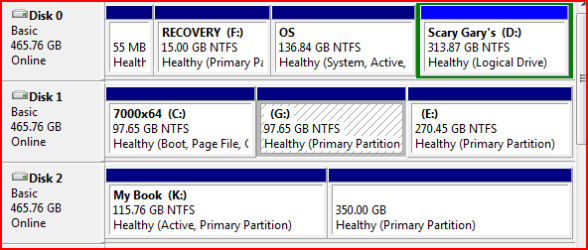
Here is the picture, but keep in mind it's not what it used to be.

dm.PNG

Gary

Edit: Does it needs to be unallocated space? It was formatted using NTFS.
 

My Computer

Computer Manufacturer/Model Number
Dell XPS420
OS
Vista Ult 64 bit Seven Ult RTM x64
CPU
Intel Core2 Quad Q6600 2.40 gigahertz
Memory
Crucial Ballistix 4x2GB PC2 6400
Graphics Card(s)
NVIDIA GeForce 8600 GTS 256 MB
Sound Card
Creative SB X-Fi audio
Monitor(s) Displays
HP w2207 + HPvs15
Screen Resolution
1680x1050 + 1024x768
Hard Drives
2-WD5000AAKS-500 GB
WD5000AAV-500 GB external
Keyboard
Microsoft Comfort Curve
Mouse
MX Revolution
Other Info
Wacom Intuos 2 Graphics Tablet
Experience Index=5.5
OK, now. What do you want to resize there?
 

My Computer

Computer type
Laptop
Computer Manufacturer/Model Number
Apple
OS
El Capitan / Windows 10
CPU
i7-4980HQ
Memory
16GB
Graphics Card(s)
Iris 5200
Nothing. As I said in the second post, its already done.

But for the sake of gaining knowledge, lets say that I wanted to add all of E into G. At this point 'extend volume' is greyed out.

Gary
 

My Computer

Computer Manufacturer/Model Number
Dell XPS420
OS
Vista Ult 64 bit Seven Ult RTM x64
CPU
Intel Core2 Quad Q6600 2.40 gigahertz
Memory
Crucial Ballistix 4x2GB PC2 6400
Graphics Card(s)
NVIDIA GeForce 8600 GTS 256 MB
Sound Card
Creative SB X-Fi audio
Monitor(s) Displays
HP w2207 + HPvs15
Screen Resolution
1680x1050 + 1024x768
Hard Drives
2-WD5000AAKS-500 GB
WD5000AAV-500 GB external
Keyboard
Microsoft Comfort Curve
Mouse
MX Revolution
Other Info
Wacom Intuos 2 Graphics Tablet
Experience Index=5.5
He probably wants to resize C: (7000X64)...

You must first shrink one of the other partitions on the right so you can have available space to resize c: ...
 
Last edited:

My Computer

Computer Manufacturer/Model Number
ENIAC
OS
Windows 7 RC 7100 32bit/64bit
CPU
Intel Core2Duo E4500 2.20 GHz
Motherboard
ASUS P5LD2-X/1333
Memory
2x1GB Kinsgston DDR2 800MHz
Graphics Card(s)
Nvidia 8500GT
Sound Card
Onboard High Definition Audio Device
Monitor(s) Displays
Sony Bravia 42"
Case
LINKW 2222
Cooling
Standard Intel
Keyboard
Some cheap one
Mouse
Microsoft Intellimouse something
Internet Speed
24MBps ADSL
To add the space in E into G, E would have to be deleted so it was unallocated space, and positioned to the immediate right of G
Nothing. As I said in the second post, its already done.

But for the sake of gaining knowledge, lets say that I wanted to add all of E into G. At this point 'extend volume' is greyed out.

Gary
 

My Computer

OS
Windows 7 RC 64-bit/Windows Vista Ultimate 64-bit
CPU
AMD64 Triple-core ~2.3GHz (Maximum clock: 3.2GHz)
Motherboard
Gigabyte GA-MA74GM-S2H
Memory
2GB
Graphics Card(s)
Gigabyte nVidia GeForce 9400GT 1GB
Sound Card
Realtek HD (unsure of model at the moment)
Monitor(s) Displays
ViewSonic VA1903wmb 19" Widescreen
Screen Resolution
1440x900
Hard Drives
500GB Samsung HD501LJ SATA,
80GB Western Digital IDE,
8GB Western Digital IDE
Case
Excel FC-HL11A
Keyboard
Microsoft Internet Keyboard
Mouse
USB Mouse
Internet Speed
256kbps
To add the space in E into G, E would have to be deleted so it was unallocated space, and positioned to the immediate right of G

Yup
 

My Computer

Computer type
Laptop
Computer Manufacturer/Model Number
Apple
OS
El Capitan / Windows 10
CPU
i7-4980HQ
Memory
16GB
Graphics Card(s)
Iris 5200
Hi everyone. New member here. I have a similar problem. I upgraded from Vista after Vista failed and could not be repaired and basically installed the Windows 7 operating system in my C: partition, which is only 12 gigs. I have over 150 gigs available on the D: partition, but when I go to shrink it so I can expand the C partition, it only says I have 2 gigs available to shrink. I'm stuck for what to do. Any ideas would be welcome, because I literally have about 50 megs left on my C: drive and the reminder messages about it are driving me crazy. Ideally, I'd love to eliminate the partition altogether without destroying my data. Any thoughts? Thanks in advance! Will the free version of Easues or whatever that is allow me to gain more partition space in C:?
 

My Computer

OS
Windows 7
IMHO, the safest way to do it is to copy all of D: someplace else temporarily.
Then delete D: and resize C:
I have had bad luck in the past with partition magic in resizing. It may have been cockpit trouble but..... My system is set up with 80GB for C: and the rest on D:
I have 32GB used But I have it configured so most programs are loaded on D: and data and config files are stored on D: also.

The reason being that if the OS needs reinstall I can do a clean install and have all my data and configs to rebuild it. Other than reinstall of software things are pretty easy.

NOTE HOWEVER, since MS hasn't figured out that this is a much better way to do things, configuring it is not for the casual user.
 

My Computer

OS
windows 7
Quick follow up. The free version of that Easeus program worked perfectly. I was able to decrease my D: partition by 10 gigs and give it to my cramped C: drive. Thanks much!!!
 

My Computer

OS
Windows 7
Yes, Easeus works GREAT. I actually went back and increased the size of my c: partition again from about 26 gigs to 160 gigs. Easeus worked fast and made the whole thing very easy.
 

My Computer

OS
Windows 7
Safest choice is Disk Management. You should be able to use it if you are a User Administrator. You can shrink one partition and then expand another, but only to the right.

For the exceptions we have found free Partition Wizard CD works best for resizing partitions in Win7, and have used it here for over 100 dual boot extractions.

If you will post back a screenshot of your full Disk Management map, using the snipping tool in Start Menu and attaching file using paper clip in reply box, then we can advise you better. Tell us exactly what you would like to do, and we'll give you the steps.

Resizing operations can fail so you'll need to back up your files and create a Win7 backup image stored externally so you can start over if necessary.
 
Status
Not open for further replies.
Back
Top