Resizing system partition without deleting data

binks

New member
Local time
2:29 AM
Messages
62
Location
UK
Hi all.
I just have a question for you guys smarter than me as I was unable to find solution for this one.
I have 2 partitions on 1 physical HDD. One for System and one for Data. On the one for Data I've got about 100GB free space and the one for System has only 1GB of free space. Now I'll be reinstalling Windows 7 soon and would like to make partition for data bigger. Is there any way to take away like 5 GB from the Data partition and give it to System partition without having to format all HDD? I don't want to loose files from the Data partition.
 
Last edited:

My Computer

Computer type
Laptop
Computer Manufacturer/Model Number
Dell XPS M1530
OS
Windows 7 Professional 64bit
CPU
Core2Duo T8100
Motherboard
Dell
Memory
3GB DDR2
Graphics Card(s)
GForce 8600M GT
Monitor(s) Displays
LG W2361
Screen Resolution
1920x1080
Hi,

Yes you can do that. Normally, you simply shrink C: (your system partition presumably), therby creating free unallocated space. Then you expand your existing data partition into the previously created unallocated space. Very easy.

Use Parition Wizard to do this, as it is more flexible than Windows Disk Management for this job:

http://www.sevenforums.com/tutorials/93322-partition-wizard-use-bootable-cd.html

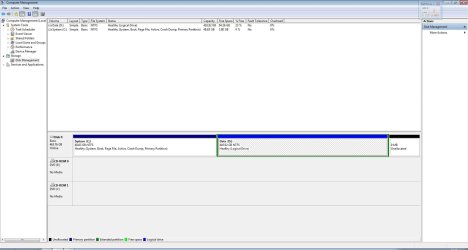
Before you start, post an image of the existing disk management so we can check for any possible issues before you start:

http://www.sevenforums.com/tutorials/274797-disk-management-post-screen-capture-image.html

Regards,
Golden
 

My Computer

Computer type
PC/Desktop
Computer Manufacturer/Model Number
Golden Mk. I.4
OS
Windows 10 Pro x64 ; Xubuntu x64
CPU
Intel i7 860 @ 2.80 GHz O/C'ed to 4.0GHz
Motherboard
Gigabyte P55A-UD3R Rev.1. Award BIOS F13
Memory
16GB Corsair Vengance DDR3 @ 661 MHz Dual Channel (9-9-9-24)
Graphics Card(s)
EVGA NVidia GTX 560 1024MB
Sound Card
Realtek Integrated
Monitor(s) Displays
Dual Samsung SyncMaster 2494HS
Screen Resolution
1920*1080 and 1920*1080
Hard Drives
1*Samsung 840 EVO 120GB SSD;
1*OCZ Vertex 2 60GB SSD;
2*Samsung F3 SpinPoint 1TB in RAID0;
1*Samsung F1 SpinPoint 1TB;
2*Western Digital 1TB External USB 3.0
1*Western Digital 500GB External USB 3.0
1*Seagate 500GB External USB 2.0
PSU
Thermaltake ToughPower QFan 750W
Case
Thermaltake Element S VK60001W2Z
Cooling
Corsair H60 Water Cooling, 2*230mm and 2*80mm case fans
Keyboard
Logitech G110
Mouse
Logitech MX518
You should make a backup of all important files on the data drive. Usually there are no problems with partition resizing but occasionally things go wrong.

Of course you should have a backup of all important files anyway. Files of particular importance need 2 or more backup copies. Having no backups is asking for trouble. Data recovery is always hit or miss and cannot be relied on.
 

My Computer

Computer type
PC/Desktop
Computer Manufacturer/Model Number
HP
OS
Windows 7 Pro 64 bit
CPU
Xeon W3520
Memory
8 GB
Graphics Card(s)
Nvidia Geforce 210
Proprietary disk partition tools will do this for you and move data safely outside of Windows, though there is always a risk of e.g. a power cut, so it is wise to back up the data first!

I recommend Easus Partition Master Professional - very easy to use, as long as you know how partitioning works and what it does! (resize existing partition, create partition from new unallocated space, format new partition and allocate a drive letter or description to it, will require reboot to resize and to apply these changes!)

Windows shrink tool is only really suited to new hard drives or hard drives without much data on, or it likely won't find space to shrink an existing partition or drive space. Windows shrink tool is unable to move 'fixed' files. :)
 

My Computer

Computer type
PC/Desktop
Computer Manufacturer/Model Number
Asus
OS
Windows 7 Ultimate x32
CPU
AMD2
Motherboard
Asus
Memory
4 Gb
Graphics Card(s)
Geforce GT 520
Hard Drives
five, up to 3 Tb
Antivirus
MSE
Browser
IE10
Why would you recommend EaseUs Pro ? It costs $39.95.
 

My Computer

Computer type
PC/Desktop
Computer Manufacturer/Model Number
Skylake Special #666
OS
Windows 10 Pro x64
CPU
Intel Core i7 6700K
Motherboard
Asus Sabertooth Z170 Mark 1
Memory
GSkill TridentZ RGB 16GB 3600 16-16-16-36
Graphics Card(s)
EVGA GTX 980 Ti SC x2
Sound Card
Realtek High Definition
Monitor(s) Displays
AOC G2460PG
Screen Resolution
1920 x 1080 144Hz
Hard Drives
Samsung 860 Pro 256GB, Seagate Barracuda 4TB x2
PSU
EVGA 1000 P2, EVGA White Custom Braided Cables
Case
Corsair Vengeance C70 Gunmetal Black
Cooling
Corsair H100i v2, Corsair ML120 x2, Thermal Grizzly Kryonaut
Keyboard
Logitech G910 Orion Spectrum
Mouse
Logitech G700s
Internet Speed
Verizon Fios Quantum Gateway 75/75
Antivirus
Windows Defender, Malwarebytes Free 3.8.3
Browser
Chrome
Other Info
Corsair SP120 x4, LG Blu-ray Drive, Durabrand HT-395 100 Watt Dolby Digital Amp, Corsair H2100 Wireless 7.1 Headset
We prefer free Partition Wizard bootable CD which has helped with tens of thousands of complicated partitioning operations here without a single failure, while all others except Disk Mgmt can and will fail with data loss.
 
Was a little busy, but thanks for all the advice:) Now I have different problem, as my dvd stopped to read dvd's so I can't install Win all over, but I think I'll have to do a bootable pendrive with win7, never mind. So thanks again for this and I'll try this bootable Mini Tool.
BTW, as I have laptop and replacing dvd will mean disassembling all my pc (dvd is below motherboard:( ), what do you think it could be? Just DVD gone bad (I checked and don't have upper or lower filters in regedit, usb dvd reads discs) or could it be just dirty lens?
 

Attachments

  • Disk management.JPG
    Disk management.JPG
    115.4 KB · Views: 0

My Computer

Computer type
Laptop
Computer Manufacturer/Model Number
Dell XPS M1530
OS
Windows 7 Professional 64bit
CPU
Core2Duo T8100
Motherboard
Dell
Memory
3GB DDR2
Graphics Card(s)
GForce 8600M GT
Monitor(s) Displays
LG W2361
Screen Resolution
1920x1080
I'd try removing filters, cleaning lens first.

Also, most laptops DVD drives slide in and out after removing a few screws. Have you looked at your schematics or googled the model + replace OD DVD CD to see for sure?
 
Last edited:

My Computer

Computer type
Laptop
Computer Manufacturer/Model Number
Dell XPS M1530
OS
Windows 7 Professional 64bit
CPU
Core2Duo T8100
Motherboard
Dell
Memory
3GB DDR2
Graphics Card(s)
GForce 8600M GT
Monitor(s) Displays
LG W2361
Screen Resolution
1920x1080
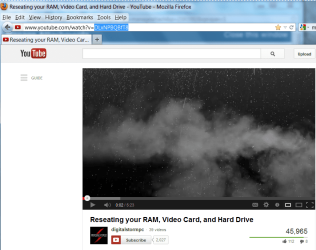
I would you like to check your video link.

Check video.PNG
 

My Computer

OS
ME/XP/Vista/Win7
Paste the code from URL after = between the
youtube.gif
code commands.

Capture.PNG
 
Sorry about that, it's been loooong time since i used tags:)
But it's fixed.

Edit: for 30min I'm trying to read original win dvd on my usb dvd and it just won't red it. How the hell my internal one read that when I was installing it?
 

My Computer

Computer type
Laptop
Computer Manufacturer/Model Number
Dell XPS M1530
OS
Windows 7 Professional 64bit
CPU
Core2Duo T8100
Motherboard
Dell
Memory
3GB DDR2
Graphics Card(s)
GForce 8600M GT
Monitor(s) Displays
LG W2361
Screen Resolution
1920x1080
If you want to go through all of that and realize the risks then go for it, but if you don't use the OD for watching DVD's or other regular use I would probably not risk it.

OD's are becoming obsolete since now almost everything bootable can be run from stick, while video can be run from files.

I'd first attempt to repair the OD.
 
If you want to go through all of that and realize the risks then go for it, but if you don't use the OD for watching DVD's or other regular use I would probably not risk it.

OD's are becoming obsolete since now almost everything bootable can be run from stick, while video can be run from files.

I'd first attempt to repair the OD.

I probably come out as complete idiot - I need some sleep- but what is "OD", "OD's"? I've heard of OS but "OD"?
I'd like to set up new system as at this point repairing my current one will take a looot more time than putting new one:)
 

My Computer

Computer type
Laptop
Computer Manufacturer/Model Number
Dell XPS M1530
OS
Windows 7 Professional 64bit
CPU
Core2Duo T8100
Motherboard
Dell
Memory
3GB DDR2
Graphics Card(s)
GForce 8600M GT
Monitor(s) Displays
LG W2361
Screen Resolution
1920x1080

My Computer

Computer type
Laptop
Computer Manufacturer/Model Number
Dell XPS M1530
OS
Windows 7 Professional 64bit
CPU
Core2Duo T8100
Motherboard
Dell
Memory
3GB DDR2
Graphics Card(s)
GForce 8600M GT
Monitor(s) Displays
LG W2361
Screen Resolution
1920x1080
Win7 is driver-complete in the installer, quickly updated with newer when you run all rounds of Important and Optional Windows Updates. Only a couple should still be missing after Updates are complete, which can be found on the OEM Support Downloads webpage.

Put your wireless driver in your backup in case its not provided so you can get online to do all of the Updates.

Any Vista driver can run on Win7, but Win7 decides which drivers it wants anyway. This isn't XP technology any longer.
 
Back
Top