Solved Resizing two partitions on one disk-what program to use ?

2pods

New member
Member
Local time
7:59 AM
Messages
92
My laptop's disk is divided into two partitions. One for the usual office stuff etc, and the other for digital audio. Both selected at boot via Boot Magic.

However, when I set it it up, I should have made the music partition much bigger than the office, as some drum sample libraries are pretty huge.

Is there a recommended program for resizing partitions "on the fly" without losing data like my old Partition Magic used to do.

I normally back up using Acronis TI 2010.

TIA
 

My Computer

Computer type
PC/Desktop
Computer Manufacturer/Model Number
SCAN V20 I7
OS
Windows 7 64 Home Premium
CPU
Intel Core I7 3770
Motherboard
Intel
Memory
16gb DDR3 1200
Graphics Card(s)
Intel HD400
Sound Card
EMU 0404|USB2, Realtek HD
Monitor(s) Displays
27" iiyama Pro Lite LCD
Screen Resolution
1920 x1080
Hard Drives
2 x 224gb SanDisk Extreme SSDs,Seagate 2tb SATA3, Seagate 500gb SATA3
PSU
Corsair 500
Internet Speed
21N up to 20mbps
Used Partition Wizard. Shrunk C:, Moved D to front of new space, then extended it. Job Done :-)
 

My Computer

Computer type
PC/Desktop
Computer Manufacturer/Model Number
SCAN V20 I7
OS
Windows 7 64 Home Premium
CPU
Intel Core I7 3770
Motherboard
Intel
Memory
16gb DDR3 1200
Graphics Card(s)
Intel HD400
Sound Card
EMU 0404|USB2, Realtek HD
Monitor(s) Displays
27" iiyama Pro Lite LCD
Screen Resolution
1920 x1080
Hard Drives
2 x 224gb SanDisk Extreme SSDs,Seagate 2tb SATA3, Seagate 500gb SATA3
PSU
Corsair 500
Internet Speed
21N up to 20mbps
Many of us use Partition Wizard: http://www.sevenforums.com/tutorials/93322-partition-wizard-use-bootable-cd.html

You get better results if you download the ISO and create a bootable disc by burning the ISO to it.

Once you've done that, just boot into Partition Wizard and partition your drive then click Apply, wait for the process to finish then boot back into Windows.

There's no reason why you should lose any data, but backing up anything important first is always advisable.
 

My Computer

Computer Manufacturer/Model Number
HP Pavilion Elite 495UK
OS
Windows 7 Ultimate SP1 64-Bit
CPU
Intel Core i7 870 @ 2.93GHz
Motherboard
MSI 2A9C (CPU1)
Memory
8Gb Dual-Channel DDR3 @ 664MHz
Graphics Card(s)
nVidia GeForce GTX 460 1024MB dedicated RAM
Sound Card
Realtek HD Audio
Monitor(s) Displays
HP2310i
Screen Resolution
1920 x 1080
Hard Drives
1x1954GB Hitachi HDS22020ALA 330 (RAID), 1x1954GB Hitachi External for backup and storage
PSU
460W
Case
HP Elite
Cooling
Air cooled
Keyboard
Logitech K750 solar-powered keyboard
Mouse
Logitech Wireless M180 mouse
Internet Speed
2Mb
Other Info
Pure Avanti Flow Internet Radio with iPod Dock, 64Gb iPod, HP USB Speakers, Sony MDR-V500 Headphones, Sony Vaio F-Series Laptop
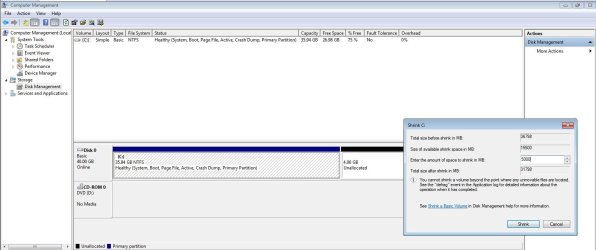
Actually, a little known fact is that, using the Win7 Disk Management utility, you can actually resize the Win7 OS partition. It reboots to do that, but it does actually work -- as I have used it.

So, if these partitions are both NTFS, you can use the Win7 Disk Management utility to resize them.
 

My Computer

Computer type
PC/Desktop
Computer Manufacturer/Model Number
Custom
OS
Win7 Pro 32-bit, Win8 Pro 32-bit
CPU
AMD Phenom II X6 1090T
Motherboard
Gigabyte
Memory
4GB ddr3 1300
Graphics Card(s)
AMD HD 4290 onboard
Sound Card
Builtin Realtek HD Audio
Monitor(s) Displays
Samsung 24" widescreen, LG 23" widescreen
Screen Resolution
1920x1200/1920x1080
Hard Drives
Kingston 256GB SSD
Keyboard
Logitech Illuminated Keyboard
Mouse
Logitech M705 wireless mouse
Antivirus
Norton Av 2013
Browser
IE v10
I believe you can extend the OS partition from within Windows, but not shrink it. (I may be wrong.)

Also, Disk Management provides no capability for moving partitions or resizing them from their left end, only the right one.
 

My Computer

Computer type
PC/Desktop
Computer Manufacturer/Model Number
Custom-built
OS
Windows 7 Professional SP1 32-bit
CPU
Intel Core 2 Duo E6600 2.4GHz
Motherboard
Asus PL5D2
Memory
4GB DDR2-667 (4x1GB in dual-channel config)
Graphics Card(s)
nVidia GeForce 9800 GT
Sound Card
Creative X-Fi XtremeMusic
Monitor(s) Displays
Acer P236H
Screen Resolution
1920x1200 (DVI)
Hard Drives
OCZ SSD Vertex Plus 60GB SATA (Firmware 3.55), 64MB cache
Hitachi HD321KJ SATA, 320GB, 7200rpm, 16MB cache
PSU
Antec TruePower 2.0
Case
Cooler Master Centurion
Cooling
Too many fans
Keyboard
Standard
Mouse
Microsoft wireless optical mouse
Internet Speed
AT&T U-verse (18mbit/sec)
Antivirus
Microsoft Security Essentials
Browser
Firefox
Other Info
Other devices:
Compaq CQ-60 laptop
Google Nexus 7 (2012) tablet
Nvidia SHIELD tablet (US/LTE)
Hardkernel ODROID-XU single-board computer (Samsung Exynos 5420)
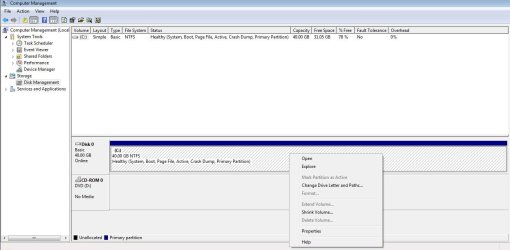
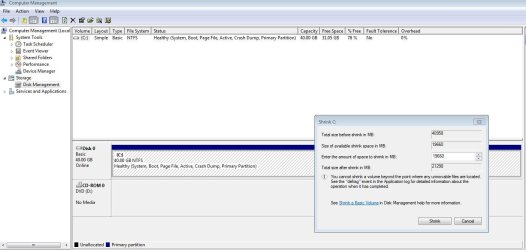
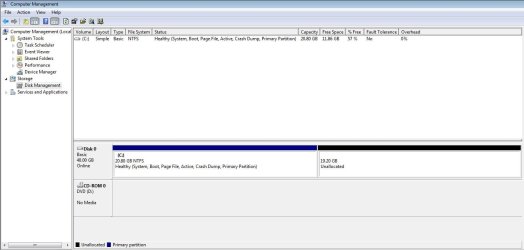
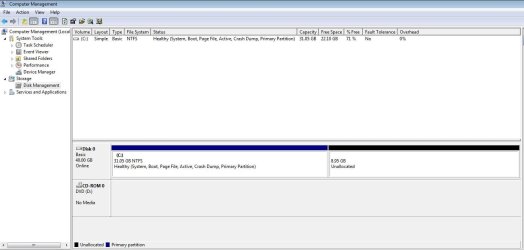
Corazon, You can shrink and extend the OS volumes from within window's disk management. You are right about the second line.
 

Attachments

  • Shrink Command.jpg
    Shrink Command.jpg
    78.9 KB · Views: 34
  • Before shrink.JPG
    Before shrink.JPG
    90.9 KB · Views: 31
  • After shrink.jpg
    After shrink.jpg
    59.1 KB · Views: 27

My Computer

Computer Manufacturer/Model Number
Toshiba Satellite P775-S7232
OS
MS Windows 7 Ultimate 64-bit SP1
CPU
i5-2410M 2.3GHz (2.9GHz Turbo-Boost) Sandy Bridge 32nm
Motherboard
Toshiba PHRAA ver. PSBY1U-00F003
Memory
4GB+4GB Samsung DDR3 PC3-10700 (1333 MHz)
Graphics Card(s)
Video Intel(R) HD Graphics Family, 1696MB available memory
Sound Card
Realtek High Definition Audio version=6.0.1.6323
Monitor(s) Displays
17.3 " Trubrite TFT LCD, LED Backlit
Screen Resolution
1600x900 32 bit, Native support for 720P content
Hard Drives
TOSHIBA MK6476GSXN
580.614 [GB] partitioned C: 80GB and D: 500GB with hidden recovery partitons.

Spare bay for 2nd HDD but no SATA connector :-(
PSU
Toshiba AC/DC Adapter
Case
Notebook
Cooling
Built-in Fan
Keyboard
Premium Raised Tile keyboard
Mouse
Logitech M215 wireless mouse
Internet Speed
Not fast enough
Other Info
Built-in Harman Kardon speakers with Dolby Advanced Audio, Waves MaxxAudio® 3. HDMI, 1xUSB3+3xUSB2 ports, WebCam, Battery life 4hrs 11mins, 4GB Readyboost SDHC card, WD My Book Essential Ext HDDs 2 TB, 2x1TB, My Passport SE 1TB and WDTV 1st Gen for Multimedia playing on a Sony Wega 32" LCD.
Recent addition to my toys are Asus Transformer Pad TF300T with 32GB onboard sd card + 32GB microsd card.
Ah, thanks for the correction rraod :)
 

My Computer

Computer type
PC/Desktop
Computer Manufacturer/Model Number
Custom-built
OS
Windows 7 Professional SP1 32-bit
CPU
Intel Core 2 Duo E6600 2.4GHz
Motherboard
Asus PL5D2
Memory
4GB DDR2-667 (4x1GB in dual-channel config)
Graphics Card(s)
nVidia GeForce 9800 GT
Sound Card
Creative X-Fi XtremeMusic
Monitor(s) Displays
Acer P236H
Screen Resolution
1920x1200 (DVI)
Hard Drives
OCZ SSD Vertex Plus 60GB SATA (Firmware 3.55), 64MB cache
Hitachi HD321KJ SATA, 320GB, 7200rpm, 16MB cache
PSU
Antec TruePower 2.0
Case
Cooler Master Centurion
Cooling
Too many fans
Keyboard
Standard
Mouse
Microsoft wireless optical mouse
Internet Speed
AT&T U-verse (18mbit/sec)
Antivirus
Microsoft Security Essentials
Browser
Firefox
Other Info
Other devices:
Compaq CQ-60 laptop
Google Nexus 7 (2012) tablet
Nvidia SHIELD tablet (US/LTE)
Hardkernel ODROID-XU single-board computer (Samsung Exynos 5420)
Just a small point. After you have shrunk a partition in Disk Management, it won't let you shrink the same partition again, which is another reason for using a third-party utility like Partition Wizard instead. :)
 

My Computer

Computer Manufacturer/Model Number
HP Pavilion Elite 495UK
OS
Windows 7 Ultimate SP1 64-Bit
CPU
Intel Core i7 870 @ 2.93GHz
Motherboard
MSI 2A9C (CPU1)
Memory
8Gb Dual-Channel DDR3 @ 664MHz
Graphics Card(s)
nVidia GeForce GTX 460 1024MB dedicated RAM
Sound Card
Realtek HD Audio
Monitor(s) Displays
HP2310i
Screen Resolution
1920 x 1080
Hard Drives
1x1954GB Hitachi HDS22020ALA 330 (RAID), 1x1954GB Hitachi External for backup and storage
PSU
460W
Case
HP Elite
Cooling
Air cooled
Keyboard
Logitech K750 solar-powered keyboard
Mouse
Logitech Wireless M180 mouse
Internet Speed
2Mb
Other Info
Pure Avanti Flow Internet Radio with iPod Dock, 64Gb iPod, HP USB Speakers, Sony MDR-V500 Headphones, Sony Vaio F-Series Laptop
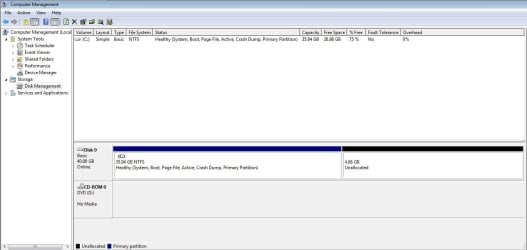
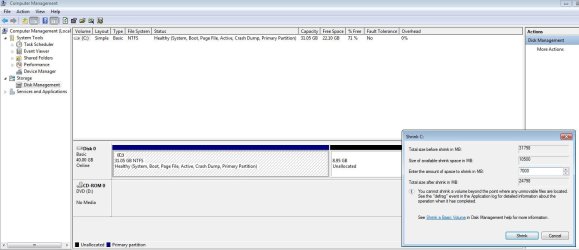
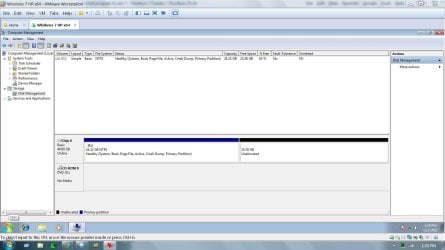
Andrew, that is not true. I have tried this on a VM and as long as there is space in the C: drive, disk management will allow you to shrink, extend and shrink the partition again and again.


Only after you shrink it to a minimum value, disk managment will not allow you to shrink again. Here the third party tools come in to play. They will reorganise the file structure and MFT, create space on the drive and shrink again.

Disk Management does not have this capability to reorganize the files and MFT to make space for shrink again.
 

Attachments

  • After Extend.jpg
    After Extend.jpg
    57.8 KB · Views: 16
  • Shrink again.jpg
    Shrink again.jpg
    93.8 KB · Views: 11
  • Shrinked 2.jpg
    Shrinked 2.jpg
    58.5 KB · Views: 11
  • Shrink again 2.jpg
    Shrink again 2.jpg
    88.5 KB · Views: 11
  • Final.jpg
    Final.jpg
    106.6 KB · Views: 13

My Computer

Computer Manufacturer/Model Number
Toshiba Satellite P775-S7232
OS
MS Windows 7 Ultimate 64-bit SP1
CPU
i5-2410M 2.3GHz (2.9GHz Turbo-Boost) Sandy Bridge 32nm
Motherboard
Toshiba PHRAA ver. PSBY1U-00F003
Memory
4GB+4GB Samsung DDR3 PC3-10700 (1333 MHz)
Graphics Card(s)
Video Intel(R) HD Graphics Family, 1696MB available memory
Sound Card
Realtek High Definition Audio version=6.0.1.6323
Monitor(s) Displays
17.3 " Trubrite TFT LCD, LED Backlit
Screen Resolution
1600x900 32 bit, Native support for 720P content
Hard Drives
TOSHIBA MK6476GSXN
580.614 [GB] partitioned C: 80GB and D: 500GB with hidden recovery partitons.

Spare bay for 2nd HDD but no SATA connector :-(
PSU
Toshiba AC/DC Adapter
Case
Notebook
Cooling
Built-in Fan
Keyboard
Premium Raised Tile keyboard
Mouse
Logitech M215 wireless mouse
Internet Speed
Not fast enough
Other Info
Built-in Harman Kardon speakers with Dolby Advanced Audio, Waves MaxxAudio® 3. HDMI, 1xUSB3+3xUSB2 ports, WebCam, Battery life 4hrs 11mins, 4GB Readyboost SDHC card, WD My Book Essential Ext HDDs 2 TB, 2x1TB, My Passport SE 1TB and WDTV 1st Gen for Multimedia playing on a Sony Wega 32" LCD.
Recent addition to my toys are Asus Transformer Pad TF300T with 32GB onboard sd card + 32GB microsd card.
I think we may be at cross purposes as I probably didn't word my initial comment very well.

What I was trying to say was that if you use Disk Management to shrink a partition, and then try and shrink the reduced-size partition again it won't succeed.

I've never used a VM so I can't comment on that, but when I tried to further shrink a partition I had already shrunk then I couldn't do it using Windows Disk Management.

As for shrinking a partition then extending it before shrinking it again, it is something I've never tried, so in that scenario I can't argue with you. :)
 

My Computer

Computer Manufacturer/Model Number
HP Pavilion Elite 495UK
OS
Windows 7 Ultimate SP1 64-Bit
CPU
Intel Core i7 870 @ 2.93GHz
Motherboard
MSI 2A9C (CPU1)
Memory
8Gb Dual-Channel DDR3 @ 664MHz
Graphics Card(s)
nVidia GeForce GTX 460 1024MB dedicated RAM
Sound Card
Realtek HD Audio
Monitor(s) Displays
HP2310i
Screen Resolution
1920 x 1080
Hard Drives
1x1954GB Hitachi HDS22020ALA 330 (RAID), 1x1954GB Hitachi External for backup and storage
PSU
460W
Case
HP Elite
Cooling
Air cooled
Keyboard
Logitech K750 solar-powered keyboard
Mouse
Logitech Wireless M180 mouse
Internet Speed
2Mb
Other Info
Pure Avanti Flow Internet Radio with iPod Dock, 64Gb iPod, HP USB Speakers, Sony MDR-V500 Headphones, Sony Vaio F-Series Laptop
As rraod said, I think you might've just shrunk your partition as much as the system allowed you to the first time around, thus being unable to shrink it further. :)

I would try it myself right now just to find out for sure - alas, my system partition is encrypted with TrueCrypt and I'd have to decrypt and re-encrypt it, besides my pagefile is all the way at the end of the partition anyway...(talk about a showstopper LOL)
 

My Computer

Computer type
PC/Desktop
Computer Manufacturer/Model Number
Custom-built
OS
Windows 7 Professional SP1 32-bit
CPU
Intel Core 2 Duo E6600 2.4GHz
Motherboard
Asus PL5D2
Memory
4GB DDR2-667 (4x1GB in dual-channel config)
Graphics Card(s)
nVidia GeForce 9800 GT
Sound Card
Creative X-Fi XtremeMusic
Monitor(s) Displays
Acer P236H
Screen Resolution
1920x1200 (DVI)
Hard Drives
OCZ SSD Vertex Plus 60GB SATA (Firmware 3.55), 64MB cache
Hitachi HD321KJ SATA, 320GB, 7200rpm, 16MB cache
PSU
Antec TruePower 2.0
Case
Cooler Master Centurion
Cooling
Too many fans
Keyboard
Standard
Mouse
Microsoft wireless optical mouse
Internet Speed
AT&T U-verse (18mbit/sec)
Antivirus
Microsoft Security Essentials
Browser
Firefox
Other Info
Other devices:
Compaq CQ-60 laptop
Google Nexus 7 (2012) tablet
Nvidia SHIELD tablet (US/LTE)
Hardkernel ODROID-XU single-board computer (Samsung Exynos 5420)
All these partition manipulations and other experiments I normally do on a virtual machine (a test platform) leaving my base system untouched! :)
 

My Computer

Computer Manufacturer/Model Number
Toshiba Satellite P775-S7232
OS
MS Windows 7 Ultimate 64-bit SP1
CPU
i5-2410M 2.3GHz (2.9GHz Turbo-Boost) Sandy Bridge 32nm
Motherboard
Toshiba PHRAA ver. PSBY1U-00F003
Memory
4GB+4GB Samsung DDR3 PC3-10700 (1333 MHz)
Graphics Card(s)
Video Intel(R) HD Graphics Family, 1696MB available memory
Sound Card
Realtek High Definition Audio version=6.0.1.6323
Monitor(s) Displays
17.3 " Trubrite TFT LCD, LED Backlit
Screen Resolution
1600x900 32 bit, Native support for 720P content
Hard Drives
TOSHIBA MK6476GSXN
580.614 [GB] partitioned C: 80GB and D: 500GB with hidden recovery partitons.

Spare bay for 2nd HDD but no SATA connector :-(
PSU
Toshiba AC/DC Adapter
Case
Notebook
Cooling
Built-in Fan
Keyboard
Premium Raised Tile keyboard
Mouse
Logitech M215 wireless mouse
Internet Speed
Not fast enough
Other Info
Built-in Harman Kardon speakers with Dolby Advanced Audio, Waves MaxxAudio® 3. HDMI, 1xUSB3+3xUSB2 ports, WebCam, Battery life 4hrs 11mins, 4GB Readyboost SDHC card, WD My Book Essential Ext HDDs 2 TB, 2x1TB, My Passport SE 1TB and WDTV 1st Gen for Multimedia playing on a Sony Wega 32" LCD.
Recent addition to my toys are Asus Transformer Pad TF300T with 32GB onboard sd card + 32GB microsd card.
Back
Top