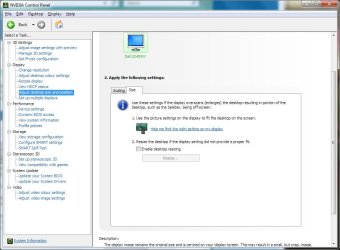
Hi, this is a long thread and I would really appreciate it if someone takes the time to help me.
All my specs that I believe are relevant are listed below, tell me if something needs to be complemented.
I'm having problem with the resolution on my TV.
I just got my new graphics card, and for some reason my TV can't use the same resolutions anymore.
My previous card was a RADEON HD 5870.
With that card I could set my two monitors to "Duplicate" on 1680 x 1050.
As you can see, my TV's native resolution is 1280 x 720 so using higher resolutions makes text a little hard to read when using the desktop but 1680 x 1050 worked for it, it just didn't fill out the frames completely.
And when using it for games that I play with a controller, 1920 x 1080 was an almost PERFECT fit.
NOW with my new card, however, when I set everything like before; Duplicate on 1680 x 1050, my monitor works as good as always, but my TV suddenly seems too SMALL!
I'll try to explain.
Before, 1680 x 1050 worked but didn't fill out the screen completely (there was a little black frame between the TV-edges and the screen, understand?)
Now, 1680 x 1050 gives my TV blacks frames only to the LEFT and RIGHT.
The top/bottom stretches 1-2 CM OUTSIDE the TV (so that I only see the top of the Windows Taskbar).
When GAMING, and I keep using 1680 x 1050, my TV gets a little black frame again (just like on my previous card, but definitely a slightly SMALLER frame).
And if I set it to 1920 x 1080, the screen goes outside ALL the sides, as expected.
Does ANYONE have any idea why it's like this?
And maybe have a solution to make everything work just like it did before?
The thing is that yes, I can absolutely play games using my TV even if the screen isn't optimally used, but i obviously want to be able to stretch the screen as much as possible on my TV for better gaming experience.
Thank you for reading, I appreciate it.
---------------------------------------------------------------
System Manufacturer/Model Number
MSI/MS-7673
OS
Windows 7 Professional x64
CPU
Intel Core i5 2500K 3,3GHz
Motherboard
MSI P67A-C43 REV B3
Memory
8GB
Graphics Card(s)
GeForce GTX 580 1536MB DirectCU II
Monitor(s) Displays
AOC 2230F & PANASONIC 42" TV
Screen Resolution
Monitor = 1680 x 1050, TV = 1280 x 720
All my specs that I believe are relevant are listed below, tell me if something needs to be complemented.
I'm having problem with the resolution on my TV.
I just got my new graphics card, and for some reason my TV can't use the same resolutions anymore.
My previous card was a RADEON HD 5870.
With that card I could set my two monitors to "Duplicate" on 1680 x 1050.
As you can see, my TV's native resolution is 1280 x 720 so using higher resolutions makes text a little hard to read when using the desktop but 1680 x 1050 worked for it, it just didn't fill out the frames completely.
And when using it for games that I play with a controller, 1920 x 1080 was an almost PERFECT fit.
NOW with my new card, however, when I set everything like before; Duplicate on 1680 x 1050, my monitor works as good as always, but my TV suddenly seems too SMALL!
I'll try to explain.
Before, 1680 x 1050 worked but didn't fill out the screen completely (there was a little black frame between the TV-edges and the screen, understand?)
Now, 1680 x 1050 gives my TV blacks frames only to the LEFT and RIGHT.
The top/bottom stretches 1-2 CM OUTSIDE the TV (so that I only see the top of the Windows Taskbar).
When GAMING, and I keep using 1680 x 1050, my TV gets a little black frame again (just like on my previous card, but definitely a slightly SMALLER frame).
And if I set it to 1920 x 1080, the screen goes outside ALL the sides, as expected.
Does ANYONE have any idea why it's like this?
And maybe have a solution to make everything work just like it did before?
The thing is that yes, I can absolutely play games using my TV even if the screen isn't optimally used, but i obviously want to be able to stretch the screen as much as possible on my TV for better gaming experience.
Thank you for reading, I appreciate it.
---------------------------------------------------------------
System Manufacturer/Model Number
MSI/MS-7673
OS
Windows 7 Professional x64
CPU
Intel Core i5 2500K 3,3GHz
Motherboard
MSI P67A-C43 REV B3
Memory
8GB
Graphics Card(s)
GeForce GTX 580 1536MB DirectCU II
Monitor(s) Displays
AOC 2230F & PANASONIC 42" TV
Screen Resolution
Monitor = 1680 x 1050, TV = 1280 x 720
My Computer
At a glance
Windows 7 Professional x64Intel Core i5 2500K 3,3GHz8GBGeForce GTX 580 1536MB DirectCU II
- Computer Manufacturer/Model Number
- MSI/MS-7673
- OS
- Windows 7 Professional x64
- CPU
- Intel Core i5 2500K 3,3GHz
- Motherboard
- MSI P67A-C43 REV B3
- Memory
- 8GB
- Graphics Card(s)
- GeForce GTX 580 1536MB DirectCU II
- Monitor(s) Displays
- AOC 2230F & PANASONIC 42" TV
- Screen Resolution
- Monitor = 1680 x 1050, TV = 1280 x 720