Resolution issue. 1600x1200 my monitor turns off. didnt in windowsxp

RichSz

New member
Local time
10:58 PM
Messages
9
Hello, i have got windows7 running fine id say which i am pleased with but there is just 1 little or abit of an annoying thing that is. I cannot get my resolution to 1600 1200 resolution. This was possible when i had windows Xp running. My GPU has uptodate drivers and my motherboard i believe is ok thou I have found this ASUS motherboard a little messy to get things uptodate. i think my motherboards fine thou.

I am abit sad that i can only go to 1280 1024. As i want to play some games in 1600 1200 resolution. I have a CRT monitor by the way but anyway.

I shall keep an eye on this post of mine to see if any1 is able to give me some useful advice/ solution. Thank you for reading this thread and would be most grateful to whoever might come up with a solution to this. I find this issue rather weird and a shame really.

Everything fine apart from going into 1600 resolution. thats 1600 by any number. it cannot go into anything that starts with 1600 but in xp when i used this recently it was ok. My monitor would just switch off and have that orange light on it like its in stand by. Lucky i know that if i press the escape key it'll go back.

Yours sincerily,

RichSz
 

My Computer My Computer

At a glance

windows 7 home premium full version 64bitIntel Core 2 Quad Q6600 (2.4GHz 1066MHz)2Gb A-Data DDR2-1066 PC2-8500 Vitesta ExtremeXFX GeForce 8800GTS 640MB

Computer Manufacturer/Model Number
Custom Made :)
OS
windows 7 home premium full version 64bit
CPU
Intel Core 2 Quad Q6600 (2.4GHz 1066MHz)
Motherboard
ASUS P5B DLX/WIFI-AP
Memory
2Gb A-Data DDR2-1066 PC2-8500 Vitesta Extreme
Graphics Card(s)
XFX GeForce 8800GTS 640MB
Sound Card
Motherboard sound card
Monitor(s) Displays
LG CS990DC
Hard Drives
Samsung SpinPoint HD501LJ 500GB SATAII Hard Drive
PSU
Antec TruePower Trio 650W PSU
Case
Antec P180 Black SPCR Advanced Super Mid Tower
Cooling
Arctic Cooling AC-FRZ-7P Socket 775 CPU Cooler
When you say your driver is up to date, do you mean the computer told you that when you looked at the video card in device manager, or did you actually go to the manufacturers website and download the most recent driver available there?
 

My Computer My Computer

At a glance

Windows 7 Professional SP1 64-bitIntel Core i5-2450M @2.5 GHz6 GB DDR3 1333MHzIntel HD 3000
Computer type
Laptop
Computer Manufacturer/Model Number
Toshiba P775-S7100
OS
Windows 7 Professional SP1 64-bit
CPU
Intel Core i5-2450M @2.5 GHz
Memory
6 GB DDR3 1333MHz
Graphics Card(s)
Intel HD 3000
Monitor(s) Displays
Built-in 17.3" LED; 22" Insignia NS-L22Q-10A
Screen Resolution
1600x900; 1360x768
Hard Drives
750 GB Hitachi
1TB Seagate FreeAgent External
Internet Speed
Verizon DSL Speed(Down/Up): 3360 Kbps / 800 Kbps
Antivirus
MSE and MBAM Pro
Browser
IE10
um, something u mentioned there has got me thinking that i might update my GPU again. As something out of the ordinary occured to do with my GPU updating. I actually installed windows7 2 times since i purchased the otherday. The reason was that i messed around abit with trying to get my motherboard uptodate and thought i just reinstall windows 7 and start again having known sometihngs already from looking around just before.
It was on this 2nd go in windows 7 that the windows update tried getting the GPU driver itself and actually said failed or something. Maybe it had to do with that i did it myself going on nvidia website but if that was the case why did it try to update the GPU if it was already updated. This is why im thinking that i will update my gpu again [rollback driver and update again] something like. I will/might try this later today as i need to give my PC a rest because its late and im tired ;). Nice to see a response so soon after posting. Will reply how my thing goes but am sorry i think im gonna have to call it a night now. Be in touch again soon i think.

edit- i think that i got the driver from the website itself. in device manager it also says everything is uptodate :/
 

My Computer My Computer

At a glance

windows 7 home premium full version 64bitIntel Core 2 Quad Q6600 (2.4GHz 1066MHz)2Gb A-Data DDR2-1066 PC2-8500 Vitesta ExtremeXFX GeForce 8800GTS 640MB
Computer Manufacturer/Model Number
Custom Made :)
OS
windows 7 home premium full version 64bit
CPU
Intel Core 2 Quad Q6600 (2.4GHz 1066MHz)
Motherboard
ASUS P5B DLX/WIFI-AP
Memory
2Gb A-Data DDR2-1066 PC2-8500 Vitesta Extreme
Graphics Card(s)
XFX GeForce 8800GTS 640MB
Sound Card
Motherboard sound card
Monitor(s) Displays
LG CS990DC
Hard Drives
Samsung SpinPoint HD501LJ 500GB SATAII Hard Drive
PSU
Antec TruePower Trio 650W PSU
Case
Antec P180 Black SPCR Advanced Super Mid Tower
Cooling
Arctic Cooling AC-FRZ-7P Socket 775 CPU Cooler
YOu need to get the driver from the NVIDIA website, not Windows Update. If you can, I would uninstall the driver completed, then install what you download from the NVIDIA website. Sometimes bugs with drivers can be carried over or be created when updating a driver then normal way. Removing it, then installing had much better chance of going well.
 

My Computer My Computer

At a glance

Windows 7 Professional SP1 64-bitIntel Core i5-2450M @2.5 GHz6 GB DDR3 1333MHzIntel HD 3000
Computer type
Laptop
Computer Manufacturer/Model Number
Toshiba P775-S7100
OS
Windows 7 Professional SP1 64-bit
CPU
Intel Core i5-2450M @2.5 GHz
Memory
6 GB DDR3 1333MHz
Graphics Card(s)
Intel HD 3000
Monitor(s) Displays
Built-in 17.3" LED; 22" Insignia NS-L22Q-10A
Screen Resolution
1600x900; 1360x768
Hard Drives
750 GB Hitachi
1TB Seagate FreeAgent External
Internet Speed
Verizon DSL Speed(Down/Up): 3360 Kbps / 800 Kbps
Antivirus
MSE and MBAM Pro
Browser
IE10
thank you for your suggestions. I will do this later on today, afternoon. Really hope this does the trick. I am rather annoyed about this to tell the truth ^^. This is the only thing stopping me enjoy the fact i have windows 7 which i badly needed for my PC ;p. It was abit unstable beforehand. This windows7 looks great and feels solid as an OS. if only i can get round this 1 tihng :s.

Will comment again later on, hopefully with a good message but maybe it will be saying how its still the same. cross fingers.
 

My Computer My Computer

At a glance

windows 7 home premium full version 64bitIntel Core 2 Quad Q6600 (2.4GHz 1066MHz)2Gb A-Data DDR2-1066 PC2-8500 Vitesta ExtremeXFX GeForce 8800GTS 640MB
Computer Manufacturer/Model Number
Custom Made :)
OS
windows 7 home premium full version 64bit
CPU
Intel Core 2 Quad Q6600 (2.4GHz 1066MHz)
Motherboard
ASUS P5B DLX/WIFI-AP
Memory
2Gb A-Data DDR2-1066 PC2-8500 Vitesta Extreme
Graphics Card(s)
XFX GeForce 8800GTS 640MB
Sound Card
Motherboard sound card
Monitor(s) Displays
LG CS990DC
Hard Drives
Samsung SpinPoint HD501LJ 500GB SATAII Hard Drive
PSU
Antec TruePower Trio 650W PSU
Case
Antec P180 Black SPCR Advanced Super Mid Tower
Cooling
Arctic Cooling AC-FRZ-7P Socket 775 CPU Cooler
check the refresh rate.
 

My Computer My Computer

At a glance

Windows 7 Ultimate x641.80 GHz Intel Core 2 Duo processor T71003 gig ddr2NVIDIA GeForce 8400M GS
Computer Manufacturer/Model Number
HP dv6519tx
OS
Windows 7 Ultimate x64
CPU
1.80 GHz Intel Core 2 Duo processor T7100
Memory
3 gig ddr2
Graphics Card(s)
NVIDIA GeForce 8400M GS
Sound Card
Realtek High Definition Audio
Monitor(s) Displays
15.4” WXGA High Definition BrightView Widescreen
Screen Resolution
1280 x 800
Hard Drives
Hitachi 320 GB (5400 rpm)
PSU
90 W AC Power Adapter
Cooling
Kitchen plate under the lappy
Keyboard
101 key compatible
Mouse
Touch Pad with On/Off button and dedicated vertical Scroll
Internet Speed
Three Wireless internet prepaid using E160G USB dongle
This does not appear to be a problem with the graphics card. It's likely that Windows 7 is not properly detecting your monitor, so try this:

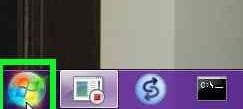
1) Click Start
1.jpg

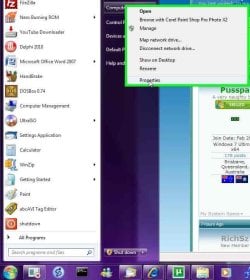
2) Right-click "Computer", then select Properties
2.jpg

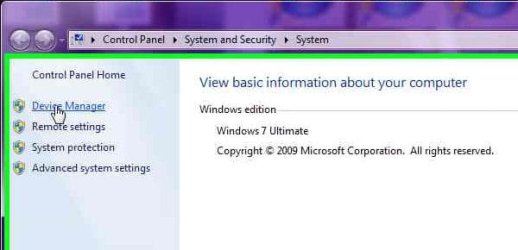
3) Click "Device Manager" (you may need to respond to a UAC Prompt
3.jpg

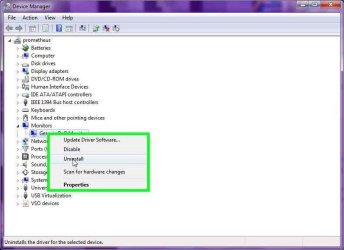
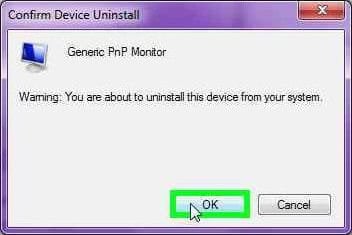
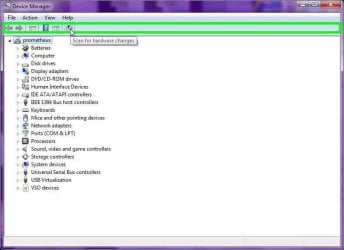
4) Under "Monitors", right-click you monitor, then select "Uninstall"
4.jpg

5) confirm the device removal
5.jpg

6) Have Windows re-detect you monitor by clicking the "Scan for New Hardware" button
6.jpg


If the above fails to work, then you might have better luck if you go to your Monitor manufacturer website to see if you can find the drive (usually some kind of INF file) that tell Windows what the capabilities of the monitor are, including refresh rates and screen resolutions.
 

My Computer My Computer

At a glance

Windows 7 Professional 32-bit SP1AMD A4/A63.00GB EDOVMware SVGA 3D
Computer type
PC/Desktop
Computer Manufacturer/Model Number
Virtual Machine
OS
Windows 7 Professional 32-bit SP1
CPU
AMD A4/A6
Motherboard
Intel Corporation 440BX Desktop Reference Platform
Memory
3.00GB EDO
Graphics Card(s)
VMware SVGA 3D
Sound Card
High Definition Audio Device
Monitor(s) Displays
Generic Non-PnP Monitor on VMware SVGA 3D
Screen Resolution
1440x900
Hard Drives
1 x 60GB VMware Virtual SATA Hard Drive ATA Device
Antivirus
Kaspersky Total Security
go into nvidia control panel and go to adjust resolution then tick the box "show resolutions not supported by my monitor then click what u want
 

My Computer My Computer

At a glance

MS Windows 7 Home Premium 64-bitAMD Athlon II X2 235 Regor 45nm Technology 2....6.0GB Dual-Channel DDR2 @ 401MHz (5-5-5-18)1024MB GeForce 9800 GT (Pny) overclocked at 662
Computer Manufacturer/Model Number
Emachines 1331G
OS
MS Windows 7 Home Premium 64-bit
CPU
AMD Athlon II X2 235 Regor 45nm Technology 2.7 Ghz
Motherboard
eMachines MCP61PM-GM (CPU 1)
Memory
6.0GB Dual-Channel DDR2 @ 401MHz (5-5-5-18)
Graphics Card(s)
1024MB GeForce 9800 GT (Pny) overclocked at 662
Sound Card
Speakers (Realtek High Definition Audio)
Monitor(s) Displays
Generic Non-PnP Monitor @ 1280x1024
Screen Resolution
1280x1024
Hard Drives
733GB Seagate ST375052 8AS SCSI Disk Device (IDE)
PSU
450W
Case
not sure
Cooling
fan/air
Keyboard
Standard PS/2 Keyboard
Mouse
Microsoft PS/2 Mouse
Internet Speed
26mbps
So i uninstalled my GPU driver and can u believe that i was able to get to 1600 resolution. the monitor was labelled something like 'default monitor' however i felt like i needed to put the uptodate drivers anyway as it had no information really on my graphics card. After updating my GPU driver i once again, was able to go into 1600 resolution thou i got to say. Was nice going into it anyway just a minute beforehand. After driver was put on i couldnt :/.

I tried the monitor thing also suggested by some1. I uninstalled the monitor and then scanned for new hardware and it picked up what it had there beforehand. nice suggestion thou. I am now currently trying to find a driver for my monitor as it might be this that isnt setup for windows 7.

In short-i still have the problem of not being able to get into 1600 1200 resolution when i was able to in windows xp. I did momentarily in windows7 but this was with my GPU having no drivers and ofc it needs to have the most uptodate drivers.

I will say how my monitor driver search goes on/turns out.

I will keep an eye on this post if any1 has any ideas or ways to get round this problem i am having. thanks again and hope to get past this mess i am experiencing ;)


EDIT-i have just seen a new post and havent read. Will see and carryout anything it might say that could help. Thank you for your contribution
 

My Computer My Computer

At a glance

windows 7 home premium full version 64bitIntel Core 2 Quad Q6600 (2.4GHz 1066MHz)2Gb A-Data DDR2-1066 PC2-8500 Vitesta ExtremeXFX GeForce 8800GTS 640MB
Computer Manufacturer/Model Number
Custom Made :)
OS
windows 7 home premium full version 64bit
CPU
Intel Core 2 Quad Q6600 (2.4GHz 1066MHz)
Motherboard
ASUS P5B DLX/WIFI-AP
Memory
2Gb A-Data DDR2-1066 PC2-8500 Vitesta Extreme
Graphics Card(s)
XFX GeForce 8800GTS 640MB
Sound Card
Motherboard sound card
Monitor(s) Displays
LG CS990DC
Hard Drives
Samsung SpinPoint HD501LJ 500GB SATAII Hard Drive
PSU
Antec TruePower Trio 650W PSU
Case
Antec P180 Black SPCR Advanced Super Mid Tower
Cooling
Arctic Cooling AC-FRZ-7P Socket 775 CPU Cooler
am trying to find drivers for my monitor but all i get is software that detects out of date drivers on my pc. then it says to update i need to pay for it?. still looking.

I remember that in XP i was not able to get refresh rate like im seeing after installing windows7, which i think is nice. In my manual i think it says monitor can handle 80hz definietely so its nice to see this being used now. I tried that thing that some1 mentioned above by going into nvidia control panel and go onto show resolution not supported by that. I found a screen where i can select the refresh rate and thought that 1600 worked on my XP tihng when it was at 60hz 70hz but no more it would go off the monitor. No luck here, it goes black even when i select 60 70hz.

Just looking for monitor drivers now but maybe this isnt gonna do anytjhing :((. I rememebr seeing it say in device manager that my monitor was uptodate driver wise :/

EDIT-side note, do ppl think that playing a game in 1280 odd resolution is abuit of a downer.

A massive solution to this would be to get maybe a new monitor which i think will solve this, b'hope so.

Please add a comment if you might have a thought on this/idea/hint/solution.

Thank you

:(
 

My Computer My Computer

At a glance

windows 7 home premium full version 64bitIntel Core 2 Quad Q6600 (2.4GHz 1066MHz)2Gb A-Data DDR2-1066 PC2-8500 Vitesta ExtremeXFX GeForce 8800GTS 640MB
Computer Manufacturer/Model Number
Custom Made :)
OS
windows 7 home premium full version 64bit
CPU
Intel Core 2 Quad Q6600 (2.4GHz 1066MHz)
Motherboard
ASUS P5B DLX/WIFI-AP
Memory
2Gb A-Data DDR2-1066 PC2-8500 Vitesta Extreme
Graphics Card(s)
XFX GeForce 8800GTS 640MB
Sound Card
Motherboard sound card
Monitor(s) Displays
LG CS990DC
Hard Drives
Samsung SpinPoint HD501LJ 500GB SATAII Hard Drive
PSU
Antec TruePower Trio 650W PSU
Case
Antec P180 Black SPCR Advanced Super Mid Tower
Cooling
Arctic Cooling AC-FRZ-7P Socket 775 CPU Cooler
I just realized that your aspect ratio isn't right. It should be 1.33 (4:3) but yours is 1.25 (4:3.2). Can you get it to 1280 x 960? At least then the aspect ratio would be right for now.
 

My Computer My Computer

At a glance

Windows 7 Professional SP1 64-bitIntel Core i5-2450M @2.5 GHz6 GB DDR3 1333MHzIntel HD 3000
Computer type
Laptop
Computer Manufacturer/Model Number
Toshiba P775-S7100
OS
Windows 7 Professional SP1 64-bit
CPU
Intel Core i5-2450M @2.5 GHz
Memory
6 GB DDR3 1333MHz
Graphics Card(s)
Intel HD 3000
Monitor(s) Displays
Built-in 17.3" LED; 22" Insignia NS-L22Q-10A
Screen Resolution
1600x900; 1360x768
Hard Drives
750 GB Hitachi
1TB Seagate FreeAgent External
Internet Speed
Verizon DSL Speed(Down/Up): 3360 Kbps / 800 Kbps
Antivirus
MSE and MBAM Pro
Browser
IE10
just sent a message to LG who make my monitor and asking them where i can get drivers for this monitor. Will be looking in email account from time to time then.

EDIT- 1 more thing, does any1 think that if i get a new monitor this will solve this thing. Not really in right financial situation to buy a monitor but just wandering. If i do will be 1-2months time :(. I left a question inprevioous post also :)
 

My Computer My Computer

At a glance

windows 7 home premium full version 64bitIntel Core 2 Quad Q6600 (2.4GHz 1066MHz)2Gb A-Data DDR2-1066 PC2-8500 Vitesta ExtremeXFX GeForce 8800GTS 640MB
Computer Manufacturer/Model Number
Custom Made :)
OS
windows 7 home premium full version 64bit
CPU
Intel Core 2 Quad Q6600 (2.4GHz 1066MHz)
Motherboard
ASUS P5B DLX/WIFI-AP
Memory
2Gb A-Data DDR2-1066 PC2-8500 Vitesta Extreme
Graphics Card(s)
XFX GeForce 8800GTS 640MB
Sound Card
Motherboard sound card
Monitor(s) Displays
LG CS990DC
Hard Drives
Samsung SpinPoint HD501LJ 500GB SATAII Hard Drive
PSU
Antec TruePower Trio 650W PSU
Case
Antec P180 Black SPCR Advanced Super Mid Tower
Cooling
Arctic Cooling AC-FRZ-7P Socket 775 CPU Cooler
1280x1024 i can get my resolution too
 

My Computer My Computer

At a glance

windows 7 home premium full version 64bitIntel Core 2 Quad Q6600 (2.4GHz 1066MHz)2Gb A-Data DDR2-1066 PC2-8500 Vitesta ExtremeXFX GeForce 8800GTS 640MB
Computer Manufacturer/Model Number
Custom Made :)
OS
windows 7 home premium full version 64bit
CPU
Intel Core 2 Quad Q6600 (2.4GHz 1066MHz)
Motherboard
ASUS P5B DLX/WIFI-AP
Memory
2Gb A-Data DDR2-1066 PC2-8500 Vitesta Extreme
Graphics Card(s)
XFX GeForce 8800GTS 640MB
Sound Card
Motherboard sound card
Monitor(s) Displays
LG CS990DC
Hard Drives
Samsung SpinPoint HD501LJ 500GB SATAII Hard Drive
PSU
Antec TruePower Trio 650W PSU
Case
Antec P180 Black SPCR Advanced Super Mid Tower
Cooling
Arctic Cooling AC-FRZ-7P Socket 775 CPU Cooler
did you try the nvidia control panel??
 

My Computer My Computer

At a glance

MS Windows 7 Home Premium 64-bitAMD Athlon II X2 235 Regor 45nm Technology 2....6.0GB Dual-Channel DDR2 @ 401MHz (5-5-5-18)1024MB GeForce 9800 GT (Pny) overclocked at 662
Computer Manufacturer/Model Number
Emachines 1331G
OS
MS Windows 7 Home Premium 64-bit
CPU
AMD Athlon II X2 235 Regor 45nm Technology 2.7 Ghz
Motherboard
eMachines MCP61PM-GM (CPU 1)
Memory
6.0GB Dual-Channel DDR2 @ 401MHz (5-5-5-18)
Graphics Card(s)
1024MB GeForce 9800 GT (Pny) overclocked at 662
Sound Card
Speakers (Realtek High Definition Audio)
Monitor(s) Displays
Generic Non-PnP Monitor @ 1280x1024
Screen Resolution
1280x1024
Hard Drives
733GB Seagate ST375052 8AS SCSI Disk Device (IDE)
PSU
450W
Case
not sure
Cooling
fan/air
Keyboard
Standard PS/2 Keyboard
Mouse
Microsoft PS/2 Mouse
Internet Speed
26mbps
yes, nothing in here seems to help-in the nvida control panel :(
 

My Computer My Computer

At a glance

windows 7 home premium full version 64bitIntel Core 2 Quad Q6600 (2.4GHz 1066MHz)2Gb A-Data DDR2-1066 PC2-8500 Vitesta ExtremeXFX GeForce 8800GTS 640MB
Computer Manufacturer/Model Number
Custom Made :)
OS
windows 7 home premium full version 64bit
CPU
Intel Core 2 Quad Q6600 (2.4GHz 1066MHz)
Motherboard
ASUS P5B DLX/WIFI-AP
Memory
2Gb A-Data DDR2-1066 PC2-8500 Vitesta Extreme
Graphics Card(s)
XFX GeForce 8800GTS 640MB
Sound Card
Motherboard sound card
Monitor(s) Displays
LG CS990DC
Hard Drives
Samsung SpinPoint HD501LJ 500GB SATAII Hard Drive
PSU
Antec TruePower Trio 650W PSU
Case
Antec P180 Black SPCR Advanced Super Mid Tower
Cooling
Arctic Cooling AC-FRZ-7P Socket 775 CPU Cooler
am going to talk to microsoft about my problem. Theyll have the answer i hope.
 

My Computer My Computer

At a glance

windows 7 home premium full version 64bitIntel Core 2 Quad Q6600 (2.4GHz 1066MHz)2Gb A-Data DDR2-1066 PC2-8500 Vitesta ExtremeXFX GeForce 8800GTS 640MB
Computer Manufacturer/Model Number
Custom Made :)
OS
windows 7 home premium full version 64bit
CPU
Intel Core 2 Quad Q6600 (2.4GHz 1066MHz)
Motherboard
ASUS P5B DLX/WIFI-AP
Memory
2Gb A-Data DDR2-1066 PC2-8500 Vitesta Extreme
Graphics Card(s)
XFX GeForce 8800GTS 640MB
Sound Card
Motherboard sound card
Monitor(s) Displays
LG CS990DC
Hard Drives
Samsung SpinPoint HD501LJ 500GB SATAII Hard Drive
PSU
Antec TruePower Trio 650W PSU
Case
Antec P180 Black SPCR Advanced Super Mid Tower
Cooling
Arctic Cooling AC-FRZ-7P Socket 775 CPU Cooler
Back
Top