Resolution problem with Intel 915

iamandyh

New member
Local time
3:24 PM
Messages
1
Using a Dell Inspiron 630m with Intel 915.

Initially does not recognize graphics card, uses Generic PnP monitor. This gives terrible resolution capped at 1024 x 768.

Video Controller and Video Controller (VGA Compatible) appear in Other Devices section of Device Manager with yellow warning triangles.

I have tried everything, uninstalling drivers, windows update etc. Apparently there isn't even a Vista driver for this, so maybe a lost cause? Hopefully not.

I can force a temporary fix by updating the Video Controller device by browsing for the XP drivers. This then makes the resolution perfectly and everything works, but the Device properties show this message:
"This device is working properly.
The drivers for this device will be uninstalled when the machine is restarted. Any changes you make to this device will not be preserved.
You need to restart your computer before the changes you made to this device will take effect."
Sure enough, when rebooted it takes me back to square one.

Is there any way to

  1. force Windows to keep the new drivers installed after reboot
or 2. force a higher resolution from the Generic PnP monitor?

Many thanks for your advice.
 

My Computer

OS
W7
Hi iamandyh and welcome to the forum!

There are two options you can take that might solve your problem.

The Windows 7 driver solution or
you could disable driver signing permanently by typing this in an elevated command prompt;

bcdedit /set loadoptions DDISABLE_INTEGRITY_CHECKS

restart then update the driver manually.
That should let you keep your old driver on your pc.

Let us know how this turns out for yah ;)
 

My Computer

Computer Manufacturer/Model Number
Custom Build
OS
Windows 7 Build 7048 x64
CPU
Athlon 64 X2 Dual Core 4600+
Motherboard
EMX-AMD750G-PRO
Memory
4 x 1GB Kingston 400MHz 6-6-6-18 (800MHz)
Graphics Card(s)
ATI Radeon 3650
Sound Card
Realtek HD Audio
Monitor(s) Displays
22" AOC 2216Vw
Screen Resolution
1680x1050
Cooling
Arctic Cooling Freezer 64 Pro PWM
Keyboard
Generic Enhanced Natural Keyboard
Mouse
Logitech VX Nano
Other Info
Edifier M1550
I had the same problem with the intel 915 chipset but i found the solution to get the right resolution i downloaded the drivers for the nc4200 that has the same chipset
heres the link to the drivers that work. I extracted the drivers first and then forced the update. The Machine i had trubel with was a acer 1640z. But i only got a wei score of 1 on gaming grapics and 1.9 on aero
ftp://ftp.hp.com/pub/softpaq/sp34501-35000/sp34749.exe
 
Last edited:

My Computer

Computer Manufacturer/Model Number
HP dv6410eo
OS
Windows 7 Build 7201 x86
CPU
Intel T2080
Memory
2 GB
Graphics Card(s)
GMA 950
Sound Card
Conexant High Definition Audio
Screen Resolution
1280 x 800
Hard Drives
WD Scorpio Black 7200rmp 320gb
Works for me

I got all excited when you said it 'posted and aero score of 1.9.' Not that 1.9 is good, but I thought that meant this driver made aero work. Wishful thinking. I was able to install the driver (through the update driver function of Device Manager) and all of the XP functionality of my video card returned, but of course, NO AERO (in caps for anyone else reading this thread).

As a side note, when went to find this driver, the HP ftp servers seemed to be ill, but a google search led me to CNET, which also has the sp34749.exe package needed.

I also get an aero score of 1.9, whatever that means, since aero doesn't work.

EDIT: I do have a mysterious phenomenon wherein when my t43 puts itself to sleep (but not when I tell it to sleep) it goes drops to 800x600. At least I think that's the vector. I can twiddle it back to the 1024x768 (as high as this panel goes) but . . . anyone else?
 
Last edited:

My Computer

Computer Manufacturer/Model Number
Homebrew
OS
Windows 7 Enterprise 64 bit
CPU
2x AMD Opteron 280 2.4 Ghz Dual Core
Motherboard
ASUS K8N-DL nforce4
Memory
4Gb
Graphics Card(s)
Nvidia Geforce 6200 TC
Sound Card
Realtek
Monitor(s) Displays
Acer 24"
Screen Resolution
1920x1080
Hard Drives
160 Gb System install disk
250Gb Archive storage
500Gb Work and Clutter space
PSU
Noname 600w (after 2 Antecs failed, I just decided to save)
Case
Antec Server Case
Cooling
Air
Keyboard
Old HP Business workstation PS/2
Mouse
Standard Logitech laser 2 button w/ scroll wheel, USB
Internet Speed
10Mb Cable
Hi iamandyh and welcome to the forum!

There are two options you can take that might solve your problem.

The Windows 7 driver solution or
you could disable driver signing permanently by typing this in an elevated command prompt;

bcdedit /set loadoptions DDISABLE_INTEGRITY_CHECKS

restart then update the driver manually.
That should let you keep your old driver on your pc.

Let us know how this turns out for yah ;)
He could also reboot press F8->turn off driver sign enforcement->Install needed drivers->reboot

That way he retains the security of driver enforcement and has a driver for his GPU
 

My Computer

Computer Manufacturer/Model Number
Compal JFT02 (Custom Build Laptop)
OS
Windows 7 Home Premium x64 - Mac OS X 10.6.4 x64
CPU
Intel Core 2 Duo T9300 2.5 GHz
Motherboard
JFT02
Memory
4GB Kingston DDR2-800
Graphics Card(s)
NVIDIA Geforce 8600M GT (512MB Model)
Sound Card
Realtek HD Audio
Monitor(s) Displays
WUXGA Standard Laptop Display
Screen Resolution
1680*1050
Hard Drives
Toshiba 320GB 5400RPM Laptop HD
PSU
Standard Laptop Power Supply
Case
Standard Laptop Case
Cooling
Standard Laptop Cooling
Keyboard
Standard Laptop 105 Key-Keyboard
Mouse
Synaptics Touchpad
Internet Speed
Verizion Online DSL 3360/864 kbs (dl/up)
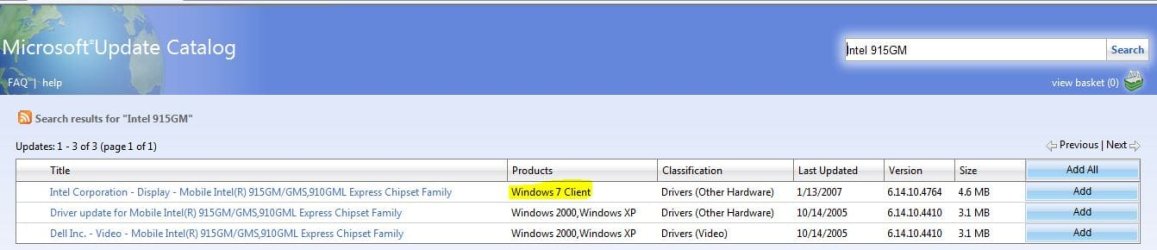
Official windows 7 driver for 915 chipset is at Windows Update Catalog.
Use this one, forget tricks and unofficial things.
 

My Computer

OS
Windows 7 / W2k8 R2
I dont get that update.
 

My Computer

Computer Manufacturer/Model Number
HP dv6410eo
OS
Windows 7 Build 7201 x86
CPU
Intel T2080
Memory
2 GB
Graphics Card(s)
GMA 950
Sound Card
Conexant High Definition Audio
Screen Resolution
1280 x 800
Hard Drives
WD Scorpio Black 7200rmp 320gb
Official windows 7 driver for 915 chipset is at Windows Update Catalog.
Use this one, forget tricks and unofficial things.

the file downloaded from windows update catalog doesnt have .inf (setup information file) windows 7 doesn't see any driver for the GFX card.
 

My Computer

Computer Manufacturer/Model Number
Dell Inspiron1300
OS
Windows 7 Ultimate
CPU
Pentium M 740 2133mhz
Memory
2GB DDr2-667
Graphics Card(s)
Intel 915GM
I know that "never" is a LONG time, but I believe I'm still safe in saying you will NEVER see Aero enabled with the 915 chipset. Why? Because everything I've read about Aero says it requires, at a minimum, an WDDM v1 driver -- and the 915 chipset driver is XPDM. That's because Intel refused to write a WDDM driver for the 915 chipset.

I'm using just that chipset, have downloaded ALL the drivers that I could find (from Intel, MS, and driver sites) and the results are always the same -- no Aero.

If you want a more colorful desktop display than Seven Basic, suggest you check out my threads in the Customization subforum. Those contain posts from other folks with links to enhanced Basic themes and a theme patcher that doesn't modify any system files.
 

My Computer

Computer type
PC/Desktop
Computer Manufacturer/Model Number
Custom
OS
Win7 Pro 32-bit, Win8 Pro 32-bit
CPU
AMD Phenom II X6 1090T
Motherboard
Gigabyte
Memory
4GB ddr3 1300
Graphics Card(s)
AMD HD 4290 onboard
Sound Card
Builtin Realtek HD Audio
Monitor(s) Displays
Samsung 24" widescreen, LG 23" widescreen
Screen Resolution
1920x1200/1920x1080
Hard Drives
Kingston 256GB SSD
Keyboard
Logitech Illuminated Keyboard
Mouse
Logitech M705 wireless mouse
Antivirus
Norton Av 2013
Browser
IE v10
the file downloaded from windows update catalog doesnt have .inf (setup information file) windows 7 doesn't see any driver for the GFX card.

You need to Select the option to "Search for Drivers on my Computer" and point it to where you downloaded the file. Then "Manually Select a Driver" Finally Select Display Adapters and the 915 Driver is there - Tested on a Latitude D510
 

My Computer

Computer Manufacturer/Model Number
Sony Vaio VGN-N38E/W
OS
Windows 7 Ultimate
Found the solution!!!!!

Dear All,

I have an ASUS P5GL-MX motherboard with Intel 915GL chipset and was facing the exact same problem. The video playback was jerky, blocky and pixelated. I initially thought it was a problem with some codecs or rendering (Haali, Direct3D etc..) and was messing around with installing codec packs and playing with the settings (all these were suggestions from other forums where this problem had been solved). Nothing worked. After I read this thread, I zeroed in on the issue with getting drivers for Intel 915 series chipset. The latest updates from the Intel Download Center (for the 915 and Windows 7) did not work as the OS refused to install it.

I looked (only) for some two hours and finally found the solution for this problem. Please click on the link below.

Download Locations

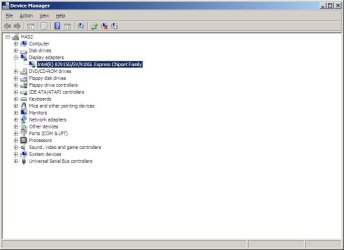
The driver is only for Windows XP but it works on Windows 7 Ultimate!!! I clicked on 'Run' with absolutely no hope of getting it installed (had already seen multiple popups saying "this operating system is not supported" and was very disheartened this evening). Ok, it did say again "this operating system is not supported". I thought "Yeah, I know. As expected" and clicked on 'OK'. This another popup appeared which gave me an option to run the program with "...recommended settings....". I thought here I go again and I gave it a shot. It installed!!! It worked. After it restarted, I immediately ran to Device Manager and checked "Display adapters" and voila! (Screenshot attached) :)

I must admit I had sort of given up hope, and started having ideas about buying a PCIe graphics card. I had set a deadline. If I didn't find a solution by 22:00 Hrs, I disconnect the Windows 7 hard disk and reconnect my old IDE HDD with a very stable and reliable Windows XP SP3 and hunt for solutions when I have the time (Yeah right! I'd still have endlessly searched like a madman tonight and everyday, without any deadline whatsoever. That is how I am when it comes to troubleshooting issues with my computer).

I know this post is long. Sorry. I'm too excited!!!! :D

Hope this helps!:) Please try other newer drivers (if ya'll could find any) and let me know if they work too.

Thanks.
 

Attachments

  • dm_915_display.jpg
    dm_915_display.jpg
    34.3 KB · Views: 1,801
Last edited:

My Computer

Computer Manufacturer/Model Number
Assembled myself!
OS
Microsoft Windows 7 Ultimate
CPU
Intel Pentium 4 506
Motherboard
ASUS P5GL-MX
Memory
2GB DDR RAM (2x512MB Transcend ; 1X1GB Kingston)
Hard Drives
Seagate Barracuda ST31000528AS - 1TB (Storage)
Seagate Barracuda ST3160211AS - 160GB (Windows / System)
PSU
Cooler Master Extreme Power Plus 500W
Cooling
2x 80mm side fans, 1x120 mm rear exhaust fan, 1x80 mm (HDD)
I have tried looking for this driver for hours and have read in a couple of places that Intel has dropped support for this chipset. Therefore, we probably will not see a Windows 7 driver. I have tried the workarounds provided here and none of them gave me Aero functionality on my Latitude D510 and I cannot go above 1024 x 768. I tried the Windows Update Catalog and Intel's site and pointed to the files manually to no avail.

Other than that, I have no other issues with display, but I really wish I could get the native resolution of 1280 x 1024.
 

My Computer

OS
Win 7
I'm using a Tablet PC in Win7 with that chipset and I got my drivers from the Windows Update Catalog. The version I have installed is v6.14.10.4764, dated 1/13/2007 -- from Intel. The display resolutions panel lists resolutions all the way up to 1600X1200 -- but in my experience, although I can choose a setting higher than 1024X768, it always resets to that upon reboot.

I think this is the best we can hope for from a 3-year-old driver that Intel refuses to update.
 

My Computer

Computer type
PC/Desktop
Computer Manufacturer/Model Number
Custom
OS
Win7 Pro 32-bit, Win8 Pro 32-bit
CPU
AMD Phenom II X6 1090T
Motherboard
Gigabyte
Memory
4GB ddr3 1300
Graphics Card(s)
AMD HD 4290 onboard
Sound Card
Builtin Realtek HD Audio
Monitor(s) Displays
Samsung 24" widescreen, LG 23" widescreen
Screen Resolution
1920x1200/1920x1080
Hard Drives
Kingston 256GB SSD
Keyboard
Logitech Illuminated Keyboard
Mouse
Logitech M705 wireless mouse
Antivirus
Norton Av 2013
Browser
IE v10
Thanks for the update. I will try that out.
I am not too surprised about an older driver being able to work. I have an eight year old Toshiba Satellite which run Win7 just fine. I had to use a driver that was a few steps down from the latest one for the chipset. Altough Aero does not work and I can't go above 1024 x 768 on it either, I was glad I was able to get something to install.
 

My Computer

OS
Win 7
HP Driver for Intel 915

I downloaded the driver from the HP website as well (link below) and installed it on Windows 7 Professional x86 SP1 without any hiccups. I also permanently disabled driver signing just to make sure. IT WORKS!

HP Driver for Intel 915: ftp://ftp.hp.com/pub/softpaq/sp34501-35000/sp34749.exe
 

My Computer

OS
Win 8 RP
CPU
C2D - OC 4.2Ghz
Memory
4GB
Graphics Card(s)
GeForce 210 - 1GB
Hard Drives
1X 128GB Vertex 4
1X 1.5TB WD Black
Hp driver for intel 915 in win 7 family

I tried to use the hp driver supplied by TekBoy in a laptop dell lattitude D610 with the 915gm grapphic chipset ( using Windows 7 family ) but the installer said that "this operating system is not supported".

I use "Universal Extractor" found here :

Universal Extractor | LegRoom.net

to extract all the files from the executable ( sp34749.exe ) in a repertory.

Next, I upgrade the driver with the "Search for Drivers on my Computer" option and pointing the file with the driver dll previously extracted and windows as installed the driver without any problem :)

After restarting, the video card finally get fonctionnal!!

Hope this helps...
 

My Computer

OS
windows seven
I have an Acer Travelmate 4020 , and i installed the HP driver sp34749 , the first prompt it said it's not safe or compatible and denied access , and when asked "install with recommended settings ? " , I replied yes , and the driver was installed successfully in the control panel , "Mobile Intel(R) 915 GM/GMS,910 GML Express chipset family " ... The System is very stable since the install 2 days ago ...

Thanks guys ...
 

My Computer

OS
windows 7 Ultimate 32 bit
I use "Universal Extractor" found here :

Universal Extractor | LegRoom.net

Hope this helps...

This is partly my fault for not explaining. I never simply double click on a driver file and tell it to install. I always extract using 7-Zip or an alternative like the Universal Extractor mentioned by yabor, then proceed to manually install the drivers from Device Manager. This is because [a] it's actually faster I hate all the mumbo-jumbo crap that drivers always install.

P.S.
This would be different if say you actually want/need the extra software bundled with a driver (ex: AMD Catalyst)
 

My Computer

OS
Win 8 RP
CPU
C2D - OC 4.2Ghz
Memory
4GB
Graphics Card(s)
GeForce 210 - 1GB
Hard Drives
1X 128GB Vertex 4
1X 1.5TB WD Black
I know it was a long time ago but I wish to thank those involved in finding a solution to the Intel 915GM/910GML graphics card driver for Windows 7. It works well in my Dell Inspiron 1300 in that I can use the natural 1280 x 800 resolution. This makes rounds round and squares square.

The method I used was to extract the SP34749 file to a new folder. Then in Device Manger, Display adaptors Intel etc., update driver, browse and go to the folder and click OK. It took a little time but went smoothly. When I restarted there were streaky colours but I clicked on list all modes available. Once I'd selected 1280 x 800 61Hz and clicked OK it cam clear.

Regards.
 

My Computer

Computer type
Laptop
Computer Manufacturer/Model Number
ME051
OS
Windows 7 Professional 32 bit
CPU
Celeron M 1.6Gh
Memory
2GB
Antivirus
Norton
Browser
IE11 & Firefox
Back
Top