Resolution problem with Nvidia GTX580 at 1920x1080

PaulioBH

New member
Local time
2:40 AM
Messages
3
Hey, ive got problems with the resolution on my monitor. Every application has been stretched to fit the resoulution thus loosing all quality. Ive got all the most recent drivers and am finding it hard to look at the screen without my eyes hurting. Can anyone help?

These are relevant specs (if you need any more then just say)
Nvidia GTX580 graphics card
windows 7 ultimate x64
1920x1080 resolution
 

My Computer My Computer

Computer Manufacturer/Model Number
Self Built
OS
Windows 7 Ultimate x64 SP-1
CPU
Intel i5 2500K OC @ 4.2
Motherboard
Asus P8P67 PRO
Memory
Corsair Vengeance Blue 2x4GB 1600Hz
Graphics Card(s)
Asus Matrix GTX 580 Platnium
Monitor(s) Displays
Dell ST2220M
Screen Resolution
1092x1080
Hard Drives
WD Caviar Black 1TB
WD Scorpio 250gb (from laptop)
PSU
XFX 850W Black Edition
Case
Bitfenix Colossus Venom Edition
Cooling
Cooler Master Hyper 212+
Keyboard
Logitech Wave 2.4 Pro
Mouse
Logitech MX1100
Internet Speed
0.3Mbs :'(
Go here > Drivers - Download NVIDIA Drivers

Select your video card, Windows 64 and language wanted. Download the driver and install.

The driver once installed should select the proper screeen resolution needed.

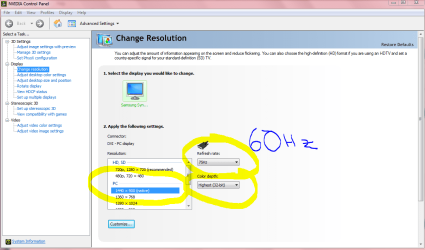
Once installed if resolution is still not proper right click open area of desktop and click "Nvidia Control Panel" in the list.

New window willl look like Snip below. Select Display> Change resolution in left column.
Then select resolution needed that is circled in yellow.
Don't worry with the Hz. It will probably show 60Hz which is standard for 99.9% of all monitors.
 

Attachments

  • Nvidia control panel.PNG
    Nvidia control panel.PNG
    42.7 KB · Views: 393
Last edited:

My Computer My Computer

Computer Manufacturer/Model Number
Hopalong/ Godzilla
OS
Windows7 Pro 64bit SP-1; Windows XP Pro 32bit
CPU
Intel Core i7-870 Lynnfield 2.93GHz LGA 1156 95W Quad-Core
Motherboard
ASUS P7P55D-E PRO
Memory
8GB@1400MHz Crucial Ballistix DDR3-1600 4x2GB
Graphics Card(s)
ASUS ENGTX460 DirectCU/2DI/1GD5 1GB 256-bit GDDR5
Sound Card
VIA Onboard
Monitor(s) Displays
Asus VS248H-P 24"; Samsung SyncMaster 941BW 19"ws
Screen Resolution
1920x1080; 1440x900
Hard Drives
Samsung 830 120GB SSD
Intel 320 120GB SSD
Western Digital Caviar Black WD7501AALS 750GB 7200 RPM SATA 3.0Gb/s
Western Digital Caviar Black WD6401AALS 640GB 7200 RPM SATA 3.0Gb/s
PSU
COOLER MASTER Silent Pro RS850-AMBAJ3-US 850W Modular
Case
COOLER MASTER HAF 932 RC-932-KKN5-GP Black
Cooling
Scythe "Mugen-2 Rev.B" (2 ScytheKaze-Jyuni PWM fans)
Keyboard
Logitech K-320
Mouse
Kensington
Antivirus
Avast Inernet Suite
Browser
IE 9 ; Chrome
ive tried all that thanks :/ ive also contacted nvidia multiple times and they've come back with different drivers to try, im using 280.26 at the mo but its still blurry...the resolution fits the screen but applications are pixelated/blurry
 

My Computer My Computer

Computer Manufacturer/Model Number
Self Built
OS
Windows 7 Ultimate x64 SP-1
CPU
Intel i5 2500K OC @ 4.2
Motherboard
Asus P8P67 PRO
Memory
Corsair Vengeance Blue 2x4GB 1600Hz
Graphics Card(s)
Asus Matrix GTX 580 Platnium
Monitor(s) Displays
Dell ST2220M
Screen Resolution
1092x1080
Hard Drives
WD Caviar Black 1TB
WD Scorpio 250gb (from laptop)
PSU
XFX 850W Black Edition
Case
Bitfenix Colossus Venom Edition
Cooling
Cooler Master Hyper 212+
Keyboard
Logitech Wave 2.4 Pro
Mouse
Logitech MX1100
Internet Speed
0.3Mbs :'(
Googled your monitor.
Since I don't know how you have the monitor wired to the video card I will suggest that you have DVI to DVI if you don't already have it this way.
So you need a DVI cable.
This will give you digital signal to monitor.

Using DVI with adapter to VGA can cause this problem.
 

My Computer My Computer

Computer Manufacturer/Model Number
Hopalong/ Godzilla
OS
Windows7 Pro 64bit SP-1; Windows XP Pro 32bit
CPU
Intel Core i7-870 Lynnfield 2.93GHz LGA 1156 95W Quad-Core
Motherboard
ASUS P7P55D-E PRO
Memory
8GB@1400MHz Crucial Ballistix DDR3-1600 4x2GB
Graphics Card(s)
ASUS ENGTX460 DirectCU/2DI/1GD5 1GB 256-bit GDDR5
Sound Card
VIA Onboard
Monitor(s) Displays
Asus VS248H-P 24"; Samsung SyncMaster 941BW 19"ws
Screen Resolution
1920x1080; 1440x900
Hard Drives
Samsung 830 120GB SSD
Intel 320 120GB SSD
Western Digital Caviar Black WD7501AALS 750GB 7200 RPM SATA 3.0Gb/s
Western Digital Caviar Black WD6401AALS 640GB 7200 RPM SATA 3.0Gb/s
PSU
COOLER MASTER Silent Pro RS850-AMBAJ3-US 850W Modular
Case
COOLER MASTER HAF 932 RC-932-KKN5-GP Black
Cooling
Scythe "Mugen-2 Rev.B" (2 ScytheKaze-Jyuni PWM fans)
Keyboard
Logitech K-320
Mouse
Kensington
Antivirus
Avast Inernet Suite
Browser
IE 9 ; Chrome
This card does not have VGA. It should have one Mini HDMI and Two Dual Link DVI .

@ Paulio, please post a sip of the same that Hopalong did to show you, but of your systems current settings.
Also, please be complete and specific in what you have (already) done/tried.
 

My Computer My Computer

Computer Manufacturer/Model Number
custom build
OS
Windows 7 64b Ultimate
CPU
I7-2600 3.40GHz - testing various OC levels..
Motherboard
ASUS Sabretooth
Memory
2x 4Gb DDR3/1333
Graphics Card(s)
GTX570 - testing OC levels
Sound Card
motherboard 7.1 DIG.
Monitor(s) Displays
2x Ilyama 24" E2409HDS-B1 2ms/DVI
Screen Resolution
1920 x 1080
Hard Drives
120 GB Intel Elmcrest SSD
1 TB SATAII 7200RPM/32MB
External 2TB USB3
PSU
Corsair Pro HX850W
Cooling
Coolermaster Hyper V8
Keyboard
Logitech G110
Mouse
Logitech G700
Internet Speed
25Mb
Other Info
CPU: 7,7 RAM: 7,7 GTX: 7,9 GTX 3D : 7,9 SSD 7,6
Overall 7,6 ...... now to speed up the SSD... ;)

Also use a Dell XPS M1710 on Vista 32b
Asus LT on Vista 32
3 older machines still doing fine on Linux/ubuntu but not used much anymore...
The video card comes with a VGA adapter and the monitor will take VGA. Which gives you analog signal.

Better to be digital if hooked up analog now.
 

My Computer My Computer

Computer Manufacturer/Model Number
Hopalong/ Godzilla
OS
Windows7 Pro 64bit SP-1; Windows XP Pro 32bit
CPU
Intel Core i7-870 Lynnfield 2.93GHz LGA 1156 95W Quad-Core
Motherboard
ASUS P7P55D-E PRO
Memory
8GB@1400MHz Crucial Ballistix DDR3-1600 4x2GB
Graphics Card(s)
ASUS ENGTX460 DirectCU/2DI/1GD5 1GB 256-bit GDDR5
Sound Card
VIA Onboard
Monitor(s) Displays
Asus VS248H-P 24"; Samsung SyncMaster 941BW 19"ws
Screen Resolution
1920x1080; 1440x900
Hard Drives
Samsung 830 120GB SSD
Intel 320 120GB SSD
Western Digital Caviar Black WD7501AALS 750GB 7200 RPM SATA 3.0Gb/s
Western Digital Caviar Black WD6401AALS 640GB 7200 RPM SATA 3.0Gb/s
PSU
COOLER MASTER Silent Pro RS850-AMBAJ3-US 850W Modular
Case
COOLER MASTER HAF 932 RC-932-KKN5-GP Black
Cooling
Scythe "Mugen-2 Rev.B" (2 ScytheKaze-Jyuni PWM fans)
Keyboard
Logitech K-320
Mouse
Kensington
Antivirus
Avast Inernet Suite
Browser
IE 9 ; Chrome
hey, thanks for the feedback
the monitors connected to it via DVI

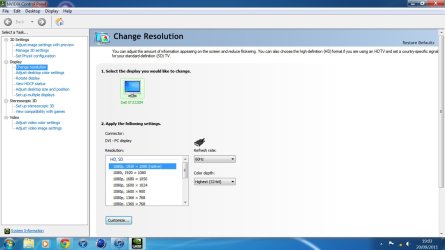
so far I've tried using a different driver (currently using 280.26), specifically the 275.50 which was recommended to me by Nvidia themselves but this didn't resolve the problem. I've also gone through all of the Windows resolution settings as-well as the Nvidia and my resolution 1920x1080 (native) is selected on both and they're both set at 60Hz refresh rate which is what the monitor requires. I'm pretty sure that's all I've done so far.

Also you requested a sip...what exactly is a sip?

Edit: Im assuming sip means snip so i took a screenshot of my version of what was already posted
 

Attachments

  • New Picture.jpg
    New Picture.jpg
    120.5 KB · Views: 229
Last edited:

My Computer My Computer

Computer Manufacturer/Model Number
Self Built
OS
Windows 7 Ultimate x64 SP-1
CPU
Intel i5 2500K OC @ 4.2
Motherboard
Asus P8P67 PRO
Memory
Corsair Vengeance Blue 2x4GB 1600Hz
Graphics Card(s)
Asus Matrix GTX 580 Platnium
Monitor(s) Displays
Dell ST2220M
Screen Resolution
1092x1080
Hard Drives
WD Caviar Black 1TB
WD Scorpio 250gb (from laptop)
PSU
XFX 850W Black Edition
Case
Bitfenix Colossus Venom Edition
Cooling
Cooler Master Hyper 212+
Keyboard
Logitech Wave 2.4 Pro
Mouse
Logitech MX1100
Internet Speed
0.3Mbs :'(
hey, thanks for the feedback
the monitors connected to it via DVI

so far I've tried using a different driver (currently using 280.26), specifically the 275.50 which was recommended to me by Nvidia themselves but this didn't resolve the problem. I've also gone through all of the Windows resolution settings as-well as the Nvidia and my resolution 1920x1080 (native) is selected on both and they're both set at 60Hz refresh rate which is what the monitor requires. I'm pretty sure that's all I've done so far.

Also you requested a sip...what exactly is a sip?

Edit: Im assuming sip means snip so i took a screenshot of my version of what was already posted


Wow, that's really washed out and big, looks like there maybe an issue with the DPI/display size settings, right click your desktop and click on personalize, on the left bar at the bottom should be an option saying display, click that, and you should see a screen like this :
DPI settings.jpg

select the smaller option and log off and log back on, it should look at least a little better.
 

My Computer My Computer

Computer type
PC/Desktop
Computer Manufacturer/Model Number
Custom Build
OS
Windows 7 Ultimate x64 SP1
CPU
Intel Q6600 @ 2.6Ghz
Motherboard
Evga NF78-CK-132-A 3-Way SLI
Memory
4Gb DDR2 Corsair Dominator @ 800Mhz 5-5-5-15
Graphics Card(s)
EVGA 560 GTX SC FTW 1GB
Sound Card
Realtek HD 7.1 Audio, Plantronics GameCom780 7.1 Headset
Monitor(s) Displays
Dell S2409W
Screen Resolution
1920 x 1080
Hard Drives
SanDisk SDSSDHII-120G-G25 120GB SSD
Samsung 7200RPM 750Gb SATA
Samsung 850 EVO 120GB SSD
Western Digital Green 1TB 7200RPM
PSU
Xigmatek 750W Quad sli quad core 80% eff
Case
Antec 900 Gaming Case
Cooling
Zalman CNPS9700-NT NVIDIA Tritium
Keyboard
Logitech generic keyboard, MS wireless keyboard
Mouse
Razor Lachesis Banshee V2 Blue, 4000DPI, MS wireless mouse
Internet Speed
152Mb Virgin Media Fibre Optic
Antivirus
Microsoft Security Essentials
Browser
Google Chrome
Other Info
Wireless Gaming Receiver for Windows, Wireless Xbox 360 Pad
Back
Top