Resolution screwed up when I adjusted text sizes

xeroinferno

New member
Local time
10:14 PM
Messages
1
I have an ATI HD3870 with fresh drivers. I'm using an HDTV as a monitor and (using ccc settings) I put it on max settings (1080p). It worked, but I wanted the text/icons to be bigger, so I went into display settings in windows 7 and adjusted the size to 125%. Logged off, and my screen went blank. I waited for about 3 minutes or so before rebooting. When I rebooted, I was able to see/go into my BIOS settings. However, whenever I boot back into the OS, it just show up blank. ATM, I'm using my back up HDD. How can I fix this without booting back into the OS or reinstalling Windows 7?

BTW, the OS on the other HDD is running the older version of the driver.
 

My Computer My Computer

OS
7
Insert your instalation CD and restore to computer to an earlier point, that will undo all the changes you have made. YOu can create custom resolutions with ATI cards:

Type regedit:

Then:

Just add a line to one of the DALNonStandardModesBCD lines within the following path.

[HKEY_LOCAL_MACHINE\SYSTEM\CurrentControlSet\Contro l\Video\{28EB637D-0B05-40E2-9B10-67836FF468A5}\0000]


(The big number at the end before the 4 zero's is random but you should be able to find yours, if you have installed multiple versions of catalysts you will have loads of different ones so make sure you modify the correct one by looking in your catalyst control panel at the "2d driver file path" entry within "information center").

For example I have just edited the DALNonStandardModesBCD1 entry to look like the following example which added 1280x900 at 60hz.

07,20,04,80,00,00,00,60,
07,20,04,80,00,00,00,75,
07,20,04,80,00,00,00,85,
07,20,05,76,00,00,00,00,
08,48,04,80,00,00,00,60,
08,48,04,80,00,00,00,75,
08,48,04,80,00,00,00,85,
12,80,07,20,00,00,00,60,
12,80,09,00,00,00,00,60
 

My Computer My Computer

Computer Manufacturer/Model Number
Dell Inspiron
OS
Windows 7
CPU
2.4 GHz Intel i3 cpu
Memory
8GB
Mouse
MS Explorer Mouse
Internet Speed
100 Mb/s
Hi

I'm having a problem with adding custom resolutions. I can't seem to find the DALNonStandardModesBCD1 key. I have gone to the ATI driver location, which has several other DAL keys, but no DALNonStandardModesBCD1 key. I did a search for the key as well but it came up empty. Should I create the key myself? Any idea what I can do?

Thanks
 

My Computer My Computer

OS
Windows 7
Try selecting where the 4 0's are so it will be:

HKEY_LOCAL_MACHINE\SYSTEM\CurrentControlSet\Control\Video\{01AF48BA-2236-4D05-B63A-13191074B88A}\0000

Just Highlight the zeros and then the list should appear in the right pane, then scroll down until you see the DALnonstandard options then right click on the word DALNonStandard then you can add it. You may need to search around but they are there.

you dont need to look inside the ATI folder, on my PC it is in the folder which is above the ATI folder.
 

My Computer My Computer

Computer Manufacturer/Model Number
Dell Inspiron
OS
Windows 7
CPU
2.4 GHz Intel i3 cpu
Memory
8GB
Mouse
MS Explorer Mouse
Internet Speed
100 Mb/s
Hi

I'm having a problem with adding custom resolutions. I can't seem to find the DALNonStandardModesBCD1 key. I have gone to the ATI driver location, which has several other DAL keys, but no DALNonStandardModesBCD1 key. I did a search for the key as well but it came up empty. Should I create the key myself? Any idea what I can do?

Thanks


Forgot to mention you need to go into the registry by typing regedit in the search bar of the start menu. It's not actually in the ATI folder where the drivers are located
 

My Computer My Computer

Computer Manufacturer/Model Number
Dell Inspiron
OS
Windows 7
CPU
2.4 GHz Intel i3 cpu
Memory
8GB
Mouse
MS Explorer Mouse
Internet Speed
100 Mb/s
Hi again. I should have been more clearer.

I wasn't looking in the ATI folder. I was in regedit, and went to the registry location stated on catalyst control centre (.../REGISTRY/MACHINE/SYSTEM/ControlSet001/Control/CLASS/{4D36E968-E325-11CE-BFC1-08002BE10318}/0000).
In this folder, I found several keys starting with DAL, but no DALNonStandardModesBCD keys.

I also, went to the location you stated, for me it was (HKEY_LOCAL_MACHINE\SYSTEM\CurrentControlSet\Control\Video\{36A342CC-322C-473D-B643-0C015C7DDC4B}/0000), and looked in the other folders inside that 1 as well. Again I found several DAL keys but not the 1 I need. I also did a search inside regedit for that particular key and DALNonStandard, but they came up empty. Searches for other keys worked. I looked through all 3 control sets manually but still couldn't find it. Can I just create the key?

Thanks
 

My Computer My Computer

OS
Windows 7
Is there noi DALNonStandardModes what so ever in there? Have you looked in every folder underneath that as well as there are 5 folders that have a name similar to {4D36E968-E325-11CE-BFC1-08002BE10318}

Here is a screen dump:

15rnzfd.png


If you just highlight the folder that I have circled by left clicking it once and try the other folders then it will be there somewhere.

Once you have done that you will then need to reboot your PC and then you can choose the resolution you have created.
 

My Computer My Computer

Computer Manufacturer/Model Number
Dell Inspiron
OS
Windows 7
CPU
2.4 GHz Intel i3 cpu
Memory
8GB
Mouse
MS Explorer Mouse
Internet Speed
100 Mb/s
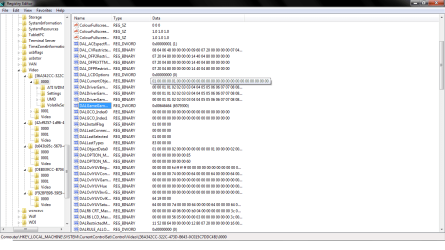
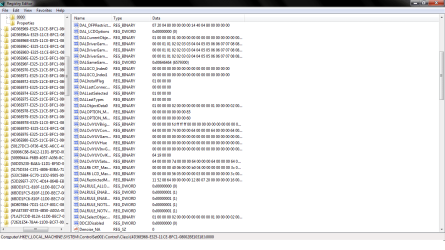
I looked in all those folders, and pretty much all the folders in ControlSet1, ControlSet2, CurrentControlSet. I haven't found DALNonStandardModes anywhere.

Heres the pictures of what I get in the locations with the most DAL keys.
 

Attachments

  • video.png
    video.png
    34.5 KB · Views: 42
  • video2.png
    video2.png
    33.5 KB · Views: 27

My Computer My Computer

OS
Windows 7
I looked in all those folders, and pretty much all the folders in ControlSet1, ControlSet2, CurrentControlSet. I haven't found DALNonStandardModes anywhere.

Heres the pictures of what I get in the locations with the most DAL keys.

Are you using an ATI video card because I forgot to mention that this will only work on ATI cards?

If you still want to create a custom resolution then it will work on the onboard video card and you can change it in windows?

Other than that I aint sure, I can only suggest you check to see if you can find anything that looks like a video resolution in your registry and try changing it then see if it works.
 

My Computer My Computer

Computer Manufacturer/Model Number
Dell Inspiron
OS
Windows 7
CPU
2.4 GHz Intel i3 cpu
Memory
8GB
Mouse
MS Explorer Mouse
Internet Speed
100 Mb/s
Try going into the registry then go to edit, then find then type DALNonStandardModes and see if that works.

Failing all that if you are using an ATI card and it still wont work you could try re installing your OS to see if that does the job.
 

My Computer My Computer

Computer Manufacturer/Model Number
Dell Inspiron
OS
Windows 7
CPU
2.4 GHz Intel i3 cpu
Memory
8GB
Mouse
MS Explorer Mouse
Internet Speed
100 Mb/s
Yes I am using an ATI card. Radeon 4570. As I said before, I used the find option inside regedit, but it came up blank. Reinstalling OS is not an option atm. I might try reinstalling video driver, and a few other things and see how it goes.
 

My Computer My Computer

OS
Windows 7
I think I have figured out why your unable to alter the resolution on your video card, your video card is for notebooks, so that means that you have a note book and that is why you don't have that ability.

The reason why you would want to create a custom resolution is for when you buy a monitor and the recommended resolution for optimum viewing on you monitor is not a native resolution, so you go into the registry to create a custom resolution.

If your using a notebook then you wont gain any benefit from creating a custom resolution as the video card will have the optimum resolution as a native resolution for the display.
 

My Computer My Computer

Computer Manufacturer/Model Number
Dell Inspiron
OS
Windows 7
CPU
2.4 GHz Intel i3 cpu
Memory
8GB
Mouse
MS Explorer Mouse
Internet Speed
100 Mb/s
Yes I do have a notebook. I wanted to create a custom resolution for an external monitor which I will be getting shortly. Last time I tried 1, the resolution wouldn't go higher than the native notebook resolution. Will the DALNonStandardModes key appear when I use an external monitor, or is there another way to increase the resolution?
 

My Computer My Computer

OS
Windows 7
Yes I do have a notebook. I wanted to create a custom resolution for an external monitor which I will be getting shortly. Last time I tried 1, the resolution wouldn't go higher than the native notebook resolution. Will the DALNonStandardModes key appear when I use an external monitor, or is there another way to increase the resolution?


I am not sure you can only try, like I said you can either try and re-install the OS or just the graphics card driver and see if that helps.

It may also be worth trying ATI technical support, or I think they have forums on their site where you may also find help.
 

My Computer My Computer

Computer Manufacturer/Model Number
Dell Inspiron
OS
Windows 7
CPU
2.4 GHz Intel i3 cpu
Memory
8GB
Mouse
MS Explorer Mouse
Internet Speed
100 Mb/s
Back
Top