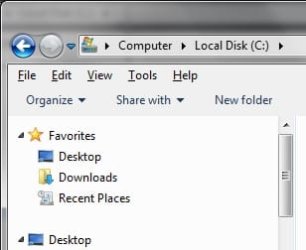
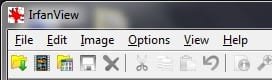
Solved Resource Image #s for Command, Menu and Scroll bars in x64 sp1

rUUk

New member
Local time
3:17 AM
Messages
6
Hello SevenForums. The past couple days I've been searching for info that I just can't seem to find. Realized I needed to ask the question someplace, and SF was my first choice. From all the helpful, friendly replies I've seen on here that nearly match what I'm looking for, I know this is the place...Do I need to go on, or am I slightly more endeared to you than the usual stranger now? :p

I'm looking for resource image numbers in default x64 sp1 aero.msstyle. The info for the background of the Command Bar and Menu bar are most important to me. For some reason the looks of these two bars in Explorer increasingly annoy me, but especially on menu bars in other programs outside of Explorer. But my searches never give me resource numbers that actually match up to what I find in aero.msstyle.
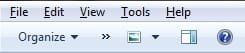
mostimportanttome.jpg
While I'm asking I guess I wouldn't mind info on the scroll bars, too, if it's not a bother.
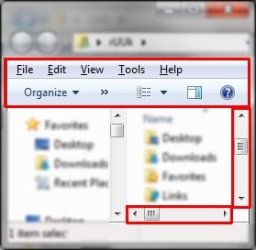
whatimtalkinbout.jpg


I don't suspect I'll run into many problems while doing the creating, replacing and using of the new background images. The image/resource editors should give me no trouble, but I'll be happy to read any quick tips about the procedures for updating a theme (use a different theme while modifying, ownership, log off/on a few times, possibly need a theme patcher, etc). Or maybe some links you have handy if you think I'll need them.

I think my biggest questions are about how many images need to be replaced. Are there separate command/menu bar files for normal, hovered and clicked on? Do the view, preview and help buttons have their own backgrounds? Does the Explorer menu bar use the same background images as the menu bar in other programs?
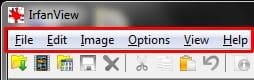
otherprog1.jpgotherprog2.jpg


I'll appreciate any help that anyone has to offer. Thank you for your time.
 
Last edited:

My Computer My Computer

At a glance

Windows 7 Ultimate x64AMD Athlon II X3 455 3.3GhzSAMSUNG 8GB DDR3 1600EVGA GeForce GTX 650
Computer type
PC/Desktop
Computer Manufacturer/Model Number
Custom build
OS
Windows 7 Ultimate x64
CPU
AMD Athlon II X3 455 3.3Ghz
Motherboard
ASUS M5A99X EVO
Memory
SAMSUNG 8GB DDR3 1600
Graphics Card(s)
EVGA GeForce GTX 650
Sound Card
Sound Blaster X-Fi Xtreme Audio
Monitor(s) Displays
22" LCD 16:10
Screen Resolution
1680x1050
Hard Drives
Western Digital 1TB
Western Digital 500GB
Western Digital 160GB
PSU
Antec TruePower New TP-750
Case
Lian Li PC-V100
Cooling
Unexciting fans
Keyboard
Ancient MS Natural
Mouse
Logitech MX510
Internet Speed
20Mbps/2Mbps
Antivirus
MSE
Browser
Firefox
Other Info
You managed to read this far and even want more?
Welcome to the Seven Forums

I have them numbers somewhere let me do some looking around and I will post them.

Jerry
 

My Computer My Computer

At a glance

Win 7 Pro x64 / Win 10 ProIntel(R) Core(TM) i7-3630QM CPU @ 2.40GHz12 GB(1) Intel(R) HD Graphics 4000 (2) NVIDIA GeFo...
Computer type
Laptop
Computer Manufacturer/Model Number
Sager NP9170
OS
Win 7 Pro x64 / Win 10 Pro
CPU
Intel(R) Core(TM) i7-3630QM CPU @ 2.40GHz
Motherboard
CLEVO P170EM
Memory
12 GB
Graphics Card(s)
(1) Intel(R) HD Graphics 4000 (2) NVIDIA GeForce GTX 675M
Sound Card
(1) Realtek High Definition Audio (2) Intel(R) Display Aud
Monitor(s) Displays
17.3
Screen Resolution
1920x1080
Hard Drives
(1) Samsung 860 EVO 500GB(OS) (1) Samsung 860 EVO 500GB(Data)
Keyboard
Backlite
Antivirus
MSE, Malwarebytes Pro
Browser
Firefox
Other Info
DESKTOP: Custom-built.
OS: Win 10 Pro x64.
CASE: Rosewill R5.
CPU: Intel I5 4670K CPU @ 3.40GHz.
CPU COOLER: Cool Master Hyper 212 EVO.
MOTHERBOARD: Asus Z87-A.
MEMORY: Kingston HyperX 2x4 GB.
GPU: Nvidia Geforce 650 TI.
PSU: Corsair TX750.
DRIVES: (1) Samsung 840 120 GB SSD (2) Western Digital blue 500 GB 7200 RPM.
The first thing you should do is use a copy of the aero theme folder and aero.theme file to make a new theme that way you did not corrupt the original, look at post #38 of this thread will show you how to do that http://www.sevenforums.com/customization/135985-start-menu-color-change-4.html#post1358071

Second
You will need to do 1 of these 2 ways of Enabling custom themes for it to work.
http://www.sevenforums.com/tutorials/34579-enabling-custom-themes-windows-7-a.html
Or
http://www.sevenforums.com/tutorials/28377-theme-how-apply-custom-themes.html?filter

You are right you cannot edit a theme while it is in the use, after you have tested your new theme and need to make some changes, you will need to switch to a different theme then log off and then log on then you can edit the theme again.
Here is some screenshots with the numbers and the locations in them. You will notice the one for the scrollbar if there are three numbers separated by a "," that is for the different DPI settings.

If any of this is confusing or if you need more help just ask.
Jerry
scroolbar_.pngExplorer.png
 

My Computer My Computer

At a glance

Win 7 Pro x64 / Win 10 ProIntel(R) Core(TM) i7-3630QM CPU @ 2.40GHz12 GB(1) Intel(R) HD Graphics 4000 (2) NVIDIA GeFo...
Computer type
Laptop
Computer Manufacturer/Model Number
Sager NP9170
OS
Win 7 Pro x64 / Win 10 Pro
CPU
Intel(R) Core(TM) i7-3630QM CPU @ 2.40GHz
Motherboard
CLEVO P170EM
Memory
12 GB
Graphics Card(s)
(1) Intel(R) HD Graphics 4000 (2) NVIDIA GeForce GTX 675M
Sound Card
(1) Realtek High Definition Audio (2) Intel(R) Display Aud
Monitor(s) Displays
17.3
Screen Resolution
1920x1080
Hard Drives
(1) Samsung 860 EVO 500GB(OS) (1) Samsung 860 EVO 500GB(Data)
Keyboard
Backlite
Antivirus
MSE, Malwarebytes Pro
Browser
Firefox
Other Info
DESKTOP: Custom-built.
OS: Win 10 Pro x64.
CASE: Rosewill R5.
CPU: Intel I5 4670K CPU @ 3.40GHz.
CPU COOLER: Cool Master Hyper 212 EVO.
MOTHERBOARD: Asus Z87-A.
MEMORY: Kingston HyperX 2x4 GB.
GPU: Nvidia Geforce 650 TI.
PSU: Corsair TX750.
DRIVES: (1) Samsung 840 120 GB SSD (2) Western Digital blue 500 GB 7200 RPM.
Thank you, Bongo. I really should have bet someone that you would have the first reply and/or one of the most helpful replies. I should have a bet a lot of money, I would have won..

If you want I can try to keep you updated on my progress. Nothing spectacular is going to happen though. The Command and Menu bars will be changed to something anti-attention-grabbing, and not blue. Probably a flat rgb(240,240,240) or something. But I need to change the gripper to have more contrast from the track (for some reason I have a hard time finding the thing lately). I most likely won't be working on it until tomorrow or later.

This information seems exactly what I was looking for. It was nice of you to find and post it for me. Thank you kindly.
 

My Computer My Computer

At a glance

Windows 7 Ultimate x64AMD Athlon II X3 455 3.3GhzSAMSUNG 8GB DDR3 1600EVGA GeForce GTX 650
Computer type
PC/Desktop
Computer Manufacturer/Model Number
Custom build
OS
Windows 7 Ultimate x64
CPU
AMD Athlon II X3 455 3.3Ghz
Motherboard
ASUS M5A99X EVO
Memory
SAMSUNG 8GB DDR3 1600
Graphics Card(s)
EVGA GeForce GTX 650
Sound Card
Sound Blaster X-Fi Xtreme Audio
Monitor(s) Displays
22" LCD 16:10
Screen Resolution
1680x1050
Hard Drives
Western Digital 1TB
Western Digital 500GB
Western Digital 160GB
PSU
Antec TruePower New TP-750
Case
Lian Li PC-V100
Cooling
Unexciting fans
Keyboard
Ancient MS Natural
Mouse
Logitech MX510
Internet Speed
20Mbps/2Mbps
Antivirus
MSE
Browser
Firefox
Other Info
You managed to read this far and even want more?
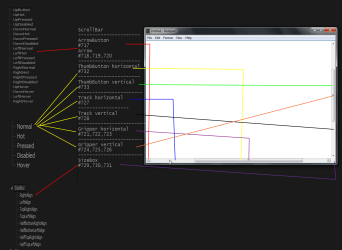
You're welcome, you can keep us updated and/or ask questions here at any time.

Jerry
 

My Computer My Computer

At a glance

Win 7 Pro x64 / Win 10 ProIntel(R) Core(TM) i7-3630QM CPU @ 2.40GHz12 GB(1) Intel(R) HD Graphics 4000 (2) NVIDIA GeFo...
Computer type
Laptop
Computer Manufacturer/Model Number
Sager NP9170
OS
Win 7 Pro x64 / Win 10 Pro
CPU
Intel(R) Core(TM) i7-3630QM CPU @ 2.40GHz
Motherboard
CLEVO P170EM
Memory
12 GB
Graphics Card(s)
(1) Intel(R) HD Graphics 4000 (2) NVIDIA GeForce GTX 675M
Sound Card
(1) Realtek High Definition Audio (2) Intel(R) Display Aud
Monitor(s) Displays
17.3
Screen Resolution
1920x1080
Hard Drives
(1) Samsung 860 EVO 500GB(OS) (1) Samsung 860 EVO 500GB(Data)
Keyboard
Backlite
Antivirus
MSE, Malwarebytes Pro
Browser
Firefox
Other Info
DESKTOP: Custom-built.
OS: Win 10 Pro x64.
CASE: Rosewill R5.
CPU: Intel I5 4670K CPU @ 3.40GHz.
CPU COOLER: Cool Master Hyper 212 EVO.
MOTHERBOARD: Asus Z87-A.
MEMORY: Kingston HyperX 2x4 GB.
GPU: Nvidia Geforce 650 TI.
PSU: Corsair TX750.
DRIVES: (1) Samsung 840 120 GB SSD (2) Western Digital blue 500 GB 7200 RPM.
I did some first draft image manipulation and set up a new theme to make sure it even worked. I will have to redo the images, but now I know I can. The final draft won't be any more exciting than this, just cleaner hover..
muchlessannoying.jpg

I'm confident I can get Windows Explorer to look how I want. But the menu bars in other programs are unchanged. Any idea what I need to do in order to change them?
stillbadotherprog3.jpgstillbadotherprog4.jpg
 

My Computer My Computer

At a glance

Windows 7 Ultimate x64AMD Athlon II X3 455 3.3GhzSAMSUNG 8GB DDR3 1600EVGA GeForce GTX 650
Computer type
PC/Desktop
Computer Manufacturer/Model Number
Custom build
OS
Windows 7 Ultimate x64
CPU
AMD Athlon II X3 455 3.3Ghz
Motherboard
ASUS M5A99X EVO
Memory
SAMSUNG 8GB DDR3 1600
Graphics Card(s)
EVGA GeForce GTX 650
Sound Card
Sound Blaster X-Fi Xtreme Audio
Monitor(s) Displays
22" LCD 16:10
Screen Resolution
1680x1050
Hard Drives
Western Digital 1TB
Western Digital 500GB
Western Digital 160GB
PSU
Antec TruePower New TP-750
Case
Lian Li PC-V100
Cooling
Unexciting fans
Keyboard
Ancient MS Natural
Mouse
Logitech MX510
Internet Speed
20Mbps/2Mbps
Antivirus
MSE
Browser
Firefox
Other Info
You managed to read this far and even want more?
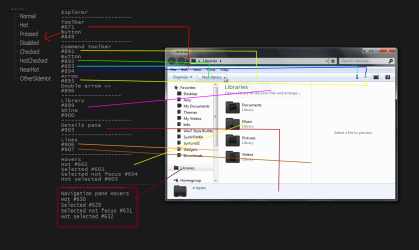
No clue if anyone could ever find these useful. I did, but I knew what what going through my head while I made them. I didn't even label them until right now.
It seems the Command Bar uses 14 different sections of 3 images, this test helped me figure out what went where.

I made each section of the three images a different solid color.
892892.png893893.png894894.png

Hovering the mouse over "Organize". No action taken on the rest of the bar.
1 hovered no-press.jpg

Hovering the mouse over "Open".
2 hovered no-press.jpg

Pressing and holding the mouse on "Open".
3 pressed.jpg

Pressing and holding on "Share With".
4 pressed.jpg

Pressed and released "Share With".
5 pressed and released.jpg


Please rest assured that I absolutely did not leave the Command Bar looking that way for one moment longer than it took to get the screenshots.
 

My Computer My Computer

At a glance

Windows 7 Ultimate x64AMD Athlon II X3 455 3.3GhzSAMSUNG 8GB DDR3 1600EVGA GeForce GTX 650
Computer type
PC/Desktop
Computer Manufacturer/Model Number
Custom build
OS
Windows 7 Ultimate x64
CPU
AMD Athlon II X3 455 3.3Ghz
Motherboard
ASUS M5A99X EVO
Memory
SAMSUNG 8GB DDR3 1600
Graphics Card(s)
EVGA GeForce GTX 650
Sound Card
Sound Blaster X-Fi Xtreme Audio
Monitor(s) Displays
22" LCD 16:10
Screen Resolution
1680x1050
Hard Drives
Western Digital 1TB
Western Digital 500GB
Western Digital 160GB
PSU
Antec TruePower New TP-750
Case
Lian Li PC-V100
Cooling
Unexciting fans
Keyboard
Ancient MS Natural
Mouse
Logitech MX510
Internet Speed
20Mbps/2Mbps
Antivirus
MSE
Browser
Firefox
Other Info
You managed to read this far and even want more?
That menu bar on other programs I think is #972 the top half is active the bottom half is inactive and the hovers are #973

The way you colored them different areas for testing is a very good way of doing it.

Jerry
 

My Computer My Computer

At a glance

Win 7 Pro x64 / Win 10 ProIntel(R) Core(TM) i7-3630QM CPU @ 2.40GHz12 GB(1) Intel(R) HD Graphics 4000 (2) NVIDIA GeFo...
Computer type
Laptop
Computer Manufacturer/Model Number
Sager NP9170
OS
Win 7 Pro x64 / Win 10 Pro
CPU
Intel(R) Core(TM) i7-3630QM CPU @ 2.40GHz
Motherboard
CLEVO P170EM
Memory
12 GB
Graphics Card(s)
(1) Intel(R) HD Graphics 4000 (2) NVIDIA GeForce GTX 675M
Sound Card
(1) Realtek High Definition Audio (2) Intel(R) Display Aud
Monitor(s) Displays
17.3
Screen Resolution
1920x1080
Hard Drives
(1) Samsung 860 EVO 500GB(OS) (1) Samsung 860 EVO 500GB(Data)
Keyboard
Backlite
Antivirus
MSE, Malwarebytes Pro
Browser
Firefox
Other Info
DESKTOP: Custom-built.
OS: Win 10 Pro x64.
CASE: Rosewill R5.
CPU: Intel I5 4670K CPU @ 3.40GHz.
CPU COOLER: Cool Master Hyper 212 EVO.
MOTHERBOARD: Asus Z87-A.
MEMORY: Kingston HyperX 2x4 GB.
GPU: Nvidia Geforce 650 TI.
PSU: Corsair TX750.
DRIVES: (1) Samsung 840 120 GB SSD (2) Western Digital blue 500 GB 7200 RPM.
Heh, I was just going through each of the 600 image resources individually to see if anything seemed to be what I was looking for. Really glad I decided to stop doing that and check for replies instead. I was only in the low 700s and already found a whole lot of this-might-be-it images marked for trial and error attempts. The information you kindly provided, again, saved me a lot of time and hassle ..again : )

Now my Command and Menu bars are unobtrusive and not annoying, imho anyway. And I can actually find the scrollbar when I need it (I think my eyes are getting old).
whatiwasgoingfor.jpg

The other programs I use no longer have a menu bar that sticks out, and doesn't match a single thing else in their windows.
finallynotannoying.jpgmenubarlookslikeitbelongsnow.jpg


Thank you again, a lot, for your time, effort, and accurate information. It was really helpful and quite appreciated.
 

My Computer My Computer

At a glance

Windows 7 Ultimate x64AMD Athlon II X3 455 3.3GhzSAMSUNG 8GB DDR3 1600EVGA GeForce GTX 650
Computer type
PC/Desktop
Computer Manufacturer/Model Number
Custom build
OS
Windows 7 Ultimate x64
CPU
AMD Athlon II X3 455 3.3Ghz
Motherboard
ASUS M5A99X EVO
Memory
SAMSUNG 8GB DDR3 1600
Graphics Card(s)
EVGA GeForce GTX 650
Sound Card
Sound Blaster X-Fi Xtreme Audio
Monitor(s) Displays
22" LCD 16:10
Screen Resolution
1680x1050
Hard Drives
Western Digital 1TB
Western Digital 500GB
Western Digital 160GB
PSU
Antec TruePower New TP-750
Case
Lian Li PC-V100
Cooling
Unexciting fans
Keyboard
Ancient MS Natural
Mouse
Logitech MX510
Internet Speed
20Mbps/2Mbps
Antivirus
MSE
Browser
Firefox
Other Info
You managed to read this far and even want more?
I did that clown color thing again.

972972.png973973.png

active window
1 active window.jpg
hovering
2 ative window hover.jpg
clicked and held
3 active window selected.jpg
inactive/background window
4 inactive window.jpg
hovering
5 inactive window hover.jpg
 

My Computer My Computer

At a glance

Windows 7 Ultimate x64AMD Athlon II X3 455 3.3GhzSAMSUNG 8GB DDR3 1600EVGA GeForce GTX 650
Computer type
PC/Desktop
Computer Manufacturer/Model Number
Custom build
OS
Windows 7 Ultimate x64
CPU
AMD Athlon II X3 455 3.3Ghz
Motherboard
ASUS M5A99X EVO
Memory
SAMSUNG 8GB DDR3 1600
Graphics Card(s)
EVGA GeForce GTX 650
Sound Card
Sound Blaster X-Fi Xtreme Audio
Monitor(s) Displays
22" LCD 16:10
Screen Resolution
1680x1050
Hard Drives
Western Digital 1TB
Western Digital 500GB
Western Digital 160GB
PSU
Antec TruePower New TP-750
Case
Lian Li PC-V100
Cooling
Unexciting fans
Keyboard
Ancient MS Natural
Mouse
Logitech MX510
Internet Speed
20Mbps/2Mbps
Antivirus
MSE
Browser
Firefox
Other Info
You managed to read this far and even want more?
You're Welcome
 

My Computer My Computer

At a glance

Win 7 Pro x64 / Win 10 ProIntel(R) Core(TM) i7-3630QM CPU @ 2.40GHz12 GB(1) Intel(R) HD Graphics 4000 (2) NVIDIA GeFo...
Computer type
Laptop
Computer Manufacturer/Model Number
Sager NP9170
OS
Win 7 Pro x64 / Win 10 Pro
CPU
Intel(R) Core(TM) i7-3630QM CPU @ 2.40GHz
Motherboard
CLEVO P170EM
Memory
12 GB
Graphics Card(s)
(1) Intel(R) HD Graphics 4000 (2) NVIDIA GeForce GTX 675M
Sound Card
(1) Realtek High Definition Audio (2) Intel(R) Display Aud
Monitor(s) Displays
17.3
Screen Resolution
1920x1080
Hard Drives
(1) Samsung 860 EVO 500GB(OS) (1) Samsung 860 EVO 500GB(Data)
Keyboard
Backlite
Antivirus
MSE, Malwarebytes Pro
Browser
Firefox
Other Info
DESKTOP: Custom-built.
OS: Win 10 Pro x64.
CASE: Rosewill R5.
CPU: Intel I5 4670K CPU @ 3.40GHz.
CPU COOLER: Cool Master Hyper 212 EVO.
MOTHERBOARD: Asus Z87-A.
MEMORY: Kingston HyperX 2x4 GB.
GPU: Nvidia Geforce 650 TI.
PSU: Corsair TX750.
DRIVES: (1) Samsung 840 120 GB SSD (2) Western Digital blue 500 GB 7200 RPM.
How do you find tha image specified for scrollbars Bonga ? Do you use some software or something ? If you use resource hacker how do you identify the specified image you go though all of them ? :O
 

My Computer My Computer

At a glance

Windows 8.1 x64
Computer type
PC/Desktop
OS
Windows 8.1 x64
Back
Top