
Restore Points disappearing - space settings problem?

sassofalco

What bad, bad,habit?
Pro User
VIP
Local time
8:34 AM
Messages
237
Location
Barnes, LONDON
My System Restore Points keep disappearing, to a situation where I have not one Restore Point showing - not even a protected "greyed" point.
I have tried to create manually set restore points on a daily basis, but even those seem to vanish.
I'm thinking that this could be because I don't allow enought space for accumulative restore points, but how do I determine the value to allow?
 

My Computer

Computer Manufacturer/Model Number
Acer Aspire Timeline X Laptop - Model 5820TG - V1.23
OS
Windows 7 Home Premium x64 - SP1
CPU
Intel Core i5 @ 2.67GHz Arrandale 32nm Technology
Motherboard
Acer JM51_CP (CPU) Base Board Version
Memory
8 GB RAM [2 x 4 GB DDR3]
Graphics Card(s)
AMD Radeon HD 6650M, Intel (R) HD Graphics
Sound Card
Realtek HD Audio, ATI HD Audio Device
Monitor(s) Displays
Acer Aspire Notebook - 15.7"; Acer LCD Monitor X223Wsd - 22"
Screen Resolution
1366 x 768 x 60Hertz
Hard Drives
Notebook - 733GB Western Digital WDC WD7500BPVT- 22HXZT1 Sata.
External HDs [4];Maxtor One Touch4 - 500GB External HD [Drive M:\].Western Digital WDXMS1200TA - 120GB External HD. WD My Book 'Elite' 1TB External HD [Windows 7 dedicated - Partitioned
Mouse
Logitech Wireless V320 for Notebooks
Other Info
Brother MFC-465CN; PC to Fax/Scan/Copy/Photo Multi Function Centre. Epson Perfection V300 Photo Scanner.
Siemens Speedstream 6520 Router.
Wacom 'Bamboo Fun' CTE-650 PC Tablet, Stylus and Mouse. Logitech X-230 Notebook Stereo Speakers and Sub-woofer.
UAC - On. Internet - FireFox v13.0.1 & IE8.
Hon.RSM to the 4th [Assault Pioneer] Troop Pune Sepoys , and 3rd Troop Jodhpur Bengali Lancers

My Computer

Computer type
PC/Desktop
Computer Manufacturer/Model Number
home built
OS
Multi-Boot W7_Pro_x64 W8.1_Pro_x64 W10_Pro_x64 +Linux_VMs +Chromium_VM
CPU
AMD Athlon II x4 620
Motherboard
Gigabyte GA-MA785G-UD3H
Memory
6GB GSkill DDR2 800
Graphics Card(s)
AMD 4670 GPU + AMD 4200 IGP
Sound Card
on board Realtek ALC889A
Monitor(s) Displays
RCA 40" LCD TV, Insignia 32" LCD TV, HP 15" LCD monitor
Screen Resolution
1680 x 1050
Hard Drives
OCZ Vertex 3 120GB,
Samsung F3 1TB (3),
Several others - WD, Seagate, Hitachi, ...
PSU
Corsair 500 W
Case
Rosewill mid tower
Cooling
CM 90mm rifle
Keyboard
Gyration wireless, Logitech wireless, Dell USB wired
Mouse
Gyration wireless, Logitech wireless, V7 USB wired
Internet Speed
Spectrum - 100Mbps D / 10Mbps U
Antivirus
Avast, MBAM3, EMET, WinPatrol
Browser
Pale Moon, Firefox, IE
Other Info
2 multi-boot PC's
Mainly HTPC/Office/Gen purpose (no gaming).
Trendnet USB KVM.
LG DVD burner/Blue Ray Player.
Tray system for removable SATA backup drives.

Not currently OCd, under-volted.
I use Hybrid sleep, rarely re-boot or shutdown.

Hauppauge HD-PVR, Avermedia PCIe TV Tuner, Hauppauge PCI TV Tuner.
Deleted Restore Points - Current Protection Settings

Thanks for getting back DavidE,

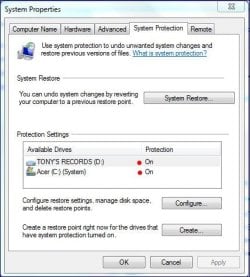
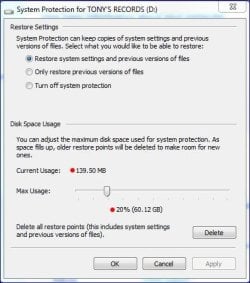
These are my current Protection Settings which seem to be more than advised in Option 1 of your recommended Tutorial..

Protection Settings.JPG Acer (C) Drive allocated space.JPG Tony's Records (D) Drive allocated space.JPG

I'm somewhat perplexed, but will investgate Option 2 later today.

Cheers, Tony
 

My Computer

Computer Manufacturer/Model Number
Acer Aspire Timeline X Laptop - Model 5820TG - V1.23
OS
Windows 7 Home Premium x64 - SP1
CPU
Intel Core i5 @ 2.67GHz Arrandale 32nm Technology
Motherboard
Acer JM51_CP (CPU) Base Board Version
Memory
8 GB RAM [2 x 4 GB DDR3]
Graphics Card(s)
AMD Radeon HD 6650M, Intel (R) HD Graphics
Sound Card
Realtek HD Audio, ATI HD Audio Device
Monitor(s) Displays
Acer Aspire Notebook - 15.7"; Acer LCD Monitor X223Wsd - 22"
Screen Resolution
1366 x 768 x 60Hertz
Hard Drives
Notebook - 733GB Western Digital WDC WD7500BPVT- 22HXZT1 Sata.
External HDs [4];Maxtor One Touch4 - 500GB External HD [Drive M:\].Western Digital WDXMS1200TA - 120GB External HD. WD My Book 'Elite' 1TB External HD [Windows 7 dedicated - Partitioned
Mouse
Logitech Wireless V320 for Notebooks
Other Info
Brother MFC-465CN; PC to Fax/Scan/Copy/Photo Multi Function Centre. Epson Perfection V300 Photo Scanner.
Siemens Speedstream 6520 Router.
Wacom 'Bamboo Fun' CTE-650 PC Tablet, Stylus and Mouse. Logitech X-230 Notebook Stereo Speakers and Sub-woofer.
UAC - On. Internet - FireFox v13.0.1 & IE8.
Hon.RSM to the 4th [Assault Pioneer] Troop Pune Sepoys , and 3rd Troop Jodhpur Bengali Lancers
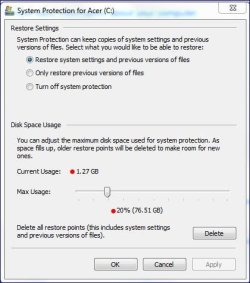
You have plenty of space available according to your Max Usage setting.

Some programs might delete restore points such as Defrag utilities, Cleanup utilities, AV programs.
If you use a 3rd party defrag program or any cleanup utilities that might be why restore points get deleted.
 

My Computer

Computer type
PC/Desktop
Computer Manufacturer/Model Number
home built
OS
Multi-Boot W7_Pro_x64 W8.1_Pro_x64 W10_Pro_x64 +Linux_VMs +Chromium_VM
CPU
AMD Athlon II x4 620
Motherboard
Gigabyte GA-MA785G-UD3H
Memory
6GB GSkill DDR2 800
Graphics Card(s)
AMD 4670 GPU + AMD 4200 IGP
Sound Card
on board Realtek ALC889A
Monitor(s) Displays
RCA 40" LCD TV, Insignia 32" LCD TV, HP 15" LCD monitor
Screen Resolution
1680 x 1050
Hard Drives
OCZ Vertex 3 120GB,
Samsung F3 1TB (3),
Several others - WD, Seagate, Hitachi, ...
PSU
Corsair 500 W
Case
Rosewill mid tower
Cooling
CM 90mm rifle
Keyboard
Gyration wireless, Logitech wireless, Dell USB wired
Mouse
Gyration wireless, Logitech wireless, V7 USB wired
Internet Speed
Spectrum - 100Mbps D / 10Mbps U
Antivirus
Avast, MBAM3, EMET, WinPatrol
Browser
Pale Moon, Firefox, IE
Other Info
2 multi-boot PC's
Mainly HTPC/Office/Gen purpose (no gaming).
Trendnet USB KVM.
LG DVD burner/Blue Ray Player.
Tray system for removable SATA backup drives.

Not currently OCd, under-volted.
I use Hybrid sleep, rarely re-boot or shutdown.

Hauppauge HD-PVR, Avermedia PCIe TV Tuner, Hauppauge PCI TV Tuner.
From cmd prompt as admin.

Type vssadmin List Shadowstorage

You should get something like this.

Microsoft Windows [Version 6.1.7601]
Copyright (c) 2009 Microsoft Corporation. All rights reserved.

C:\Users\Jack>vssadmin List Shadowstorage
vssadmin 1.1 - Volume Shadow Copy Service administrative command-line tool
(C) Copyright 2001-2005 Microsoft Corp.

Shadow Copy Storage association
For volume: (C:)\\?\Volume{cc1934e0-7154-4dc2-86f4-fde6173dce8f}\
Shadow Copy Storage volume: (C:)\\?\Volume{cc1934e0-7154-4dc2-86f4-fde6173dce8f}\
Used Shadow Copy Storage space: 10.06 GB (4%)
Allocated Shadow Copy Storage space: 10.551 GB (4%)
Maximum Shadow Copy Storage space: 11.167 GB (5%)

Shadow Copy Storage association
For volume: (E:)\\?\Volume{3f386cfc-8f19-4d03-9db4-618103525c72}\
Shadow Copy Storage volume: (E:)\\?\Volume{3f386cfc-8f19-4d03-9db4-618103525c72}\
Used Shadow Copy Storage space: 0 B (0%)
Allocated Shadow Copy Storage space: 0 B (0%)
Maximum Shadow Copy Storage space: 11.167 GB (5%)


C:\Users\Jack>
 
Last edited:

My Computer

Computer type
PC/Desktop
Computer Manufacturer/Model Number
Home made Desktop
OS
Windows 10 Pro. 64/ version 1709 Windows 7 Pro/64
CPU
Intel i7-6800K @ 4.3
Motherboard
ASUS X-99 Deluxe II
Memory
Corsair Platinum 16 gig @2400
Graphics Card(s)
EVGA GTX 1070 OC
Monitor(s) Displays
Asus 27" LED LCD/VE278Q
Screen Resolution
1920-1080 or 1280-720 HDMI
Hard Drives
INTEL SSD 730-240 Gb Sata 3.0/
PSU
EVGA Platium 1200W
Case
Phanteks Luxe Tempered Glass 8 fans/ one radiator
Cooling
XSPC/ Water Cooled CPU
Keyboard
Das 4 Professional
Mouse
Logitech M705/MX Anywhere 2-S
Internet Speed
100 mbits
Antivirus
Microsoft Security Essentials/ Malwarebytes Premium 3.0/ SAS
Browser
I.E. 11 default/Firefox/ ISP Time Warner Cable/Spectrum
Other Info
LG BluRay Burner/
Sound system-KLipsch-THX/
Icy Dock ssd Hot Swap bays.
From DavidE post #4
I agree

If you use a 3rd party defrag program or any cleanup utilities that might be why restore points get deleted.
Other members have found this to be true also.

Some times the Restore Points are still there but Windows 7 can't find them after using some 3rd party defrag programs or cleanup utilities

Avast has also been know to mess with Restore Points but it has been a few months ago. So I'm thinking they have solved the problem by now.
 

My Computer

Computer type
PC/Desktop
Computer Manufacturer/Model Number
Home made Desktop
OS
Windows 10 Pro. 64/ version 1709 Windows 7 Pro/64
CPU
Intel i7-6800K @ 4.3
Motherboard
ASUS X-99 Deluxe II
Memory
Corsair Platinum 16 gig @2400
Graphics Card(s)
EVGA GTX 1070 OC
Monitor(s) Displays
Asus 27" LED LCD/VE278Q
Screen Resolution
1920-1080 or 1280-720 HDMI
Hard Drives
INTEL SSD 730-240 Gb Sata 3.0/
PSU
EVGA Platium 1200W
Case
Phanteks Luxe Tempered Glass 8 fans/ one radiator
Cooling
XSPC/ Water Cooled CPU
Keyboard
Das 4 Professional
Mouse
Logitech M705/MX Anywhere 2-S
Internet Speed
100 mbits
Antivirus
Microsoft Security Essentials/ Malwarebytes Premium 3.0/ SAS
Browser
I.E. 11 default/Firefox/ ISP Time Warner Cable/Spectrum
Other Info
LG BluRay Burner/
Sound system-KLipsch-THX/
Icy Dock ssd Hot Swap bays.
If you use a 3rd party defrag program or any cleanup utilities that might be why restore points get deleted.
Some times the Restore Points are still there but Windows 7 can't find them after using some 3rd party defrag programs or cleanup utilities
Avast has also been know to mess with Restore Points but it has been a few months ago. So I'm thinking they have solved the problem by now.
Thanks Guys,

However, 3rd party defrag program(s) never used, and post-analysis/run (as administrator) of CCleaner shows Restore Points still in place (under CCleaner>Tools>SystemRestore).

The culprit may well be Avast - I do have Avast Premier with SecureLine VPN capability.

I will note any changes/deletions after I run my next full scan with Avast over the next couple of days, and let you know how it goes.

Wait out, and cheers,
Tony
 

My Computer

Computer Manufacturer/Model Number
Acer Aspire Timeline X Laptop - Model 5820TG - V1.23
OS
Windows 7 Home Premium x64 - SP1
CPU
Intel Core i5 @ 2.67GHz Arrandale 32nm Technology
Motherboard
Acer JM51_CP (CPU) Base Board Version
Memory
8 GB RAM [2 x 4 GB DDR3]
Graphics Card(s)
AMD Radeon HD 6650M, Intel (R) HD Graphics
Sound Card
Realtek HD Audio, ATI HD Audio Device
Monitor(s) Displays
Acer Aspire Notebook - 15.7"; Acer LCD Monitor X223Wsd - 22"
Screen Resolution
1366 x 768 x 60Hertz
Hard Drives
Notebook - 733GB Western Digital WDC WD7500BPVT- 22HXZT1 Sata.
External HDs [4];Maxtor One Touch4 - 500GB External HD [Drive M:\].Western Digital WDXMS1200TA - 120GB External HD. WD My Book 'Elite' 1TB External HD [Windows 7 dedicated - Partitioned
Mouse
Logitech Wireless V320 for Notebooks
Other Info
Brother MFC-465CN; PC to Fax/Scan/Copy/Photo Multi Function Centre. Epson Perfection V300 Photo Scanner.
Siemens Speedstream 6520 Router.
Wacom 'Bamboo Fun' CTE-650 PC Tablet, Stylus and Mouse. Logitech X-230 Notebook Stereo Speakers and Sub-woofer.
UAC - On. Internet - FireFox v13.0.1 & IE8.
Hon.RSM to the 4th [Assault Pioneer] Troop Pune Sepoys , and 3rd Troop Jodhpur Bengali Lancers
What version of Avast are you using ?
Layback Bear is right, the problem with Restore Points was fixed a while ago.

I looked on the Avast forum and see a few people say Avast is creating a lot of Temp files, causing a low free-space problem.
When you see Restore Points are missing, check how much free space you have on before running CCleaner, or any cleaner. If you are low on free space, Windows might delete old Restore Points to free up more space. I'm just guessing with that, but it's something i would check if i had your problem. Something to consider is use a backup imaging program such as Macrium Reflect Free. Then you can control what is backed up, where, and how long the backup is kept. With Macrium you can save backups on a different drive than [C], and keep them offline. Backup Images include everything on the "C" drive, Restore Points do not include everything and every change. Backup Images are more reliable and controllable than Restore Points imho.
 

My Computer

Computer type
PC/Desktop
Computer Manufacturer/Model Number
home built
OS
Multi-Boot W7_Pro_x64 W8.1_Pro_x64 W10_Pro_x64 +Linux_VMs +Chromium_VM
CPU
AMD Athlon II x4 620
Motherboard
Gigabyte GA-MA785G-UD3H
Memory
6GB GSkill DDR2 800
Graphics Card(s)
AMD 4670 GPU + AMD 4200 IGP
Sound Card
on board Realtek ALC889A
Monitor(s) Displays
RCA 40" LCD TV, Insignia 32" LCD TV, HP 15" LCD monitor
Screen Resolution
1680 x 1050
Hard Drives
OCZ Vertex 3 120GB,
Samsung F3 1TB (3),
Several others - WD, Seagate, Hitachi, ...
PSU
Corsair 500 W
Case
Rosewill mid tower
Cooling
CM 90mm rifle
Keyboard
Gyration wireless, Logitech wireless, Dell USB wired
Mouse
Gyration wireless, Logitech wireless, V7 USB wired
Internet Speed
Spectrum - 100Mbps D / 10Mbps U
Antivirus
Avast, MBAM3, EMET, WinPatrol
Browser
Pale Moon, Firefox, IE
Other Info
2 multi-boot PC's
Mainly HTPC/Office/Gen purpose (no gaming).
Trendnet USB KVM.
LG DVD burner/Blue Ray Player.
Tray system for removable SATA backup drives.

Not currently OCd, under-volted.
I use Hybrid sleep, rarely re-boot or shutdown.

Hauppauge HD-PVR, Avermedia PCIe TV Tuner, Hauppauge PCI TV Tuner.

My Computer

Computer type
PC/Desktop
Computer Manufacturer/Model Number
Home made Desktop
OS
Windows 10 Pro. 64/ version 1709 Windows 7 Pro/64
CPU
Intel i7-6800K @ 4.3
Motherboard
ASUS X-99 Deluxe II
Memory
Corsair Platinum 16 gig @2400
Graphics Card(s)
EVGA GTX 1070 OC
Monitor(s) Displays
Asus 27" LED LCD/VE278Q
Screen Resolution
1920-1080 or 1280-720 HDMI
Hard Drives
INTEL SSD 730-240 Gb Sata 3.0/
PSU
EVGA Platium 1200W
Case
Phanteks Luxe Tempered Glass 8 fans/ one radiator
Cooling
XSPC/ Water Cooled CPU
Keyboard
Das 4 Professional
Mouse
Logitech M705/MX Anywhere 2-S
Internet Speed
100 mbits
Antivirus
Microsoft Security Essentials/ Malwarebytes Premium 3.0/ SAS
Browser
I.E. 11 default/Firefox/ ISP Time Warner Cable/Spectrum
Other Info
LG BluRay Burner/
Sound system-KLipsch-THX/
Icy Dock ssd Hot Swap bays.
Back
Top