Restore points vanishing, cannot increase space

Tharwatime

New member
Member
Local time
8:12 AM
Messages
51
Restore points are vanishing for reasons I cannot determine. Apart from patches and RPs when none has been done for seven days (not often) I do a manual RP once a week. If there is not enough room my understanding is that the old RPs are deleted first. Instead, I have a handful of RPs when I bought the box six months ago, one in July, and then the weekly and MS patch RPs. An attempt was made to increase the disk space usage for RPs and there was an error message:
Could not apply the settings for the following reason: The filename, directory name, or volume label syntax is incorrect (0X8007007B)
The SSD (OS and software) has a lot of space, as do the USB HDs which I use for data.

Could someone please advise me what is happening and how it can be fixed? TIA
 

My Computer

Computer type
PC/Desktop
Computer Manufacturer/Model Number
Dell Optiplex
OS
Windows 7 Pro 64 bit
CPU
Dual core
Motherboard
n/k
Memory
4 MB
Graphics Card(s)
n/k
Hard Drives
120 MB SSD
USB HDs for data
Antivirus
MSE
Browser
Firefox

My Computer

Computer type
PC/Desktop
Computer Manufacturer/Model Number
Home made Desktop
OS
Windows 10 Pro. 64/ version 1709 Windows 7 Pro/64
CPU
Intel i7-6800K @ 4.3
Motherboard
ASUS X-99 Deluxe II
Memory
Corsair Platinum 16 gig @2400
Graphics Card(s)
EVGA GTX 1070 OC
Monitor(s) Displays
Asus 27" LED LCD/VE278Q
Screen Resolution
1920-1080 or 1280-720 HDMI
Hard Drives
INTEL SSD 730-240 Gb Sata 3.0/
PSU
EVGA Platium 1200W
Case
Phanteks Luxe Tempered Glass 8 fans/ one radiator
Cooling
XSPC/ Water Cooled CPU
Keyboard
Das 4 Professional
Mouse
Logitech M705/MX Anywhere 2-S
Internet Speed
100 mbits
Antivirus
Microsoft Security Essentials/ Malwarebytes Premium 3.0/ SAS
Browser
I.E. 11 default/Firefox/ ISP Time Warner Cable/Spectrum
Other Info
LG BluRay Burner/
Sound system-KLipsch-THX/
Icy Dock ssd Hot Swap bays.
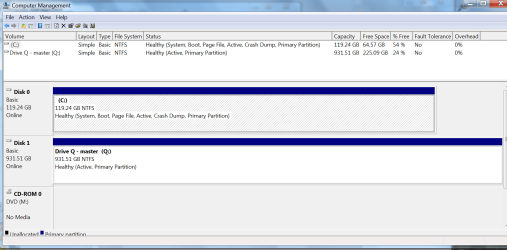
PNG file showing status.
 

Attachments

  • Disks.png
    Disks.png
    43.7 KB · Views: 4

My Computer

Computer type
PC/Desktop
Computer Manufacturer/Model Number
Dell Optiplex
OS
Windows 7 Pro 64 bit
CPU
Dual core
Motherboard
n/k
Memory
4 MB
Graphics Card(s)
n/k
Hard Drives
120 MB SSD
USB HDs for data
Antivirus
MSE
Browser
Firefox
What is the reason you have partition (Q) drive #1 active?
What is on partition (Q)?

What % do you have set Restore Points? 5% works well for me but some use 10%.
You have more than enough room on partition (C) for restore points.

I'm not understand 0X8007007B when one is just trying to increase Restore Point volume %.
0X8007007B normally is seen when their is a activation problem.

Do you have a proper activated Window 7?
 

My Computer

Computer type
PC/Desktop
Computer Manufacturer/Model Number
Home made Desktop
OS
Windows 10 Pro. 64/ version 1709 Windows 7 Pro/64
CPU
Intel i7-6800K @ 4.3
Motherboard
ASUS X-99 Deluxe II
Memory
Corsair Platinum 16 gig @2400
Graphics Card(s)
EVGA GTX 1070 OC
Monitor(s) Displays
Asus 27" LED LCD/VE278Q
Screen Resolution
1920-1080 or 1280-720 HDMI
Hard Drives
INTEL SSD 730-240 Gb Sata 3.0/
PSU
EVGA Platium 1200W
Case
Phanteks Luxe Tempered Glass 8 fans/ one radiator
Cooling
XSPC/ Water Cooled CPU
Keyboard
Das 4 Professional
Mouse
Logitech M705/MX Anywhere 2-S
Internet Speed
100 mbits
Antivirus
Microsoft Security Essentials/ Malwarebytes Premium 3.0/ SAS
Browser
I.E. 11 default/Firefox/ ISP Time Warner Cable/Spectrum
Other Info
LG BluRay Burner/
Sound system-KLipsch-THX/
Icy Dock ssd Hot Swap bays.
The OS and software are on the SSD C:. Data is on the USB drive Q:. The setting is 5.42% or 6.96 GB. As far as I'm aware the OS has been activated. I've been getting MS Win 7 patches most weeks, such as five days ago, 100 MB or so. Absent a way of stopping the RPS from vanishing, could I copy the RP folder to Q: , and then if I need a particular RP move that folder back to C:? This is not really desirable as I delete all but the first RP of the month after six months, and after 12 months I'll have RPs at three month intervals. That's the plan at this juncture.
 

My Computer

Computer type
PC/Desktop
Computer Manufacturer/Model Number
Dell Optiplex
OS
Windows 7 Pro 64 bit
CPU
Dual core
Motherboard
n/k
Memory
4 MB
Graphics Card(s)
n/k
Hard Drives
120 MB SSD
USB HDs for data
Antivirus
MSE
Browser
Firefox
You want Restore Points on the same Partition that Windows 7 is on.

The Q partition drive #1 should not be active.

Just to check. Unhook you disk #1 and make sure your system will boot.
If it boots, that is good. Hook the disk #1 back up and take the active flag off of it. You only want the active flag on your (C) partition.

Try giving the Restore point 10%. You have more than enough room on the (C) partition disk #0.

Remember that Restore Points are not a replacement for proper backups.
They work in conjunction with proper backups.

NOTE:
All the unhooking and unhooking of hardware should be done with the computer off and power off.
 

My Computer

Computer type
PC/Desktop
Computer Manufacturer/Model Number
Home made Desktop
OS
Windows 10 Pro. 64/ version 1709 Windows 7 Pro/64
CPU
Intel i7-6800K @ 4.3
Motherboard
ASUS X-99 Deluxe II
Memory
Corsair Platinum 16 gig @2400
Graphics Card(s)
EVGA GTX 1070 OC
Monitor(s) Displays
Asus 27" LED LCD/VE278Q
Screen Resolution
1920-1080 or 1280-720 HDMI
Hard Drives
INTEL SSD 730-240 Gb Sata 3.0/
PSU
EVGA Platium 1200W
Case
Phanteks Luxe Tempered Glass 8 fans/ one radiator
Cooling
XSPC/ Water Cooled CPU
Keyboard
Das 4 Professional
Mouse
Logitech M705/MX Anywhere 2-S
Internet Speed
100 mbits
Antivirus
Microsoft Security Essentials/ Malwarebytes Premium 3.0/ SAS
Browser
I.E. 11 default/Firefox/ ISP Time Warner Cable/Spectrum
Other Info
LG BluRay Burner/
Sound system-KLipsch-THX/
Icy Dock ssd Hot Swap bays.
Thanks. I had guessed that an OS-related function such as Restore Points should be on the same drive as the OS. The Q drive was plugged in and set up, and was not made active by me. The OS must have done this. The box boots with and without the Q drive. The SSD seems to be needed.

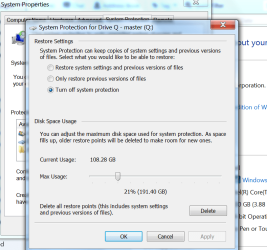
I'm unsure how to remove the active flag on Q. While looking for a way to do this the following screen came up:
Ooops, can't put the PNG here. No matter

That is what I saw when the screen was opened - I have not changed anything. Can you please advise me how to remove the active flag? The advice in the link is old but seems to be current
http://www.sevenforums.com/general-...artition-without-removing-data-partition.html

Thank you for your reminder about RPs not being backups. I have multiple full BUs going back for ages. The manual RP and a BU are done one a week, then copied to multiple places geographically different. So far so good. Data loss does not appeal.
 

Attachments

  • Q  System props.png
    Q System props.png
    50.1 KB · Views: 1

My Computer

Computer type
PC/Desktop
Computer Manufacturer/Model Number
Dell Optiplex
OS
Windows 7 Pro 64 bit
CPU
Dual core
Motherboard
n/k
Memory
4 MB
Graphics Card(s)
n/k
Hard Drives
120 MB SSD
USB HDs for data
Antivirus
MSE
Browser
Firefox
I'm unsure how to remove the active flag on Q. While looking for a way to do this the following screen came up:
Ooops, can't put the PNG here. No matter

That is what I saw when the screen was opened - I have not changed anything. Can you please advise me how to remove the active flag? The advice in the link is old but seems to be current
http://www.sevenforums.com/general-...artition-without-removing-data-partition.html

Here's our tutorial,

http://www.sevenforums.com/tutorials/197157-partition-mark-inactive.html
 

My Computer

Computer type
PC/Desktop
Computer Manufacturer/Model Number
Self Built
OS
Win 10 Pro x64
CPU
Intel I5-2500K @3.3GHz
Motherboard
Asrock P67 Extreme4
Memory
16GB G.Skill Ripjaws X (4x4GB)
Graphics Card(s)
EVGA GeForce 750 Ti SC 2GB
Sound Card
ASUS Xonar DG 5.1 Channels 24-bit 96KHz PCI Interface Sound
Monitor(s) Displays
auria eq2367
Screen Resolution
1920 x 1080
Hard Drives
250GB Samsung 850 EVO SSD
1TB WD Blue
1TB Hitachi
PSU
SeaSonic X 650W 80 Plus Gold
Case
Corsair Obsidian 750D
Cooling
Corsair H60, Three 140mm case fans
Keyboard
Logitech Wireless Keyboard K520
Mouse
Logitech Wireless Mouse M310
Internet Speed
Wave Broadband ~ 100 dn 5 up
Antivirus
Windows Defender, Malwarebytes Premium
Browser
Edge, IE11, Chrome
Other Info
Laptop specs: HP g7-1365dx /
CPU: AMD A6-3420M APU with Radeon(tm) HD Graphics /
RAM: Crucial 8Gb (2x4Gb) /
SSD: Crucial M4-CT128M4SSD2 ATA Device/ FW 000F /
GFX: AMD Radeon HD 6520G /
OS: Windows 10 Pro x64
Thanks Derek. I forgot the tutorial. I'm in the process of trying to stay awake after taking my medication.
 

My Computer

Computer type
PC/Desktop
Computer Manufacturer/Model Number
Home made Desktop
OS
Windows 10 Pro. 64/ version 1709 Windows 7 Pro/64
CPU
Intel i7-6800K @ 4.3
Motherboard
ASUS X-99 Deluxe II
Memory
Corsair Platinum 16 gig @2400
Graphics Card(s)
EVGA GTX 1070 OC
Monitor(s) Displays
Asus 27" LED LCD/VE278Q
Screen Resolution
1920-1080 or 1280-720 HDMI
Hard Drives
INTEL SSD 730-240 Gb Sata 3.0/
PSU
EVGA Platium 1200W
Case
Phanteks Luxe Tempered Glass 8 fans/ one radiator
Cooling
XSPC/ Water Cooled CPU
Keyboard
Das 4 Professional
Mouse
Logitech M705/MX Anywhere 2-S
Internet Speed
100 mbits
Antivirus
Microsoft Security Essentials/ Malwarebytes Premium 3.0/ SAS
Browser
I.E. 11 default/Firefox/ ISP Time Warner Cable/Spectrum
Other Info
LG BluRay Burner/
Sound system-KLipsch-THX/
Icy Dock ssd Hot Swap bays.
Thank you both. I made the command line changes as advised and it seems to have worked. My command screen is all but identical to the screen shots in the tutorial, with Q where the D is. I'll have to wait and see if RPs continue to vanish. I don't want to change the RP disk size as I prefer to see if one thing works. If the fix you you suggested works then I know that the problem was due to to the Q drive being active.
 

My Computer

Computer type
PC/Desktop
Computer Manufacturer/Model Number
Dell Optiplex
OS
Windows 7 Pro 64 bit
CPU
Dual core
Motherboard
n/k
Memory
4 MB
Graphics Card(s)
n/k
Hard Drives
120 MB SSD
USB HDs for data
Antivirus
MSE
Browser
Firefox
You want Restore Points on the same Partition that Windows 7 is on.
Yep, and the screenshot posted at the end is of Drive Q: and not Drive C: where the problem is.
The Q partition drive #1 should not be active.
My main reason to reply was to ask why it was suggested that the Q: drive should not have the active flag.

Every drive can be a primary partition and marked active and it will not affect the system in any way at all.
 

My Computer

Computer type
PC/Desktop
OS
Win 8.1 32 bit
My reason is simple. No partition needs or should be active unless it has a operating system on it in a double boot. Other than that one proper activate partition is all that is needed or wanted.

I don't have a high tech answer but what I have discovered is when their is active partitions that are not needed Windows 7 gets confused. We don't want that. Their are many members that will be able to give a very long and high tech response to your question. Just hang in and wait.
 

My Computer

Computer type
PC/Desktop
Computer Manufacturer/Model Number
Home made Desktop
OS
Windows 10 Pro. 64/ version 1709 Windows 7 Pro/64
CPU
Intel i7-6800K @ 4.3
Motherboard
ASUS X-99 Deluxe II
Memory
Corsair Platinum 16 gig @2400
Graphics Card(s)
EVGA GTX 1070 OC
Monitor(s) Displays
Asus 27" LED LCD/VE278Q
Screen Resolution
1920-1080 or 1280-720 HDMI
Hard Drives
INTEL SSD 730-240 Gb Sata 3.0/
PSU
EVGA Platium 1200W
Case
Phanteks Luxe Tempered Glass 8 fans/ one radiator
Cooling
XSPC/ Water Cooled CPU
Keyboard
Das 4 Professional
Mouse
Logitech M705/MX Anywhere 2-S
Internet Speed
100 mbits
Antivirus
Microsoft Security Essentials/ Malwarebytes Premium 3.0/ SAS
Browser
I.E. 11 default/Firefox/ ISP Time Warner Cable/Spectrum
Other Info
LG BluRay Burner/
Sound system-KLipsch-THX/
Icy Dock ssd Hot Swap bays.
Thanks for your reply Layback Bear.

You misunderstand my post - I'm informing you that there is no reason to remove the active flag from any drive, because the BIOS is set to boot from only one drive.

All other active flags are ignored.

My reason is simple. No partition needs or should be active unless it has a operating system on it in a double boot.

You can have have multiple drives with an OS installed and then choose which one to boot from using the BIOS boot menu.


what I have discovered is when their is active partitions that are not needed Windows 7 gets confused.

No, it doesn't. Your testing methodology must have confused you.

There is no reason to remove the active flag. That advice will just confuse future readers.

It also doesn't affect restore points in any way, shape or form.
 
Last edited:

My Computer

Computer type
PC/Desktop
OS
Win 8.1 32 bit
Back
Top